.png)
Dev Machine Guard now inventories AI agent skills installed on developer machines. A new Agent Skills page in the StepSecurity dashboard shows every skill detected across your fleet, which AI coding agents can load it, where it came from, and whether it contains executable content.
If your developers use Claude Code, Codex, GitHub Copilot, Cursor, OpenCode, Gemini CLI, Amp, Factory, or any other AI coding agent, there is a good chance skills are already installed on their machines. Until now, most security teams had no way to know which ones.
What Agent Skills Are, and Why They Spread Fast
An agent skill is a folder containing a SKILL.md file, plus optional scripts and resources, that an AI coding agent loads to gain a specialized capability: creating slide decks, reviewing pull requests, deploying to a specific platform, and thousands of other tasks.
Skills spread through an open ecosystem. Vercel's skills CLI installs a skill with a single command (npx skills add <owner/repo>) and symlinks it into the directories that each coding agent reads. Skills also arrive as plain folders: cloned from GitHub, copied from a teammate, or written by hand. Any folder with a SKILL.md in the right location becomes part of what the agent can do.
That convenience is exactly what makes skills a supply chain surface. A skill's instructions are treated as trusted input by the agent, and any scripts it bundles run with the developer's user privileges. The same machine that holds SSH keys, cloud credentials, and npm publishing tokens.
This Attack Surface Is Already Active
This is not a hypothetical risk.
In January 2026, the ClawHavoc campaign planted 1,184 malicious skills across 12 publisher accounts on a public skill registry, delivering the Atomic Stealer (AMOS) malware that targets macOS crypto wallets, SSH keys, and browser credentials. At the peak of the campaign, five of the seven most-downloaded skills on the registry were confirmed malware, according to the OWASP Agentic Skills Top 10 project.
The following month, Snyk's ToxicSkills research audited 3,984 publicly available skills and found that 36% contained security flaws, including active malicious payloads targeting Claude Code, OpenClaw, and Cursor users. The researchers demonstrated that three lines of markdown in a SKILL.md file were enough to exfiltrate SSH keys.
We have been tracking attacks on the AI developer tool chain all year. The Miasma worm campaign explicitly targeted AI coding agents, and the Cline v2.3.0 compromise showed how an AI coding tool itself can become the delivery vehicle. Skills follow the same trajectory as every other developer-adjacent package ecosystem: rapid adoption first, attacker attention immediately after.
No Inventory, No Governance at Enterprise Scale
What makes this surface especially uncomfortable is that skills bypass every governance control enterprises already run. A skill is not an application your MDM inventories, not a package that flows through your registry allowlist, and not a marketplace extension with an admin approval flow. It is a folder of markdown and scripts that lands on a machine through npx skills add, a git clone, or a zip file from a teammate, with no procurement step, no review gate, and no record that it arrived.
Now multiply that across an enterprise: hundreds of developers, each running two or three coding agents, each agent loading skills at the global, project, and system level. Skill adoption happens bottom-up, developer by developer, and until now there was no inventory to even ask what has accumulated. Security teams cannot review what they cannot see, and most cannot answer the basic question: what can our agents execute, and on which machines?
And when the next malicious skill campaign is disclosed, security teams will face the question they always face: which of our machines have it installed?
What the Agent Skills Inventory Shows You
The Agent Skills page in the Dev Machine Guard section of the dashboard answers that question continuously, not just during an incident.

Fleet-wide inventory
Every skill detected across your organization appears in a single table, with the agents that can load it, its installation scope (Global, Project, or System), how it is managed, and the number of devices it is installed on. Filter chips break the inventory down by source and by agent, so you can see at a glance how many skills are managed through the skills.sh CLI versus dropped in as local folders, and which agents they serve.
Dev Machine Guard detects skills in the shared skills directory (~/.agents/skills), in agent-specific directories such as ~/.claude/skills, and at the project level inside repositories. It resolves the common pattern where a skill is installed once globally and symlinked into each agent's directory, so a single installation is reported once.
Executable content flags
Skills are supposed to be instructions. The inventory flags the ones that are more than that:
- code: the skill folder ships executable script files, not just a SKILL.md
- hooks: the skill declares a hooks block that registers commands against the agent's tool-use events, firing while the skill is active
- shell: the SKILL.md body injects shell commands that execute when the skill loads
These three mechanisms are precisely where malicious skills hide their payloads. A flag does not mean a skill is malicious, but flagged skills are the ones worth reviewing first: inline shell commands execute the moment the skill loads, and bundled scripts run with the developer's privileges as soon as the agent invokes them.
Provenance for every skill
Select any skill to see where it came from. Skills installed through the skills.sh CLI trace back to their source GitHub repository or well-known source, the plugin they belong to, and the upstream folder hash recorded at install time. Standalone skills are marked as authored on device with no upstream source, which makes unmanaged, hand-written skills easy to isolate and review.
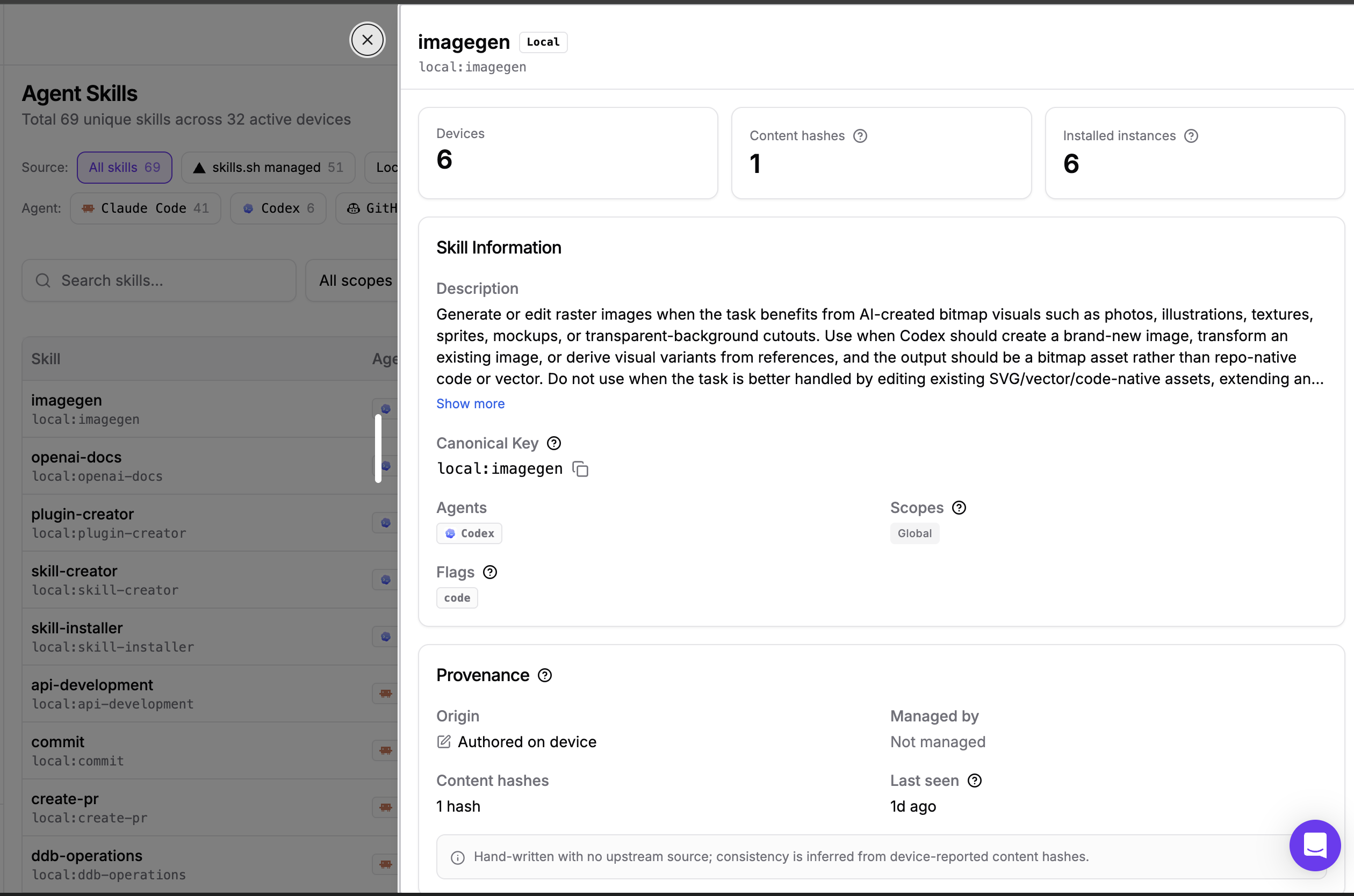
Version drift detection
Dev Machine Guard computes a content hash of each skill's SKILL.md on every device. If the same skill reports more than one distinct hash across your fleet, the dashboard highlights it: some machines are running an outdated or locally edited copy. For a skill that was compromised upstream and then fixed, this is how you find the machines still carrying the bad version.
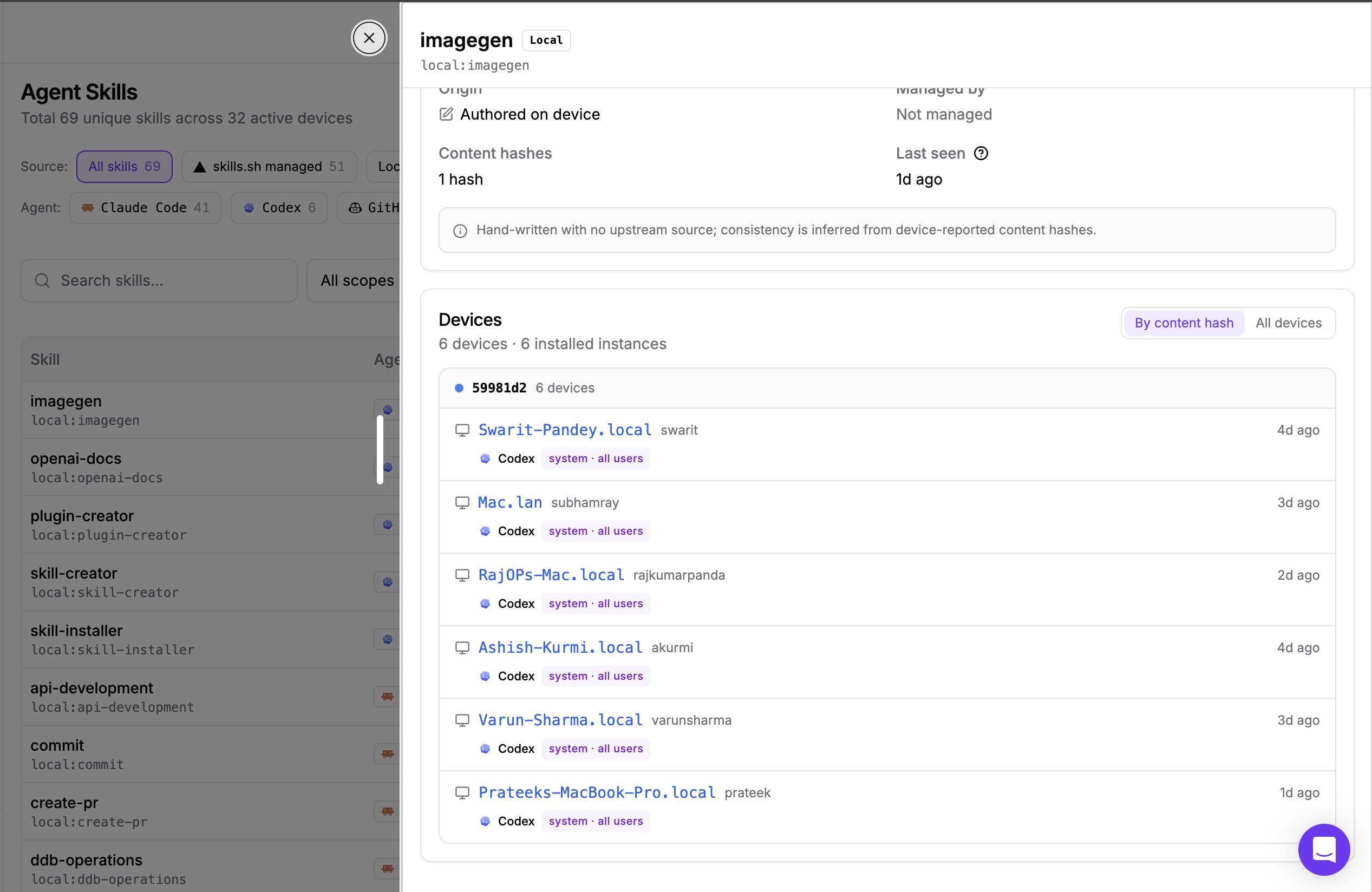
Per-device installation detail
Each skill's detail view lists every installation: the device, the user, the agent that loads it, the installation scope, and when it was last seen. When an incident hits, this is the difference between a fleet-wide email asking developers to check their machines and a filtered list of exactly who is affected.
You can search the inventory by skill name, filter by scope and flags, and download the full inventory with Export CSV.
What Security Teams Can Do With This Today
- Incident response: a malicious skill campaign is disclosed. Search the inventory for the skill name and get the exact list of affected devices, users, and agents in seconds.
- Executable content review: filter by Has code, Has hooks, or Shell execution to build a prioritized review queue of the skills that can actually run something.
- Unmanaged skill hunting: filter by the Local source to surface every skill that arrived outside a package manager, with no upstream repository to vouch for it.
- Version drift cleanup: sort by content hashes to find skills that are not identical across the fleet and bring stragglers up to date.
- AI tool governance: combined with Dev Machine Guard's existing IDE and AI agent inventory and MCP server inventory, you now have visibility into the agents on your machines, the servers they talk to, and the skills they load.
How To Get Started
If you already run Dev Machine Guard, agent skills scanning is included. Your next scan will inventory skills across every device, and the Agent Skills page will populate in the dashboard.
Follow this interactive demo to see how this feature works:
If you are new to Dev Machine Guard, see the installation guide to deploy the agent across your fleet, and the Agent Skills documentation for the full feature reference.
.png)


