.png)
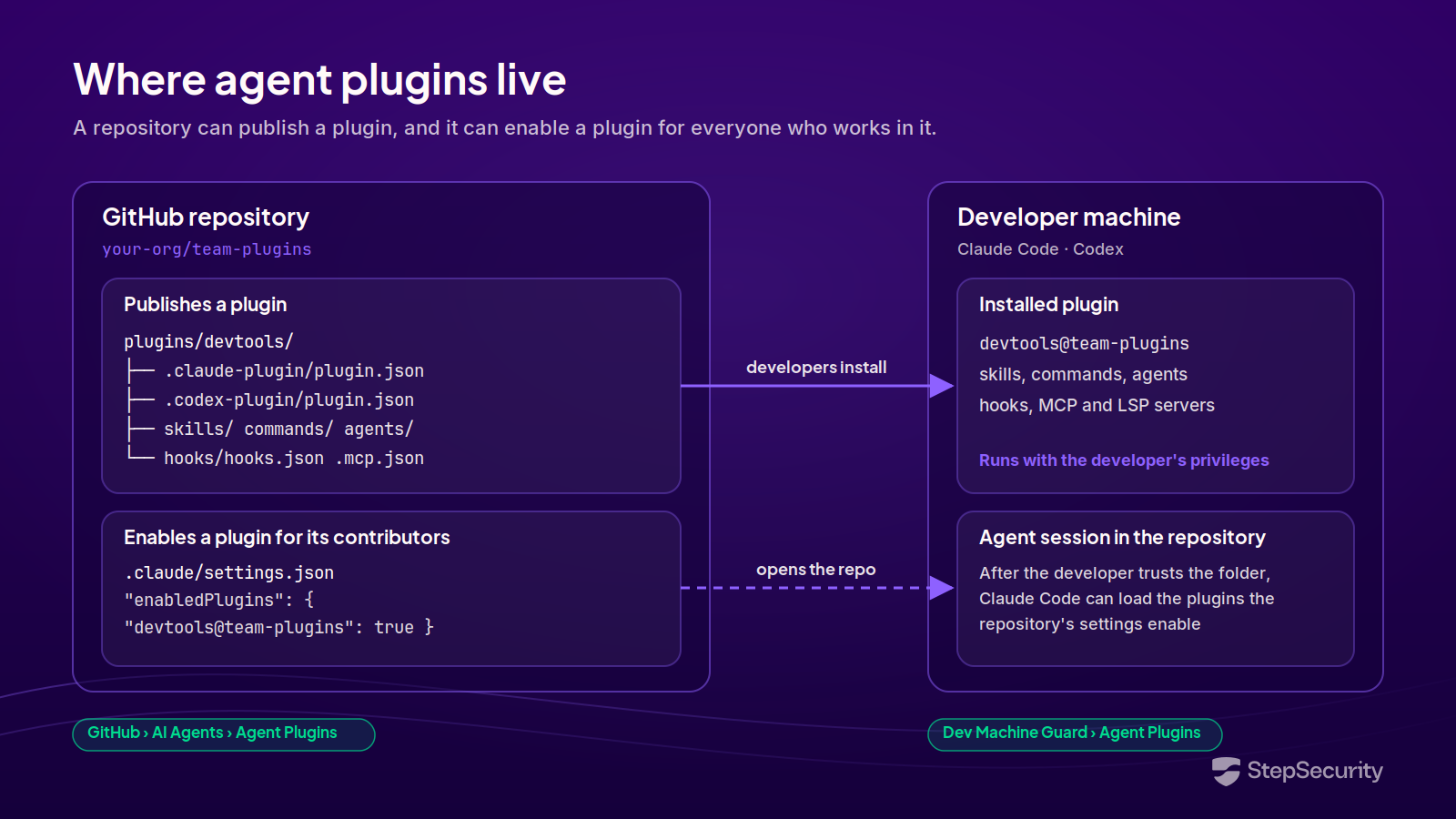
AI agent plugins live in two places. Developers install them on their own machines, usually from a marketplace, and repositories publish them or enable them for everyone who works in the codebase. A plugin often travels between the two: a team packages its skills, hooks, and MCP (Model Context Protocol) servers into a plugin, publishes it from a repository, and developers across the organization install it.
StepSecurity now gives security teams an inventory of both. Dev Machine Guard shows the Claude Code and Codex plugins installed on your developer machines, and a new Agent Plugins page under GitHub shows the plugins your organization's repositories publish and enable. Together, they answer two questions: what have your developers' agents been extended with, and what are your repositories distributing?
Why Agent Plugins Are a Supply Chain Surface
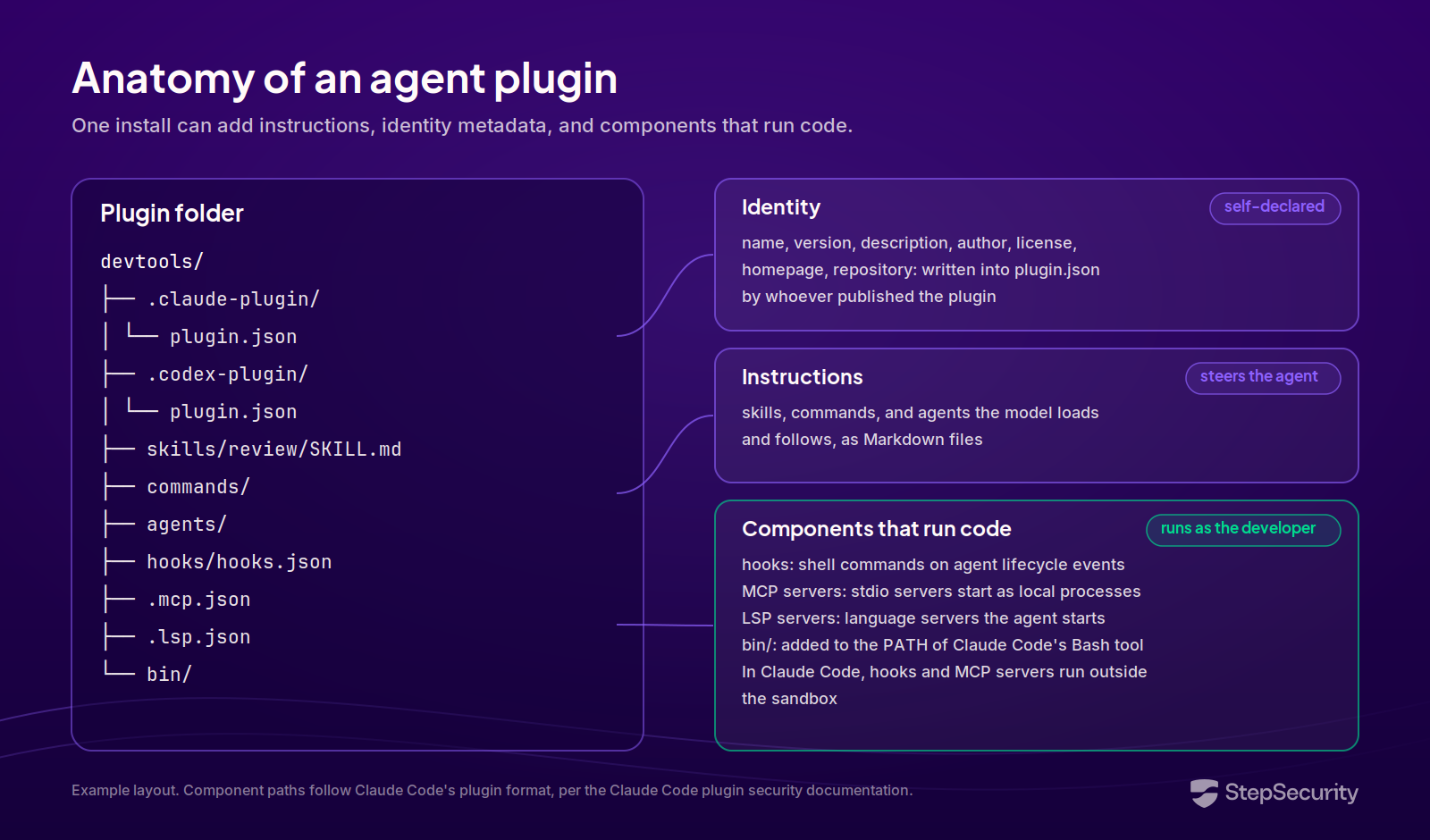
A plugin is a bundle. A single folder with a manifest, .claude-plugin/plugin.json for Claude Code or .codex-plugin/plugin.json for Codex, can add skills, commands, subagents, hooks, MCP servers, and LSP (Language Server Protocol) servers to an AI coding agent in one install. Three properties make that bundle a supply chain surface.
- Plugins run code as the developer: The Claude Code documentation states that a plugin you install can execute arbitrary code on your machine with your user privileges. A plugin's hooks run as shell commands at points in the agent's lifecycle, such as before or after a tool call. Its MCP servers connect the agent to tools, and a stdio MCP server runs as a process the agent starts on the machine. Claude Code adds a plugin's bin/ directory to the PATH of its Bash tool, and it runs hooks and MCP servers outside its sandbox. All of this happens on the same machine that holds the developer's SSH (Secure Shell) keys, cloud credentials, and publishing tokens.
- Plugin identity is self-declared: The publisher, homepage, and repository in a plugin's manifest are fields that whoever wrote the manifest typed in. Nothing checks that a plugin claiming to come from your platform team was published by your platform team.
- Repositories distribute plugins at scale: A repository can publish a plugin for developers to install, and it can also enable one for its contributors. Claude Code supports requiring plugins per repository by setting extraKnownMarketplaces and enabledPlugins in the repository's .claude/settings.json, and the marketplace registers once a contributor accepts the workspace trust dialog for that folder. In Claude Code, marketplaces with auto-update turned on keep their plugins refreshing in the background, so a change merged into a published plugin can travel to developers without anyone running an install command.
The mechanisms attackers already use
None of the campaigns below used an agent plugin. Each one used a mechanism that a malicious plugin would depend on:
- Configuration that runs when an agent opens a repository: In June, the Miasma worm used a compromised contributor account to plant a .claude/settings.json file with a SessionStart hook in a Microsoft repository. The hook ran a credential-harvesting payload whenever a Claude Code session started there. Plugins can declare hooks too, and .claude/settings.json is also the file where a repository enables plugins for its contributors.
- Fake AI tools on a trusted marketplace: The 15 malicious JetBrains plugins posed as AI-powered developer tools across seven publisher accounts on the JetBrains Marketplace and collected roughly 70,000 installations over eight months, while quietly exfiltrating the AI provider API keys developers entered. A plausible name and a marketplace listing were enough to earn the install.
- One compromised account rewriting what many repositories ship: When GhostAction returned in October, two compromised maintainer accounts pushed a credential-stealing workflow to 345 repositories in automated windows that lasted minutes. A repository that publishes a plugin is one push away from changing what every developer who installs it receives.
Agent plugins combine all three: they run hooks, they are distributed through marketplaces, and they are published from repositories that a single compromised account can change. When the first malicious plugin is disclosed, the questions will be the familiar ones: which machines have it, and which of our repositories distribute it?
Agent Plugins on Developer Machines: Dev Machine Guard
The Agent Plugins page under IDE & AI Agents in Dev Machine Guard is an organization-wide inventory of the Claude Code and Codex plugins installed across your developer machines. Plugins usually arrive from a marketplace, which can be a public catalog, a Git repository, a hosted URL, or a local directory. Some arrive without one, for example bundled with an account. The inventory covers both.
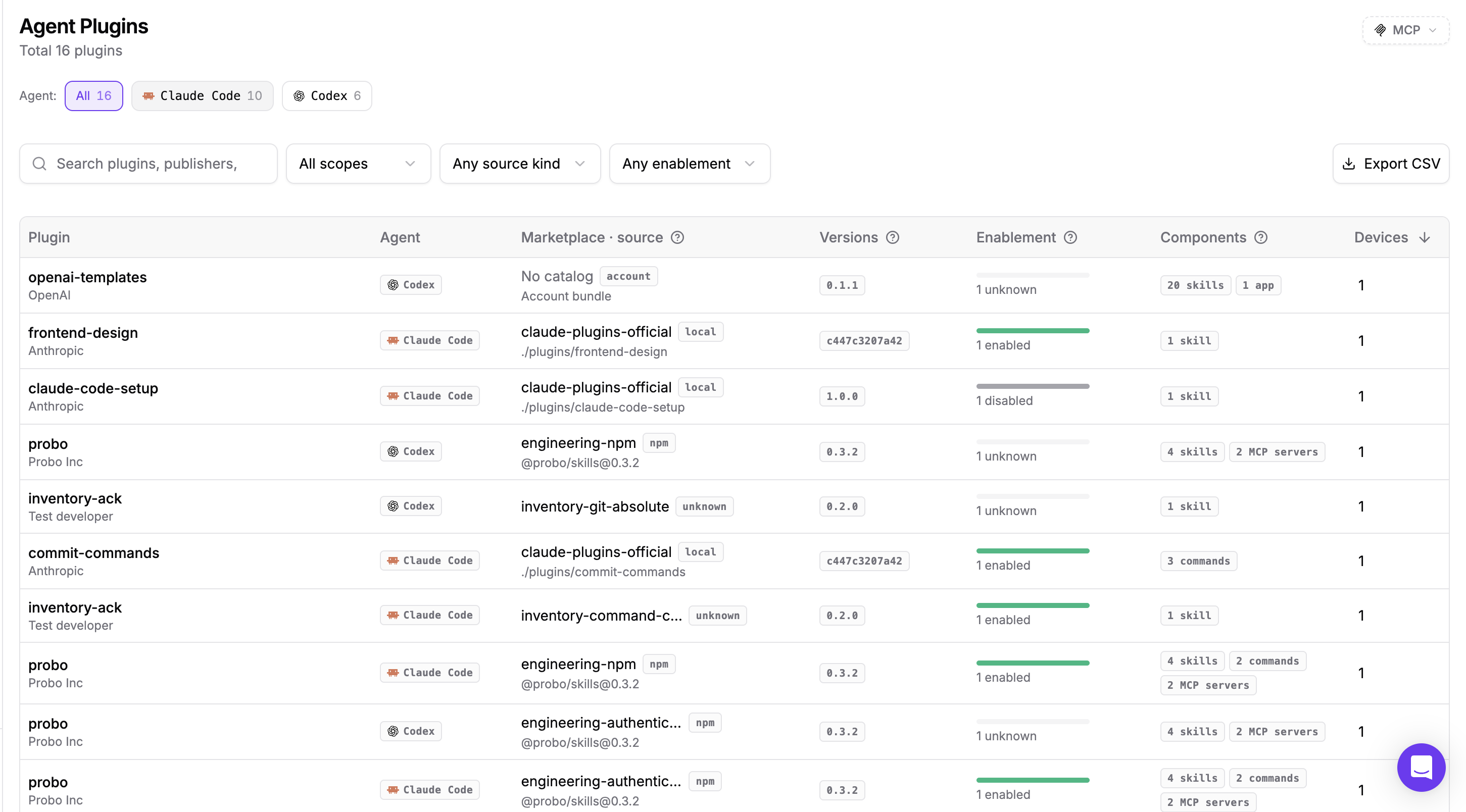
For each plugin, the inventory shows:
- Plugin and agent. The plugin name, the publisher its manifest declares, and whether it is installed into Claude Code or Codex.
- Marketplace and source. The marketplace the plugin was installed from, the kind of source its files come from, such as github, local, npm, account, or command, and the path or repository they come from. A plugin installed without a marketplace shows No catalog.
- Versions. Every version observed across your fleet.
- Enablement. How many devices have the plugin enabled, and how many have it installed but disabled. A disabled plugin is still on the device and can be turned back on without a new install, so it stays in the inventory.
- Components and devices. What the plugin supplies, counted by kind, and how many machines have it installed.
Filter by installation scope (User, Project, Local, or System), by source kind, or by enablement, search by plugin or publisher, and export the full inventory as a CSV (comma-separated values) file.
Where a plugin actually came from
Select a plugin to open its detail panel. Plugin information shows the description, publisher, homepage, and manifest name from the plugin's manifest, along with the versions observed and a stable plugin key you can copy. The panel flags publisher, description, and homepage as self-declared metadata.

Source shows where the plugin was installed from, in two parts: the Marketplace, with its source kind and a link to the marketplace itself, and Plugin files from, where the plugin's own files were fetched. The two can differ. A marketplace hosted on GitHub can ship a plugin's files from a path inside that marketplace, so a plugin listed in a GitHub-hosted catalog can still be delivered as local files.
Installations lists every installation by device, scope, version, and state, so you can tell a plugin that is active on a machine from one that is installed and switched off. Components lists every skill, command, MCP server, and other component the plugin supplies, by kind or by device. For Claude Code skills, it also shows how many times Claude Code has recorded the skill being used.
Plugin components also appear in the inventories for their type, attributed to the plugin that supplied them. A plugin skill shows its plugin and marketplace on the Agent Skills page, and a plugin MCP server shows Claude Code plugin or Codex plugin as its configuration source on the MCP Servers page. That answers a question neither page could answer on its own: was this skill or server installed deliberately, or did it arrive inside a plugin?
How Dev Machine Guard reads plugins
Dev Machine Guard reads each agent's own record of installed plugins and configured marketplaces, at user and project scope, along with the plugin manifests and the components they declare. The scan never runs a plugin, hook, script, or either agent's CLI (command-line interface), and it makes no network requests. Plugin metadata and definition hashes are reported, while skill and command bodies, credentials, and complete settings files stay on the device. Old plugin files left in a cache directory are not counted as installations.
Agent Plugins in GitHub Repositories
When a repository publishes a plugin, every developer who installs it gets what that repository contains at the time they install or update. The Agent Plugins page under GitHub > AI Agents inventories those plugins across your organization's repositories.
StepSecurity identifies a plugin by its manifest, and the folder that holds the manifest directory is the plugin folder. A plugin folder can be the repository root or a subfolder such as plugins/devtools/, so a single repository can publish several plugins. A plugin folder with manifests for both Claude Code and Codex appears once, with both agents.

For each plugin, the inventory shows:
- Plugin and agent. The name, the author its manifest declares, and one badge for each manifest found in the plugin folder.
- Repository and path. The repository that publishes the plugin and the plugin folder inside it, shown as repository root for a plugin at the top level.
- Version. The version declared in the manifest.
- Used by. The repositories in your organization whose settings enable the plugin.
- Components. What the plugin supplies, counted by kind, for example 5 skills.
Filter by agent or repository, search by plugin or component name, and sort by plugin, Used by, or components.
Declared metadata, next to where the plugin is published
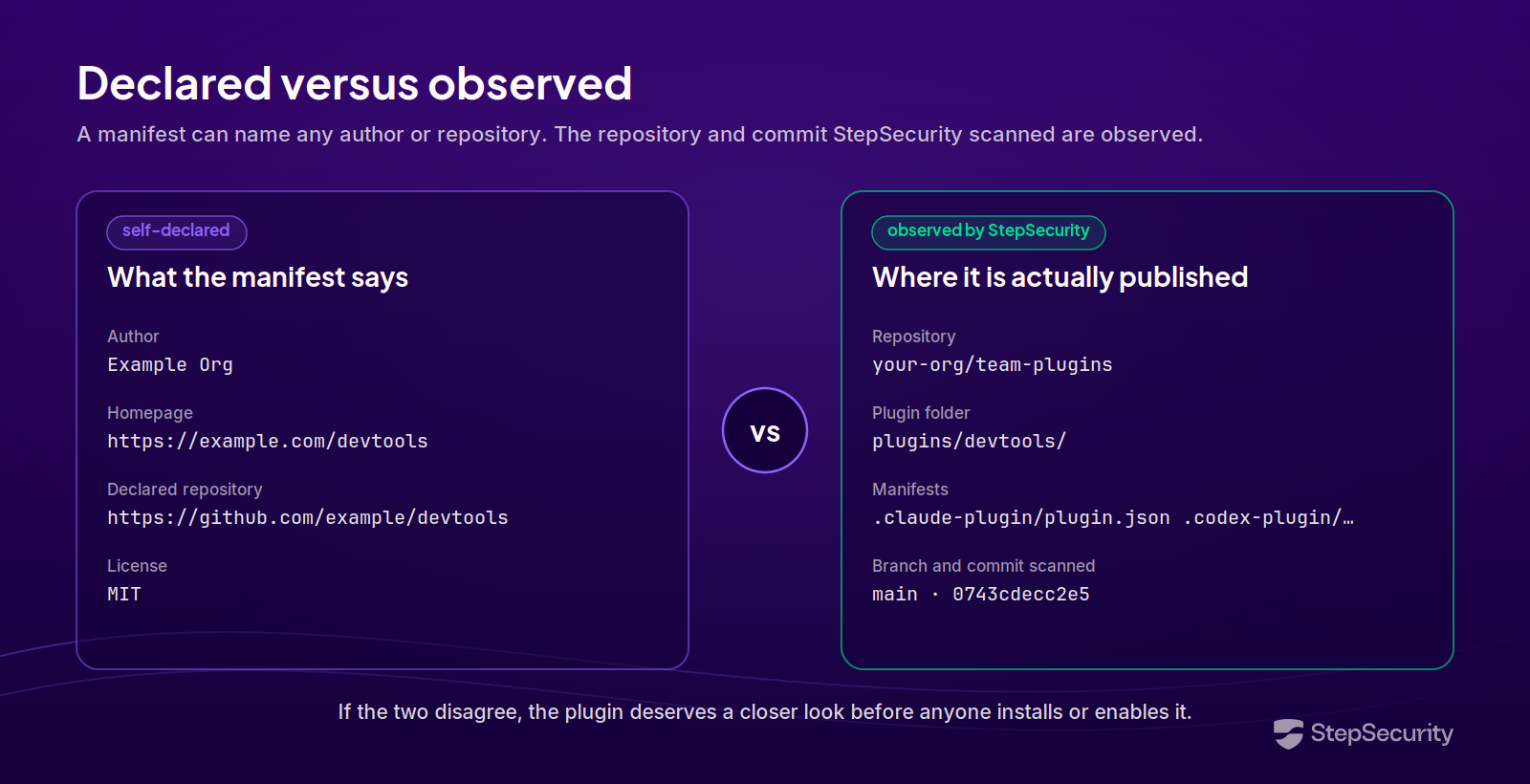
Select a plugin to open its details panel. Plugin information is what the manifest declares: the description, name, version, author, license, homepage, and declared repository. Source is what StepSecurity observed: the repository that publishes the plugin, the plugin folder, each manifest linked by agent, the branch, and the commit scanned.
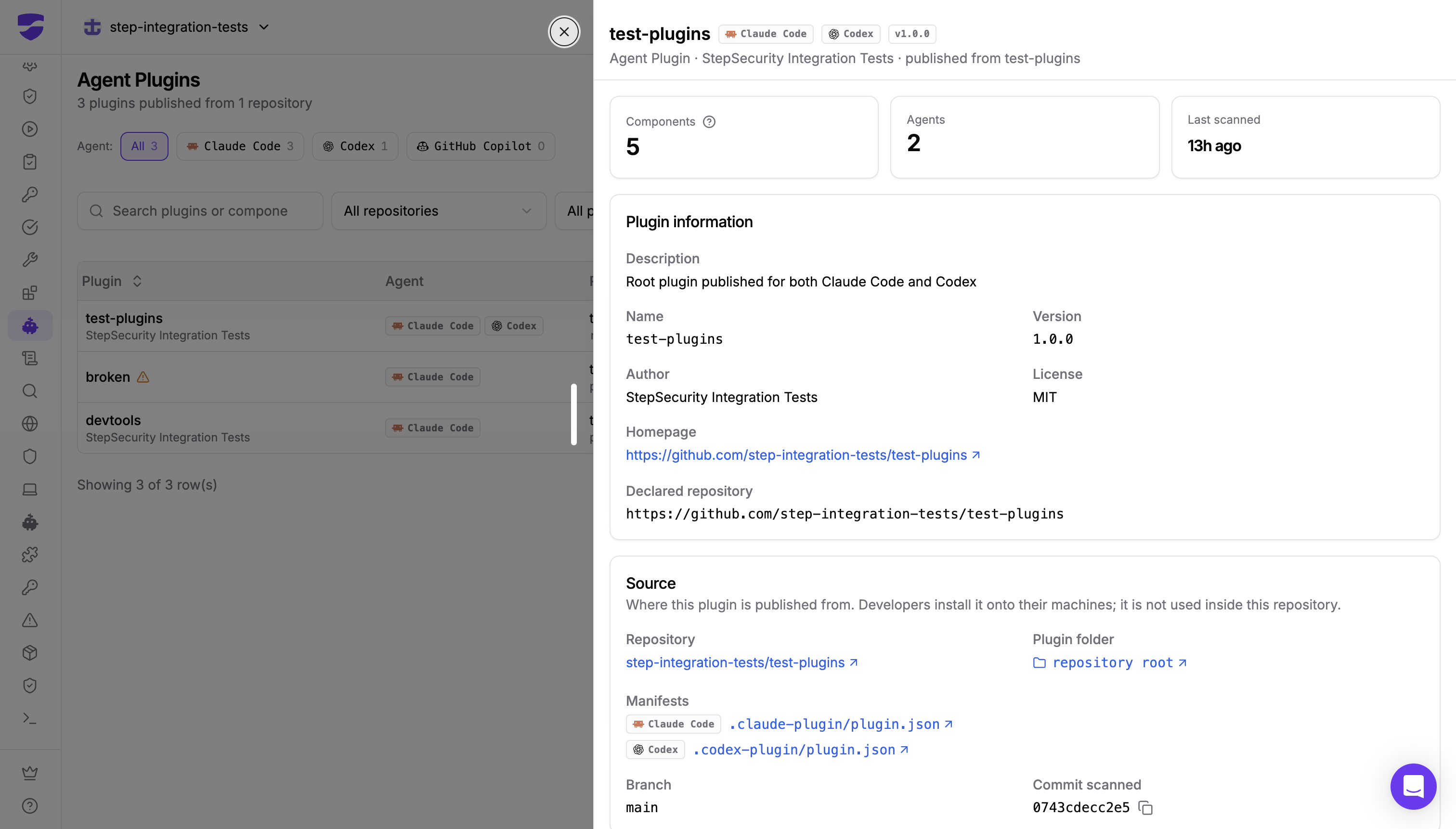
When the author or declared repository in the manifest does not match the repository and folder in Source, that mismatch is the first thing to investigate.
Used by and Components
Publishing a plugin and enabling one are different acts, and the panel keeps them apart. Source shows where developers install the plugin from. Used by lists the repositories in your organization whose settings enable the plugin, which means it is configured for everyone who works in those repositories.
Components lists every component the plugin supplies, grouped by kind, each with a link. Hooks are listed by the event they run on, which tells you when a hook fires before you read its command.

Two Views of One Surface
Both views separate what a plugin's manifest declares from where the plugin actually came from, so a plugin you investigate in one can be followed into the other. Dev Machine Guard tells you what is already running on your developers' laptops. The GitHub inventory tells you what your repositories are distributing, which is where you can review a plugin before it spreads.
Get Started
Both inventories are in the StepSecurity dashboard: Agent Plugins under IDE & AI Agents for Dev Machine Guard, and Agent Plugins under GitHub > AI Agents for your repositories. The Dev Machine Guard inventory requires agent v1.17.0 or later. To learn more, see:
If you are not yet a StepSecurity customer, start a free trial to see the plugins installed across your developer machines and published from your repositories.
.png)


