.png)
Supply chain attacks move fast, and the window between a package being compromised and that compromise being exploited keeps shrinking. StepSecurity Threat Intelligence was built for exactly this: it detects active supply chain compromises within minutes using the same systems that uncovered the tj-actions and nx incidents, and it pushes those detections straight into the channels your team already uses.
The Threat Center is where all of that intelligence comes together: a real-time feed of active incidents, historical records, affected packages, and recommended remediation, all in one view.
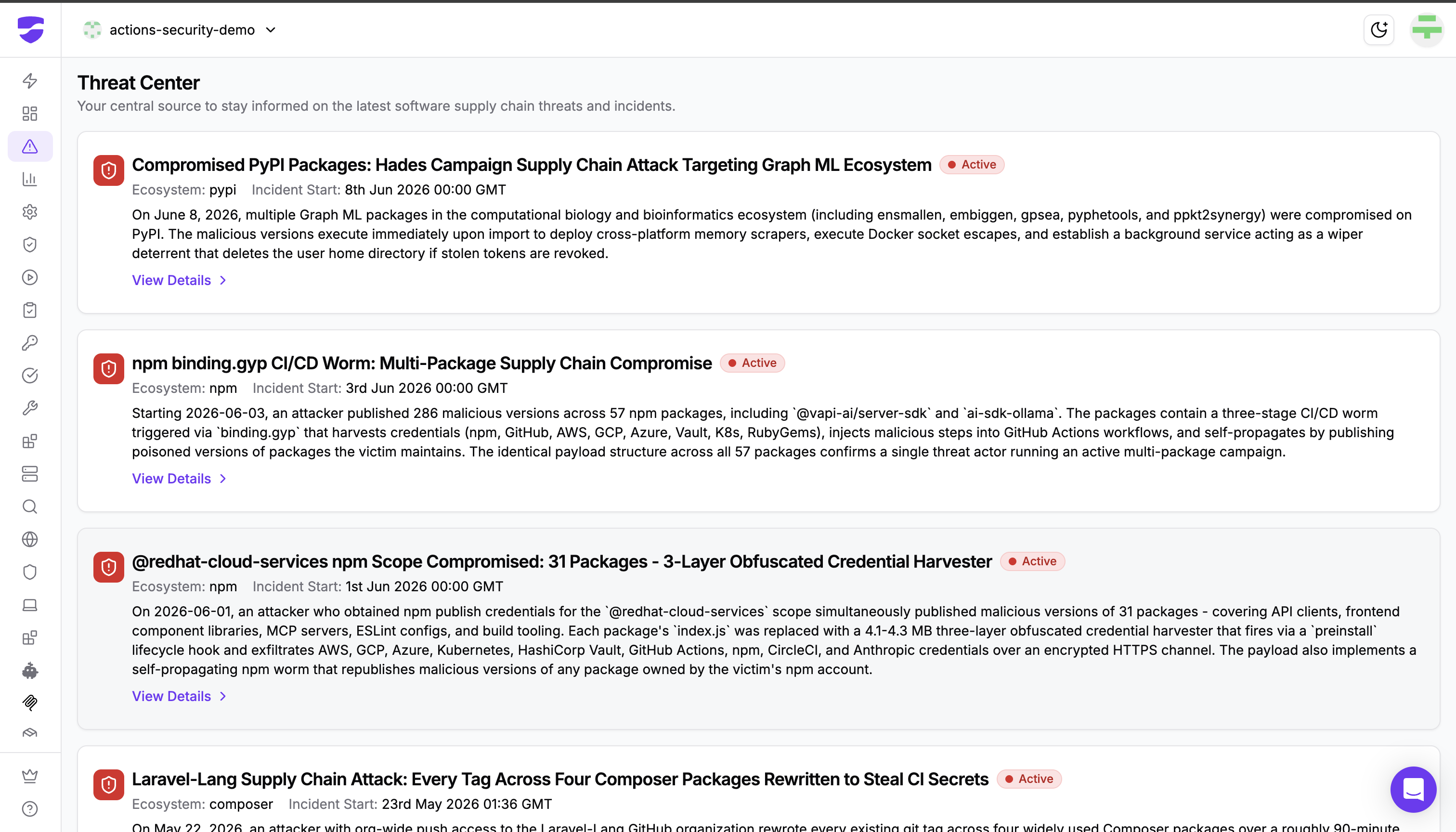
Now we have made that incident data available programmatically. A new StepSecurity API endpoint returns the compromised Open Source Software (OSS) components for any threat incident, so the intelligence that powers the Threat Center can flow directly into your own automation and tooling.
Where this fits
It helps to see the endpoint as one piece of a larger response loop rather than a standalone feature. StepSecurity already detects supply chain compromises and surfaces them in three connected ways:
- Real-time detection events stream into your Security Information and Event Management (SIEM) platform through your existing AWS S3 and webhook integrations, alongside Slack and email notifications. A Threat-Intelligence detection event fires the moment an incident is raised.
- The Threat Center dashboard gives your team a human-friendly command center to investigate each incident, see affected packages or Actions, and apply remediation.
- Pull request checks like the NPM Package Compromised Updates Check already block your developers from pulling in versions of packages known to be compromised, right at the pull request.
- The Secure Registry enforces your controls at install time. It sits between your developers, CI runners, and the public registries, evaluating every install request against your configured controls, whether the install runs in CI or on a developer's laptop.
The new endpoint adds a fourth path: on-demand, structured access to the compromised components for a specific incident. Where the detection event tells you an incident exists, this endpoint lets your systems ask, at any time, "exactly which packages and versions does this incident involve?" and act on the answer.
What the endpoint does
A single request returns every compromised OSS component tied to a specific incident, including the package ecosystem, the affected version, the severity, whether the compromise has been verified, and a description of the threat.
GET /github/{owner}/threat-intel/incidents/{incidentId}/compromised-components
You provide your GitHub organization and the unique incident identifier, along with a valid StepSecurity API token. The incidentId is the same identifier you already receive in the Threat-Intelligence detection event and see in the Threat Center, so the pieces connect naturally. The response looks like this:
{
  "compromised_components": [
    {
      "type": "npm",
      "component_name": "malicious-pkg",
      "version": "1.2.3",
      "incident_group_id": "ig-001",
      "description": "Package contains malicious code that exfiltrates credentials",
      "severity": "critical",
      "verified": true,
      "added_at": "2024-01-15T10:00:00Z",
      "threat_intel_id": "f47ac10b-58cc-4372-a567-0e02b2c3d479"
    }
  ]
}
That structured payload is the difference between knowing an incident exists and being able to do something about it without a human in the loop.
Three ways teams can use it
Automating incident response
A Threat-Intelligence detection event already lands in your webhook, S3 bucket, Slack, and email the moment an incident is raised, carrying the incident identifier and a link straight to the Threat Center. The new endpoint lets you take that identifier and immediately pull the full list of compromised components, then route them into your on-call paging, your ticketing system, or a dedicated response channel. The alert and the actionable detail arrive together, and the first manual step (someone opening the dashboard to read off the affected packages) disappears.
Integrating into your SIEM and tooling
Threat Intelligence was designed for SIEM and Security Operations Center (SOC) workflows from day one, using your existing StepSecurity integrations rather than new ones to configure. The detection event gives your SIEM the signal; this endpoint enriches it with clean, typed component data. The severity and verified fields are particularly useful pivots: you can prioritize verified, critical compromises automatically and correlate them against everything else your SIEM already sees, turning a detection into a fully contextualized event.
Correlating against your dependency inventory
The question every team asks during a supply chain incident is simple: are we actually exposed? With the component_name and version returned by the endpoint, you can cross-reference an incident against your own Software Bill of Materials (SBOM) or lockfiles and answer that in seconds instead of hours. This complements the enforcement you already have: the Package Compromised Updates check blocks compromised versions at the pull request, and the Secure Registry enforces your controls at install time across CI and developer machines. Together, those controls guard the front door while the API lets you sweep everything already inside.
The bigger picture
Taken together, these capabilities form a single loop that no longer depends on someone watching a dashboard. StepSecurity detects a compromise within minutes, the detection event reaches your SIEM and your team, the Package Compromised Updates check and the Secure Registry keep compromised versions out at the pull request and at install time across CI and developer machines, and now the API lets your systems pull the exact compromised components on demand to drive response and confirm exposure. Detection was always the hard part, and Threat Intelligence handles it. This endpoint is what lets the rest of your response keep pace.
Getting started
The Threat Center and this compromised components endpoint are available to StepSecurity Enterprise customers. To start using it, generate an API token from your StepSecurity dashboard, then point it at a real incident from your Threat Center to see the response for yourself.
To learn more about how Threat Intelligence and the Threat Center detect and track supply chain incidents, see the Threat Center documentation and the introducing Threat Intelligence blog post.