.png)
Over the past few months, a wave of supply chain attacks has hit the npm and PyPI ecosystems: the axios and TanStack compromises, the Shai-Hulud worm, and most recently the fast-spreading Miasma and Hades worms. They share a pattern. A trusted package ships a malicious version, it installs on a developer's machine, and it runs with that developer's access to steal the secrets stored there. The core risk is to everyone who installs these packages.
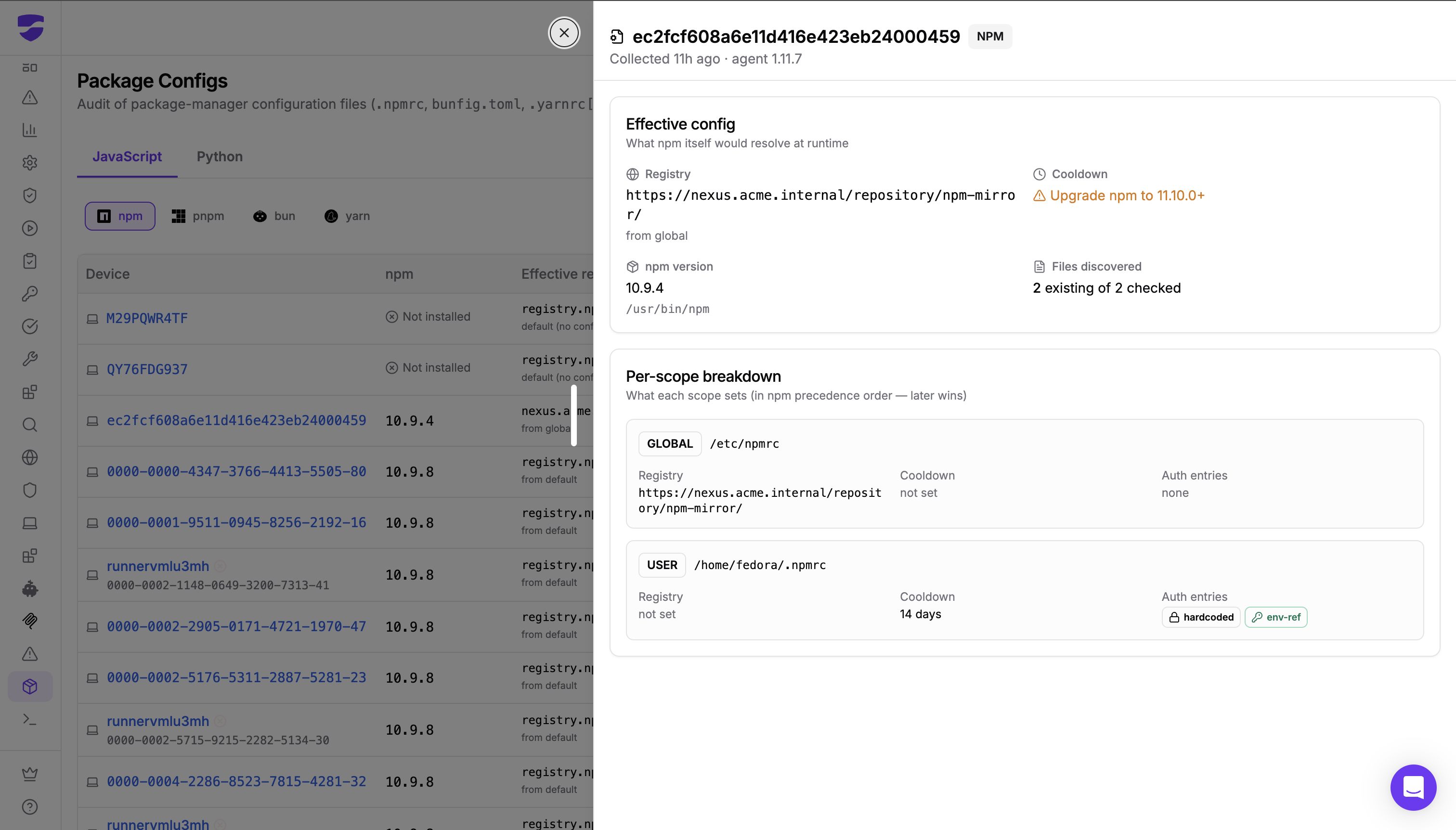
The strongest defenses against this already exist: routing every install through an internal registry or Secure Registry that blocks known-compromised packages, and a cooldown policy that keeps brand-new versions out of builds until they have been vetted. The catch is that these controls only protect a machine that is actually configured to use them. Dev Machine Guard's new Package Configs feature shows you, across your entire fleet, exactly how each developer machine fetches packages: which registry it resolves from, whether cooldown is in effect, and where registry credentials are exposed.
The StepSecurity research team has been at the forefront of these campaigns, frequently first to report them: the Nx / s1ngularity compromise, the chalk and debug compromise affecting more than 20 packages downloaded billions of times a week, and the Shai-Hulud worm that infected over 500 npm packages. Most recently, the team tracked each wave of the Miasma and Hades campaign as it broke: the Miasma npm wave on June 3, the attack on Microsoft's Azure organizations that disabled 73 repositories on June 5, and the Hades PyPI campaign on June 8. Package Configs comes directly out of that research, built to close the configuration gaps these attacks exploit.
Why this is urgent
Miasma and Hades are self-replicating worms, and the registry is their highway. Once the worm lands on a developer machine, it harvests any npm or PyPI publishing token it can find, then republishes infected versions of every package that token can publish. Each compromised developer becomes a new launch point. On June 3 the npm wave compromised 57 packages across more than 286 malicious versions in under two hours, and five days later the same actor surfaced on PyPI as Hades, compromising ensmallen and roughly two dozen related machine-learning and bioinformatics packages.
Two registry-level controls break this cycle:
A cooldown policy holds back newly published package versions until they have aged, so a malicious version pushed by the worm is not installed the moment it lands. This is one of the most effective defenses available, because most malicious packages are discovered within roughly 24 hours of publication, and a multi-day waiting period keeps the worm's freshly published versions out of your builds entirely.
An internal registry or artifact manager, fronted by a Secure Registry, gives you a single controlled path for packages, where cooldown and policy can be enforced and where you have an audit trail instead of every laptop reaching out to the public registry independently.
These are exactly the right defenses against a fast-spreading worm. The problem is knowing whether they are actually in force on every machine.
The control you configured is not always the control that runs
Configuring cooldown and an internal registry centrally does not guarantee they apply on a developer's laptop. Package-manager configuration is layered and easy to override, often without anyone noticing.
A .npmrc checked into a project can silently point npm at the public registry instead of your internal mirror, taking that machine off the protected path. A device can be missing the configuration that enables cooldown, or running a package-manager version too old to support it, so new versions install immediately. And registry credentials are routinely hardcoded directly into a config file rather than referenced from the environment, leaving a long-lived token on disk in exactly the place a worm like Hades goes looking. None of this is visible from a central policy dashboard, because the gap lives on the endpoint.
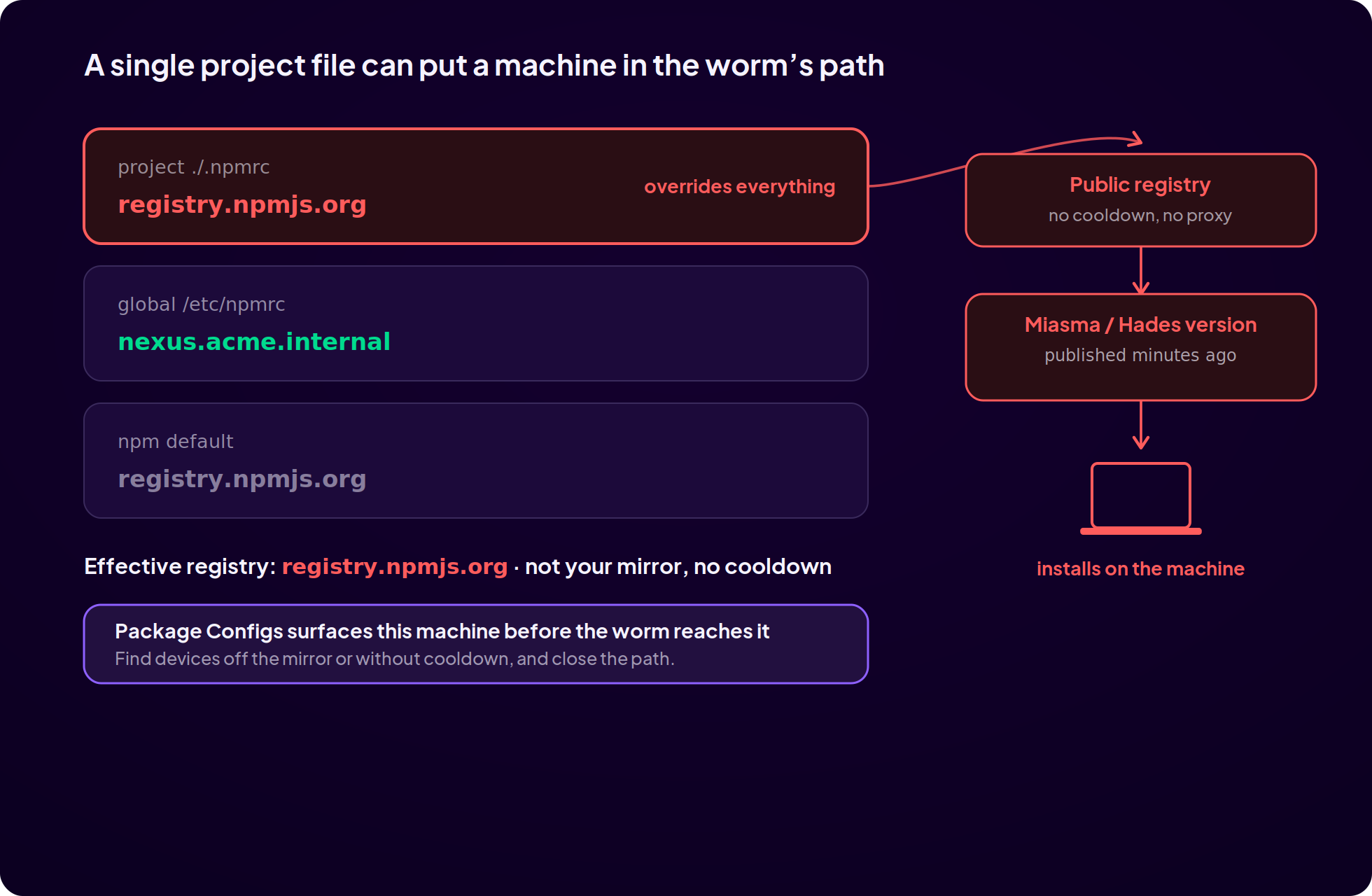
This is the same lesson the campaign keeps teaching: the defense you think you have is only as good as its weakest configured machine. A single laptop pointed at the public registry with no cooldown is the unguarded door the worm walks through.
What Package Configs audits
Package Configs inventories the package-manager configuration files across every scope on each developer machine: .npmrc, bunfig.toml, .yarnrc and .yarnrc.yml, and pip.conf. It covers the JavaScript ecosystem (npm, pnpm, bun, and yarn) and Python (pip). For every device, it resolves three things that decide whether that machine is exposed to a campaign like Miasma or Hades.
Effective registry
Where does this machine actually get its packages? Package Configs resolves the effective registry per device, accounting for configuration precedence across global, user, and project scopes, and shows where the value came from. A device resolving from an internal Artifactory or Nexus mirror is on your protected path. A device showing the public registry default is fetching directly from the public registry, outside any Secure Registry or proxy protection, and is exposed to whatever the worm published in the last few minutes.
Cooldown
Whether a cooldown policy is in effect. Cooldown is the single most direct defense against a worm that spreads by publishing new malicious versions, but it only protects machines configured to use it. Package Configs flags devices that are unprotected, and where the package manager is too old to support cooldown, it tells you exactly what to upgrade.
Authentication surface
How registry credentials are configured. Package Configs summarizes the auth surface per device, distinguishing credentials hardcoded into a config file from those referenced safely through an environment variable. Hardcoded registry tokens are exactly what Miasma and Hades harvest, so a static token sitting in a .npmrc is not just a hygiene issue, it is the fuel these worms run on.
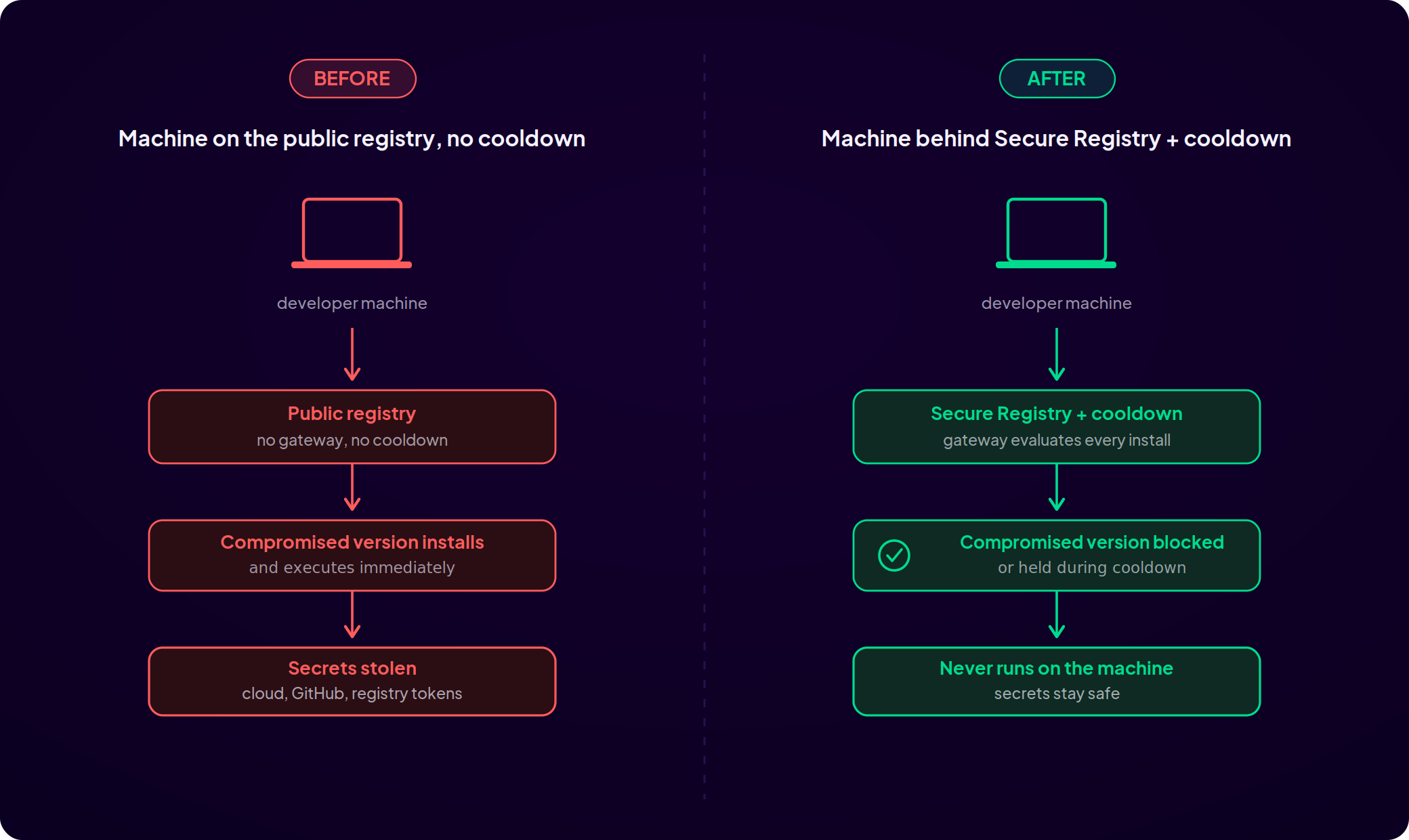
How Package Configs defends against compromised packages
The attacks above succeed through a specific chain: a compromised version is published, it is installed on a developer machine, it executes, and it steals secrets or spreads. Each thing Package Configs surfaces helps security teams ensure the controls that break that chain are actually in place.
Confirm every machine is behind a gateway that blocks compromised packages. The primary defense is making sure all developer machines resolve packages through StepSecurity Secure Registry or an approved internal registry, so the gateway can block known-compromised versions before they are fetched. Package Configs shows you exactly which machines are on that path and which have drifted off it, often through a single project .npmrc, so you can bring the exposed ones back behind the gateway.
Confirm cooldown is in effect. With npm package managers, a cooldown policy can prevent a compromised component from running on a developer machine even if that machine is not yet behind your internal registry, because the attacker's freshly published version sits in the waiting period until it is caught. Package Configs shows every machine where cooldown is missing or unsupported, so you can close that gap as a second layer.
Find exposed credentials before the worm does. The secrets these packages steal include registry publishing tokens, and a hardcoded token in a .npmrc is the easiest to take. Package Configs flags every machine carrying a static token in a config file, turning "we hope no one has tokens on disk" into a concrete list you can act on.
Put together, this lets a security team respond to an active campaign in minutes: pull up the fleet, find the machines not behind the gateway or without cooldown, surface exposed tokens, and fix the specific gaps a compromised package would exploit, instead of hoping the central policy reached every endpoint.
Built from frontline research
Package Configs reflects how StepSecurity has watched these campaigns operate. The research team is consistently among the first to detect major supply chain attacks, having been officially credited for discovering several, including the compromises of axios and TanStack, and has tracked Miasma and Hades from their first waves. Seeing how these attacks reach developer machines and steal what is on them is what shaped the three things Package Configs surfaces. As the campaigns evolve, the audit evolves with them.
Get started with Dev Machine Guard
Package Configs is part of Dev Machine Guard and is collected by the same lightweight agent you already deploy through your existing MDM or EDR tooling, on macOS, Windows, and Linux. There is nothing extra to install.
If you already run Dev Machine Guard, Package Configs is available now in your dashboard under Developer Machines. Open it to see how every device in your fleet fetches packages, and sort by cooldown and configuration coverage to find the gaps first. With npm and Python supply chain attacks landing almost weekly, the machines pointed at the public registry with no cooldown are the ones to fix today.
If you are not yet using Dev Machine Guard, get started by deploying it across your fleet to protect your developers from compromised packages.
See the Package Configs documentation and the Installation Script guide for rollout, or request a demo to see Dev Machine Guard in action.