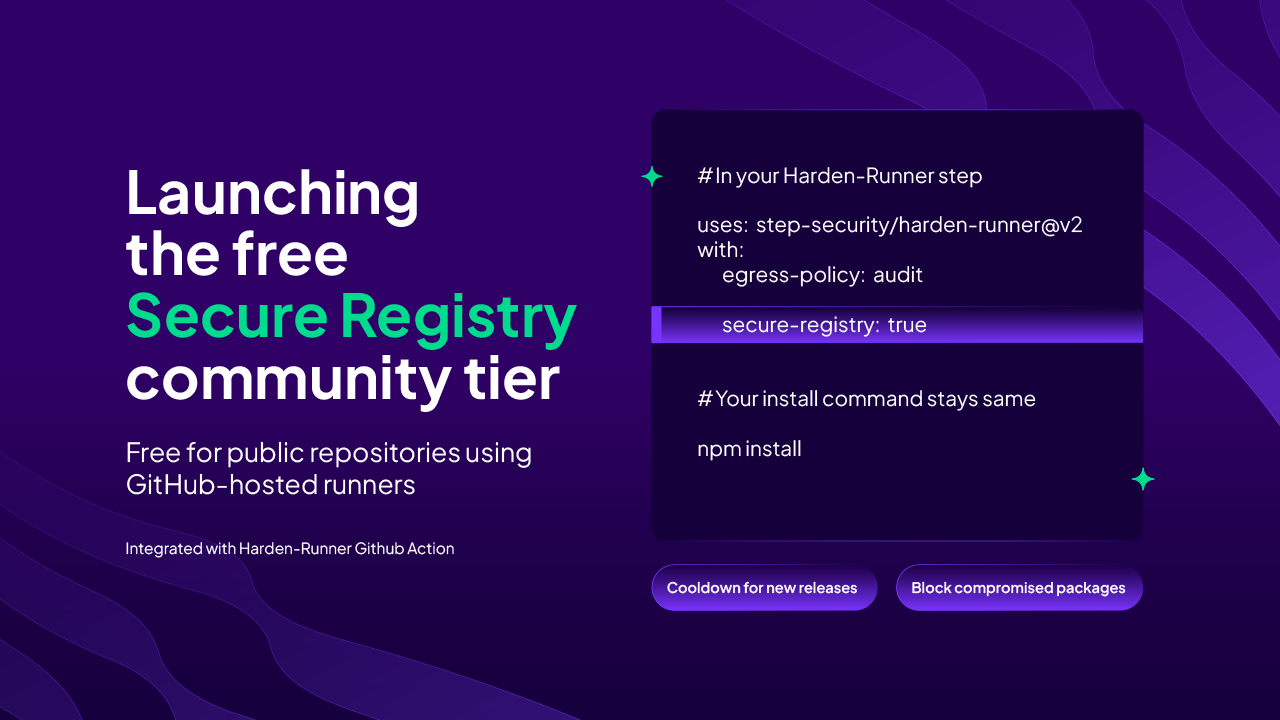
Today, we’re making the StepSecurity Secure Registry available for free as part of our community tier, and integrating it with Harden-Runner to make it easier to adopt in GitHub Actions.
Previously available only to enterprise customers, StepSecurity Secure Registry helps protect dependency downloads by applying policies such as package cooldown periods and blocking known compromised packages. With the community tier, more projects can bring these protections into their CI/CD workflows.
A safer way to pull dependencies
Every package installation in a CI/CD workflow is a dependency trust decision. Pulling packages through a secure registry gives teams a place to enforce security policies before those packages reach their builds.
A cooldown period delays adoption of newly published package versions, giving the ecosystem time to identify potential threats. Blocking known compromised packages helps prevent those threats from entering subsequent builds. Together, these controls reduce exposure to malicious dependencies without requiring developers to review every package release themselves.
Easier adoption with Harden-Runner
Adopting a secure registry often involves repetitive configuration work. Developers need to update individual workflows, adjust package manager settings, or modify configuration files in their repositories. Applying those changes consistently across projects can be cumbersome.
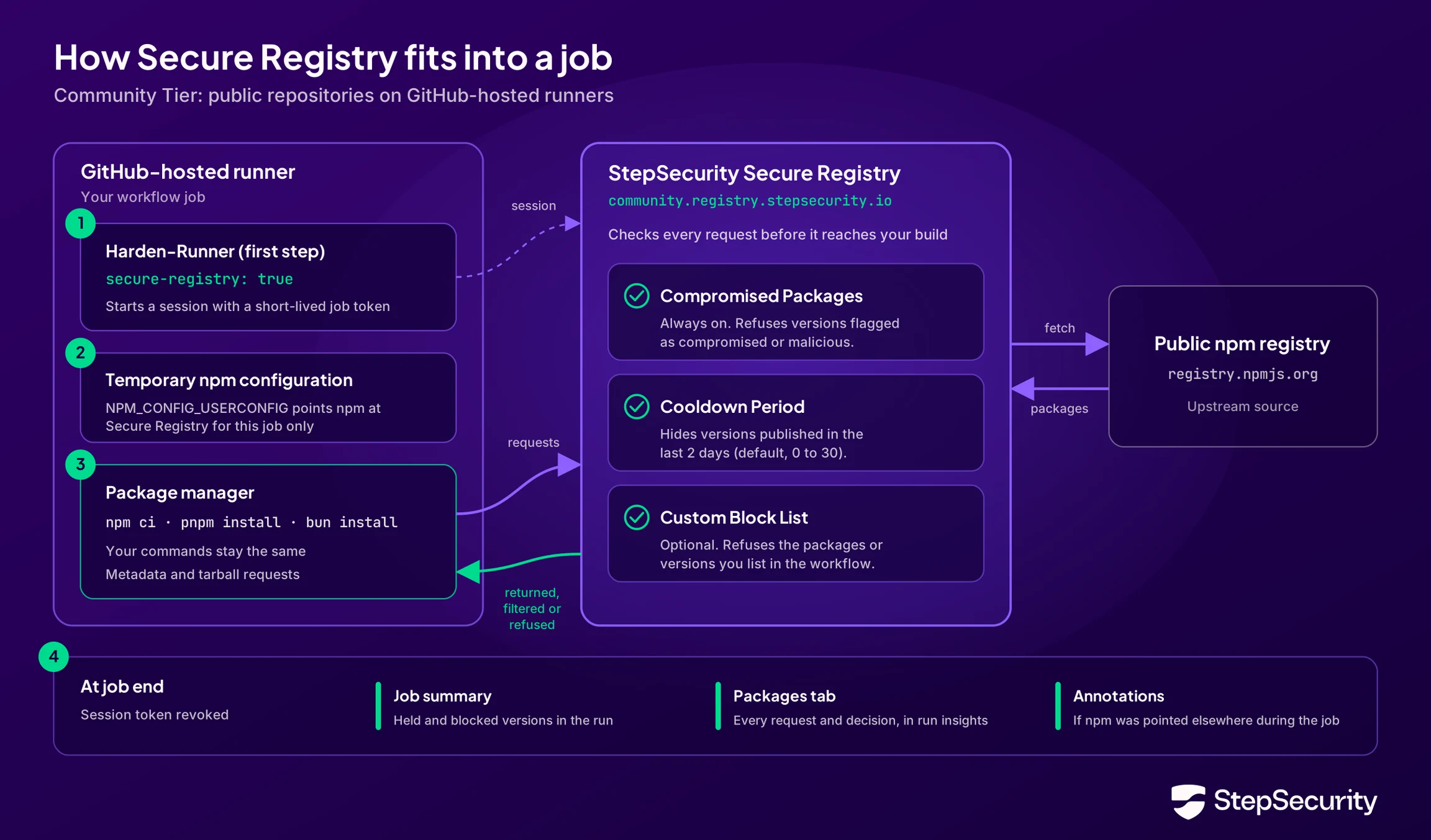
Our integration with Harden-Runner simplifies that setup by automatically configuring supported package managers to use the StepSecurity Secure Registry in GitHub Actions workflows.
Harden-Runner also provides visibility into whether that configuration is working. Because it already tracks outbound network calls from workflows, you can verify whether dependency downloads are reaching the secure registry or still going directly to a public registry. This brings configuration and verification together, making it easier to adopt the registry and confirm that your workflows are using it.
Enable Secure Registry with one setting
Add secure-registry: true to your Harden-Runner step and place it first in the job:
- name: Harden the runner
  uses: step-security/harden-runner@v2
  with:
    egress-policy: audit
    secure-registry: true
Harden-Runner automatically configures npm to use the StepSecurity Community Secure Registry at community.registry.stepsecurity.io/javascript/. Your existing installation commands, such as npm ci, stay the same.
The default configuration provides two protections: a two-day cooldown for newly published versions and blocking of known compromised packages. No custom package policy is needed. The egress-policy: audit setting controls network monitoring separately from these registry protections. Read the docs here: https://docs.stepsecurity.io/packages/secure-registry/community-tier
One workflow showing both protections
Our example workflow run demonstrates three outcomes in one job: an ordinary dependency installs successfully, a newly published version is held by the cooldown, and a known compromised version is blocked. You can view the insights for this run here: https://app.stepsecurity.io/github/step-community-org/int-tests/actions/runs/43761709796?tab=packages
Install an ordinary dependency
The job starts with npm install [email protected]. Secure Registry allows both the metadata request and the package archive download, and the installation succeeds.
For developers, the installation process stays familiar. Harden-Runner handles the registry configuration, and Secure Registry evaluates the package requests.
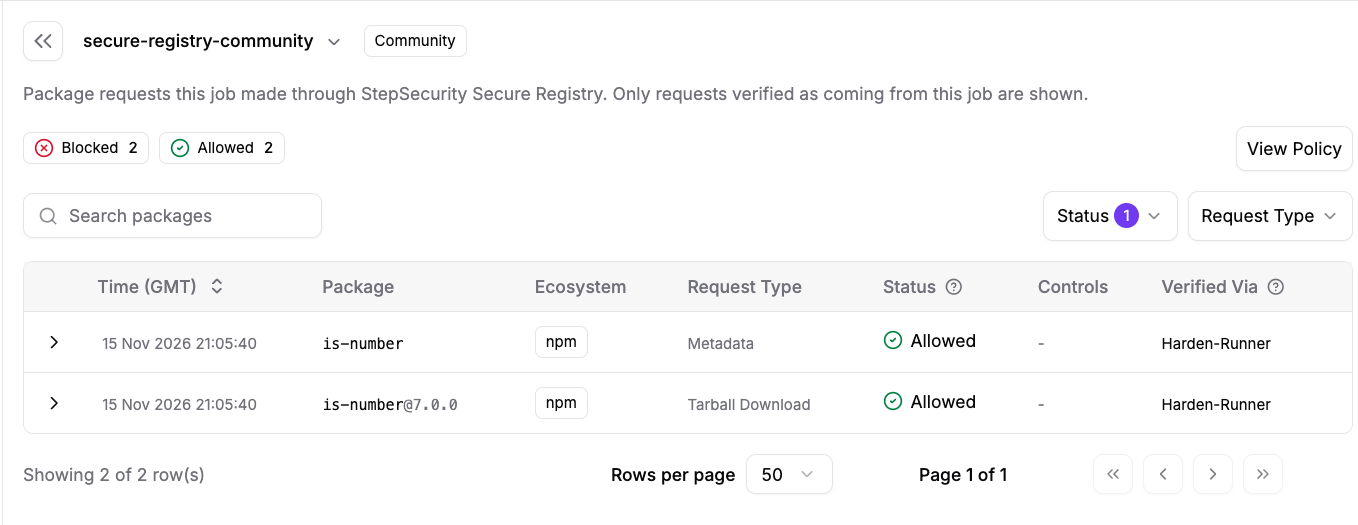
The Insights API records two allowed requests for is-number: one metadata lookup and one archive download.
Hold a newly published version
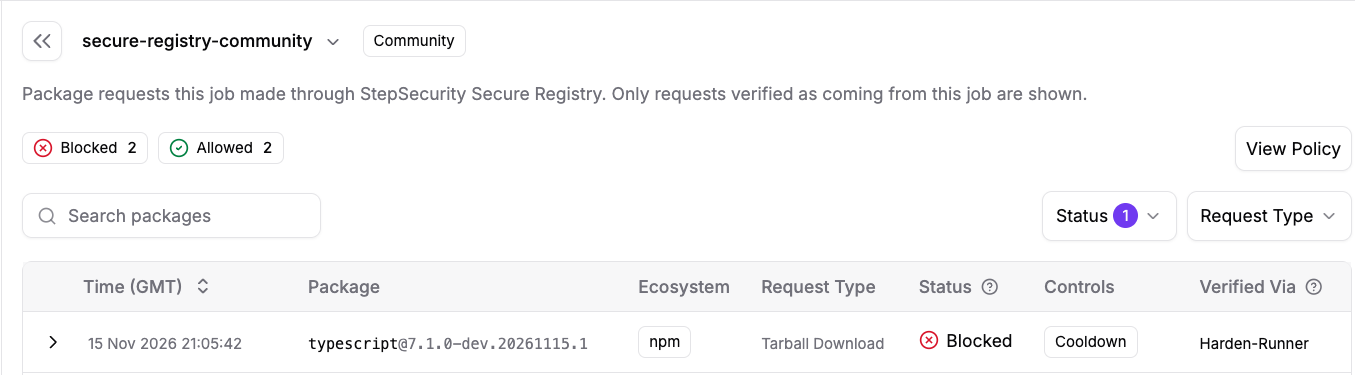
Next, the workflow attempts to install [email protected]. At the time of the request, the registry reported that this version had been published approximately 12 hours 42 minutes earlier, within the default two-day cooldown.
The test requests the package archive directly from the secure registry using npm install. The registry refuses the download with an HTTP 403 response. In Harden-Runner Insights, the archive request is marked blocked and the cooldown control explains that the version is within the two-day waiting period.
This waiting period gives the ecosystem time to identify suspicious releases before they reach your builds. It applies automatically with secure-registry: true.
Block a known compromised version
The same job then requests [email protected], an actual compromised release documented in StepSecurity’s September 2025 npm supply chain incident report.
The workflow uses npm install to request the Chalk archive directly through the secure registry. Secure Registry rejects the download with an HTTP 403 response, so the package is not installed. The Insights API records the compromised control as blocked and identifies [email protected] as a known compromised package.

Verify what happened in Harden Runner insights
Follow the Harden-Runner insights link in the job summary, or open this run’s Packages view.
The job contains four package request records: two allowed requests for [email protected], the TypeScript archive blocked by cooldown, and the Chalk archive blocked as compromised. Each record includes its request type, status, and evaluated controls.
The recorded policy confirms the community tier, enforcement mode, a two-day cooldown with no exemptions, and compromised-package protection enabled. These settings all come from defaults.
All package download attempts in this example use community.registry.stepsecurity.io.
Frequently asked questions
Is the Secure Registry community tier free
Yes. The community tier is free for public repositories using GitHub-hosted runners with the Harden-Runner GitHub Action. There are no additional usage limits for workflows that meet these conditions.
Using Secure Registry in a private repository requires the enterprise tier. Using it with self-hosted runners also requires the enterprise tier, even if the repository is public.
Which ecosystems and package managers are supported
The first release supports the JavaScript ecosystem, including npm, pnpm, and Bun.
We plan to add support for other ecosystems, including Python, Maven, Ruby, and Rust, in future releases. See our Secure Registry documentation: https://docs.stepsecurity.io/packages/secure-registry for the current list of supported ecosystems and package managers.
What is the default cooldown period and can I customize it or exempt specific packages
The default cooldown period is two days. You can change its duration and exempt specific packages or versions through the secure-registry configuration in Harden-Runner.
For example, this configuration sets a three-day cooldown while exempting TypeScript and packages in the @typescript scope:
secure-registry: |
  npm:
    cooldown:
      days: 3
      exemptions:
        - "typescript@*"
        - "@typescript/*"
To exempt only a specific version, use an entry such as "[email protected]" instead of "typescript@*". Cooldown exemptions do not bypass protection against known compromised packages.
Where is the community registry hosted and what is its SLA
The community registry is a SaaS offering available at community.registry.stepsecurity.io. It is hosted using Cloudflare and AWS in the US region and provides a 99.9% availability SLA.
What if my npmrc uses another registry or contains publishing credentials
Your own registry stays in charge. If npm already points at another registry, Harden-Runner leaves it alone and prints a notice. Those installs aren't checked by Secure Registry.
Publishing needs one change. npm publish doesn't work through Secure Registry, so set npm: mode: off under secure-registry in the job that publishes
secure-registry: |
  npm:
    mode: off
Why use the StepSecurity Secure Registry instead of the public npm registry
The StepSecurity Secure Registry adds protections that help prevent software supply chain attacks from reaching your builds.
A cooldown period delays downloads of newly published package versions. During that window, StepSecurity’s ThreatIntel team analyzes package releases to identify threats. When a version is identified as compromised, the secure registry blocks its download, including after the cooldown period ends.
You also gain visibility into your build’s dependencies. The Packages tab in Harden-Runner Insights shows the package requests made through the secure registry for each job, helping you understand what was downloaded and where security policies intervened.
What happens if the secure registry is unavailable
Installs fail instead of skipping the checks. npm retries a few times, and if Secure Registry is still unavailable the install fails. Packages are never installed without being checked.
Coming soon: Harden-Runner will check Secure Registry's health at the start of each job, and fall back to the public registry automatically when it's unavailable.
For status, Please take a look at Community Secure Registry on status.stepsecurity.io and re-run the job once it's back. If you need to ship sooner, set secure-registry: false for that run.
Do cached dependencies and existing lockfiles receive protection
Cached dependencies aren't covered. Packages restored from a cache are never downloaded, so Secure Registry can't check them. For full coverage, turn off dependency caching or delete old caches.
Most lockfiles work as they are. package-lock.json, pnpm-lock.yaml and bun.lock (Bun 1.4.4 and later) need no changes, and every download goes through Secure Registry.
Some lockfiles may not be covered yet. Some tools, such as Yarn with a yarn.lock file, download packages straight from the public registry and skip SecureRegistry.
What should I do when a dependency is blocked
Find out why it is blocked. Open the Packages tab in your run's insights on the StepSecurity dashboard. It lists every package the job pulled, with the decision and reasonfor each. The job summary shows the same information, but it may be missing when a job ends right after the block.
Held by the cooldown: wait until the version is old enough, use an older version, or add an exemption to allow it now:
secure-registry: |
  npm:
    cooldown:
      exemptions:
        - "[email protected]"
        - "@example-org/*"
Blocked as compromised: move to a safe version, either newer or older. Compromised versions can't be exempted, which protects your build even when a malicious release is pinned in your lockfile.
Think a version was flagged by mistake? Open an issue in the Harden-Runner repository with the package name, version and a link to your workflow run, and we'll review it quickly.
Does passing the registry checks mean a package is safe
It means the package passed the checks that stop supply chain attacks. Secure Registry refuses versions known to be compromised. It also holds back new releases during the cooldown, which gives time for malicious releases to be detected and removed before they reach your build.
It isn't a vulnerability scanner. A legitimate package with a known CVE still installs.
Use it with the rest of Harden-Runner. Network monitoring and egress control in Harden-Runner can catch a malicious package that's still unknown when it tries to reach out from your job.
What package information is collected and who can see it
Secure Registry sees every package request that goes through it. For each one, we record the package name, version, decision (allowed, held or blocked) and reason, linked to the workflow run. This is what powers the Packages tab in your run insights.
Insights follow your repository's visibility. For public repositories, run insights are public, just like the workflow logs on GitHub.
Are there rate limits or fair use conditions and is signup required
No signup needed. Secure Registry is free for public repositories on GitHub-hosted runners. Add secure-registry: true to Harden-Runner and it works, with no account or API key. There are no additional usage limits for workflows that are part of public repositories on GitHub-hosted runners.
What does the availability SLA cover
We work to keep Secure Registry available 99.9% of the time each month, on a redundant setup built for high availability. You can follow availability under Community Secure Registry on status.stepsecurity.io
Some things are outside our control. Outages of the public registries themselves, and setup issues on your side, such as egress rules that block Secure Registry, can affect your installs. Scheduled maintenance is announced at least 24 hours ahead.
Try it in your workflow
Start by adding secure-registry: true to your Harden-Runner configuration. Run your workflow, then follow the insights link to review its package requests.
With one setting, you can apply a cooldown to new releases, block known compromised versions, and see how those protections affect dependency downloads in each job.
Documentation: https://docs.stepsecurity.io/packages/secure-registry/community-tier