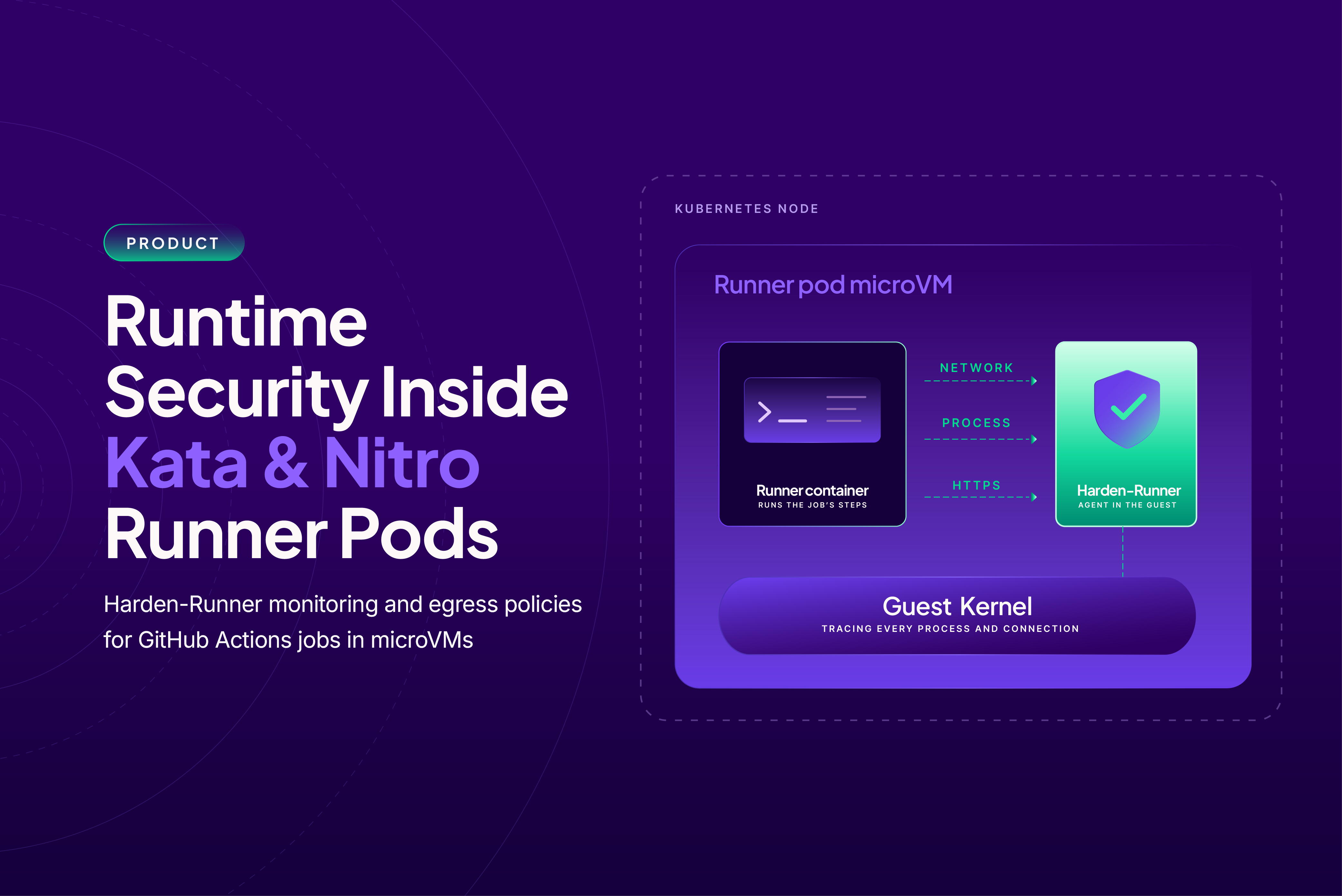
Moving a GitHub Actions runner pod into a microVM gives it its own Linux kernel and a boundary around the job. But a malicious dependency or tampered action still runs inside that boundary, with access to the job’s secrets, source code and network. For platform and security teams, the question is what the job does once it starts. Security tools on the Kubernetes node see only the VM. The commands, connections and HTTPS (Hypertext Transfer Protocol Secure) requests inside it stay out of their view.
Harden-Runner now supports those runners. We bring runtime monitoring and egress policy enforcement inside Actions Runner Controller (ARC) runner pods on Kata Containers and Amazon EKS (Elastic Kubernetes Service) Nitro Sandboxes. Your jobs keep their VM isolation, and you get visibility into their activity without changing your workflows.
See what runs inside each job
Harden-Runner agent v1.9.7 and later gives jobs on both runtimes the same coverage as jobs on a self-hosted VM:
- Monitoring: network, DNS (Domain Name System), process and HTTPS events.
- Egress policy enforcement: control over the job’s outbound network access.
- Job summary: a summary of the job’s activity in its output.
Each job appears under Workflow Runs. You can inspect the processes it ran, the domains it resolved, the network connections it opened and the HTTPS requests it made. The activity inside the microVM shows up in the same job view you use for other Harden-Runner jobs.
HTTPS visibility includes requests from Go programs and requests over HTTP/2. You can see API calls made by gh and other Go tools, which carry their own TLS (Transport Layer Security) code and bypass the system’s OpenSSL. You can also see image pulls made during the job by a Docker-in-Docker daemon that was already running when the job started.
Alongside that visibility, egress policy enforcement lets you control the job’s outbound network access. Monitoring and enforcement run where the job runs: inside its VM.
Requirements for your runner pods
We support two VM-per-pod runtimes for ARC runners. Use the requirements below to prepare the guest image and, for Nitro Sandboxes, the nodes that host it.
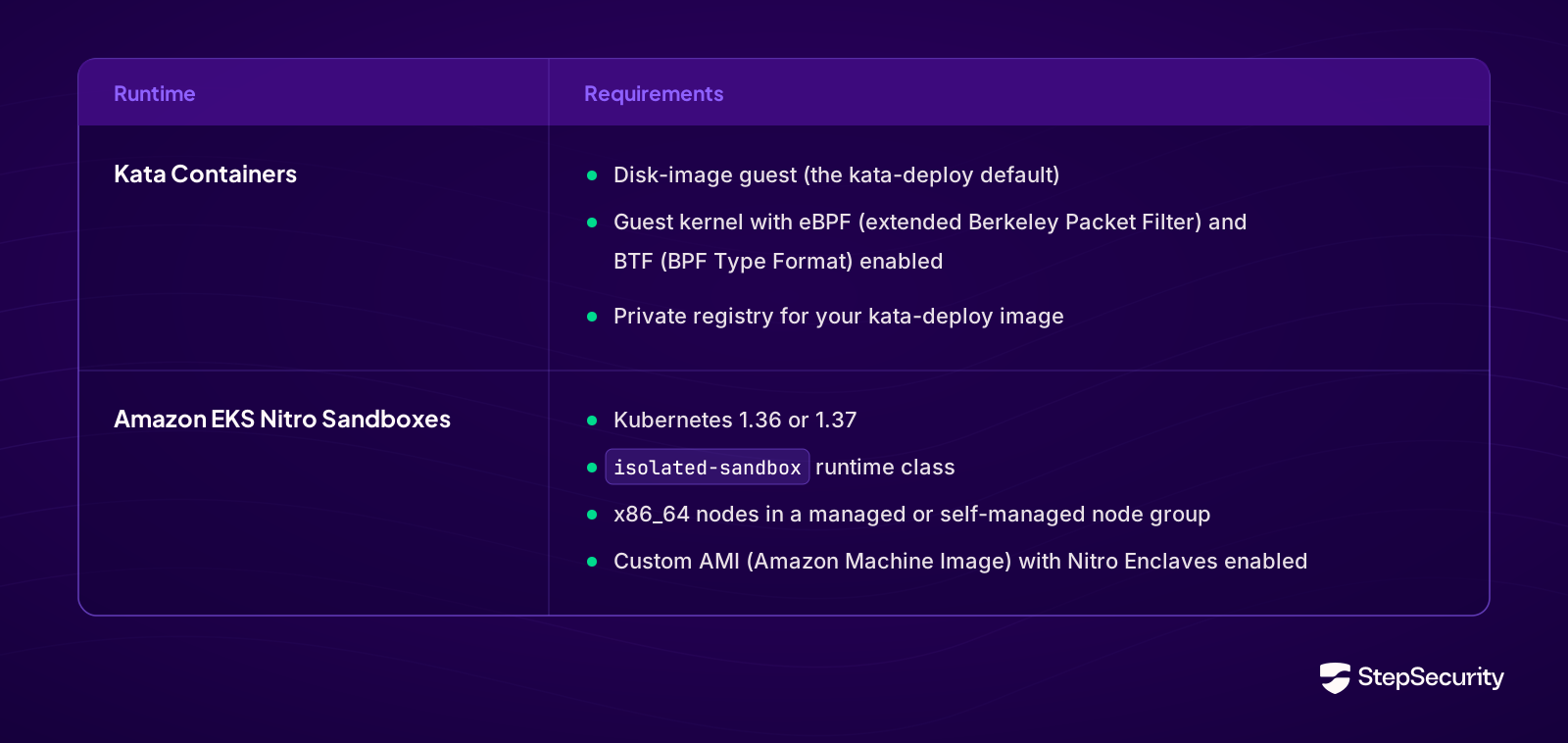
For Nitro Sandboxes, set runtimeClassName: isolated-sandbox on your runner pods.
Runner pods that use other runtimes stay monitored by ARC Harden-Runner on the same cluster.
How the agent reaches the job
Each microVM has its own kernel, so monitoring starts inside the guest. The Harden-Runner agent is baked into the guest image that the runtime boots for every runner pod. It starts with the VM, before the runner.
The runner’s job hooks associate the agent’s activity with each job. At job start, the hooks tell the agent which job is running. At job end, they add the job summary and agent log to the job’s output. This connects monitoring inside the VM to the workflow run you review afterward.
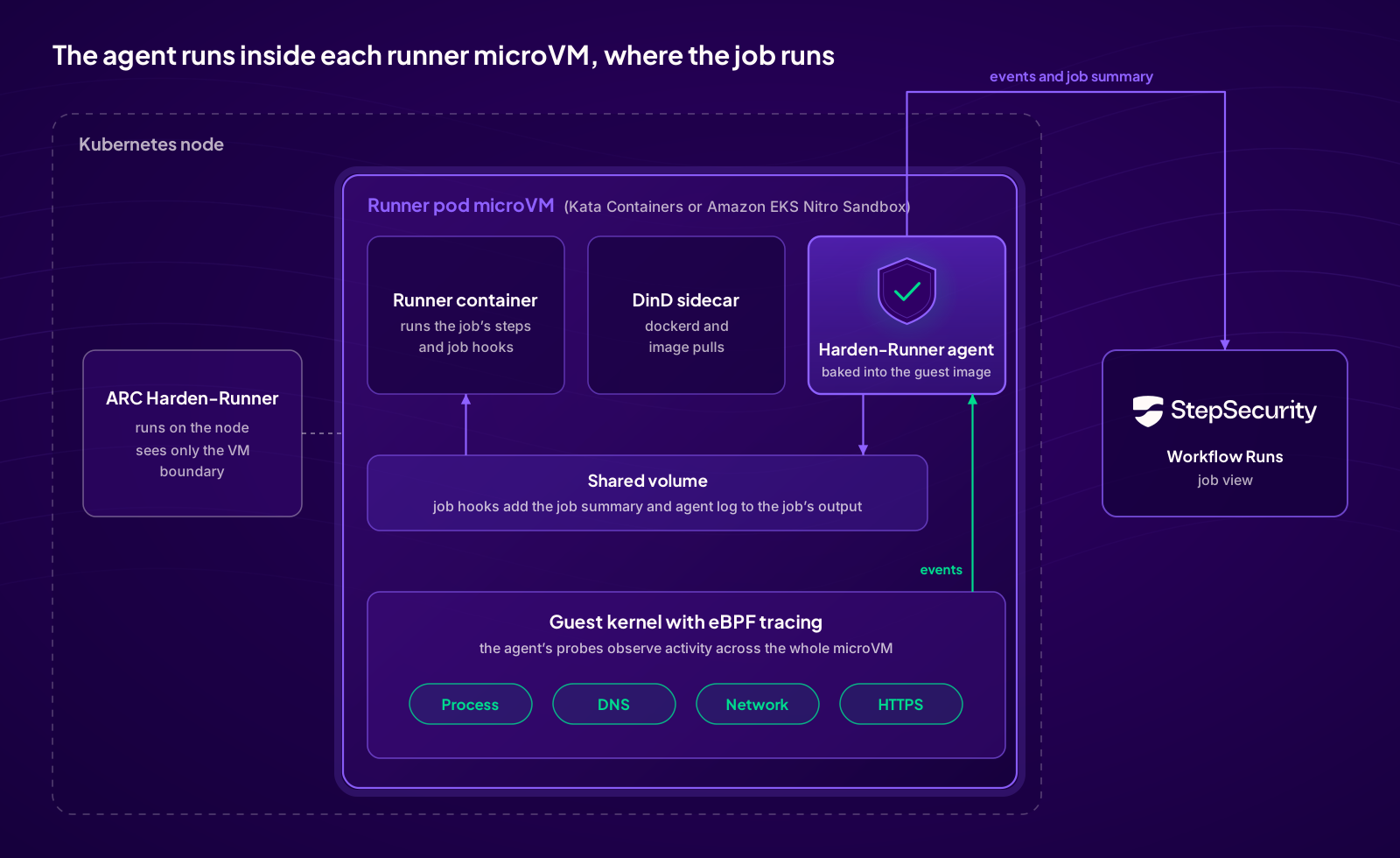
The agent runs inside the VM boundary, where it can see the job’s processes and network activity.
Prepare the guest image
On Kata Containers, adding the agent is one more stage in the kata-deploy image you already build for your eBPF (extended Berkeley Packet Filter) enabled guest kernel.
On Nitro Sandboxes, the installation steps rebuild the sandbox guest kernel with eBPF tracing enabled. They use AWS’s source, patches and configuration from the open source Bottlerocket kernel kit. Packer then bakes the kernel, agent and job hooks into the sandbox guest image on your node AMI (Amazon Machine Image).
The setup happens in the runner infrastructure. Once the guest image and hooks are configured, your existing workflows use the monitoring without changes to their steps.
Get started
Open the StepSecurity app and go to Harden-Runner installation, then the Self-Hosted VM tab. Select ARC runners on Kata Containers or ARC runners on Amazon EKS Nitro Sandboxes for the installation steps. Your API key and the current agent release are already filled in. Contact us to enable the Self-Hosted VM tab if needed.
[IMAGE: Self-Hosted VM installation tab screenshot, API key masked. Alt text: “Harden-Runner installation page, Self-Hosted VM tab, showing the ARC runners on Kata Containers and ARC runners on Amazon EKS Nitro Sandboxes options”]
For more on the job view and setup, see the Harden-Runner documentation.
Harden-Runner is open source. View Harden-Runner on GitHub.
Run a free GitHub Actions Audit, Start free, or request a demo.