Every public repository on GitHub has a setting that decides who can run workflows from a fork without asking first. Set it to the least restrictive option, and any established GitHub account can fork your repository, edit a workflow, open a pull request, and run that code on your runners.
If those runners are self-hosted, the code runs inside your network.
Today we are adding a new control to StepSecurity that finds this setting across your GitHub organization and every public repository in it: Fork pull request workflows should require approval. It is rated Critical, it runs every hour, and it tells you exactly which organization or repository to fix.
The setting: three levels of approval
GitHub calls it Approval for running fork pull request workflows from contributors, and you find it under Settings > Actions > General for an organization or a repository. It has three options, from least to most restrictive:
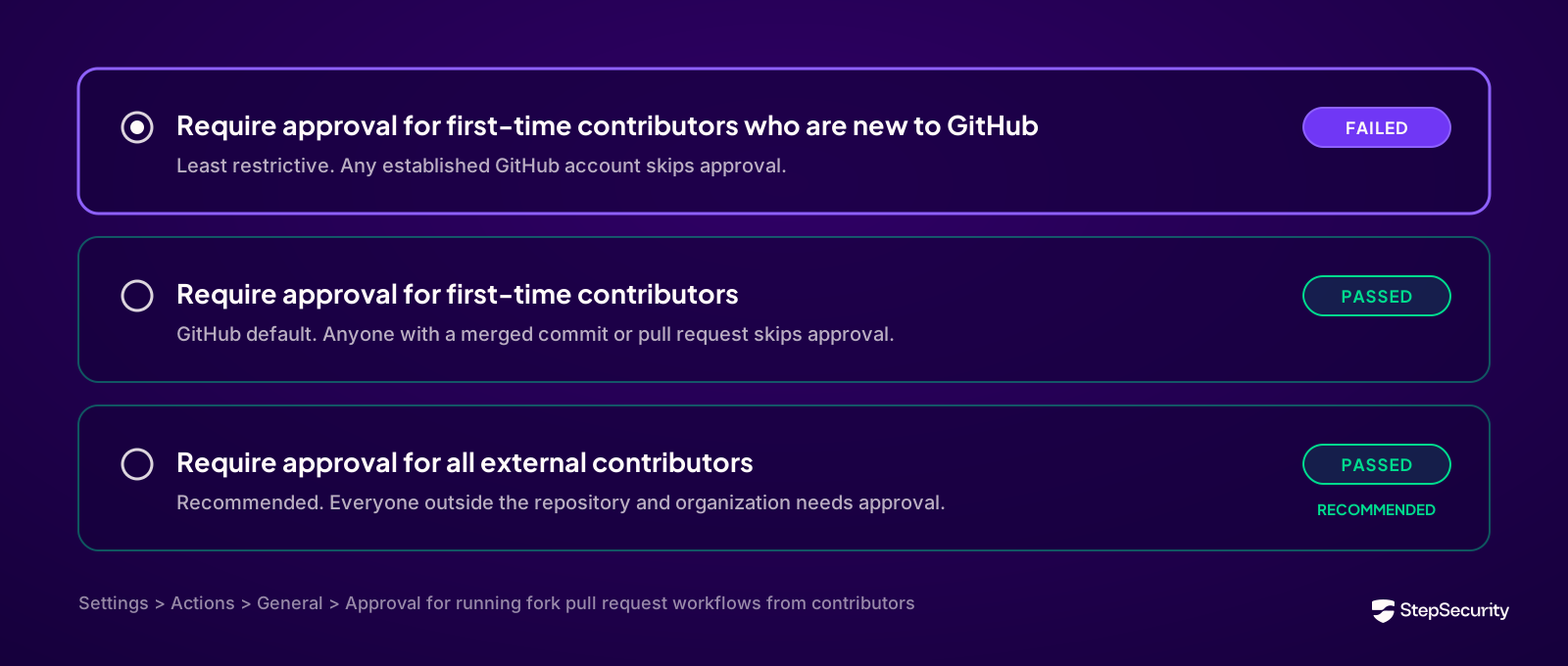
GitHub's default is the middle option. The first option is a step down from that default, and it is the one this control flags. With it, an account only needs some history on GitHub to skip approval, and building that history costs an attacker almost nothing.
The setting applies to public repositories. Forks of private repositories follow a separate set of GitHub policies.
How the attack works
Under the least restrictive policy, an attacker needs four steps and no special access:
- Use any GitHub account with some history.
- Fork your public repository.
- Edit a workflow file, or a script a workflow calls, to run their own commands.
- Open a pull request. The modified workflow starts running right away, with no maintainer involved.
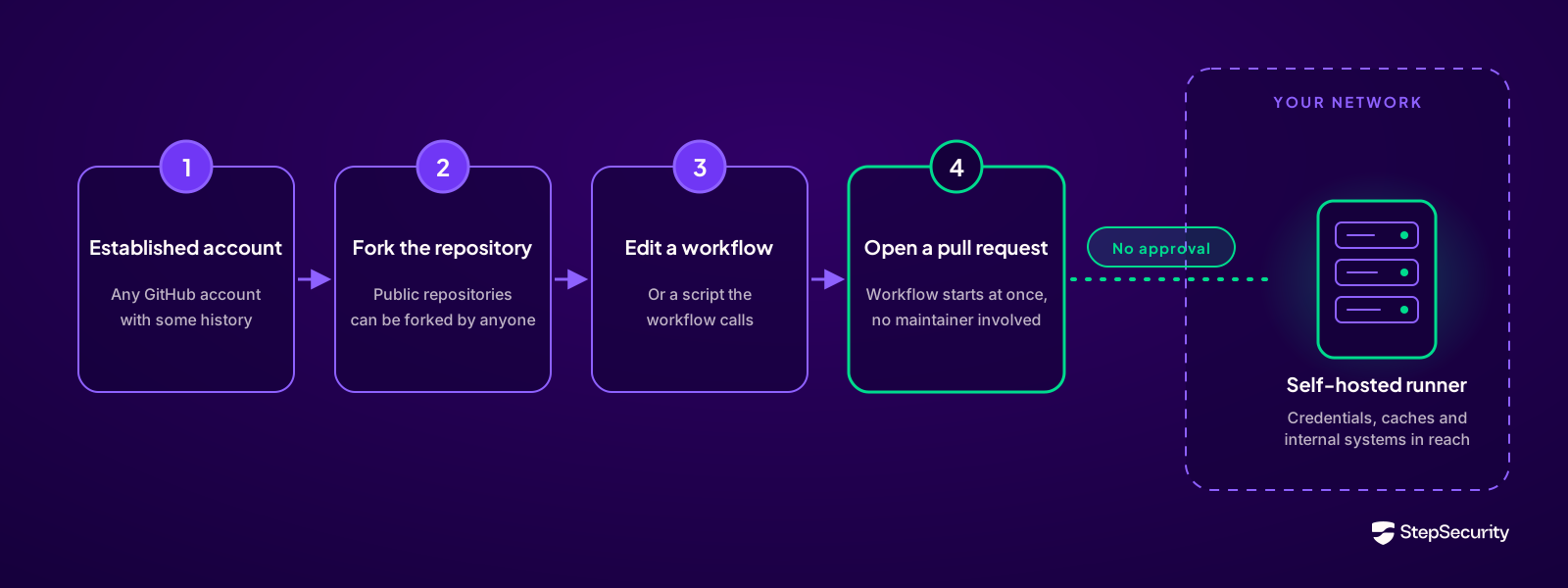
Code review does not help here. Your team may reject the pull request an hour later, but the workflow already ran the moment the pull request was opened.
GitHub limits repository secrets and GITHUB_TOKEN permissions for pull_request workflows from public forks. That protection covers what GitHub hands to the job. It leaves out whatever the runner machine itself can reach.
Self-hosted runners raise the stakes: GitHub-hosted runners are fresh virtual machines that GitHub throws away after each job. Self-hosted runners live in your infrastructure, are not guaranteed to be wiped clean between jobs, and can reach internal systems. GitHub's own documentation warns that on self-hosted runners, code from a user who is allowed to skip approval runs automatically. From there an attacker can steal credentials left on the runner, plant a backdoor that survives into later jobs, or move deeper into your network.
Why "first-time contributor" options still leave a gap
Both first-time contributor options stop asking for approval once a user has had a single commit or pull request merged into the repository. GitHub warns that a typo fix is enough to qualify.
PyTorch shows why that matters. In 2023, researchers got a small typo fix merged into PyTorch, and their later pull requests then ran workflows on PyTorch's self-hosted runners with no further approval. From there they gained root on the runners, took tokens with write access, and reached cloud credentials for release artifacts. Read our PyTorch supply chain compromise breakdown and the researchers' original report, published in January 2024. The reports describe returning contributors skipping approval; they do not state which of the three options PyTorch had selected.
That is why Require approval for all external contributors is the setting we recommend. It is the only option that keeps asking until someone is a member of your repository or organization.
One more gap to close: GitHub always runs workflows triggered by pull_request_target, whatever this approval policy says, because they run in the context of the base branch. The hackerbot-claw campaign showed how an automated bot can scan public repositories for these workflows and exploit them at scale. StepSecurity covers that risk with a separate control for Pwn Request vulnerabilities, so the two controls work together.
How StepSecurity finds it
The new control, Fork pull request workflows should require approval, sits in the Code Injection category of All Controls on the StepSecurity Overview dashboard, rated Critical. It checks your GitHub setup at two levels:
- Organization: the default approval policy that repositories inherit unless they set their own.
- Repository: the policy each public, non-archived repository actually runs with. A repository can set its own policy, stricter or weaker than the organization's, so a well-configured organization can still have exposed repositories.
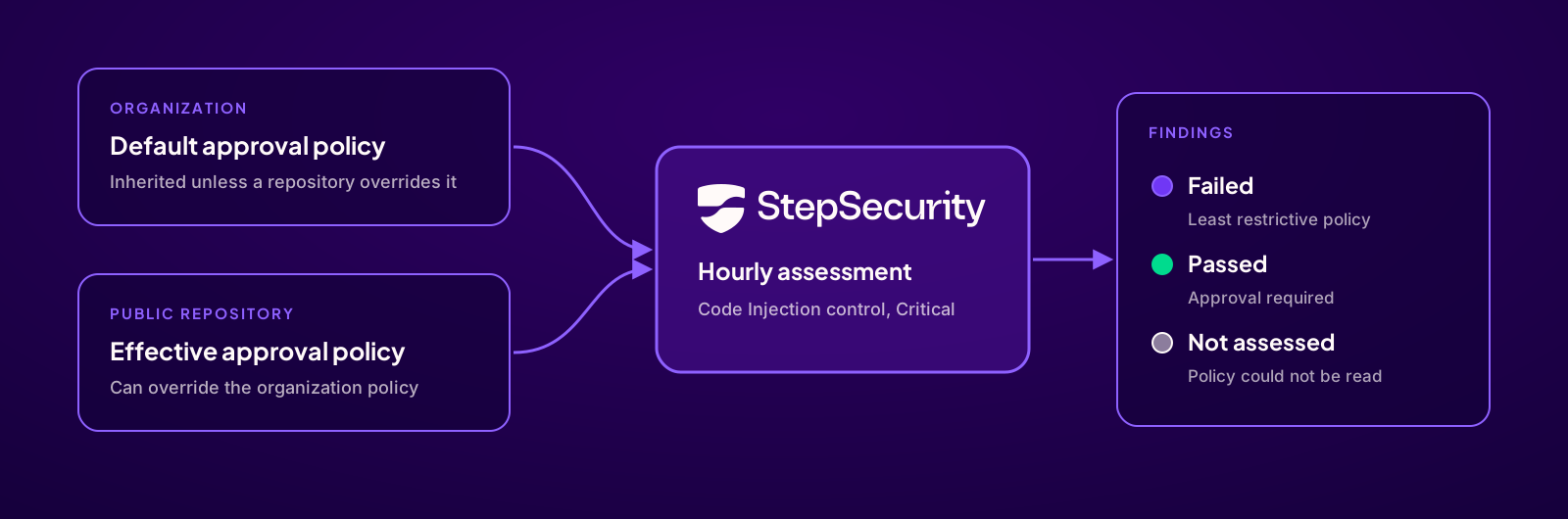
Each finding shows the scope (Org or Repo), the organization or repository name, the current approval policy, the reason it passed or failed, and when it was scanned. An Open Settings link takes you to the setting in GitHub. When StepSecurity cannot read a policy, for example because the GitHub App is missing a permission, the finding shows Not assessed with the reason, so you can see exactly which organizations or repositories still need the right access.

The control runs every hour, so a fixed setting shows as passing on the next successful scan. Findings are also available through the existing control tools in the StepSecurity MCP (Model Context Protocol) server.
The control fails only on the least restrictive option. Teams that have chosen Require approval for first-time contributors pass, though we still recommend moving to all external contributors.
Read the control documentation
How to fix it
The fix is one setting per organization or repository:
- Open Settings > Actions > General for the organization or repository named in the finding, or click Open Settings on the finding.
- Under Approval for running fork pull request workflows from contributors, select Require approval for all external contributors.
- Click Save.
Start at the organization level. That fixes every public repository that inherits the organization's policy in one step. Then work through any repositories that set their own least restrictive policy, which StepSecurity lists individually.
Accept the risk on purpose: if an organization deliberately keeps the least restrictive option, an owner can suppress the finding with a reason. Suppression is tracked separately from remediation and leaves the GitHub setting as it is.
What the control does: it reads and reports approval policies. Changing GitHub settings, approving workflow runs and blocking pull requests all stay with your team.
Add a second layer on the runner itself: an approval policy decides who can start a workflow. It cannot see what the workflow does once it runs, and approved pull requests, pull_request_target workflows and compromised dependencies all still execute code. Harden-Runner monitors network calls, file changes and processes on self-hosted runners as well as GitHub-hosted ones, and can block outbound traffic to destinations you have not allowed. With a block policy in place, untrusted code that does run cannot send your credentials to a destination you have not approved.
Conclusion
One setting decides whether a stranger's pull request can run code on your runners before anyone on your team looks at it. It is easy to loosen, easy to forget, and hard to track across dozens of public repositories by hand.
The Fork pull request workflows should require approval control finds every organization and public repository on the least restrictive policy, checks again every hour, and links you straight to the fix.
The control is available now to StepSecurity Enterprise customers, under Code Injection in the Overview dashboard. It needs the StepSecurity GitHub App to have Administration: read permission on the organizations and repositories it checks. See the control documentation for details.
Start a free trial to see where your organization stands today.