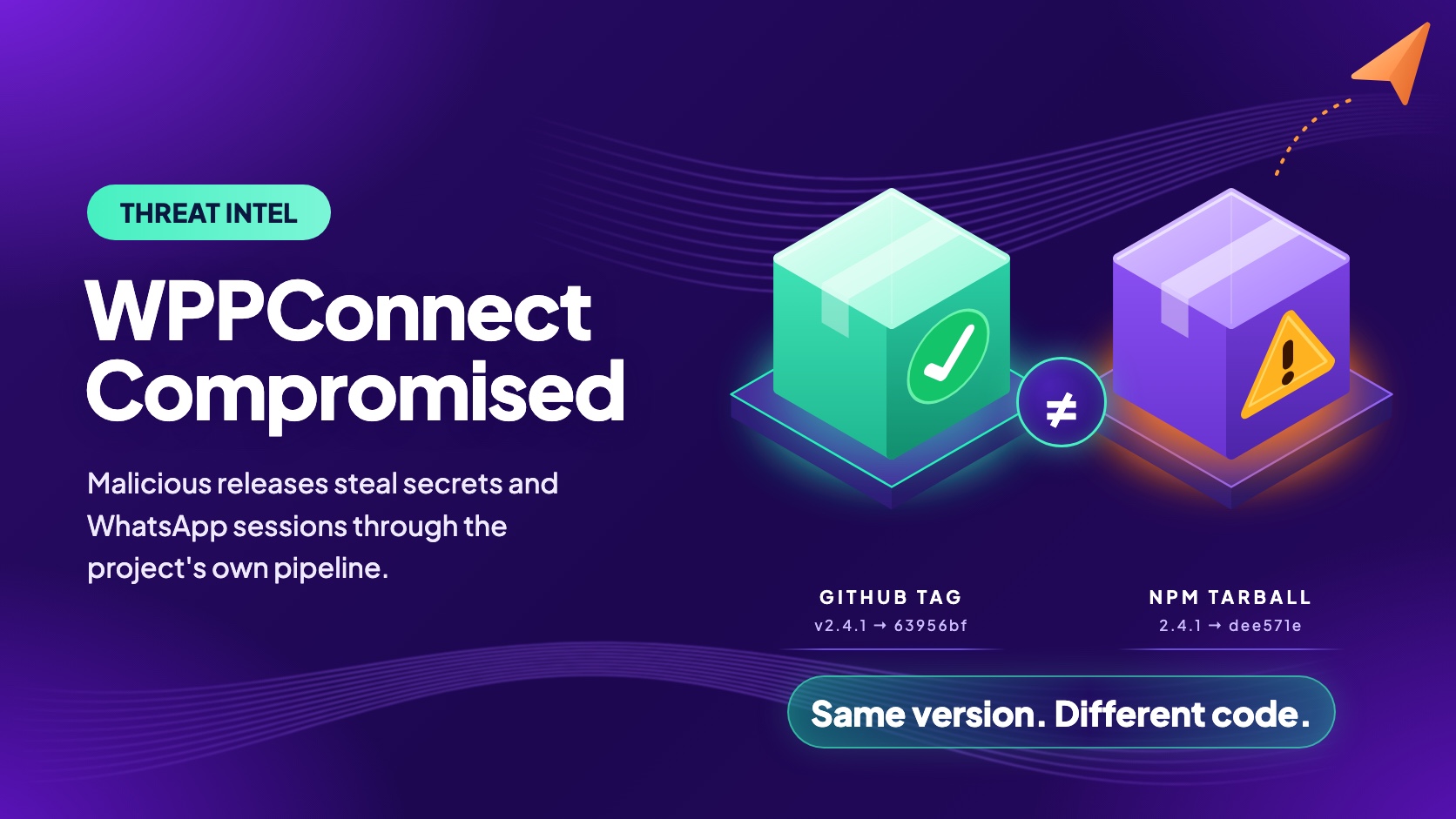
On November 15, 2026, at 23:31 UTC, npm began serving @wppconnect-team/wppconnect 2.4.1. At 03:09 UTC on November 16, @wppconnect/server 2.10.82 followed. Both contain a "diagnostics" module that copies the host's environment variables, .env and config files, and WhatsApp session tokens, and uploads them to a Telegram bot. The project's Docker and nightly-release workflows also built from the payload commits, so Docker images of wppconnect/wppconnect-server and the GitHub nightly release carried the same code.
2.4.1 was the latest version for about 4.5 hours. npm recorded 155 downloads of it, but for a window ending November 15 that covers only about 28 minutes of that period, so 155 is a floor, not a count of affected systems.
We checked the npm registry, GitHub's API and Actions logs, the Sigstore transparency log and Docker Hub, and read the payload source as text without running it. This post covers what we found, including three details that change how you respond:
- It runs on import, not install. The code fires when the library is loaded or the server starts.
npm install --ignore-scriptsdoes not stop it. - Valid publishing credentials did not mean reviewed code. The library release was published by a GitHub Actions trusted publisher and carries valid SLSA provenance. The commit behind it had no review.
- The release tag was rewritten. About 30 seconds after an external researcher opened public issues, both default branches were force-pushed. The
v2.4.1tag now points to a look-alike commit without the payload, so the code on GitHub does not match the code on npm.
Check your projects and servers now
Search lockfiles and node_modules for @wppconnect-team/wppconnect 2.4.1 and 2.4.3, and @wppconnect/server 2.10.82 and 2.10.83, and compare Docker image digests, not tags. If anything loaded one of these versions, or ran an image tagged 2.10.82 or 2.10.83, or any wppconnect/wppconnect-server image pulled between 02:48 and 03:54 UTC on November 16 (or the main tag before 07:31 UTC), treat every secret reachable from that process as stolen, and sign out the WhatsApp sessions.
How the Releases Reached Users
Every step below was done through the joaosouz4dev account, with the access and release automation the project already had. GitHub shows which account acted, not who operated it, and we have not established how access was obtained.
1. Push: unreviewed commits on the default branch
At 22:34 UTC on November 15, two unsigned commits landed on master of wppconnect-team/wppconnect with no pull request. 06caa8c adds src/utils/diagnostics.ts (208 lines), and 27ed8e3 imports it from src/controllers/browser.ts. The server repository got the same treatment at 02:43 UTC on November 16: bdddf54 adds one line to src/server.ts, also unsigned, with no pull request.
2. Publish: the project's own pipeline, with valid credentials
In the library repository, the account dispatched the release workflow by hand within a minute. It runs release-it, which creates a release commit and a v* tag, and the tag push starts publish.yml with id-token: write. In the server repository, release.yml runs on every push to main, so the payload push itself triggered the v2.10.82 release. The v2.10.83 release was a manual dispatch at 02:45 UTC. The library's publish.yml at the release commit has no environment: key, so no reviewer approval stood between the tag and the registry. The publish.yml on master today is different, so review the version at dee571e.
The registry shows both bad versions published by GitHub Actions with a GitHub trusted-publisher identity. @wppconnect-team/[email protected] also has a SLSA provenance attestation. We decoded it: it names publish.yml, ref refs/tags/v2.4.1, commit dee571e55aef07e648d675055a45fcef13f9e586 and run 43770170170. Every field is accurate, and the commit is the malicious one. Provenance proves where a package was built, not whether anyone reviewed the source.
@wppconnect/[email protected] has the same trusted-publisher identity but no attestation: the attestations endpoint returns HTTP 404. A "trusted publisher" check passes both releases, and a provenance check flags only the server release.
3. Cleanup: rewrite the history
GitHub's activity feed shows force-pushes by joaosouz4dev to main of wppconnect-server at 04:00:52 UTC and to master of wppconnect at 04:00:57 UTC. An external researcher had opened the public issues 29 and 33 seconds earlier (wppconnect-server#2734 at 04:00:23, wppconnect#2968 at 04:00:24).
The v2.4.1 tag now resolves to 63956bf, a look-alike with the same message and timestamp as the commit npm built from (dee571e) but without the payload. We confirmed that src/utils/diagnostics.ts exists at dee571e, 2d9e12a and 9215363 (the original v2.4.3 release commit) and is absent at master and the rewritten tags. Anyone reviewing the tagged source on GitHub does not find the code that shipped in the tarball.
What the Payload Does
The module is a single function in diagnostics.ts, with Portuguese comments that present it as a support tool.
Trigger
The import in browser.ts runs the module whenever the library is loaded, and the server's dist/server.js loads its own copy at startup. The Docker image's entrypoint is node dist/server.js, so the payload runs when the container starts. The library has no install script; its only lifecycle hook, prepare, does not run for registry installs.
Collect
- Hostname, username, OS, Node version, working directory, memory and the public IP (via
api.ipify.org). - Every environment variable whose value is 3 to 499 characters, except shell noise and
npm_*names. API keys, database URLs and cloud credentials fall under this. - The first 12,000 characters of
.env,.env.local,.env.production,config.js,config.jsonandormconfig.json. - Up to five
.jsonsession files from./tokens/(the server variant also reads./wppconnect_tokens/). The project's own type definition describes these as the session token that authenticates the WhatsApp Web interface: a browser ID, a secret bundle with encryption and MAC keys, and two tokens. Treat them as account credentials.
Exfiltrate
The report goes out as <hostname>_<YYYYMMDD-HHMMSS>.txt through the Telegram Bot API sendDocument method, to bot 9034051102 and chat 7343578055. The bot token is hard-coded in three string fragments, redacted here. The code ignores the response and swallows errors.
const SUPPORT = {
  url: ['https://api.telegram.org/bot', '<BOT_TOKEN_REDACTED>', '/sendDocument'].join(''),
  chat: 7343578055,
  cooldown: 24 * 3600 * 1000,
  maxFile: 12000,
};
A marker file, .wpp-support-diag (library) or .wpp-diag (server), is written to the OS temp directory before collection starts, limiting uploads to one per day per host. The marker shows only that the payload started, so its absence does not clear a host.
Hide (server variant)
The server variant, which we read at ccdc9c9, base64-encodes the endpoint, waits 30 to 240 seconds, and does nothing on hosts that look like CI runners or analysis sandboxes. It checks CI and sandbox environment variables, a proxy URL containing mitm, and test-like hostnames. The library variant has no such checks, so a CI job that imports it would have sent its job environment, including any secrets passed in.
Who Is Exposed
| Channel | Malicious artifact | Became available | Stopped being the default |
|---|---|---|---|
| npm, library | @wppconnect-team/[email protected] | Nov 15, 23:31 UTC | latest back to 2.4.0 by about 04:03 UTC, Nov 16 |
| npm, server | @wppconnect/[email protected] | Nov 16, 03:09 UTC | Never latest; packument last changed 04:06 UTC |
| Docker Hub | 2.10.82, 2.10.83, and floating tags latest, 2, 2.10 | Nov 16, 02:48 to 02:51 UTC | Floating tags repointed 03:54 UTC |
| GitHub release | nightly asset | Nov 15, 22:35 UTC, rebuilt on every push to master | Asset replaced 03:53 UTC |
- The deprecation time is inferred. npm records none. The packuments'
modifiedtimes place it about 3 minutes after the public issues, assuming nothing touched them afterward. Both bad versions remain installable by exact version, with a "SECURITY INCIDENT" deprecation message. - The server reaches the library transitively.
@wppconnect/server2.10.82 depends on the library at^2.3.6. A fresh server install while 2.4.1 waslatestpulled in the bad library, and the server loads it on start. 2.4.3and2.10.83are not listed on npm, but the pipeline ran for them. The Actions log shows a successful publish of 2.4.3 withdiagnostics.jsin its tarball, the 2.10.83Publishjob succeeded, and a 2.10.83 Docker image exists. We do not know why npm does not list them. Search for both, and for2.4.2as a precaution.- Docker needs digests, not tags. The
2.10.82and2.10.83images were built from commits that contain the payload (ccdc9c9andafe72c9), and Docker Hub tags each image with its commit. The workflow also moveslatest,2and2.10on every version tag, so until 03:54 UTC they pointed to the2.10.83image. We could not determine whethermain, last updated at 07:31 UTC, held an infected image before then, and we did not verify that the replacement images are clean.
Timeline
All times UTC, checked against the registry, GitHub, Docker Hub or the transparency log unless marked inferred.
| Time | Event |
|---|---|
| Nov 15 22:34 | Two unsigned commits pushed to master. release dispatched at 22:35. |
| 23:31 | npm records 2.4.1 and tags it latest. |
| Nov 16 02:43 | Server payload pushed to main. The v2.10.82 release follows automatically. |
| 02:48–02:50 | Docker Hub receives the 2.10.82 and 2.10.83 images. |
| 03:09 | npm records @wppconnect/[email protected]. |
| 03:50–03:54 | Removal PRs merged by joaosouz4dev. Nightly asset replaced. Docker floating tags repointed. |
| 04:00 | External researcher opens public issues. Force-pushes follow within 35 seconds. |
| ~04:03–04:06 | npm packuments modified. latest is 2.4.0 and 2.10.81, and both bad versions are deprecated (inferred). |
The Actions log reports the 2.4.1 publish at 22:36 UTC, but the registry and its countersigned attestation record 23:31. The server shows the same gap (02:44 versus 03:09). We do not know why, and we use the registry time for when a version became installable.
How StepSecurity Helps
A release that comes from the project's own pipeline, with valid credentials, passes the usual trust checks. This table maps each step to the StepSecurity feature that applies to it:
| Step | StepSecurity feature | What it does |
|---|---|---|
| Bad version installed on a laptop | Dev Machine Guard: OSS Packages | Finds the machines and project folders that have the package |
| Other credentials on the same machine | Dev Machine Guard: Credentials | Shows which well-known credential files exist on each machine, and which hold plaintext credentials |
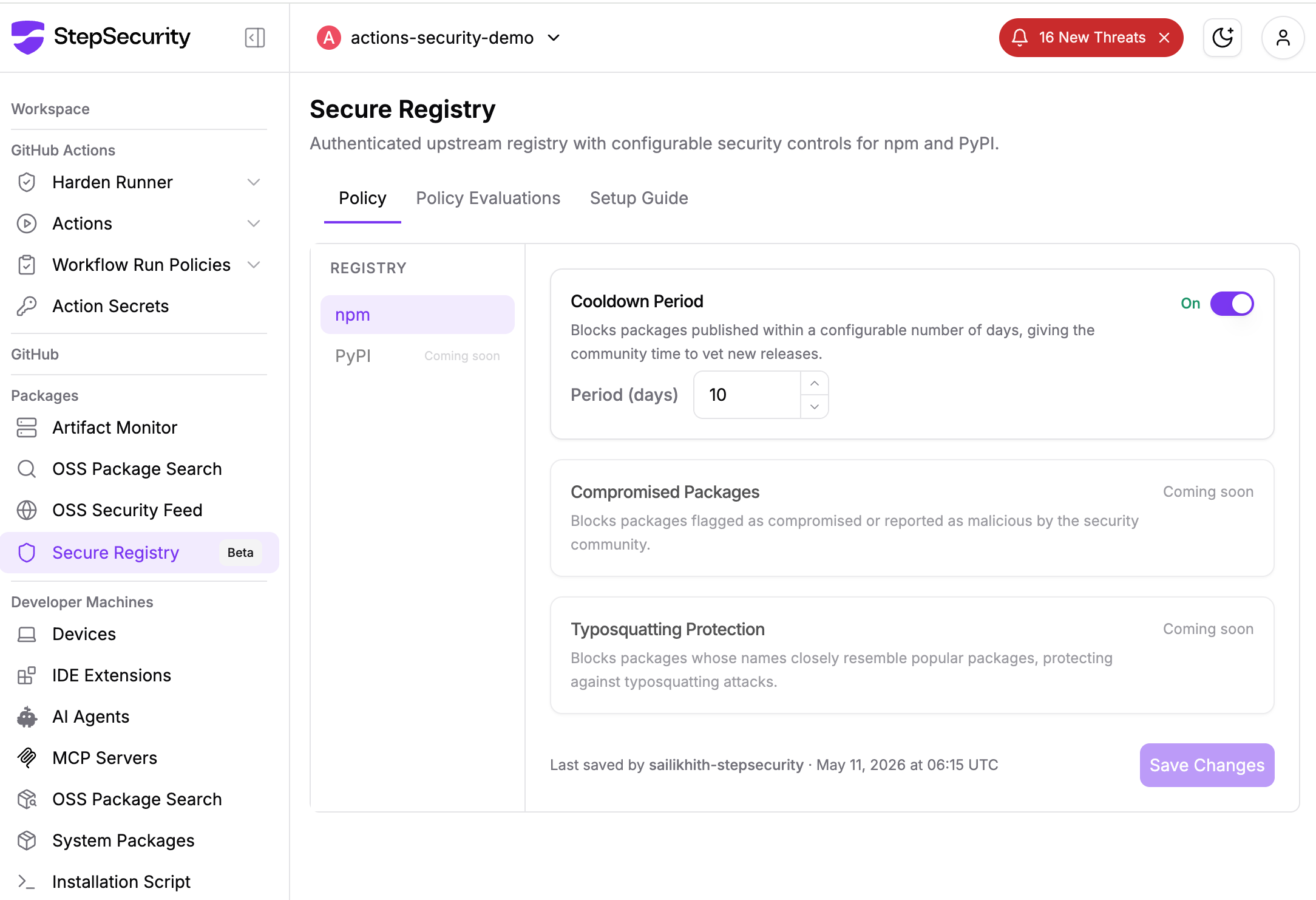
| Newly published malicious release | Secure Registry cooldown | Hides package versions published within a set number of days |
| Library loaded in CI | Harden-Runner | Flags or blocks unexpected outbound connections from the build |
1. OSS Packages: find the bad versions
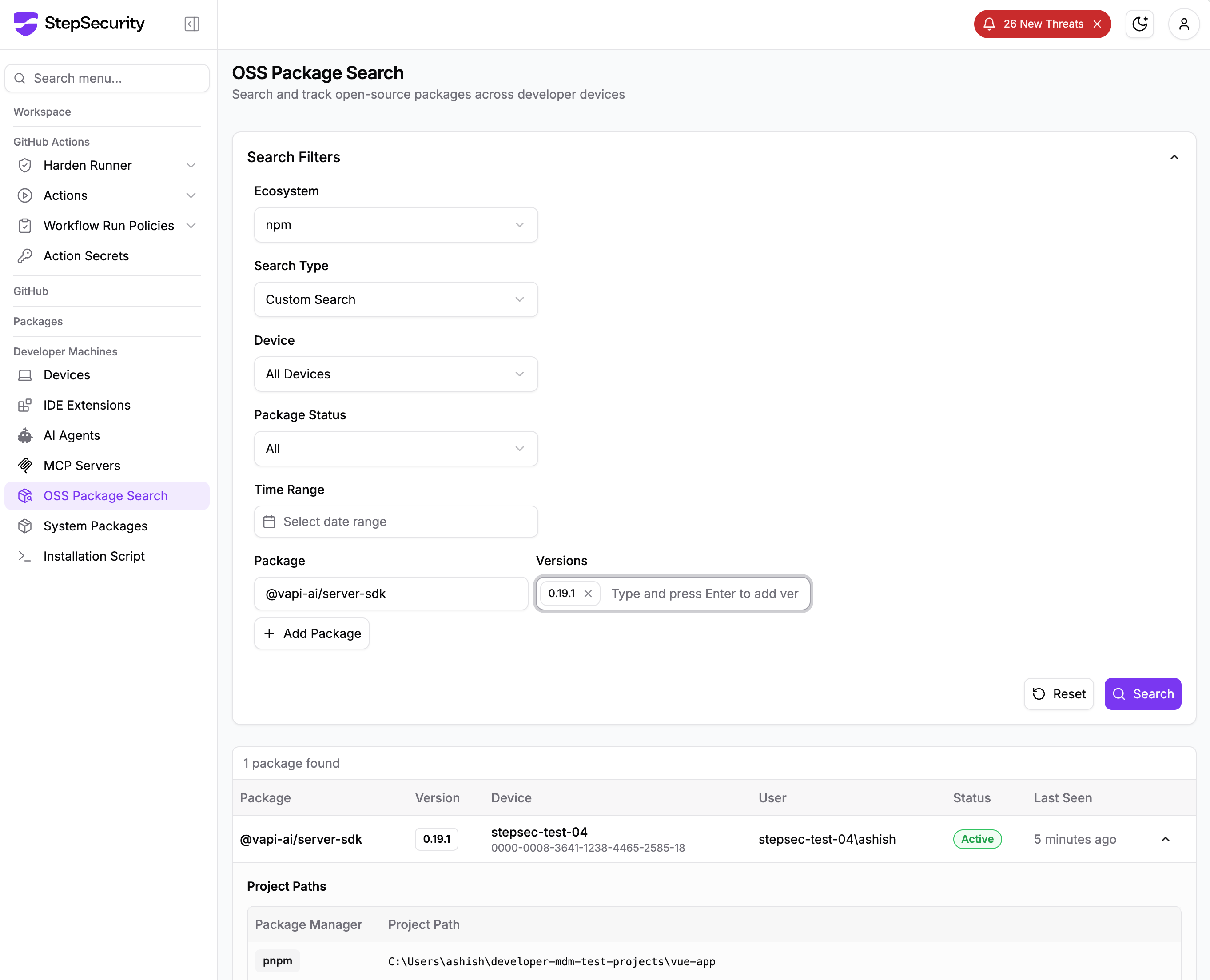
OSS Packages in Dev Machine Guard inventories npm packages on every enrolled developer machine. Search for @wppconnect-team/wppconnect and @wppconnect/server across all devices at once. Each result shows the device and project path.
2. Credentials: see what else is on the machine
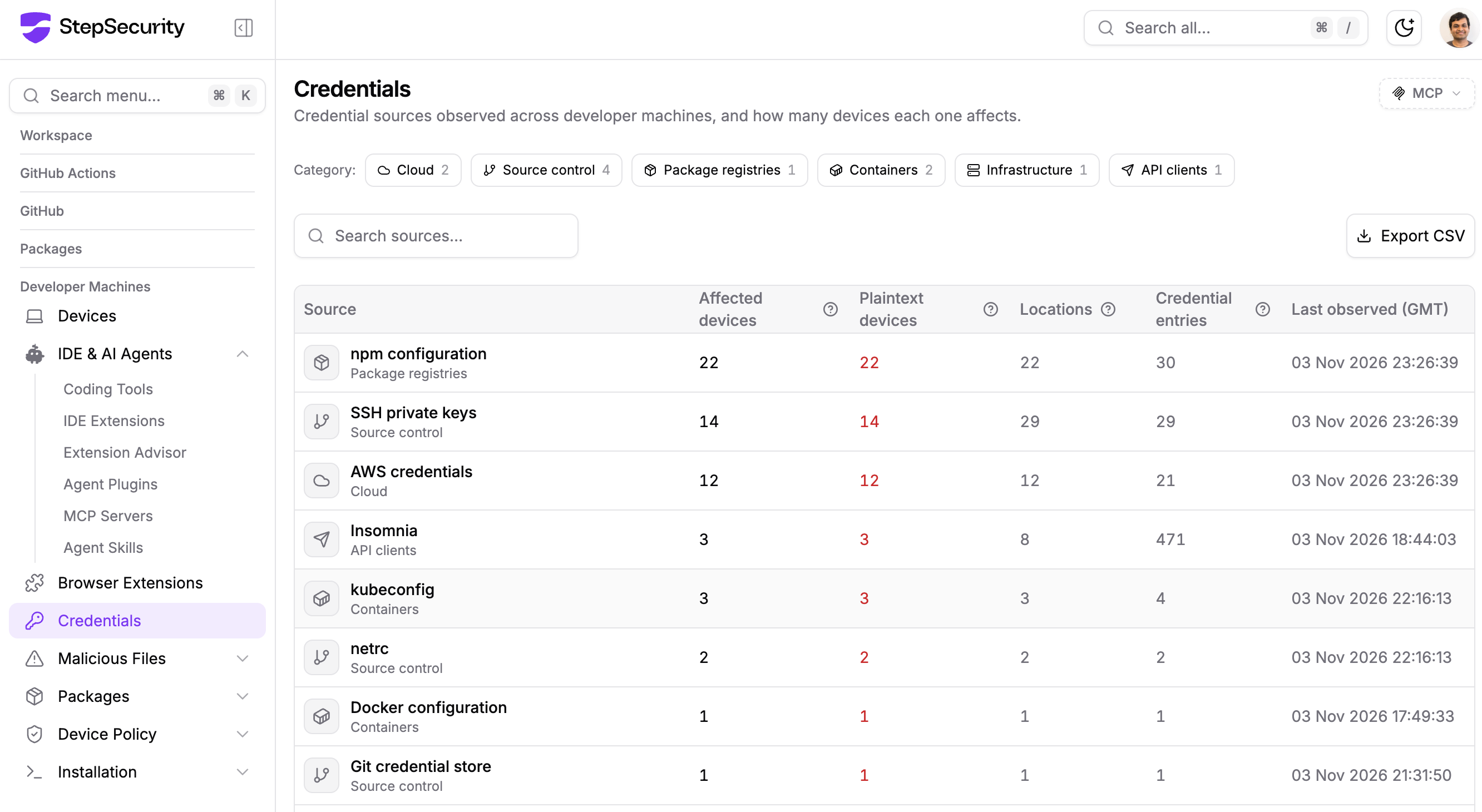
Credentials lists the well-known credential files on each machine, such as AWS, SSH, npm, Docker and kubeconfig, and which hold plaintext credentials. This payload did not read those files. It took environment variables, .env and config files, and WhatsApp session tokens, which this view does not cover. Use it to see what a stealer that does sweep those files would reach on the same machines, and rotate what this payload reached as described below.
3. Secure Registry: hold back new releases
The Cooldown Period in Secure Registry hides package versions published within a set number of days (the default is 2), so installs resolve to the newest older version. 2.4.1 was latest for about 4.5 hours, so even the default would have held it back. Package Configs shows, for each machine and package manager, which registry packages resolve from and whether a release-age cooldown is in effect, so you can find machines that go straight to the public registry or have no cooldown.
4. Harden-Runner: block the upload
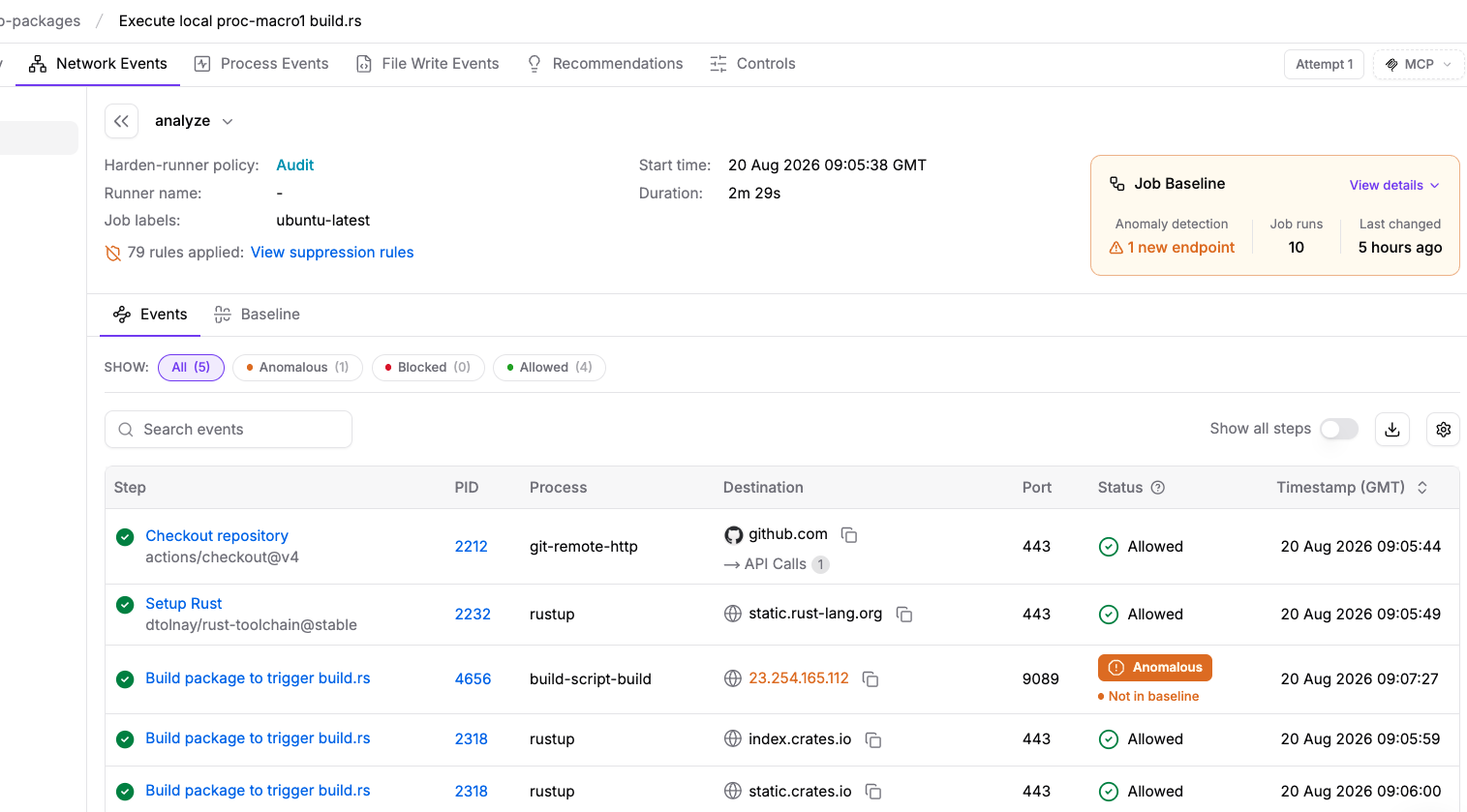
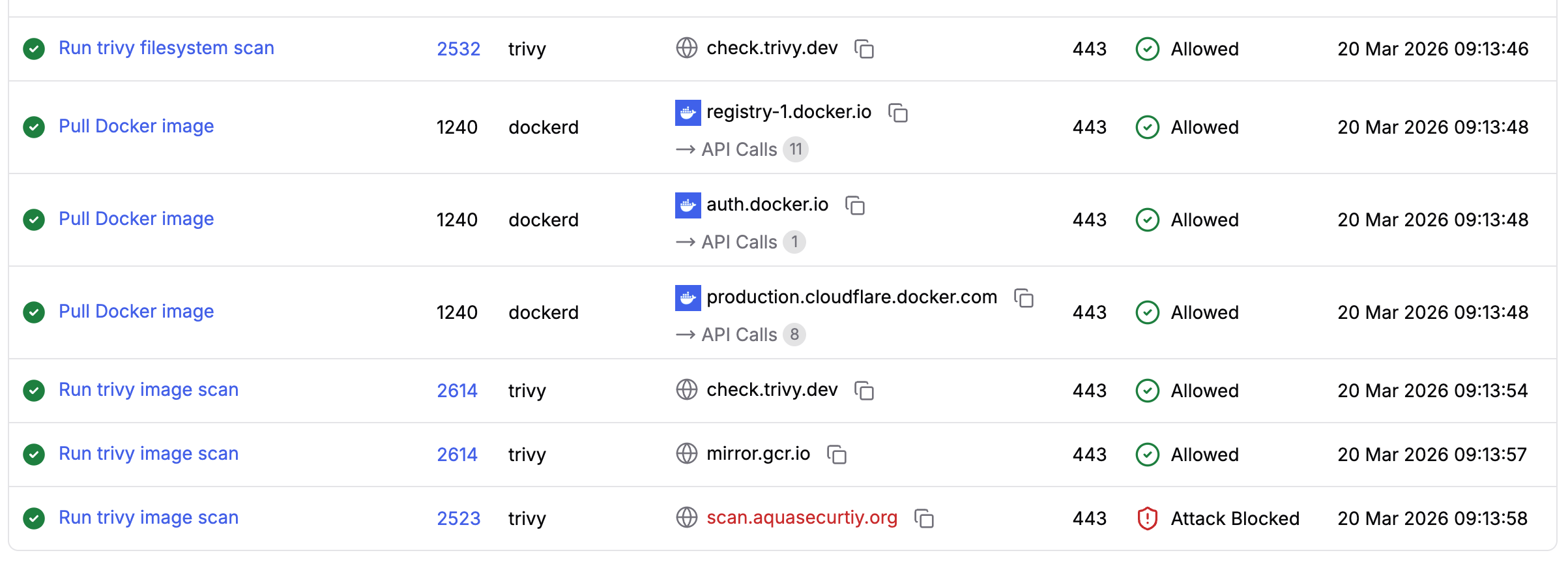
Harden-Runner monitors outbound traffic from every job in a GitHub Actions workflow, at the DNS and network layers. The library variant has no CI check, so a job that imports it would send its environment to api.telegram.org. Once a workflow has a baseline from earlier runs, a new destination like that is flagged as anomalous, even in audit mode. With egress-policy: block and an allowed-endpoints list, the call is blocked, because Telegram is not an endpoint a normal build calls. The Global Block List, which blocks known-malicious destinations automatically, has no entry for this incident, so the block here depends on your own allowlist.
These features cover developer machines and CI. For production servers and containers, use the lockfile, digest and egress checks below.
What to Do Now
1. Find out whether you were hit
Check installed packages, lockfiles and image digests:
npm ls @wppconnect-team/wppconnect @wppconnect/server

jq -r '.packages | to_entries[]
  | select(.key | test("node_modules/@wppconnect(-team)?/(wppconnect|server)$"))
  | "\(.key) \(.value.version)"' package-lock.json

docker image inspect <image> --format '{{index .RepoDigests 0}}'
Then look for traces. Absence is not proof of safety.
T=$(node -p "require('os').tmpdir()")
ls -la "$T/.wpp-support-diag" "$T/.wpp-diag" 2>/dev/null

grep -rIl -e "WPP SUPPORT DIAG" -e "WPP ENV" -e "wpp-support-diag" -e ".wpp-diag" \
  node_modules/@wppconnect-team node_modules/@wppconnect 2>/dev/null
Also search DNS, proxy and egress logs for api.telegram.org and api.ipify.org from hosts that run WPPConnect.
2. If the code ran, rotate everything it could reach
From a clean machine, rotate every environment variable available to the process, every value in the config files above, and any secret passed to CI jobs that imported the library. Unlink the WhatsApp devices, delete the old tokens/ and wppconnect_tokens/ files, and pair again only after pinning a clean version.
3. Pin a clean version
Use library 2.4.0 and server 2.10.81 with a committed lockfile. The server depends on the library at ^2.3.6, so add an override:
{ "overrides": { "@wppconnect-team/wppconnect": "2.4.0" } }Do not treat a GitHub tag or a floating Docker tag as a clean release. The maintainers said on November 16 that containment of the publishing account and revocation of the Telegram credentials were not yet confirmed, and at 21:09 UTC that day both issues were open with no newer npm release. Treat any new release as untrusted until you have reviewed the tarball.
4. Add a release-age delay and an egress allowlist
A 24-hour delay would have kept 2.4.1 out. npm has min-release-age, set in days (npm 11.10 and later). pnpm has minimumReleaseAge, set in minutes; its documented default is 1440 (one day), enforced strictly only when you set the value yourself. Yarn has npmMinimalAgeGate, which takes a duration such as 1d (documented default 1d since Yarn 4.12); older 4.x releases were reported to read a day suffix as minutes without warning, so check your version. The payload used the Telegram API, so a domain allowlist is the practical egress control. A WhatsApp bot host has no reason to call api.telegram.org.
5. If you publish with trusted publishing, add a review step
Put the publish job in a GitHub environment with required reviewers who did not push the tag, bind the npm trusted-publisher configuration to it, require pull requests and signed commits on the default branch, and block force-pushes. Rotate any personal access token the release workflow uses; the library's does (PERSONAL_TOKEN). npm's staged publishing, which adds a 2FA-approved step, is another option; confirm its behavior in npm's documentation.
Indicators of Compromise
Sources are marked in each row. "Our reading" means the GitHub, registry and Actions checks described above.
| Type | Indicator | Notes |
|---|---|---|
| npm packages | @wppconnect-team/[email protected], @wppconnect/[email protected] | Known-good: library 2.4.0, server 2.10.81 (registry) |
| npm packages, not listed | @wppconnect-team/[email protected], @wppconnect/[email protected] | Built by the pipeline (Actions log) |
| npm integrity | sha512-b7ifN9DEUR//0ImJojfwlbkLJ3uBLVhY4CdXBeuTE9Ht5NPvtrE/MtJioT4rDerKGBnYryf+Sy6ebFw0bWPMfg== (2.4.1); sha512-zDf9tuP7v92dvkBxwLQJeIyG8qTiRcAL1YkRzo9HEKEPr2kQB4WMEwYs4kVjJaH10KcS9OtQLrUb5pqLCCk5QQ== (2.10.82) | Registry |
| SHA-1 | 755274304012c7489e85c23da3c2423d184d113b (2.4.1); 950514e4fea481c0770bd618274cecb306bd8d56 (2.4.3) | Actions log |
| Commits (pre-rewrite) | Library: 06caa8c6f5f06e47900d5466289b4aab2753add3, 27ed8e343f0393978c63f84888eeb9b8fa197852, dee571e55aef07e648d675055a45fcef13f9e586, 2d9e12a, 9215363. Server: bdddf54ca86019c853ba68c2eeca45c2ac8128d6, ccdc9c9eb6fed6cf17067fbedbc0b0c62aacb7ea, afe72c9 | Our reading |
| Network | https://api.telegram.org/bot9034051102:<token>/sendDocument, chat_id 7343578055; https://api.ipify.org?format=json (public IP lookup) | Our reading of the library and server source |
| Files | <tmpdir>/.wpp-support-diag (library), <tmpdir>/.wpp-diag (server); dist/utils/diagnostics.js, dist/util/diagnostics.js; report headers === WPP SUPPORT DIAG, === WPP ENV | Our reading |
| Docker digests | Infected: 2.10.82 sha256:56a546a38f6e59509f627168c8d67f9c87fd487babf3ad91f375fe99a235c4c7; 2.10.83 sha256:cc01ce839afeaf865cfeff2e020288f721c46941e14a4e42b0f88e554c7f6aeb. Known-good: 2.10.81 sha256:7c882ee934a5663a107b5f5a0382bfd8b1fb95150cd21ab35cd8ff9cea70d1f8 | Docker Hub |
Telegram and ipify are shared services, so the network indicators alone do not show infection.
References
- Public issues: wppconnect#2968 and wppconnect-server#2734
- Our reading draws on the npm registry, GitHub REST API and Actions logs, Sigstore Rekor and Docker Hub tag metadata, queried on November 16, 2026 (UTC)