The most damaging supply chain campaigns of 2026 have one thing in common: they leave files behind. A worm pushes a backdated commit that adds an editor configuration file to a repository. A hijacked account force-pushes obfuscated code onto the end of a setup.py. A compromised contributor slips a new workflow file onto a branch nobody reviews. Each file waits for a developer to open the project, run an install, or trigger a pipeline.
Today StepSecurity is launching Malicious Files for GitHub (Beta), which scans the full history of every repository in your GitHub organization, across every branch, pull request and tag, for files planted by known campaigns. At the same time, Dev Machine Guard's Suspicious Files feature becomes Malicious Files, with a new Rules page that lets you see, deactivate and reactivate every detection rule running on your developer machines.
Together, they answer the two questions security teams ask first when a campaign breaks: is it in our repositories, and is it on our developers' machines?
Attackers have moved to planted files
For years, supply chain defenses focused on package installation: lifecycle scripts in package.json, setup.py hooks, and the registries that serve them. Recent campaigns have moved the trigger somewhere those defenses do not look.
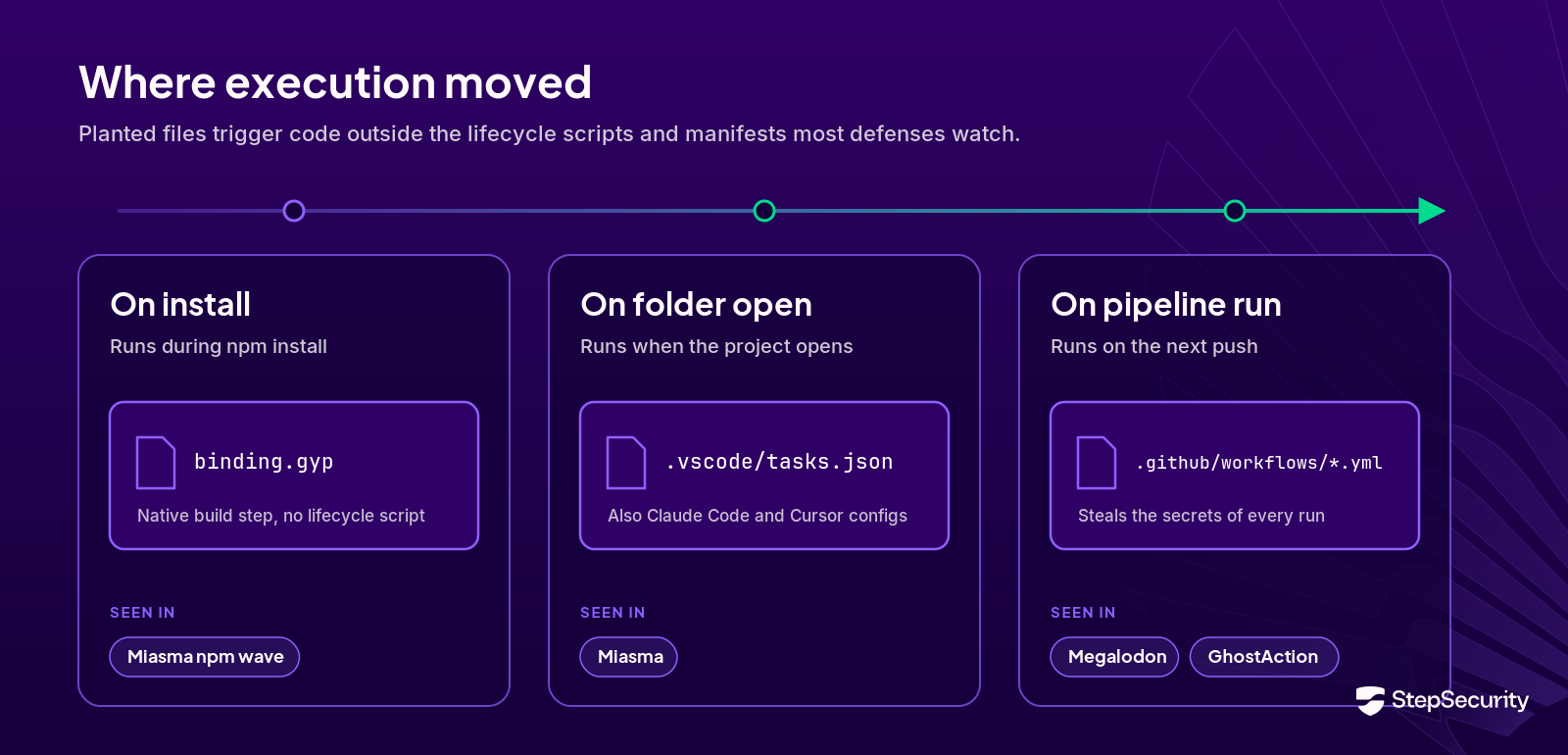
- Editor and AI agent configuration: in June, the Miasma worm used a compromised contributor account to push a commit into a Microsoft repository. The commit changed no source code. It added five files, including a .claude/settings.json SessionStart hook and a .vscode/tasks.json task, that run a credential-harvesting payload the moment a developer opens the repository in Claude Code, Gemini CLI, Cursor or VS Code. The commit carried a [skip ci] flag and a timestamp backdated six years.
- Code appended to existing files: the ForceMemo campaign took over developer accounts, appended obfuscated malware to files like setup.py and main.py, and force-pushed the result while preserving the original commit message, author and date.
- Injected workflows: Megalodon pushed backdoored GitHub Actions workflows into more than 5,500 repositories in six hours, and GhostAction disguised secret-stealing workflows as security improvements across 817 repositories.
- Persistence on the developer machine: Mini Shai-Hulud installs persistence hooks in Claude Code and VS Code that survive reboots.
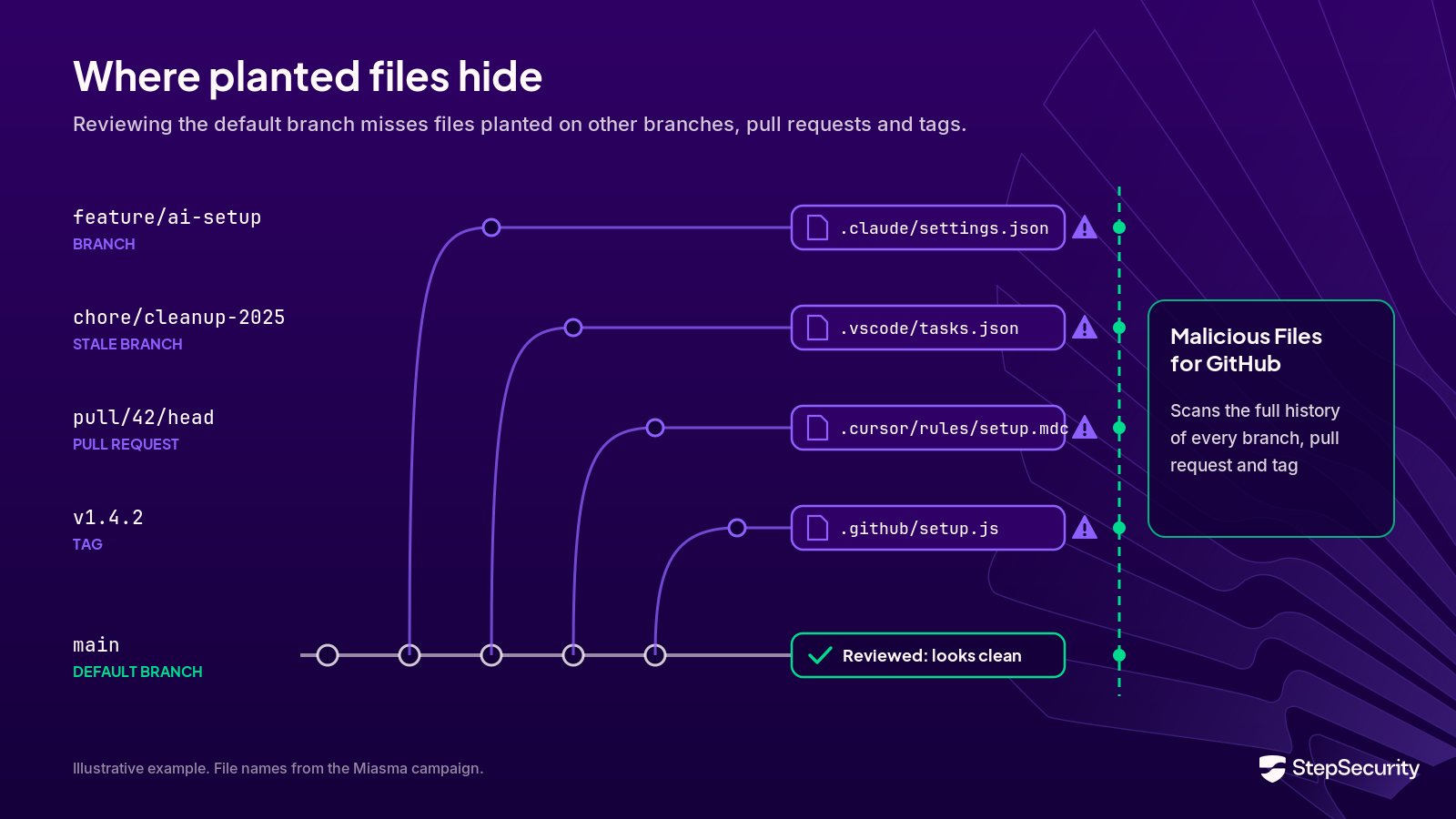
These files share three properties that make them hard to catch. They do not appear in a package manifest or lockfile, so dependency scanners have nothing to flag. They often land on branches other than the default branch, where reviewers rarely look. And they are small, plain-text configuration files that read like ordinary project setup.
Malicious Files for GitHub
Malicious Files for GitHub checks every version of every file in your repositories against detection rules written by the StepSecurity research team, the same team that tracks and frequently first reports these campaigns. It lives under GitHub > Malicious Files in the StepSecurity console and has three pages: Rules, Scan Status and Findings.
Rules: detection logic you can read
Each rule targets the files a specific campaign drops, and each is an ordered chain of checks. filename checks match a file's path, and content checks match what is inside it. A rule fires only when every required check matches, so an ordinary .vscode/tasks.json does not trigger a Miasma rule unless it also contains the worm's loader and auto-run trigger.
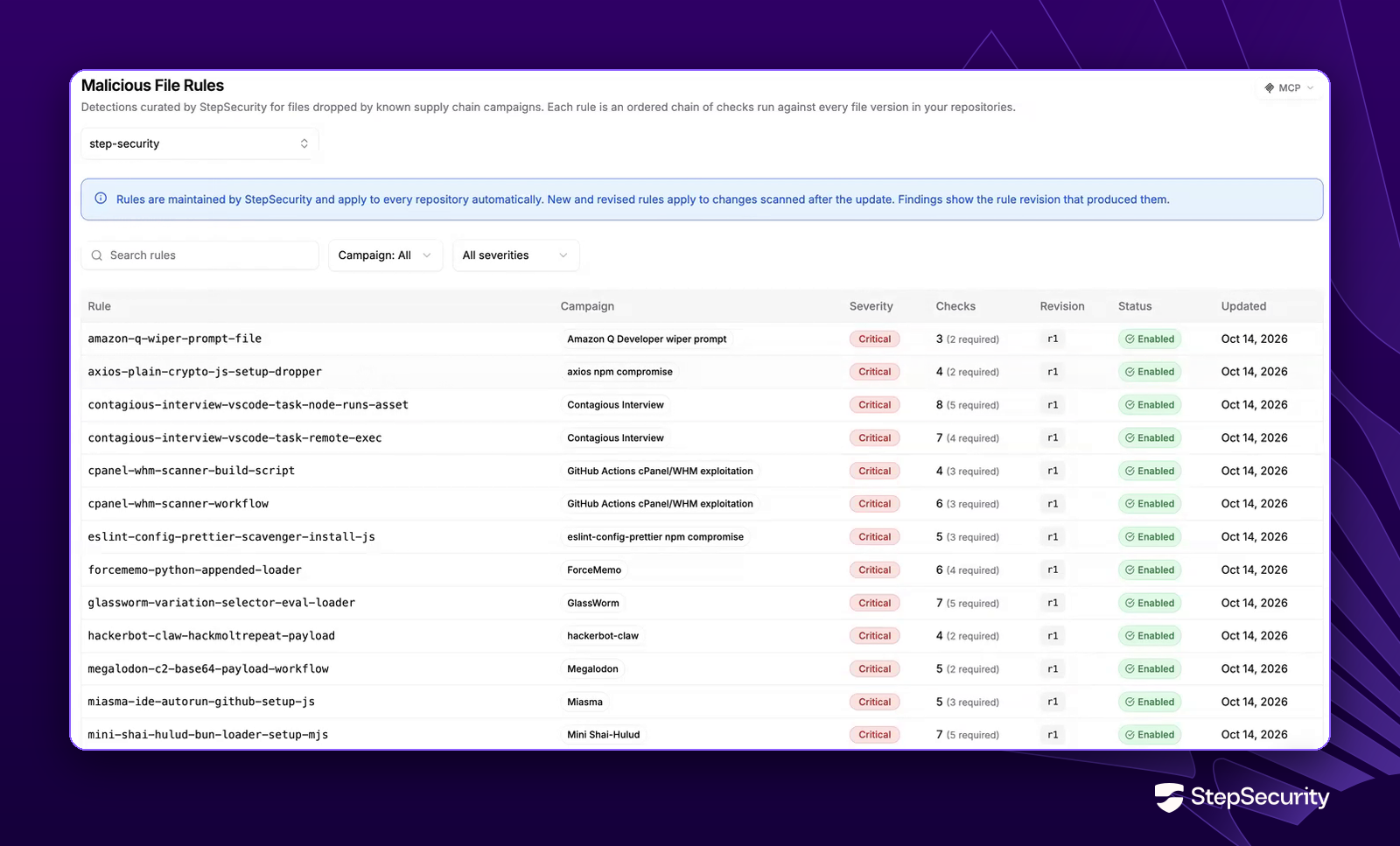
The rule list shows every rule's campaign, severity, revision, and how many of its checks are required. Coverage spans the campaigns that have hit GitHub repositories hardest, including Miasma, Mini Shai-Hulud, ForceMemo, Megalodon, GhostAction, TeamPCP, the axios compromise and the s1ngularity attack on Nx.
Open any rule to see exactly what it looks for. Here is the rule for the Miasma files from the Microsoft incident:
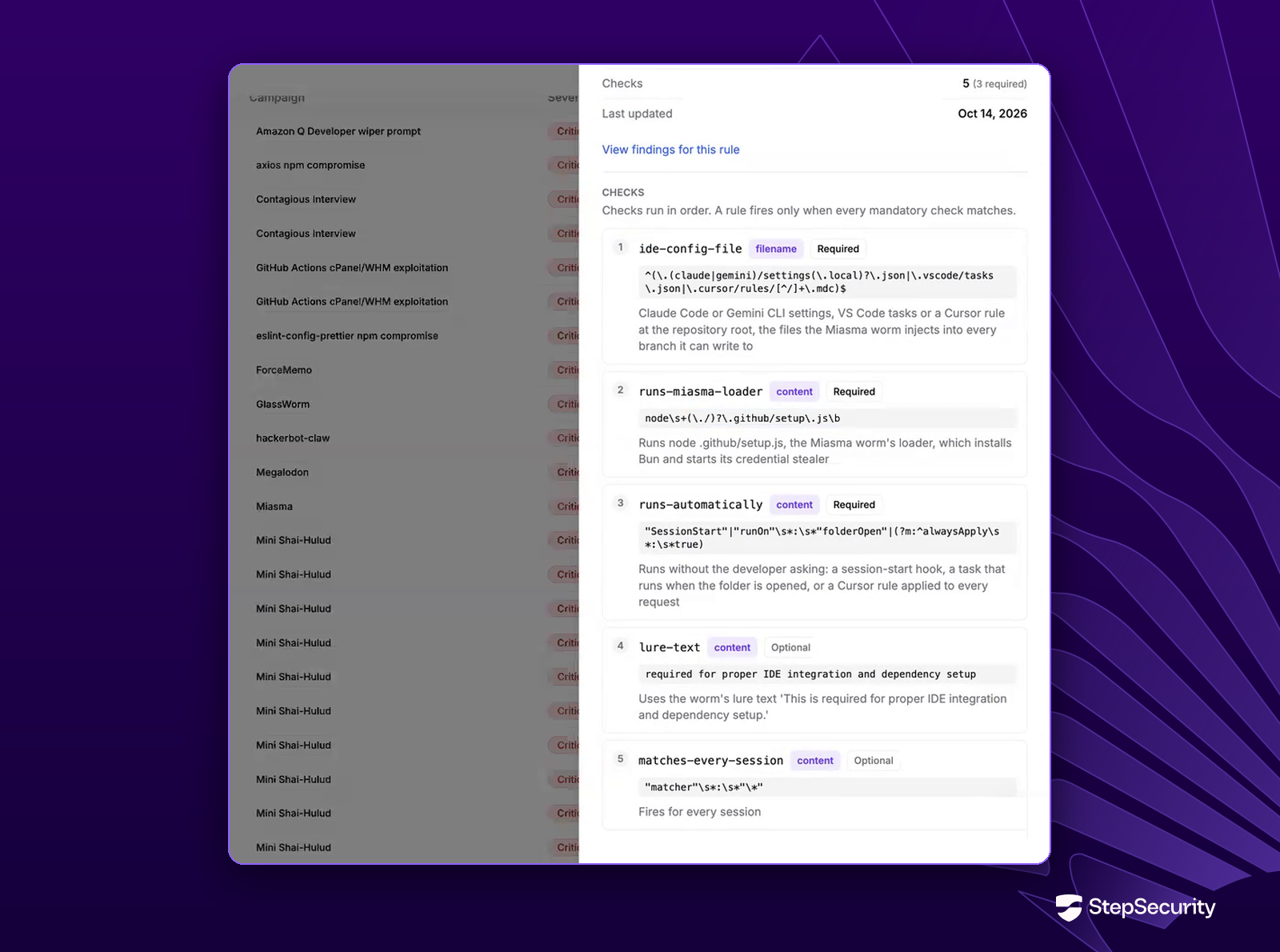
Rules are maintained by StepSecurity and apply to every repository automatically. When a campaign mutates, StepSecurity revises the rule, and every finding records the rule revision that produced it.
Scan Status: full history, every ref
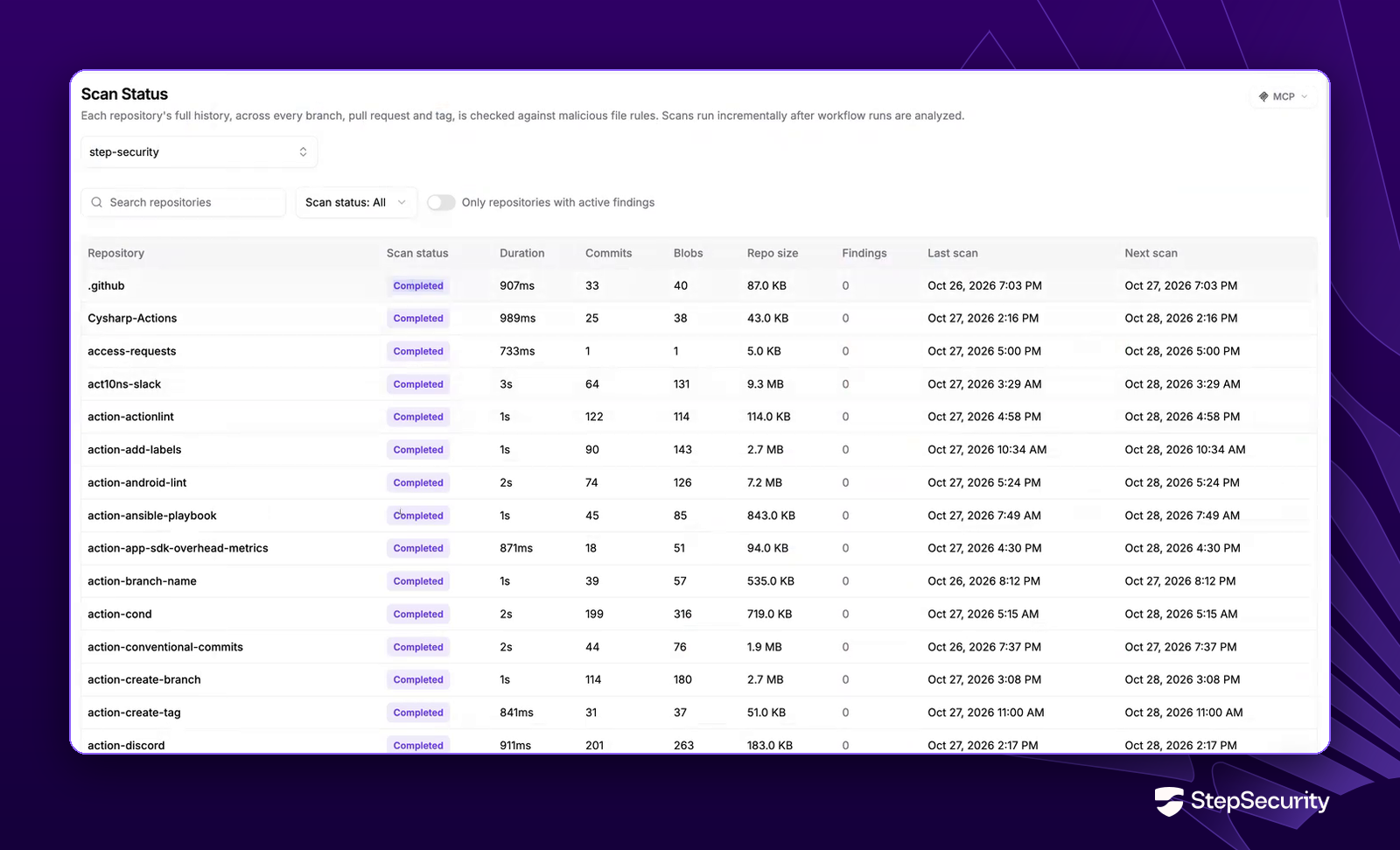
The Scan Status page shows the most recent scan of each repository: how many commits and file versions it covered, the repository size, the number of findings, and when the last and next scans run. A toggle narrows the list to repositories with active findings.
Findings: where the file is and how it got there
A finding is one file path matched by one rule, across every version of that file. Each finding answers the questions you need for cleanup:
- Found in: every branch, pull request and tag that contains the file, so you can remove it from all of them, including the stale branches nobody remembers.
- Occurrences: the commit that introduced the file, its author and date, with a link to the commit on GitHub. That tells you which account to treat as compromised.
- Rule checks: which checks matched and the patterns they used, so a detection is never a black box.
- Versions: the hash of each version of the file that matched.
Filter findings by severity, campaign or rule, search by file path, commit hash or blob hash, and export the results to CSV (Comma-Separated Values) for your incident tracker. Once no branch, pull request or tag contains the file anymore, the finding is marked as vanished and kept for 180 days, so your record of the incident survives the cleanup.
Dev Machine Guard: Suspicious Files is now Malicious Files
In June we launched Suspicious Files in Dev Machine Guard to catch the files Miasma and Hades dropped on developer machines. It is now Malicious Files, matching the GitHub feature, and it has two pages under Developer Machines.
Rules: see and control what runs on your fleet
The new Rules page lists every malicious-file detection rule running on your enrolled devices, with its campaign, the number of indicator groups it matches, and the file patterns it scans, such as **/binding.gyp or **/.github/setup.js.
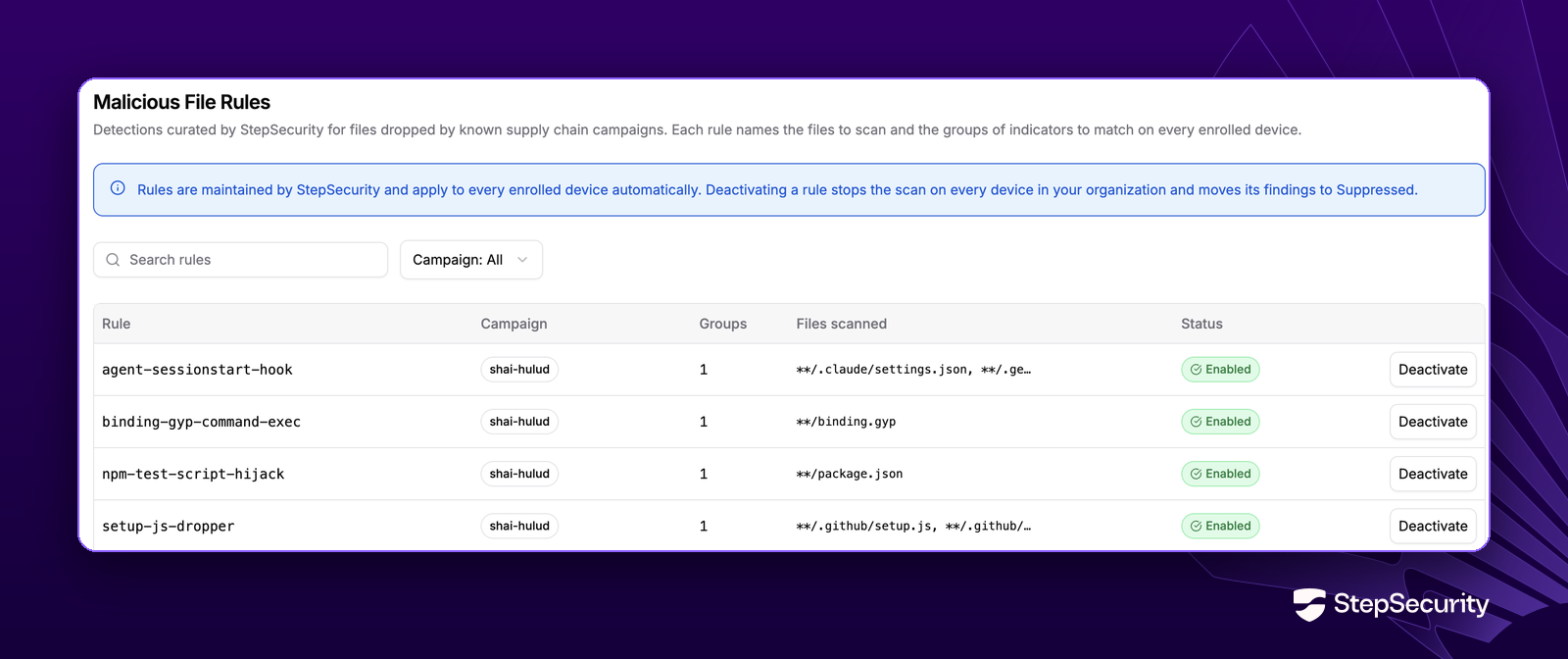
Rules are still maintained by StepSecurity and apply automatically. If a rule does not suit your environment, select Deactivate to stop it scanning on every device in your organization. Its findings move to the Suppressed tab, and you can select Activate to turn it back on at any time.
Findings: triage by device
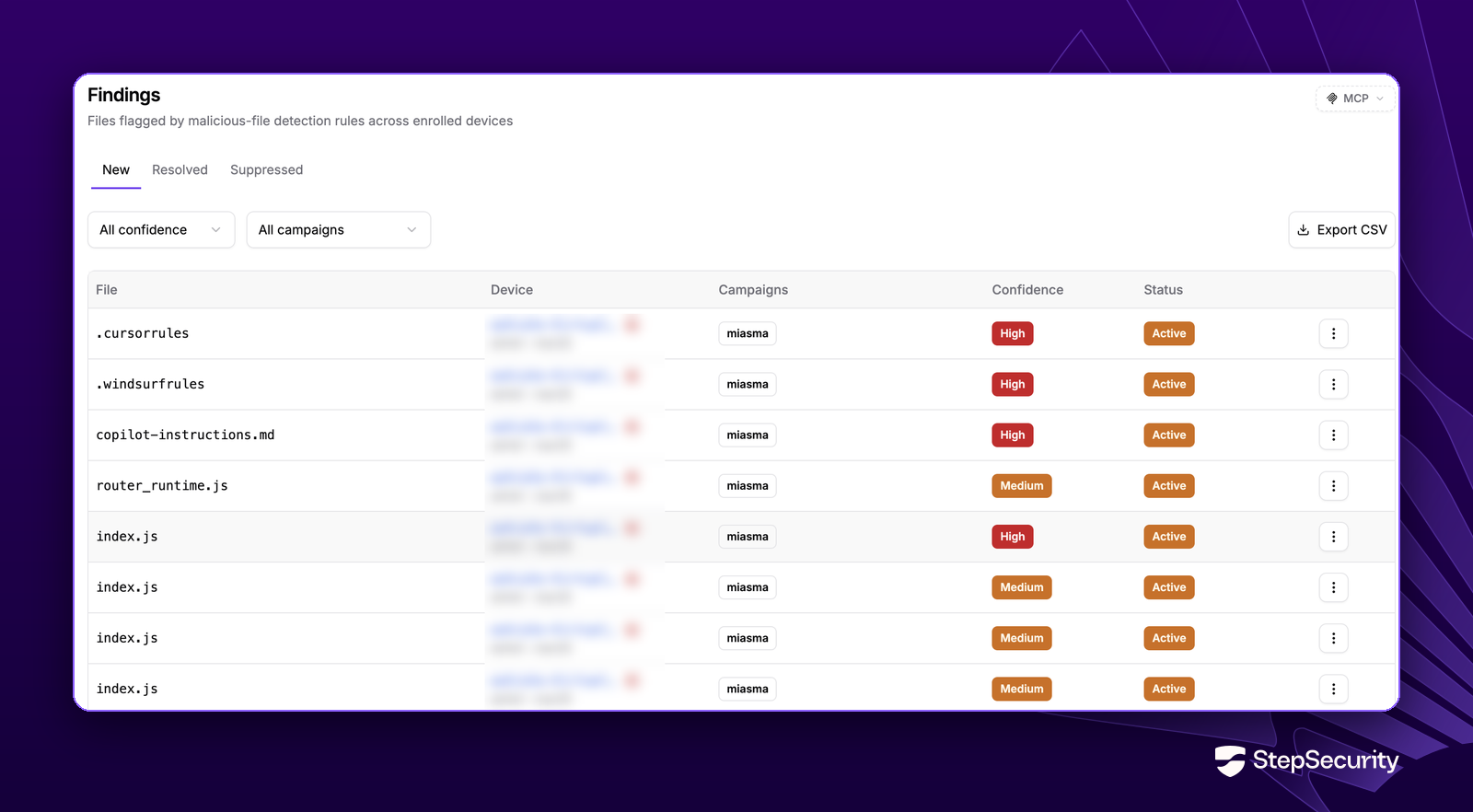
The Findings page groups flagged files into New, Resolved and Suppressed tabs and shows each file with the device, its user and operating system, the campaign, and a confidence level. Open a finding for the full detection record: the file path, its SHA-256 hash, the matched rule and file pattern, first and last seen times, and a condition breakdown showing exactly which indicators matched. Filter by confidence or campaign and export to CSV.
One campaign, two places to look
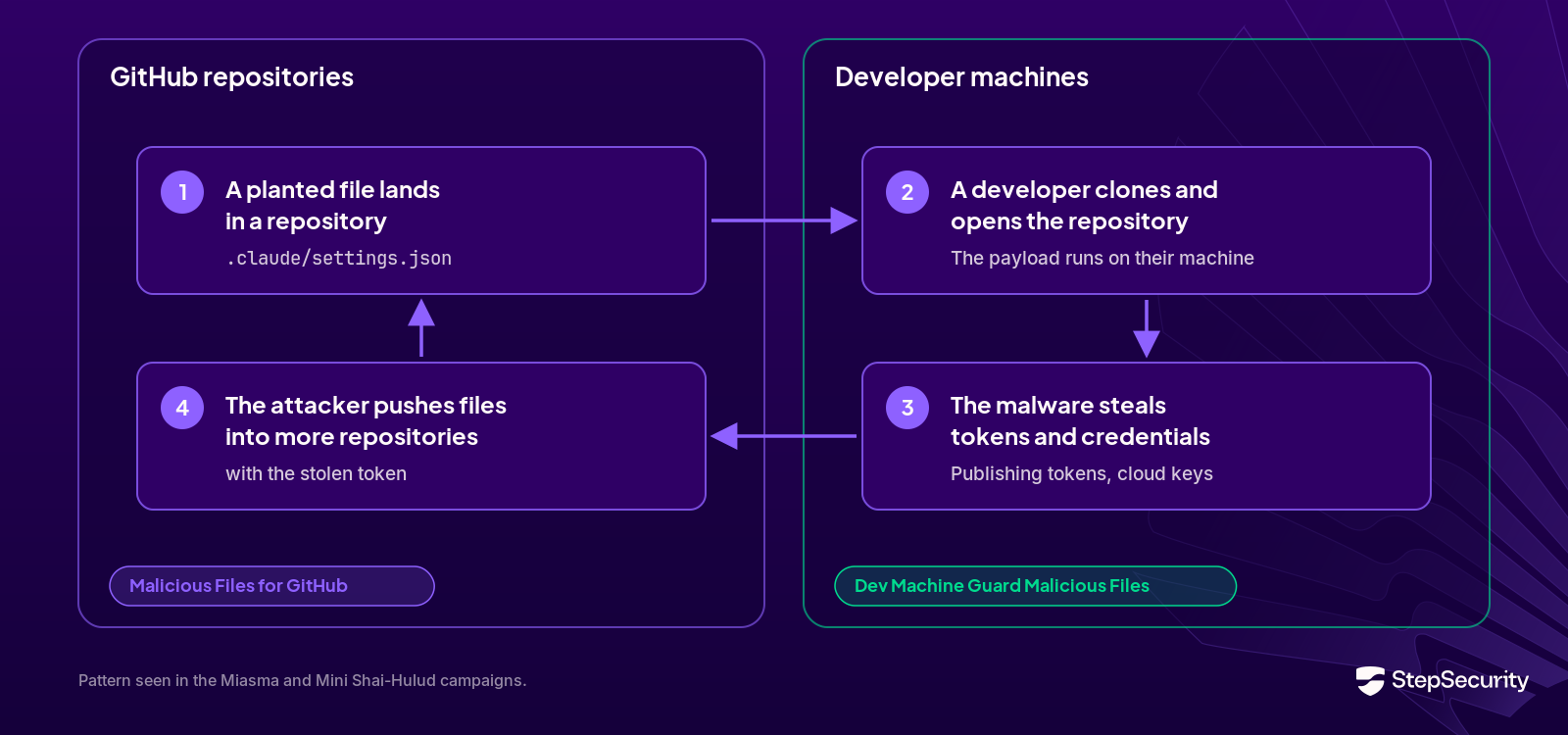
Planted files move between repositories and machines. A developer clones an infected repository and opens it, and the payload runs on their laptop. Malware on a laptop steals a token, and the attacker uses it to push files into more repositories. Checking only one side leaves the other open.
With both features, a single campaign name connects the investigation:
- Check the repositories: filter GitHub Findings by the campaign. Use Found in to see every affected branch, pull request and tag, and Occurrences to identify the account that pushed the file.
- Check the machines: filter Dev Machine Guard Findings by the same campaign to see which developers already have the files on disk.
- Clean up and rotate: remove the file from every ref and every device, and rotate the credentials of the pushing account and of every affected machine.
Get started
Malicious Files for GitHub is available now in beta under GitHub > Malicious Files in the StepSecurity console. Malicious Files for Dev Machine Guard is available now under Developer Machines > Malicious Files, on the same lightweight agent you already run on macOS, Windows and Linux.
Read the documentation for Malicious Files for GitHub and Malicious Files in Dev Machine Guard, or request a demo to see both in action.
Attackers no longer need you to install anything. They need you to open the project. Now you can find what they left behind, wherever it is.