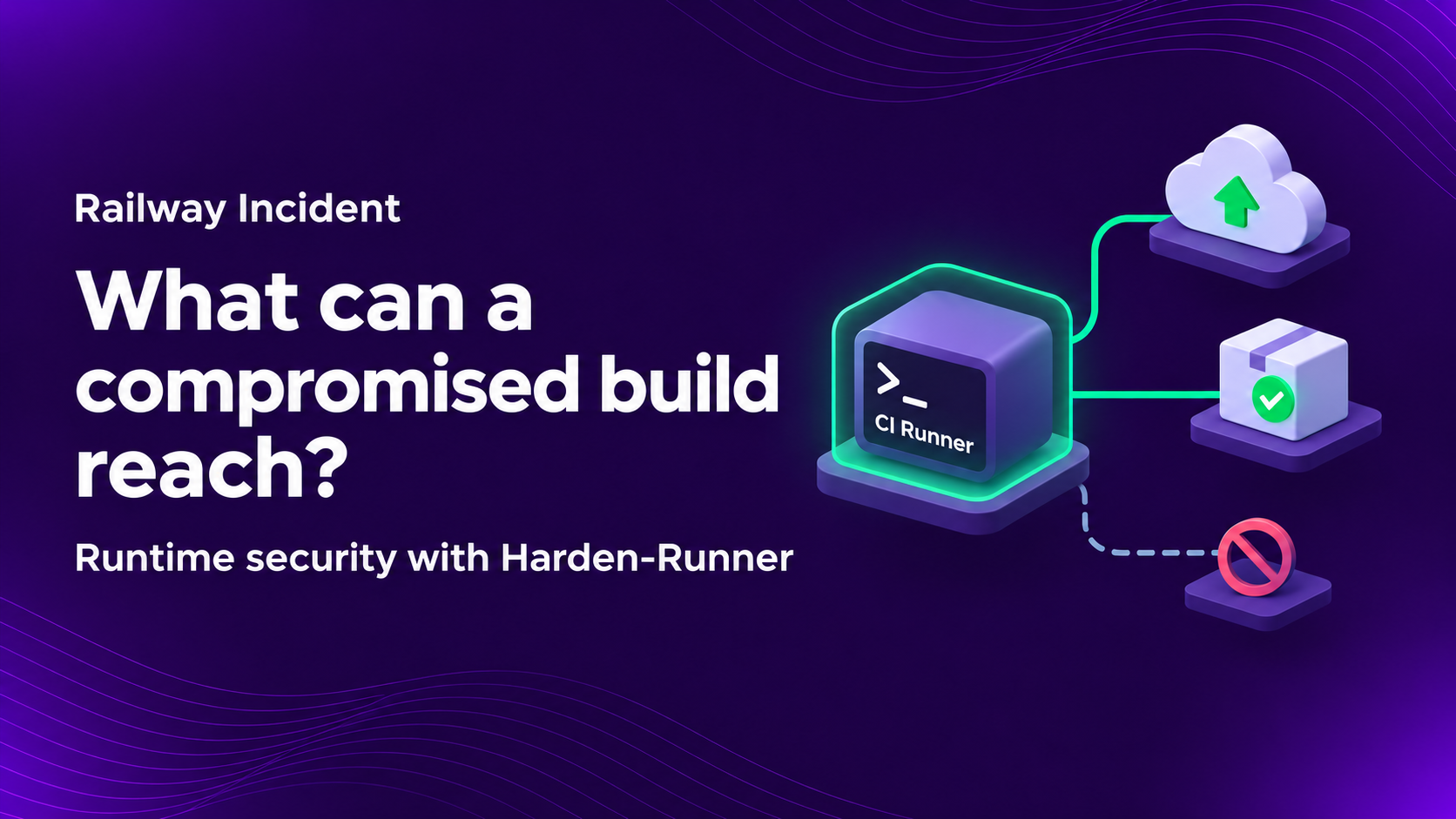
A build job executes code, handles credentials, and produces software your customers will run. If that job is compromised, its network access and permissions can become the attacker’s access and permissions.
Railway’s November 10, 2026 report describes how an attacker moved from build infrastructure to systems holding customer secrets. The attack occurred on October 20 and 21. Its findings give CI/CD teams specific access paths to review. Read Railway’s report.
This post explains how to review those paths and use StepSecurity Harden-Runner to monitor build activity and restrict outbound connections.
What to check in your pipelines
- Which jobs can reach production services or obtain production credentials?
- Can you identify the process and workflow step behind an unexpected connection?
- Have you tested your network restrictions and cloud trust policies?
What Railway disclosed
Railway describes a partial build-isolation escape that exposed a build credential. Misplaced trust in that credential enabled access to stored build histories and Railway’s internal source. A separate OIDC configuration error later enabled cloud access, followed by access to credentials and systems used to retrieve and decrypt customer variables. Railway reports that at most 1.85% of workspaces (about 100,000) could have had variables decrypted. That figure is an upper bound. Source: Railway’s incident report.
Railway does not identify its CI/CD platform in the report. Our recommendations apply the lessons to GitHub Actions environments. This analysis is based on publicly disclosed information in Railway’s incident report.
Treat build access as a security boundary
Ask your platform and security teams to review all CI/CD pipelines together. Start at the first step that executes third-party code and follow the access available from there. Include package installation, test scripts, build tools, and release automation.
Do not stop at the permissions listed in the workflow. Include credentials inherited from the runner host, access to internal services, cached material, and identities that a job can obtain during execution. A job with a narrowly scoped token may still run on a host with broader access.
Separate untrusted builds from privileged deployment jobs. Keep production credentials out of jobs that do not need them. Where you operate the infrastructure, use isolated, disposable execution environments and restrict access between build workloads and internal services. Review authorization at the service receiving the request as well as at the runner sending it.
Strengthen isolation around every build job
Railway reports that multiple builds ran on the same virtual machine, with isolation between them. The report does not specify how that isolation was implemented. It does confirm that an attacker exploited a vulnerability to partially escape filesystem isolation, read files on the host VM, and obtain a build infrastructure credential. This establishes that host files became accessible through the vulnerability, but does not establish that builds intentionally shared a filesystem. Read Railway’s incident report.
Build jobs should have their own disposable execution environments. Avoid sharing writable workspaces or exposing sensitive host directories and credentials across jobs. Where shared caches or artifact storage are necessary, restrict access and separate workloads with different trust levels.
For VM-based runners, use a dedicated ephemeral VM per job, with narrowly scoped credentials and restricted access to internal services. Railway adopted this approach after the incident, adding a VM boundary around its existing isolation and limiting each build credential to pushing a specific image.
For enterprises using Actions Runner Controller (ARC), apply these principles through ephemeral runner pods and Kubernetes security controls:
- Separate workloads by trust level. Keep untrusted builds apart from privileged deployment jobs and production applications. Use dedicated node pools or clusters where stronger separation is required.
- Restrict privileges and host access. Limit access to host directories, container runtime sockets, Kubernetes APIs, and secrets.
- Control connectivity and credentials. Allow only the network destinations and permissions each workflow needs.
- Maintain and monitor the infrastructure. Keep runner images, ARC, nodes, and container runtimes patched, and retain logs after runner pods are deleted.
GitHub also recommends placing runner pods in a separate namespace from ARC operator pods and isolating production workloads from CI execution. See GitHub’s ARC deployment guidance.
StepSecurity Harden-Runner adds runtime protection to both deployment models. For self-hosted VM runners, teams install the agent in their runner image. For ARC deployments, teams deploy Harden-Runner as a Kubernetes DaemonSet. These integrations provide runtime visibility and outbound network controls alongside the isolation and access restrictions configured in the underlying infrastructure. See Harden-Runner’s deployment architecture.
Why runtime visibility matters in CI/CD
A workflow file tells you which steps you intended to run. It does not tell you every process a dependency started, every connection a script made, or every file changed during execution. A successful build result does not answer those security questions either.
StepSecurity Harden-Runner provides network and process monitoring with workflow-step context. File-write visibility is available on supported configurations. Process and file event views require Enterprise, and capabilities vary by runner platform. This context helps investigators move from an unusual event to the job and step responsible.
If a package installation step contacts a new destination, check which process made the request and whether a dependency or workflow change explains it. A new connection warrants a look, but does not by itself prove compromise.
A documented example: tj-actions/changed-files
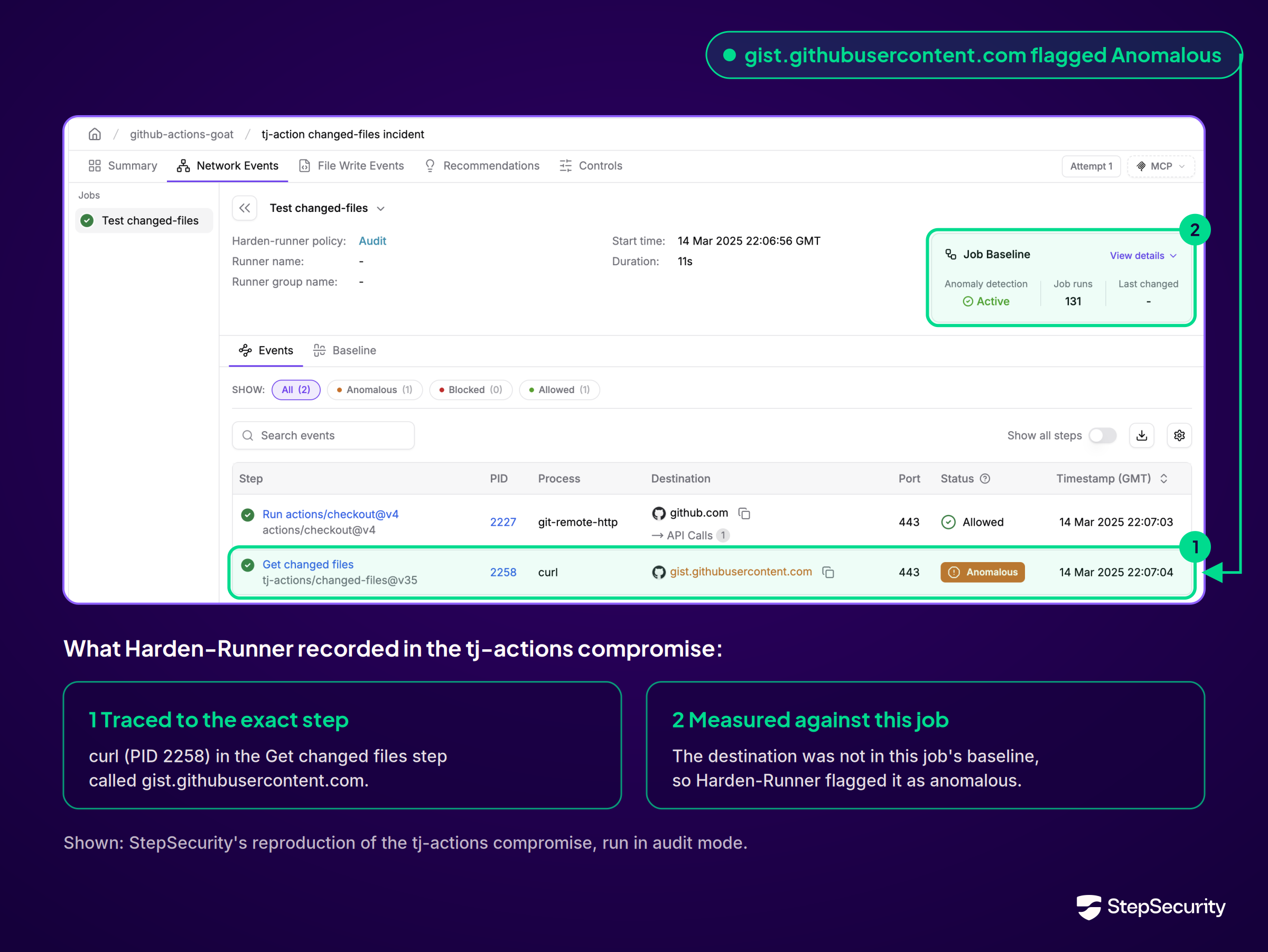
In the March 2025 tj-actions/changed-files compromise, Harden-Runner detected an unexpected endpoint in workflow traffic. StepSecurity’s investigation found that the compromised action exposed secrets in build logs. Read the detection analysis.
Combine runtime protection with cloud access controls
Review outbound access, then enforce it
Use Harden-Runner’s egress-policy: audit setting to observe a job’s destinations. Review representative runs and validate required dependencies before moving a supported job to egress-policy: block with an explicit allowlist. An outbound request outside that policy can then be blocked. See the setup and feature reference.
Check downloads, artifact uploads, deployment endpoints, and failure-handling paths before rollout. In a test workflow, attempt a connection to an unapproved destination. Confirm that the request is blocked and the event is recorded.
Destination restrictions have a defined scope. An allowed service can still be misused, and runner egress controls do not govern stolen credentials used from another machine. Cloud and service permissions must also limit what an authenticated caller can do.
Validate OIDC trust and role permissions
OIDC lets a workflow exchange its identity for short-lived cloud credentials. Validate issuer, audience, and subject conditions against the tokens your jobs actually issue, using claims supported by your cloud provider. Grant id-token: write only to jobs that need it.
For sensitive targets such as production, put the job that obtains cloud credentials behind a GitHub environment with required reviewers. Designate trusted GitHub users or teams, prevent self-review, and disable administrator bypass of protection rules. The protected job waits for an authorized reviewer’s explicit approval before it starts, even if an attacker can trigger the workflow. Restrict which branches or tags may deploy to that environment. See GitHub’s environment protection rules.
Bind the production cloud role’s trust policy to the intended repository and protected environment. A job that omits the environment must not be able to obtain the same production role. Test that an unapproved job remains waiting and that a job outside the protected environment is denied cloud access. See GitHub’s OIDC trust guidance.
Keep third-party code in the job that assumes the OIDC-based IAM role to the minimum needed for deployment. Move unrelated checks and preparation into separate jobs with fewer permissions, so their dependencies do not execute in the privileged job.
For example, if deployment should run only when certain files change, evaluate those changes in a separate job without id-token: write or production credentials. Pass a simple should_deploy output to the deployment job through needs, and compare it with 'true' in that job’s condition. The deployment job still uses the protected production environment and requires approval. This keeps the file-change Action out of the job that can assume the production role. See GitHub’s job-output guidance.
Use separate, isolated runner environments for the jobs. Treat the output as data, never as a command to execute, and keep environment approval and cloud trust checks in place even when the output requests deployment.
Review the resulting role’s permissions separately. Limit access to the resources the deployment needs, and protect changes to workflows, environment settings, and cloud trust policies.
How StepSecurity helps enterprises secure CI/CD at runtime
With hundreds of repositories, reviewing each workflow by hand is difficult. Harden-Runner records activity inside jobs, detects unexpected behavior, and enforces network policies. Security teams can investigate individual runs and manage policies across repositories.
Investigate activity at the responsible workflow step
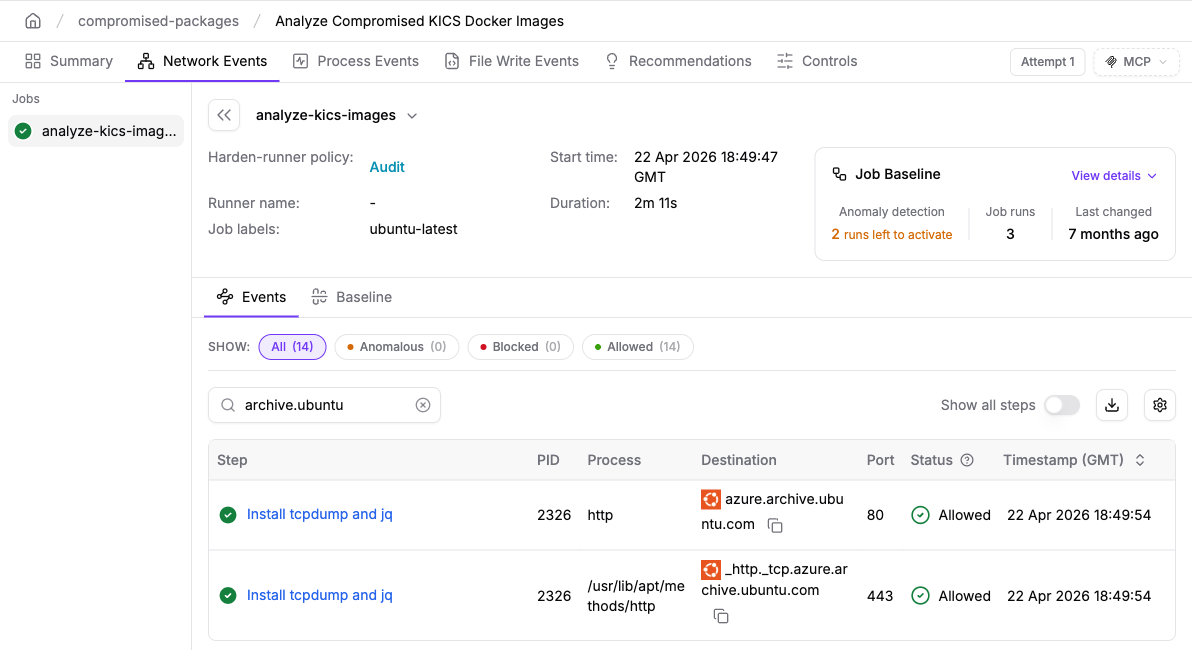
Network Events shows the destination, port, and workflow step for each connection. Enterprise process views add process names and arguments. Use these together to find the command behind an unexpected request.
Detect changes in network behavior
Harden-Runner learns a job’s network baseline from previous runs and flags unexpected destinations once anomaly detection is active. Teams can investigate those changes while the job remains in audit mode.
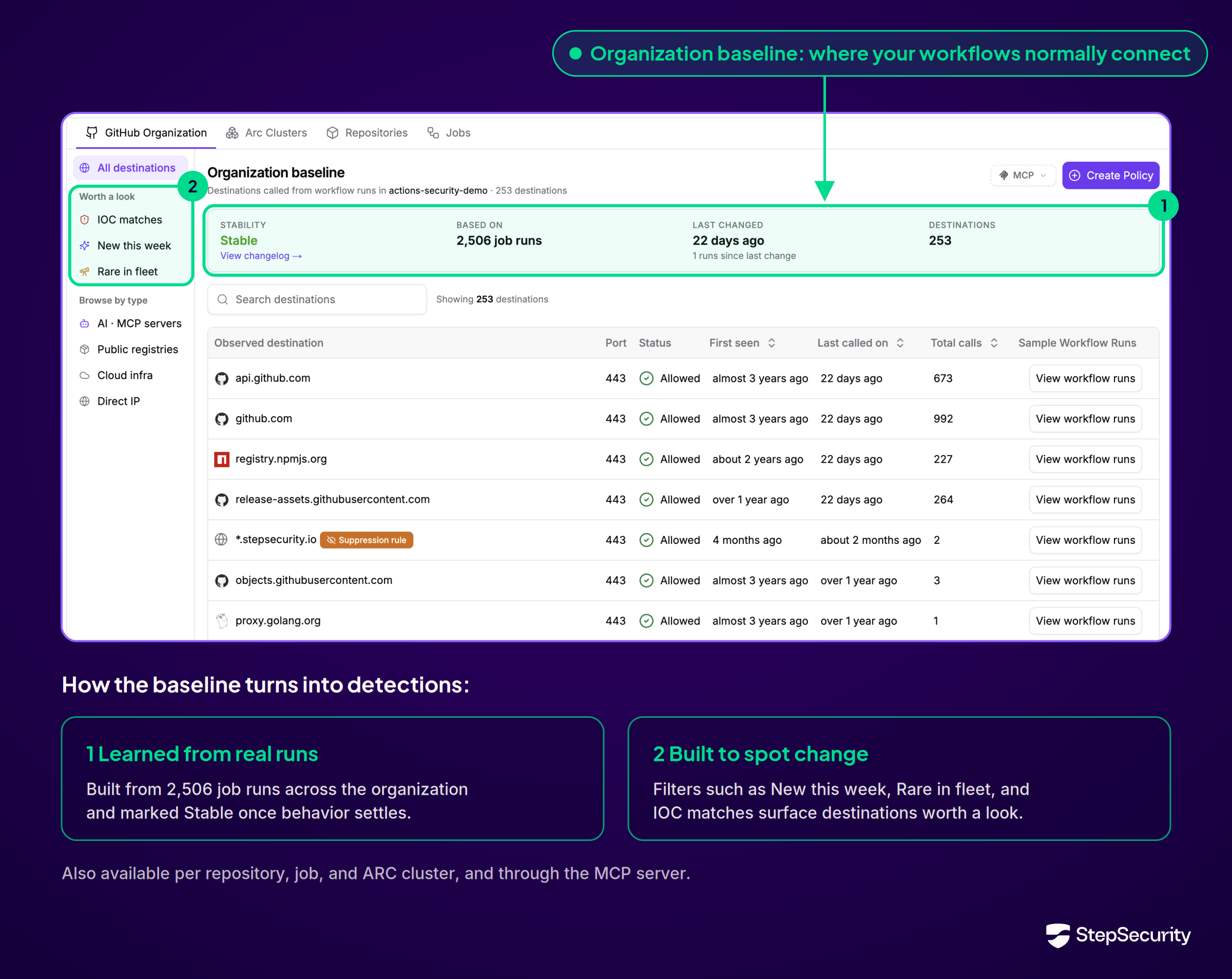
Restrict outbound connections
On supported runners, block mode enforces a reviewed list of approved destinations. A script that attempts to send credentials to a destination outside that policy has its connection blocked.
StepSecurity’s global blocklist also blocks known malicious destinations, including when a workflow uses audit mode. This runs alongside the workflow’s own egress policy.
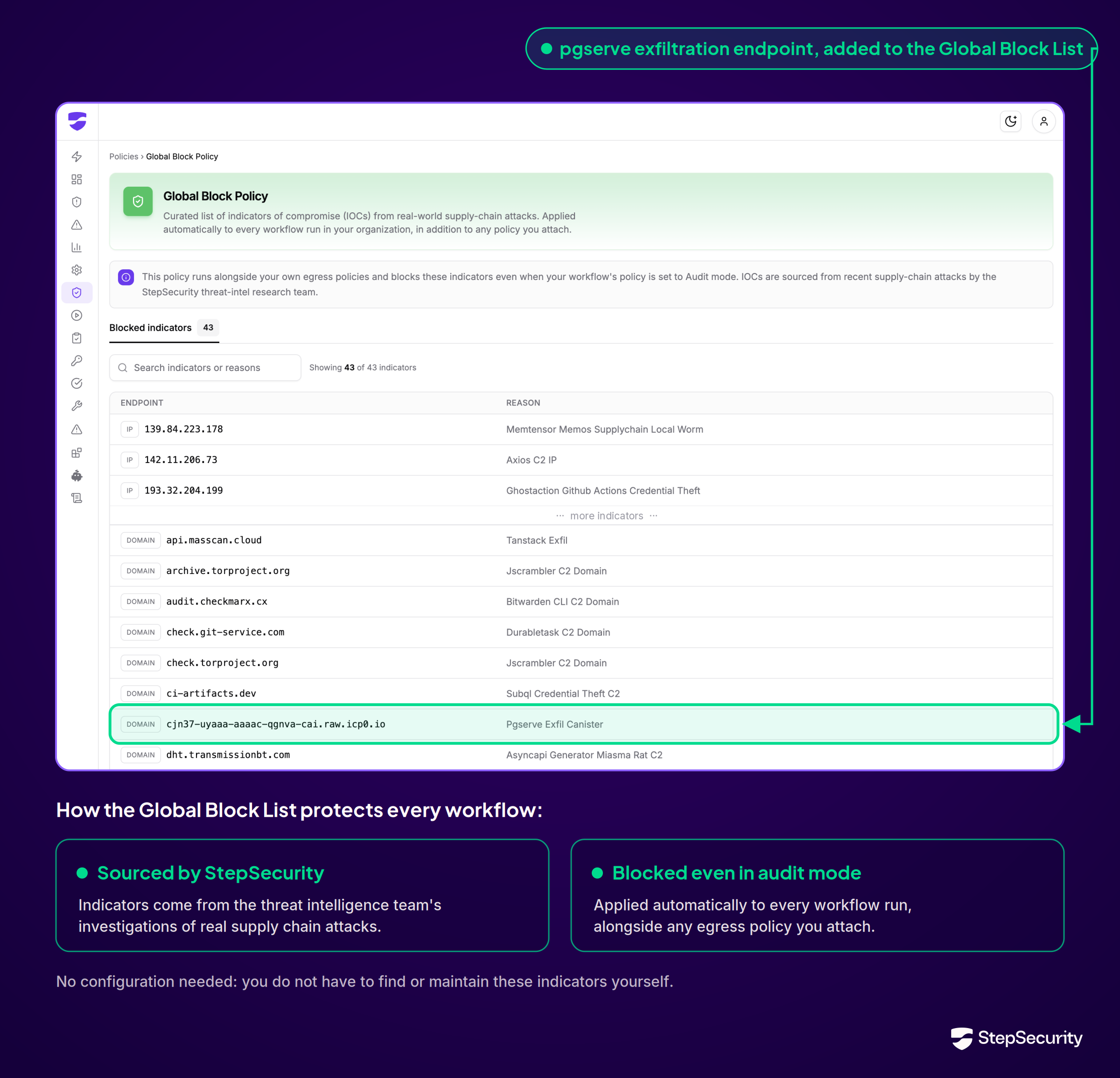
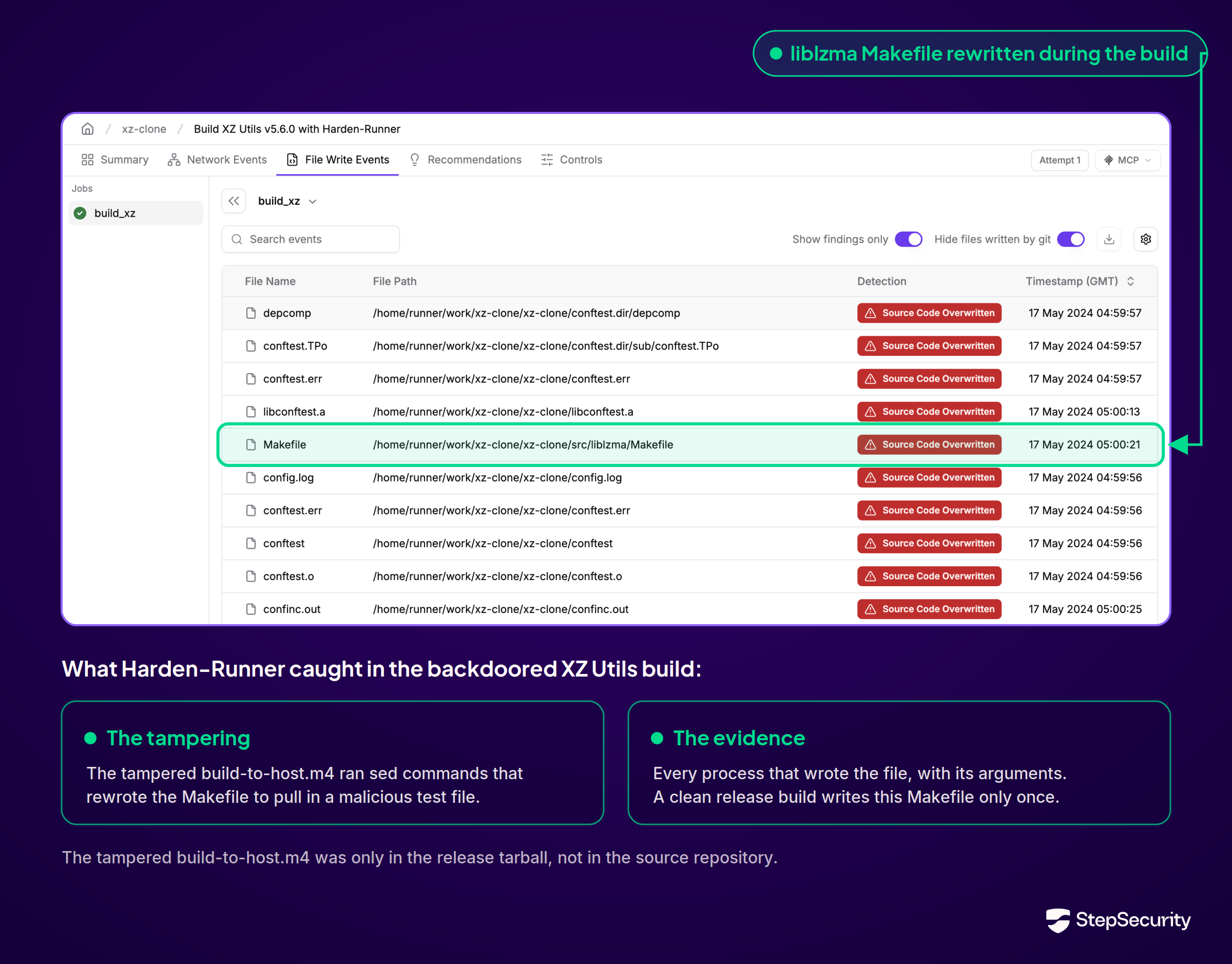
Investigate build tampering
Source-code overwrite detections flag changes made during a build. Where file-write monitoring is supported, Enterprise views show the affected path and the process responsible. Teams can examine what changed and which command caused it. See runtime investigation capabilities.
Apply network policies across repositories
The Enterprise Policy Store centrally manages egress rules at workflow, repository, organization, or ARC cluster scope. Security teams can update an attached policy across its scope without editing every workflow, while retaining a history of policy changes.
Route findings to the teams that can respond
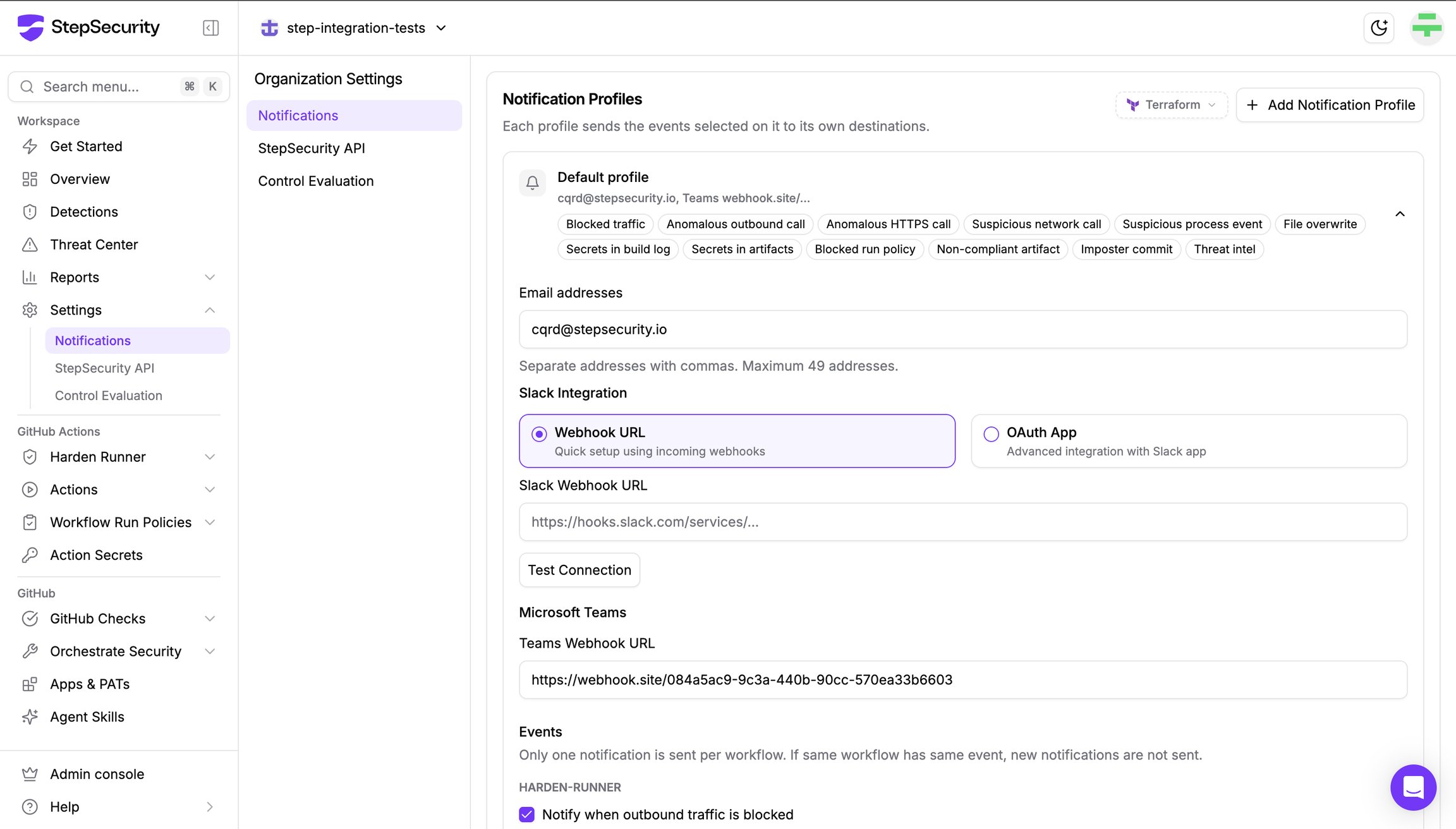
Use notification profiles to send selected Harden-Runner detections to email, Slack, or Microsoft Teams. Route blocked connections and unexpected activity to the people responsible for the workflow.
Alongside Harden-Runner’s runtime protections, StepSecurity’s Enterprise posture controls help teams review how workflows obtain cloud credentials and publishing secrets.
OIDC should be used when deploying to the cloud
This control flags supported deployment Actions that use long-term secrets instead of OIDC. Use the findings to prioritize migration to short-lived cloud credentials, paired with the environment approvals and narrowly scoped trust policies described above. See the OIDC control.
The Actions Secret inventory adds workflow usage and OIDC availability details, helping teams identify credentials that can be replaced. After validating the migration, remove the obsolete static credentials. See Actions Secret documentation.
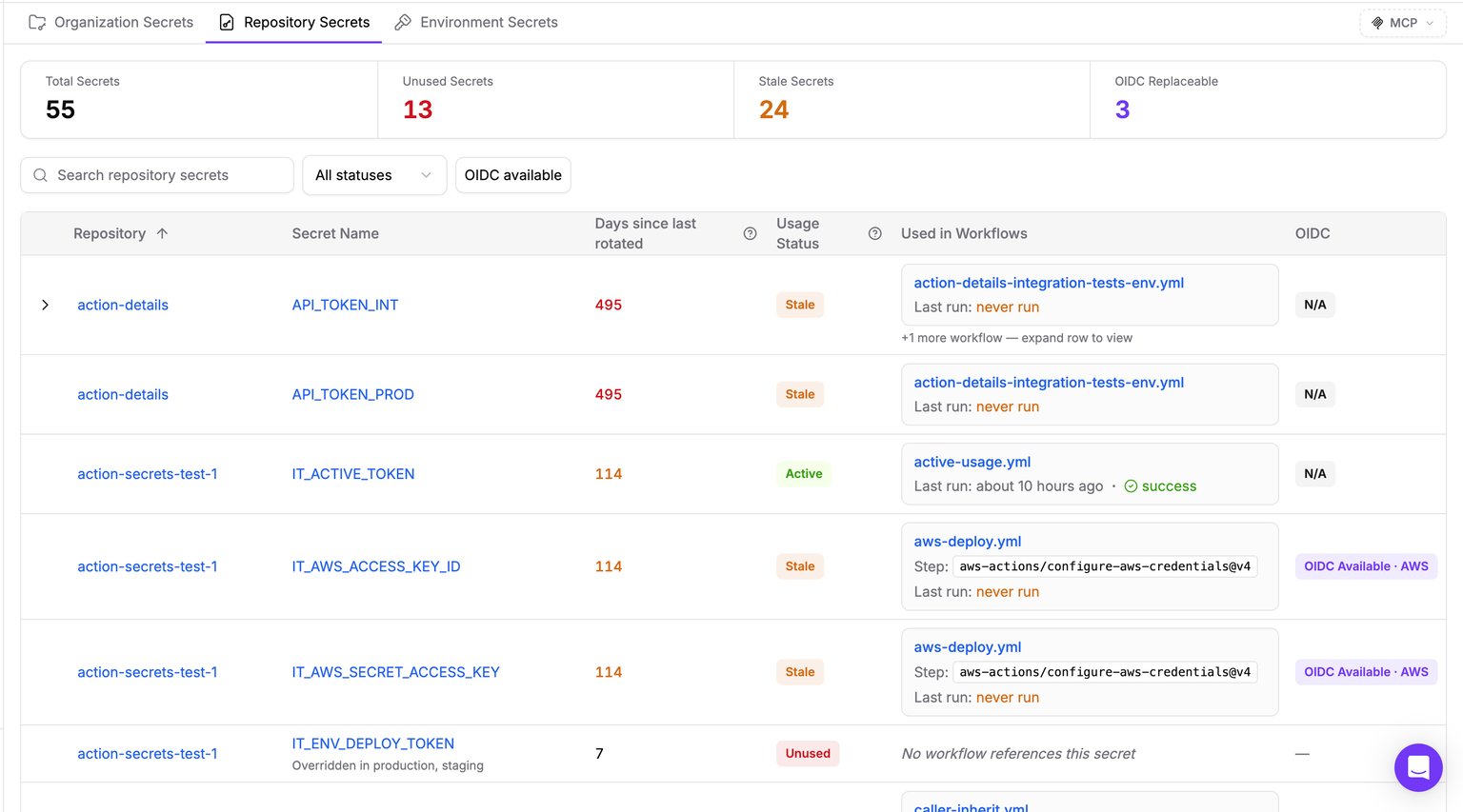
Publishing secrets should be set as environment secrets
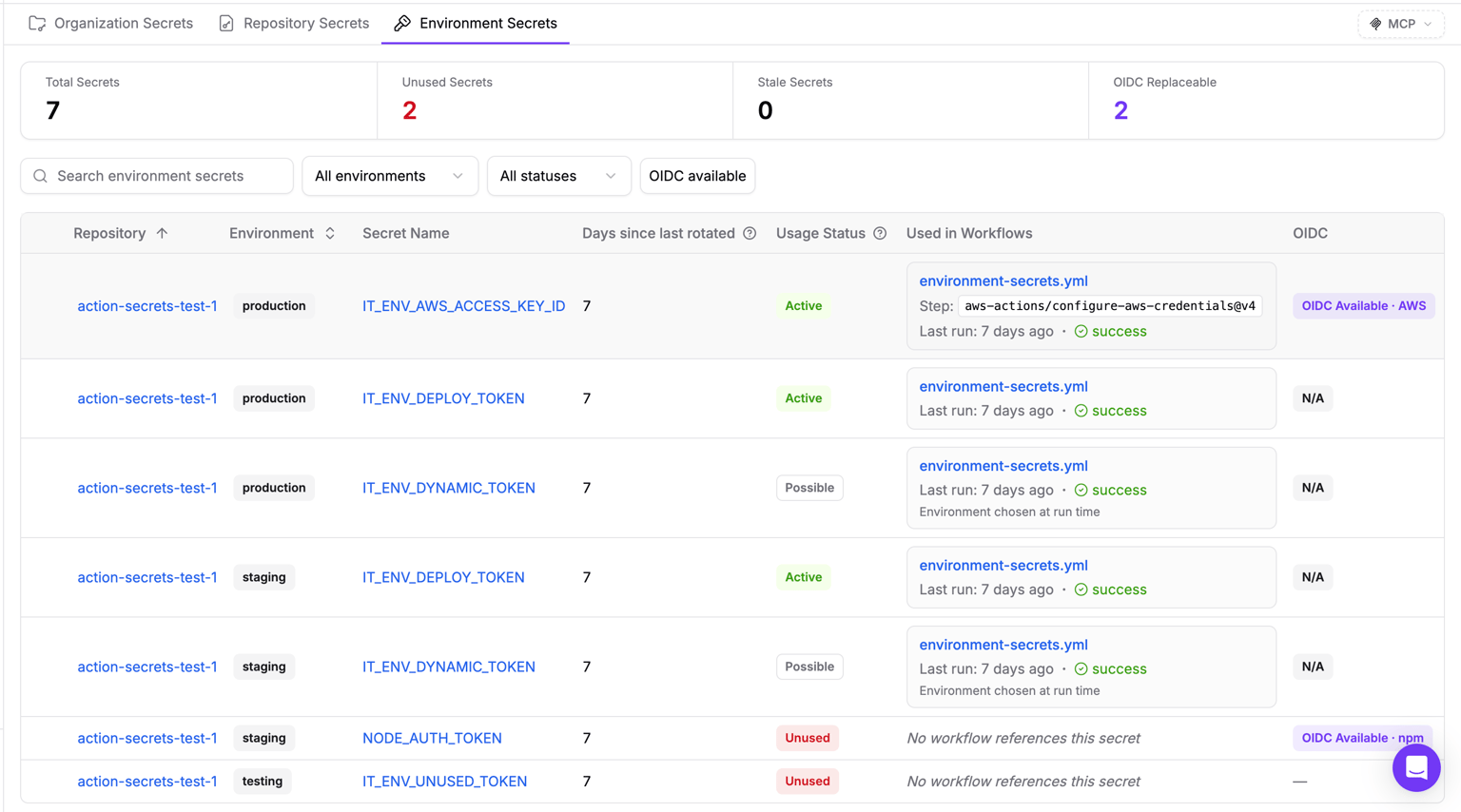
This control identifies publishing secrets stored at repository or organization scope instead of environment scope. For publishing credentials that remain necessary, move them into a dedicated release environment, require approval from trusted reviewers, and restrict eligible branches or tags. Remove broader copies after validating the change. See the publishing-secrets control.
StepSecurity’s Environment Secrets inventory shows each secret’s repository, environment, usage, and rotation age. Use it to review where publishing credentials are stored. Configure the approval rules in GitHub; storing a secret in an environment does not automatically require approval. See the environment-secrets inventory.
Start with production deployment and package-publishing jobs, then expand the reviewed policies and monitoring coverage. Match the rollout to your runner platform and subscription capabilities. Pair these runtime controls with the cloud trust, least-privilege permissions, and workload isolation described above.