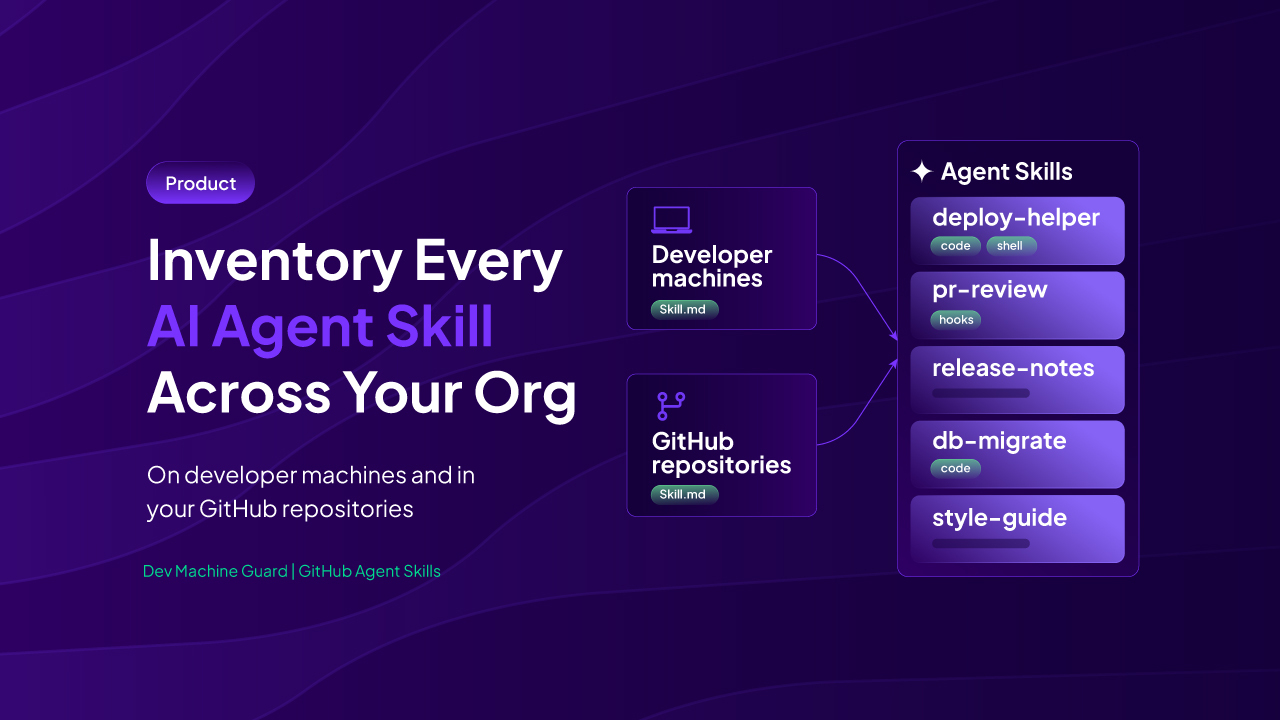
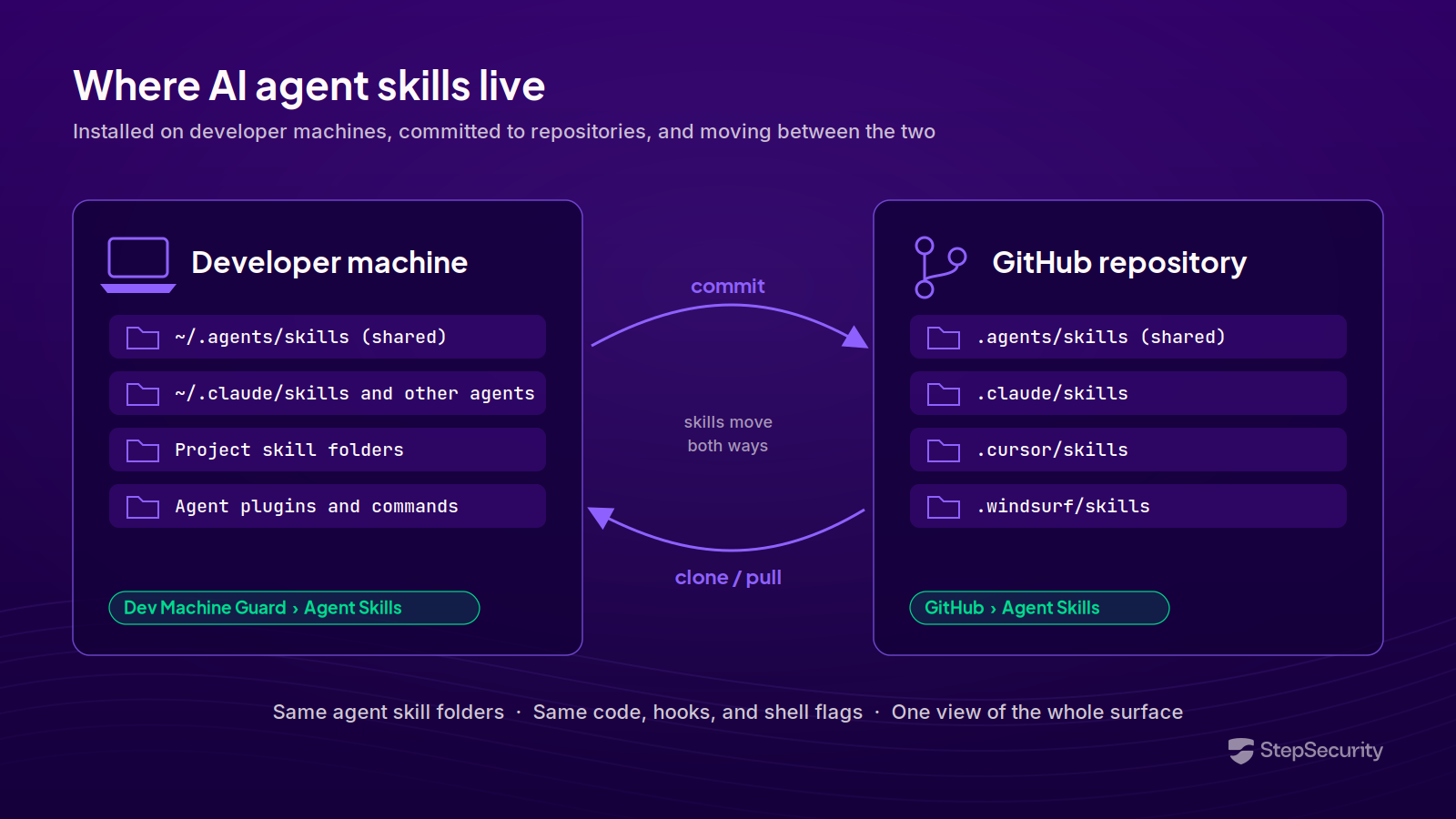
AI agent skills live in two places. Developers install them on their own machines, and teams commit them to repositories so everyone who works in the codebase gets them. A skill often travels between the two: a developer installs it, finds it useful, and commits it; everyone who clones the repository then has it.
StepSecurity now gives security teams an inventory of both. Dev Machine Guard shows the skills detected in supported locations on your developer machines, and a new Agent Skills page under GitHub shows the skills committed to your organization's repositories on GitHub.com. Together, they answer two questions: what is installed on your developers' machines, and what are your repositories distributing?
Why Agent Skills Are a Supply Chain Surface
An agent skill is a folder containing a SKILL.md file, plus optional scripts and resources, that an AI coding agent loads to gain a specialized capability. Claude Code, Codex, GitHub Copilot, Cursor, Gemini CLI, Windsurf, and many other agents load them.
Skills are easy to share, and that is what makes them a supply chain surface:
- Skills can execute. A skill can bundle scripts and declare hooks. In Claude Code, for example, a skill can also embed shell commands that run when the skill loads, subject to Claude Code's permissions and settings; other agents handle this differently. Whatever a skill runs, it runs with the developer's user privileges, on the same machine that holds SSH (Secure Shell) keys, cloud credentials, and publishing tokens.
- Skills can pre-approve their own tools. In Claude Code, a skill's
allowed-toolsfrontmatter lets the agent use the listed tools without a permission prompt during the turn that invokes the skill. The Claude Code documentation notes that workspace trust does not gate this field, and advises reviewing theallowed-toolsof skills checked into a repository before running Claude Code there. - Skills look like documentation. A
SKILL.mdfile is Markdown. In a pull request it reads like a README, and it tends to get reviewed like one.
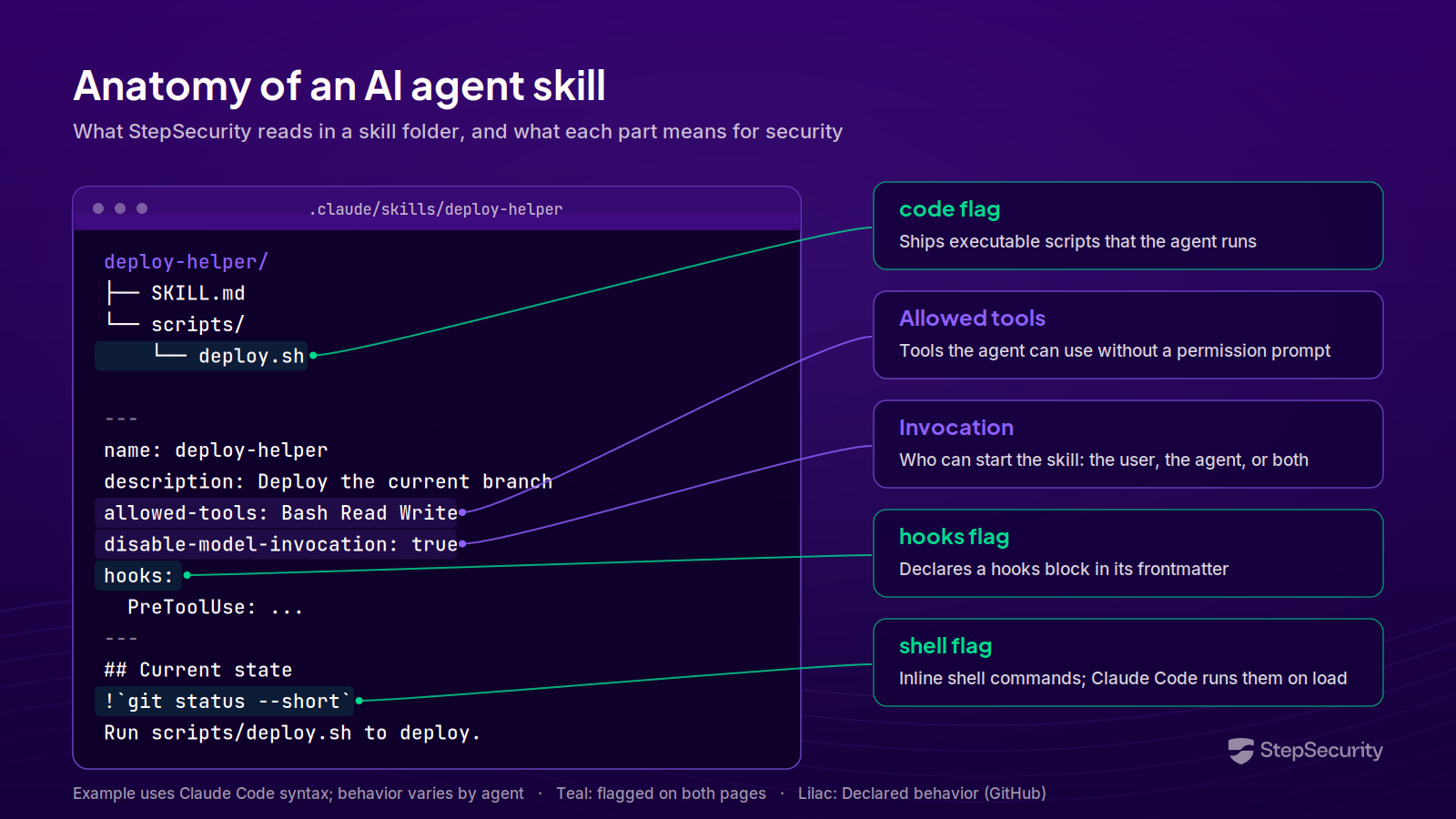
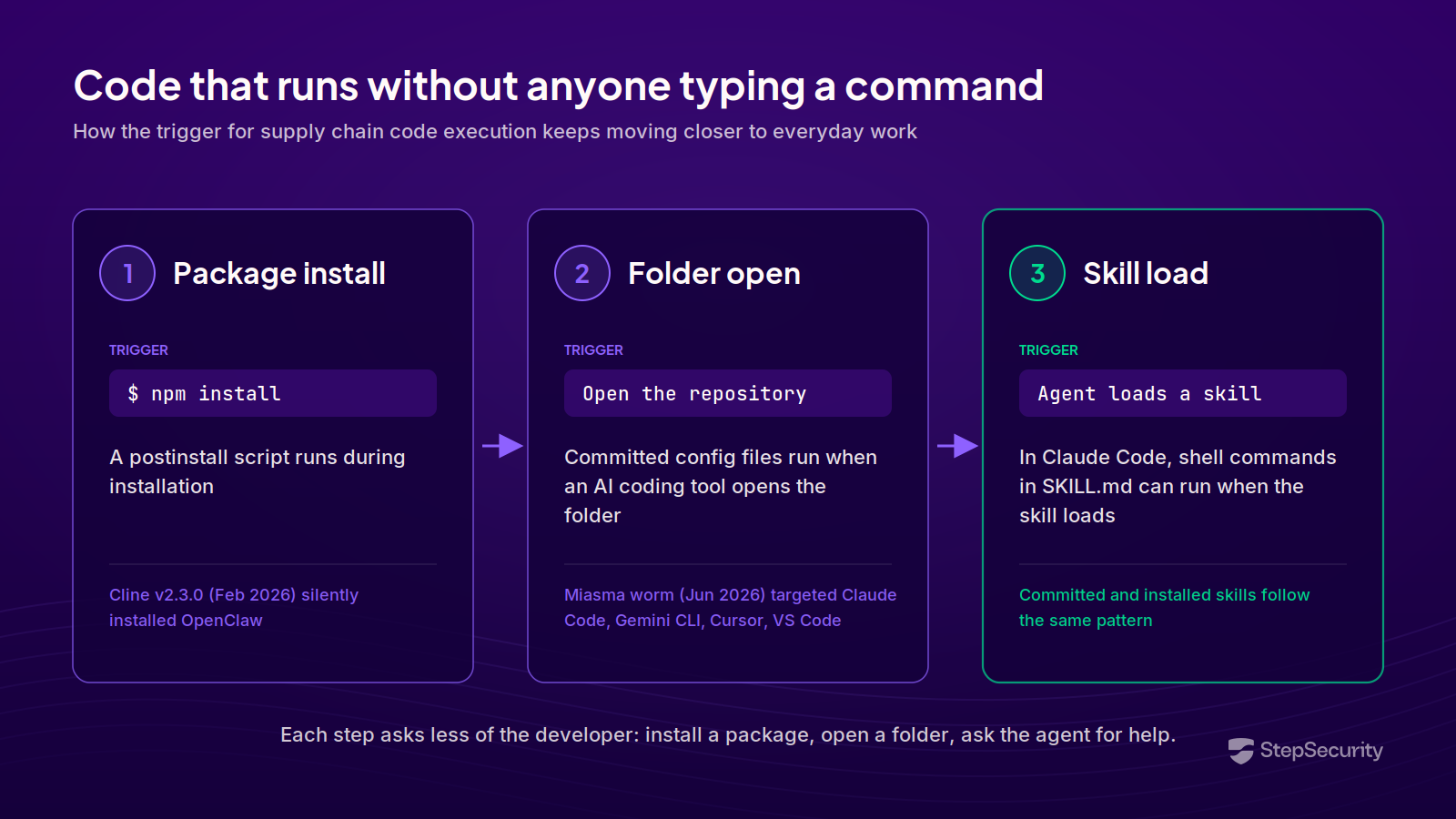
Attackers are already targeting the files AI agents act on. In June, the Miasma worm used a compromised contributor account to push a commit into a Microsoft repository. The commit changed no source code. It planted configuration files that run a credential-harvesting payload when a developer opens the repository in Claude Code, Gemini CLI, Cursor, or VS Code, and it carried a [skip ci] flag and a backdated timestamp to avoid attention. Code execution moved from "on package install" to "on folder open."
Earlier incidents point the same way. The s1ngularity attack on Nx was the first documented case of malware turning AI CLI (command-line interface) tools into reconnaissance and exfiltration agents, and the Cline v2.3.0 compromise showed an AI coding tool itself becoming the delivery vehicle.
Agent Skills on Developer Machines: Dev Machine Guard
The Agent Skills page in Dev Machine Guard is an organization-wide inventory of the skills detected on your developers' machines. On each device, Dev Machine Guard scans these supported locations:
- The shared skills directory in the user's home folder (
~/.agents/skills), which any AI coding agent on the device can load - Agent-specific directories, such as
~/.claude/skillsfor Claude Code - Project-level skill folders inside repositories on the device
- The skills.sh lock file, which records skills installed and version-managed by the skills.sh CLI
- Skills supplied by installed Claude Code and Codex agent plugins, attributed to the plugin that supplied them
- Standalone Claude Code commands
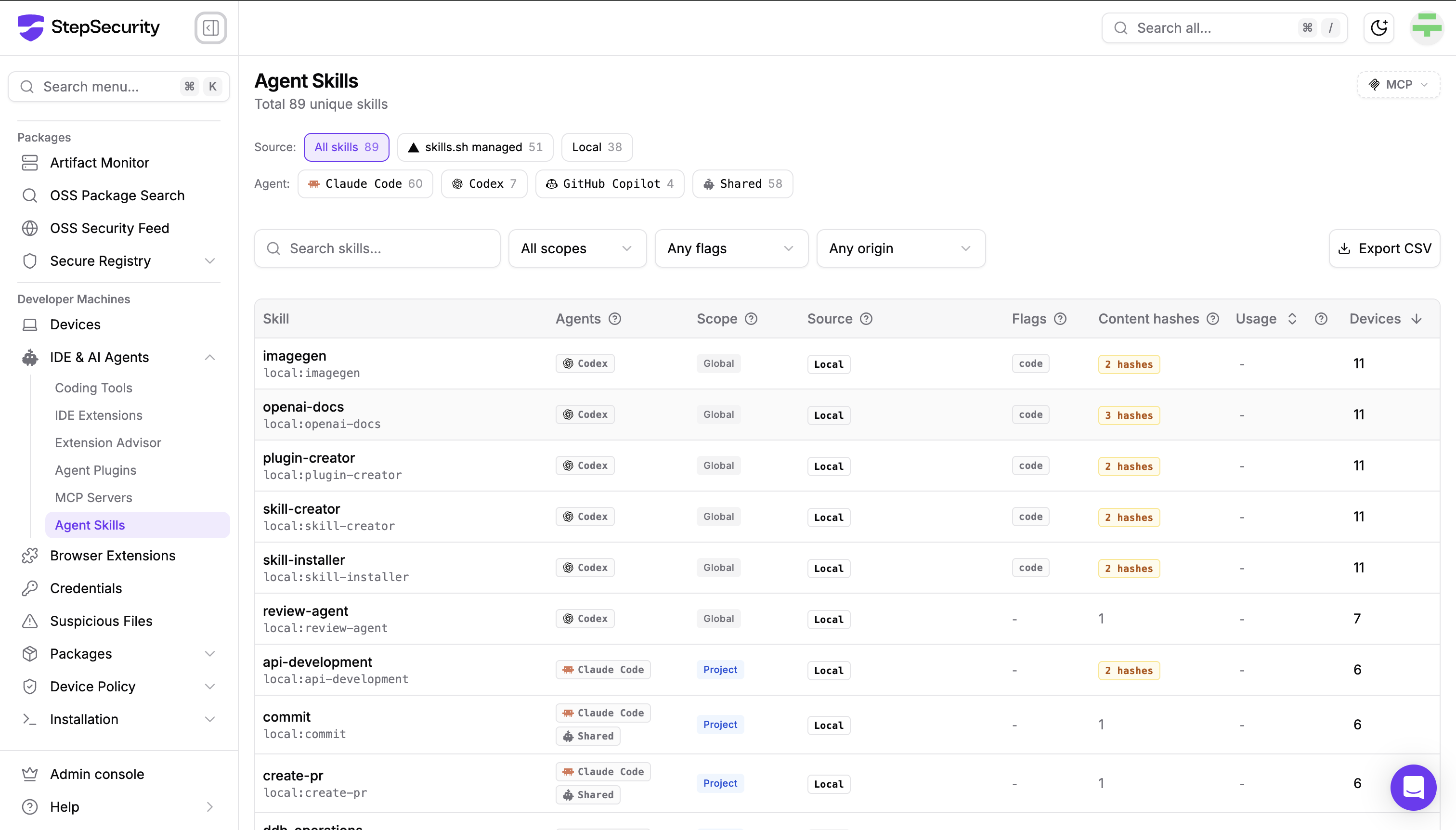
Skills installed once in the shared directory are often symlinked into agent-specific directories. Dev Machine Guard resolves that pattern and reports a single installation, so your counts reflect real installs.
Coverage spans 18 AI coding agents, including Claude Code, Codex, GitHub Copilot, OpenCode, Cursor, Gemini CLI, Kiro, Windsurf, Antigravity, and OpenClaw.
For each skill, the inventory shows:
- Agents and scope. Which agents can load the skill, and whether it is installed globally in the user's home directory, inside a specific project, or machine-wide.
- Source. Whether the skill is managed by the skills.sh CLI, with the GitHub repository it was installed from; supplied by an agent plugin, with the plugin and marketplace; or
Local, a standalone folder no package manager tracks. - Flags.
code,hooks, andshellfor executable content, pluscommandfor Claude Code commands. - Content hashes. How many different
SKILL.mdcontents Dev Machine Guard has seen for the skill across your fleet. A value greater than one is highlighted, because the copies differ. - Usage. How many times Claude Code has recorded the skill being used, where those records are available.
- Devices. How many machines have the skill installed.
Content Variation and Unmanaged Skills
Select a skill to see each detected installation by device, user, agent, and scope, grouped by content hash. When the skill's content differs between devices, the panel says so. Different hashes show that the content varies; they do not show which copy is current or correct, so compare the variants before deciding which one to keep.
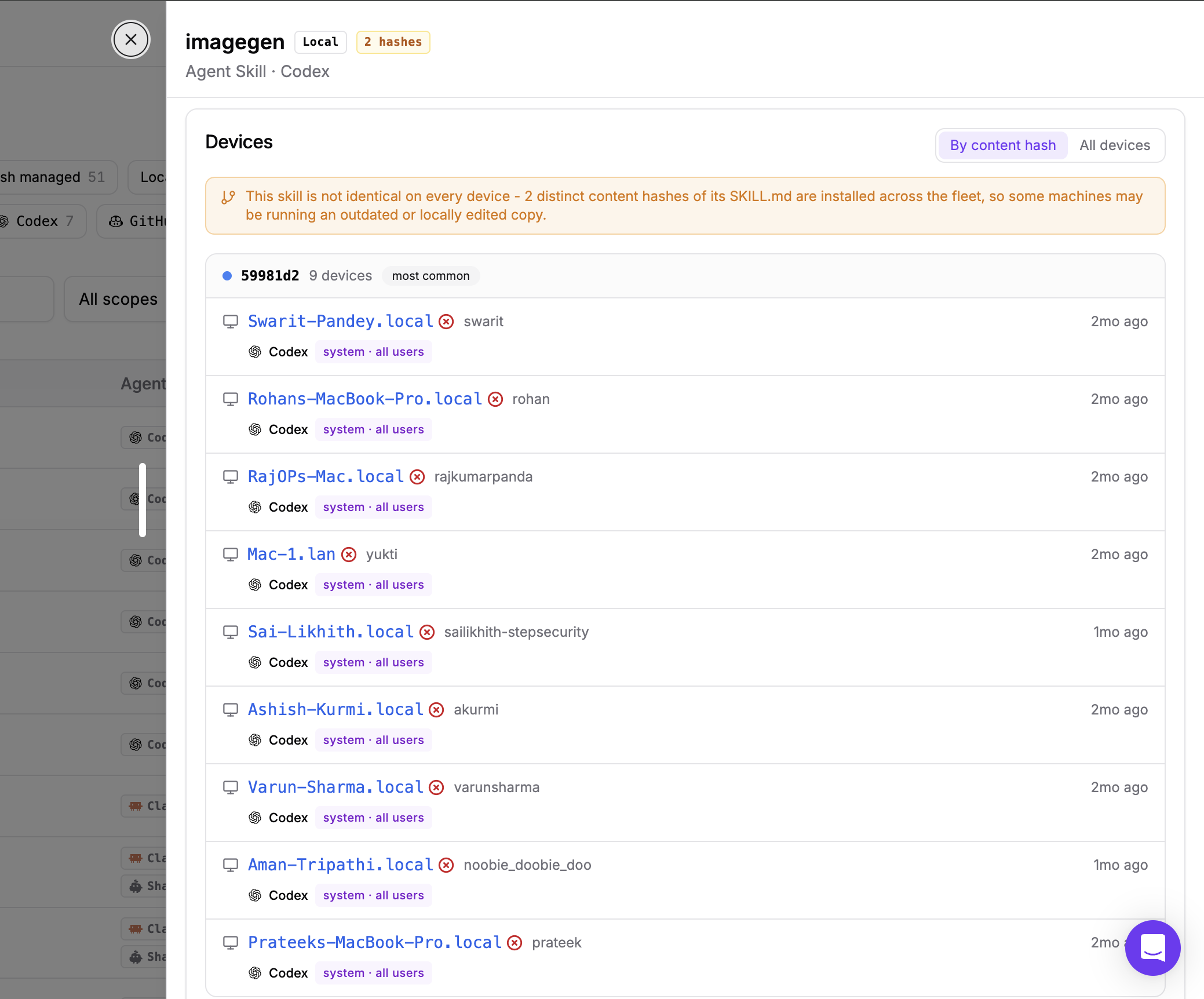
Local skills deserve a closer look. Local means no managed source was identified: the skill may have been written on the device, or copied or downloaded there by hand. With no upstream source to compare against, Dev Machine Guard uses the content hashes devices report to show whether copies match. No registry or lock file records where these skills came from.
You can export the full inventory as a CSV (comma-separated values) file, and turn on notifications for new agent skills. Notifications apply to skills that appear after a device's initial baseline, and each device that reports one raises its own alert.
Agent Skills in GitHub Repositories
When a skill is committed to a repository, it reaches every developer and every agent session that works in that codebase. In Claude Code, for example, project skills in .claude/skills/ load in every session started in that repository, and cloud sessions load the project skills committed to the repository they clone. Merging a skill distributes it.
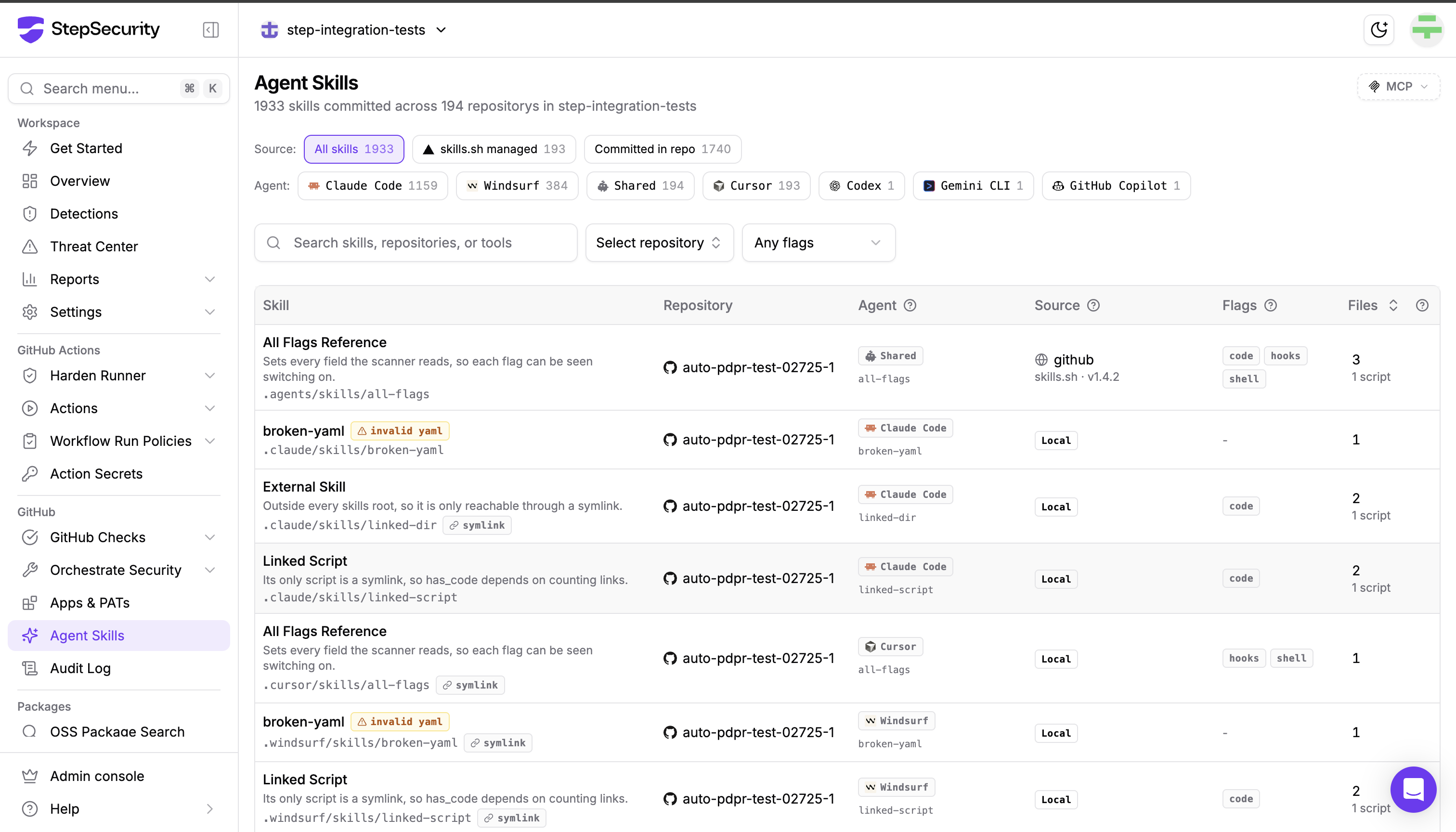
The Agent Skills page under GitHub inventories those skills. Once a day, StepSecurity scans the default branch of each non-archived repository in your organization on GitHub.com and records the skills it detects in supported agent skill folders. These are the same folders Dev Machine Guard recognizes on devices, such as .claude/skills, .cursor/skills, .windsurf/skills, and the shared .agents/skills directory. GitHub Enterprise Server is not supported.
For each skill, the inventory shows:
- Skill and path. The name and description from
SKILL.mdand the folder it lives in. Skills whose frontmatter does not parse are markedinvalid yaml, and skills reached through a symbolic link are markedsymlink. - Repository and agent. Where the skill is committed and which agent loads it. In a monorepo, the inventory also shows the package the skill applies to.
- Source. Whether the skill is managed by the skills.sh CLI, with an upstream source, or is a local skill written directly in the repository.
- Flags. The same
code,hooks, andshellflags Dev Machine Guard uses. - Files and scripts. How many files the skill folder holds and how many are scripts. A skill is meant to be a
SKILL.mdplus whatever it bundles, so a high count means there is more here than instructions.
Filter by source, agent, repository, or flag. The Has code, Has hooks, and Shell execution filters take you straight to the skills that can run something.
Declared Behavior and Provenance
Select a skill to open its details panel.
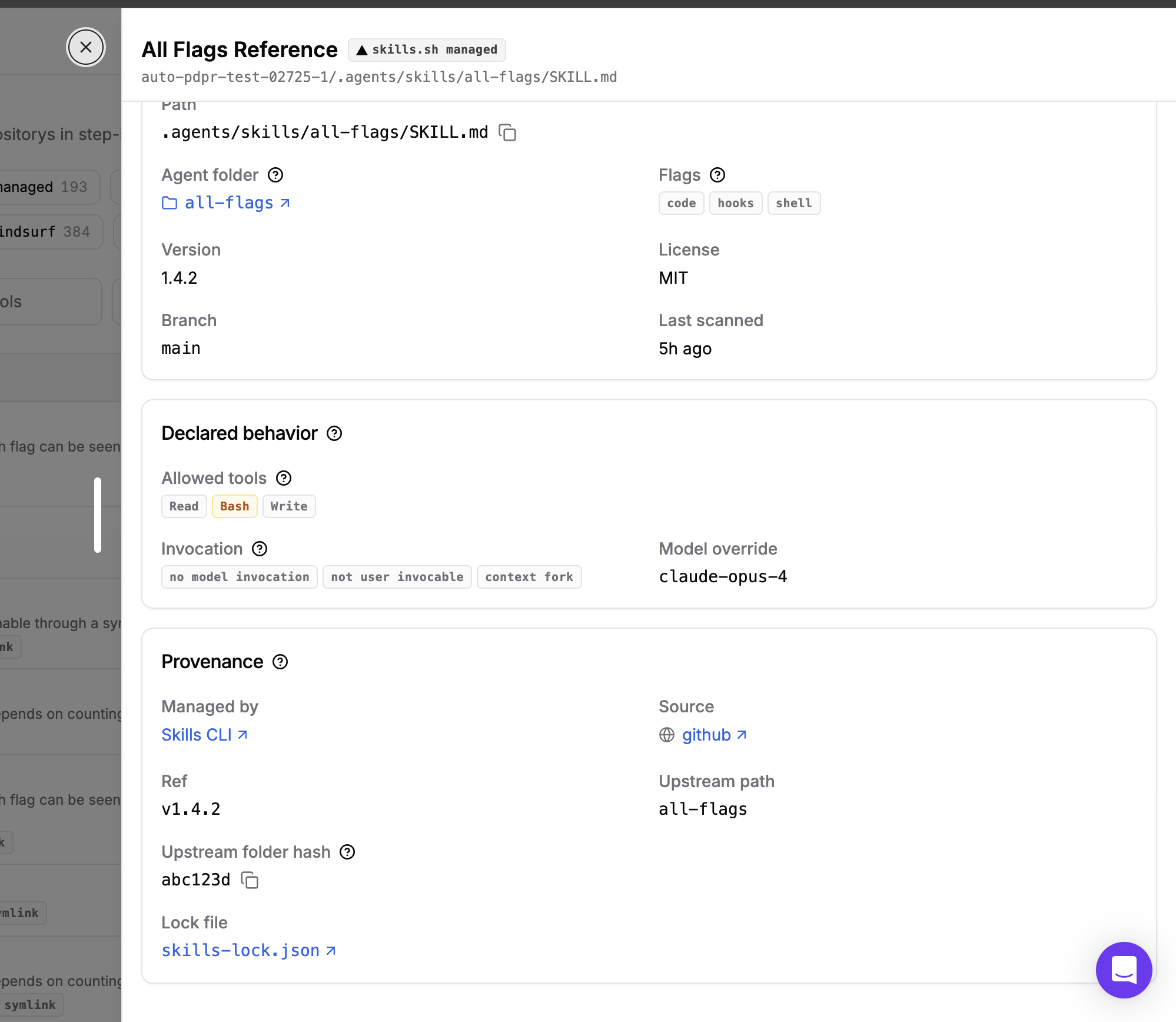
Declared behavior shows what the skill asks for in its frontmatter: the tools it pre-approves, such as Read, Write, or Bash; who can invoke it, for example no model invocation when only a user can start it, or not user invocable when only the agent can; whether it runs in a forked subagent context; and any model override.
For skills installed by the skills.sh CLI, Provenance traces the skill back to its origin: the upstream source and ref, the path within that source, the upstream folder hash, and the skills-lock.json file that records the installation.
Two Views of One Surface
Both inventories recognize the same agent skill folders and use the same code, hooks, and shell flags, so a skill flagged in one view is flagged the same way in the other. Dev Machine Guard tells you what is installed on your developers' laptops. The GitHub inventory tells you what your repositories are distributing, which is where you can stop a skill before it spreads.
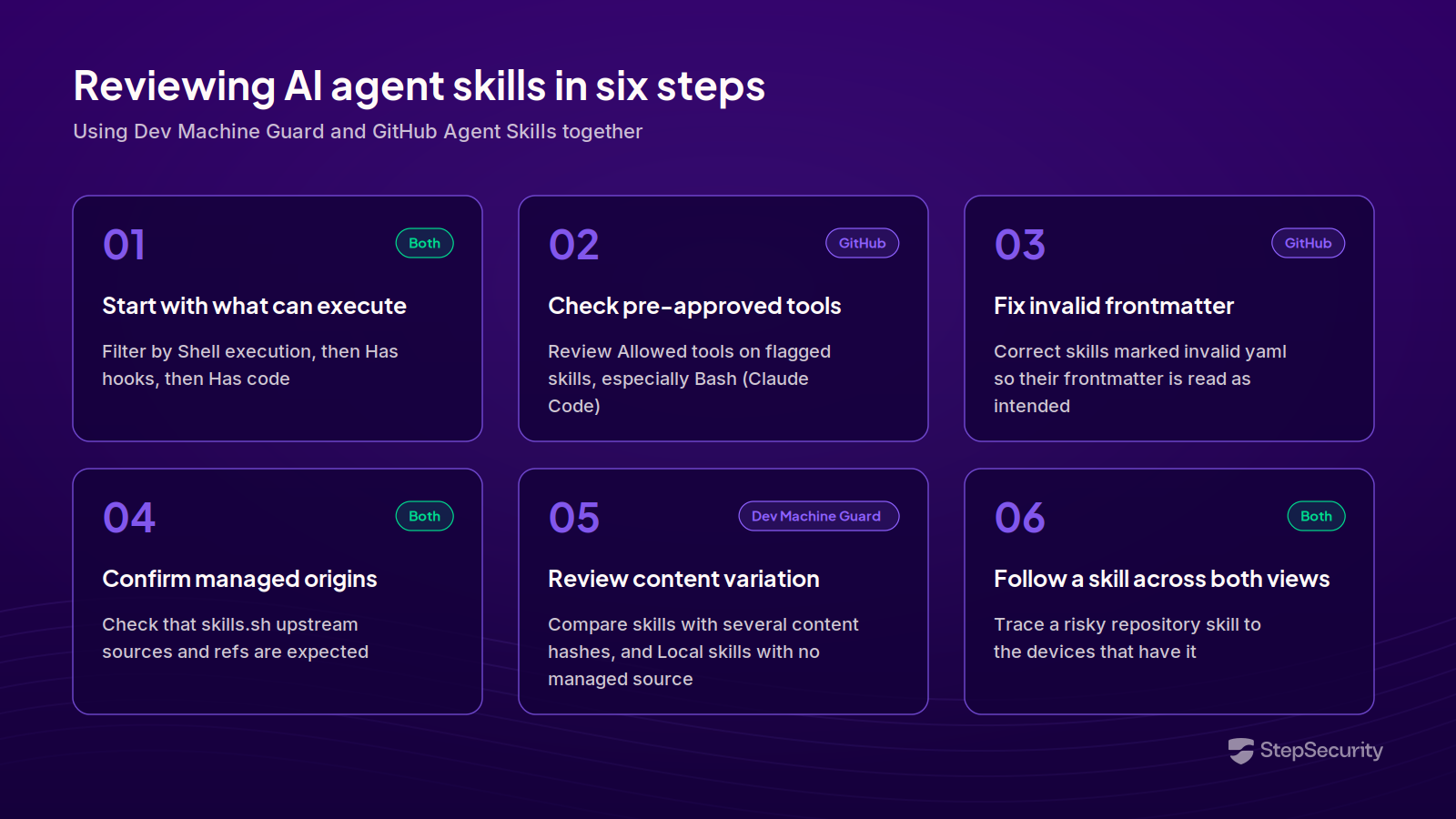
A Practical Review Workflow
- Start with what can execute. In either view, filter by Shell execution, then Has hooks, then Has code. In Claude Code, shell injections can run when the skill loads, so review those first.
- Check pre-approved tools in your repositories. On the GitHub page, open each flagged skill and look at Allowed tools. A skill that pre-approves
Bashdeserves the same scrutiny as a change to a CI/CD (continuous integration and continuous delivery) workflow. - Fix invalid frontmatter. Correct skills marked
invalid yamlso their frontmatter is read as intended. - Confirm the origin of managed skills. Check that skills.sh managed skills come from upstream sources and refs you expect, in both views.
- Review content variation and unmanaged skills on devices. In Dev Machine Guard, compare the variants of skills with more than one content hash, and filter by
Localsource to find skills with no managed source. - Follow a skill across both views. When a repository skill looks risky, search for it in Dev Machine Guard to see which devices already have it installed.
Get Started
Both inventories are in the StepSecurity dashboard: Agent Skills under IDE & AI Agents for Dev Machine Guard, and Agent Skills under GitHub for your repositories. To learn more, see:
If you are not yet a StepSecurity customer, start a free trial to see the skills detected across your developer machines and repositories.