.png)
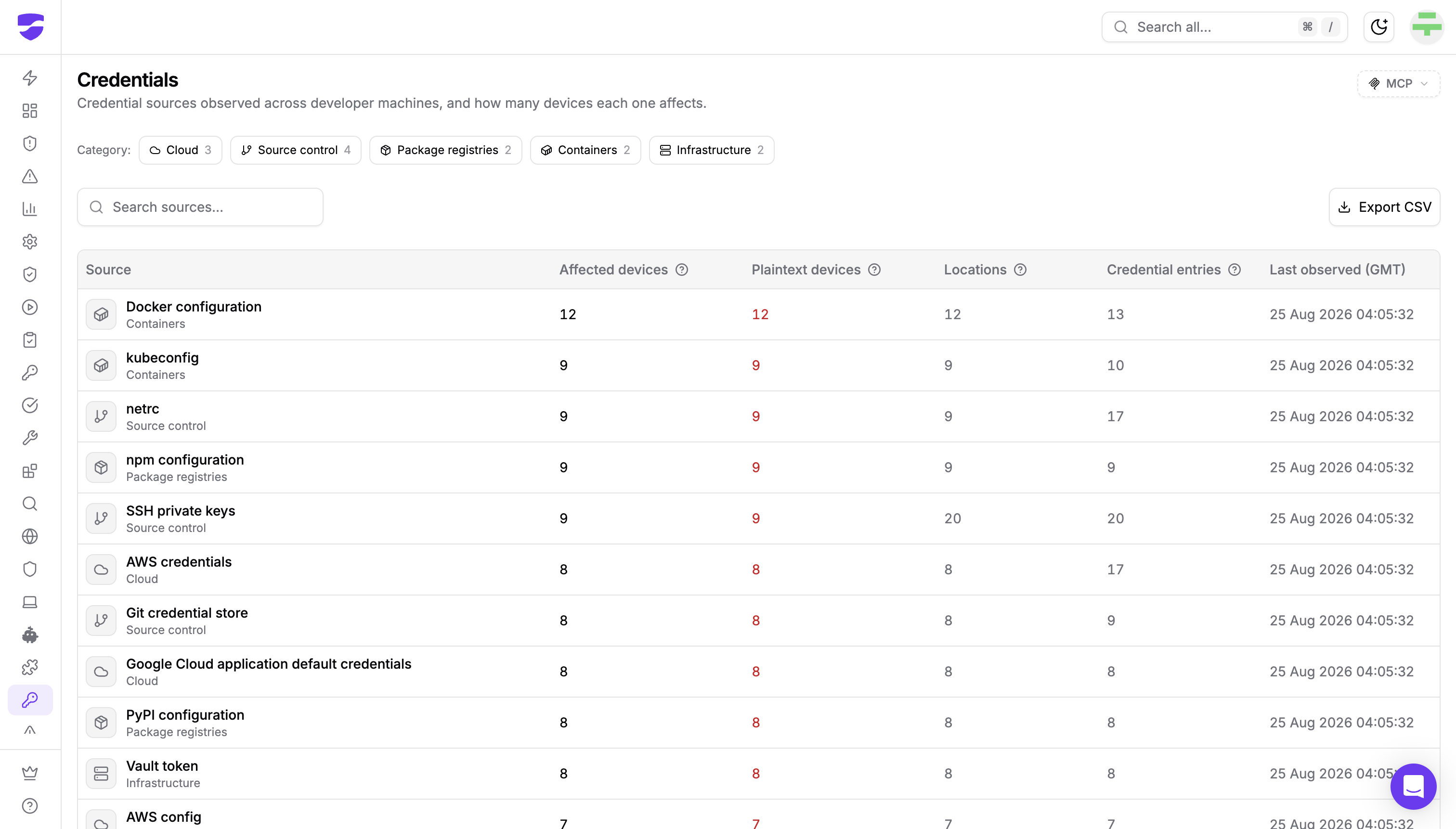
Dev Machine Guard now inventories the credential sources in use across developer machines. A new Credentials page in the StepSecurity dashboard shows which credential sources are in use, how far each one spreads across your fleet, and how much of that material is stored without encryption or passphrase protection.
It is worth being clear about who already has this inventory. When we analyzed the TeamPCP credential stealer planted in the xinference PyPI package, the payload's target list was not clever or novel. It was a flat enumeration of well-known paths: ~/.npmrc, ~/.pypirc, ~/.vault-token, ~/.netrc, ~/.aws/credentials, ~/.aws/config, ~/.docker/config.json, the gcloud application default credentials file, and kubeconfig.
Attackers have had that list for years. They wrote it down, shipped it inside a postinstall hook, and ran it on developers' machines. What is new is that the defender now has the same list.
Attackers Enumerate. Defenders Guess.
That target list is not one actor's research. The hijacked Bitwarden CLI package on npm reached for nearly the same set, adding ~/.ssh/id_rsa, id_ed25519, id_ecdsa, and ~/.git-credentials, then weaponized any GitHub token it found to inject workflows and pull CI secrets.
Between them, those two campaigns targeted many of the same well-known credential locations that Dev Machine Guard now covers. The inventory currently covers thirteen source types across their supported default and relocated locations, which is not every place a credential can sit on a developer machine: keychains, credential helpers, environment variables, browser stores, and password managers are all outside it. Neither actor needed to discover anything. These paths are documented by the tools themselves, because the tools have to find them too.
Three properties make this the first thing malware reaches for:
- The locations are fixed. No discovery step, no guesswork, no scanning. A postinstall hook can read the well-known ones in milliseconds.
- The files are readable by the developer's own account, which means they are readable by anything running as that account: every package install script, every IDE extension, every AI agent with shell access.
- The contents are readable as stored. Nothing has to be cracked, replayed, or phished. A registry token is a registry token.
And once harvested, credentials fund the next hop. The second wave of Shai-Hulud used stolen npm tokens to publish more compromised packages, turning every set of harvested credentials into further distribution.
So the attacker's side of this is a solved problem. The defender's side, until now, has not been. Ask a security team which of their developer machines hold AWS credentials, and the honest answer has usually involved a survey, a script written that afternoon, or an incident.
Plaintext Is the Normal Case, Not the Exception
The first thing most teams notice on the Credentials page is how much of the fleet shows up as plaintext. That is not a configuration failure and it is not a fleet in unusually bad shape. It is how these tools work.
Almost every developer tool stores its credential in a form it can read directly, because it has to authenticate without prompting anyone. A Docker registry token, an npm publish token, a GitHub CLI entry, a Vault token: each sits in a file, in a form usable as it stands.
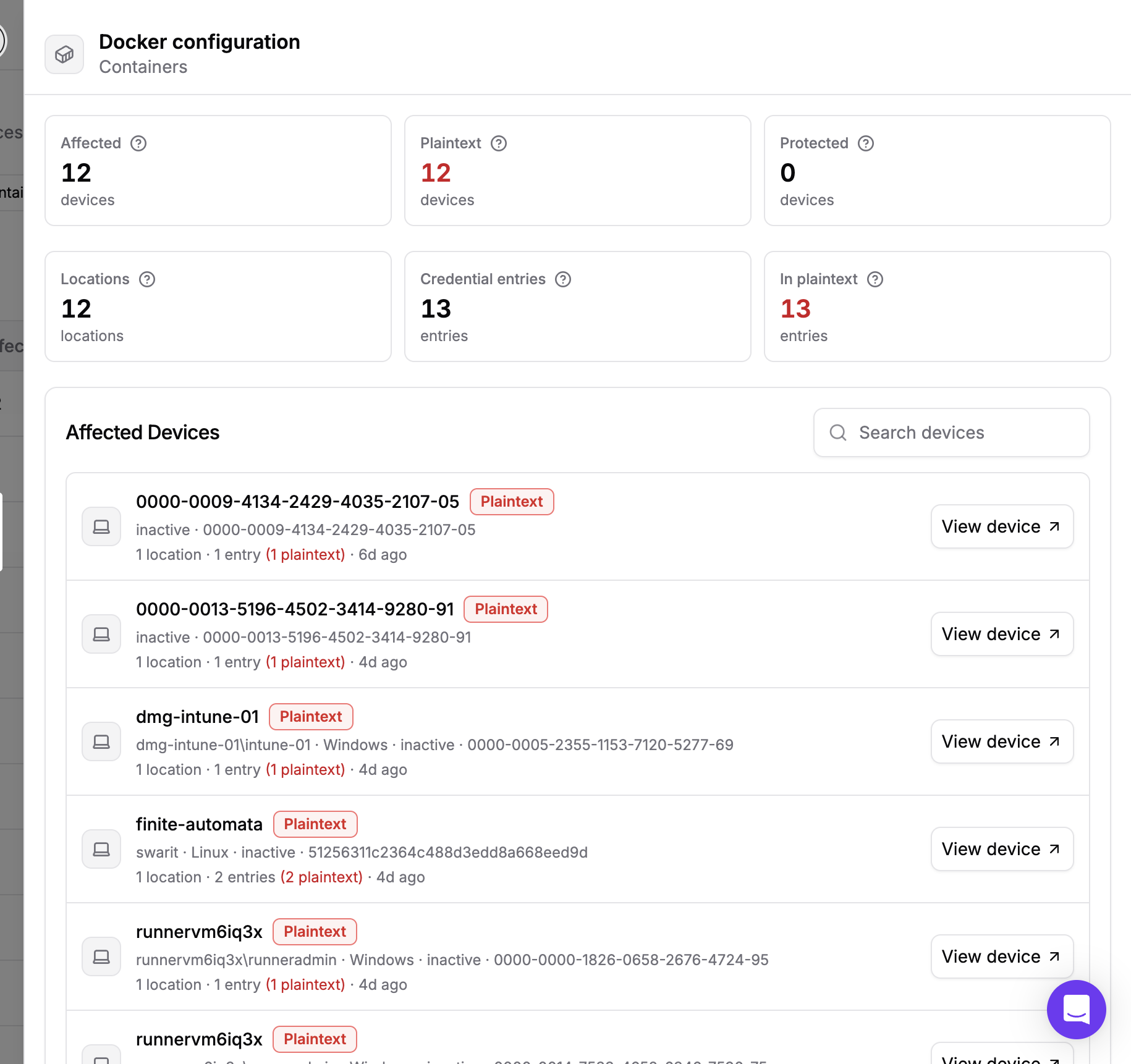
SSH private keys are the most common source of Protected findings, because they support passphrase encryption and in practice many are created without one. Supported encrypted or hardware-backed private-key material can also be Protected, including keys embedded in a kubeconfig. SSH remains the place where a concrete hygiene action is most readily available today.
The point of the plaintext view is not to flag misconfiguration. It is to make the blast radius explicit. If a credential-stealing package executes on a machine, everything on that machine listed as plaintext should be treated as potentially exposed. This is precisely the exposure that install-time controls such as package configs exist to reduce, because the cheapest way to protect these files is for hostile code never to run beside them.
What the Credentials Inventory Shows You
Sources, devices, and spread
The page aggregates by credential source across the whole fleet rather than listing findings one machine at a time. Each row shows a source, how many devices hold it, how many of those devices hold plaintext material, how many credential files were found, and how many individual credentials those files contain.
That ordering answers the question that actually drives a response. A source present on eleven of twelve machines is a fleet-wide problem. The same source on two machines is a conversation with two developers.
Thirteen sources are covered across five categories: Cloud, Source control, Package registries, Containers, and Infrastructure. Filter to a category, search by source, or export the view as CSV.
Reading the counts
Locations and entries count different things, and the gap between them is informative. Locations are credential files. Entries are the individual credentials inside them. Where entries exceed locations, some files hold several credentials, which is normal for an AWS credentials file with multiple named profiles or a .netrc covering several hosts. Where locations exceed devices, some machines hold more than one file for that source, which is normal for SSH keys.
For rotation planning, entries is the number to start from. Devices tells you how many machines to visit. Entries estimates how much credential material there is to investigate. Entries are counted as found, so they are not deduplicated across devices or validated against the provider: the same material stored twice counts twice, and an expired or incomplete entry still counts.
One limit worth stating plainly: findings show where credential material was found during each device's most recent scan. They do not tell you whether a credential is still active or valid.
Per-source detail
Open any source for a fleet-wide summary and the full list of affected devices.
Six figures summarize the source: affected devices, plaintext devices, protected devices, locations, credential entries, and how many of those entries are in plaintext. Beneath them, every device holding the source, each labelled Plaintext, Protected, or both.
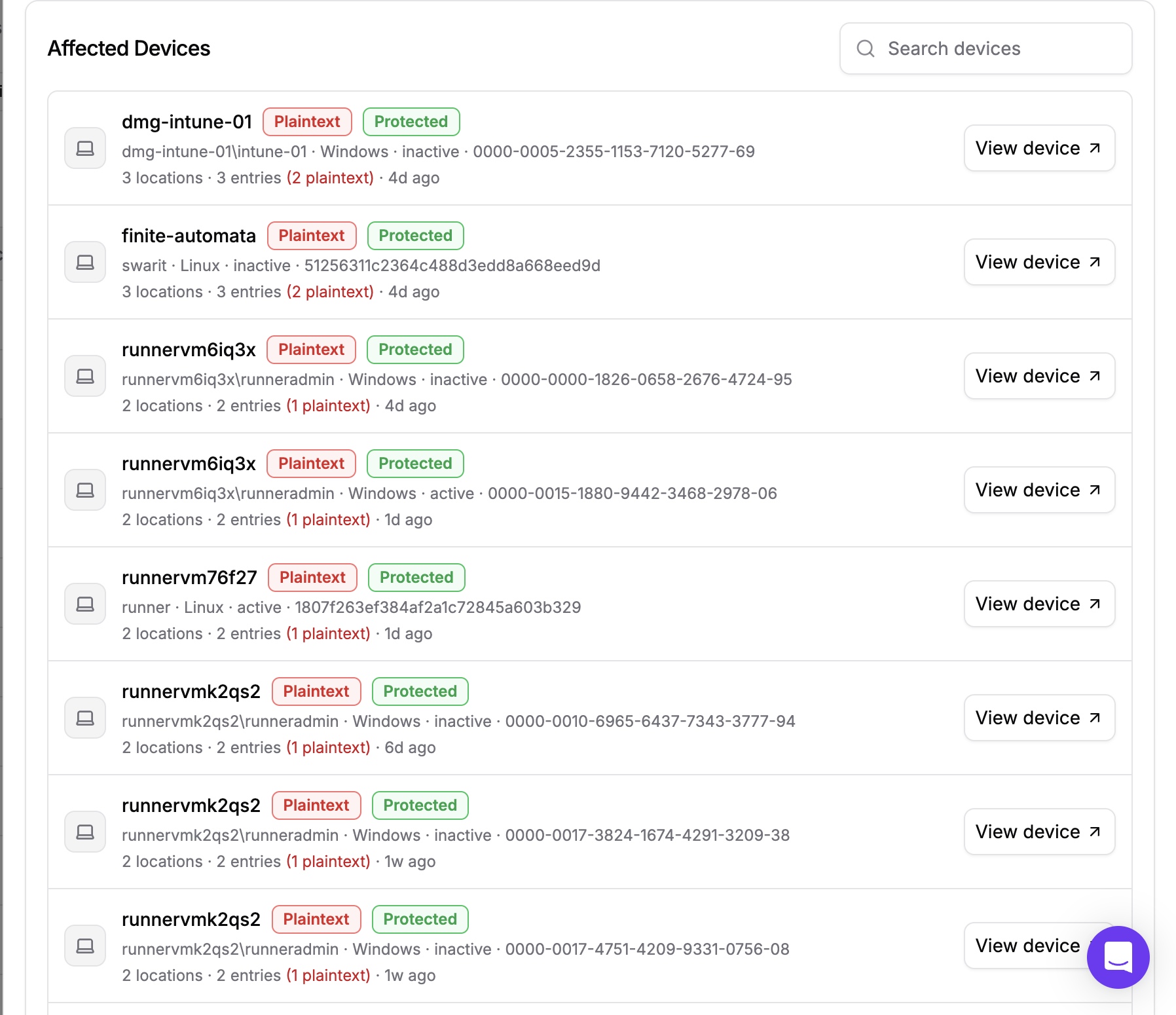
Both badges on one device is a common and useful case: a developer with one passphrase-protected key and one without. Each device row summarizes its own position in the form 3 locations · 3 entries (2 plaintext), and links straight through to the machine.
What is never collected
Credential-bearing files are read locally, using bounded reads, only far enough to record whether concrete credential material is present and whether private-key material is protected. Nothing derived from the material itself is kept.
No credential value, fragment, hash, digest, fingerprint, or parser output is serialized, logged, stored, displayed, or sent off the device. Every location is an exact path rather than a directory to walk, and each is a single size-capped read, so no directory tree is traversed anywhere on the machine. The one exception is ~/.ssh, listed a single level deep so each key file can be assessed on its own.
What gets recorded is which supported locations exist, how much material is in them, and whether that material is stored without encryption or passphrase protection. That is enough to plan a rotation and scope an incident, and it deliberately excludes the credential material an attacker would need to authenticate.
What Security Teams Can Do With This Today
- Scope an incident instead of guessing. When a credential-stealing package is disclosed, the inventory tells you which sources existed on the affected machines, so rotation is targeted rather than fleet-wide.
- Plan rotation by entry count. Devices tell you how many machines to touch. Entries estimate how much credential material to investigate, rather than giving an exact count of unique, active credentials.
- Apply least privilege by category. Filter to Cloud or Package registries and ask who needs credential material for those source categories on a laptop.
- Fix SSH passphrase hygiene. The one source where protection is achievable, and the panel shows exactly which machines are missing it.
- Pair inventory with detection. Knowing what is on the machine is one half. Suspicious Files detects when something arrives to come looking for it.
How To Get Started
If you already run Dev Machine Guard, credential inventory is included from agent v1.16.0. The Credentials page populates across eligible devices after their next scan. A scan that cannot resolve a signed-in developer reports no credential inventory.
On macOS, several of these locations sit in TCC-protected paths, so grant the agent Full Disk Access through your MDM for complete results.
Follow this interactive demo to see how this feature works:
If you are new to Dev Machine Guard, see the installation guide to deploy the agent across your fleet, and the Credentials documentation for the full feature reference, including every covered source and its location on each platform.