.png)
Dev Machine Guard now scans IDE extensions across eight IDE families: Visual Studio Code, Cursor, Windsurf, Antigravity, JetBrains IDEs, Android Studio, Eclipse-based IDEs, and Xcode. Coverage works identically on macOS, Windows, and Linux.
For organizations with mixed developer environments, that means a single inventory and a single risk view across every IDE your team actually uses, including the ones most extension governance tools have historically ignored.
Why IDE Extension Coverage Matters
Modern developer machines run dozens of IDE extensions, each with access to source code, environment variables, and the developer's credentials. Most install with broad permissions, most auto-update silently in the background, and very few are inspected after the initial install.
For a long time, the security tooling story around IDE extensions ended at Visual Studio Code. That worked while VS Code was the only meaningful target. It does not work anymore.
Today, your developers are running:
- VS Code and forks like Cursor, Windsurf, and Antigravity, each with their own extension ecosystem
- JetBrains IDEs for backend, mobile, and data work, with a separate plugin model
- Xcode for iOS and macOS development, with its own extension and source editor plugin surfaces
- Android Studio for Android development, built on the JetBrains platform but with its own plugin set
- Eclipse-based IDEs in enterprise Java, embedded, and scientific computing environments
Each of these is a real entry point. A malicious or compromised extension only needs to land in one of them to reach a developer with publishing tokens, SSH keys, and production access.
Real Incidents That Drove This Work
IDE extension supply chain attacks are no longer hypothetical.
- In October 2025, security researchers disclosed that publishers of more than 100 VS Code extensions had leaked access tokens, exposing more than 150,000 developers to potential takeover and silent malicious updates through auto-update.
- In August 2025, the s1ngularity Nx compromise weaponized developer-facing AI CLI tools to harvest GitHub and npm tokens, SSH keys, and AI credentials directly from developer machines.
- The Shai-Hulud npm worm campaign compromised 500+ packages and earned a CISA advisory, with several affected packages sitting as transitive dependencies of widely installed extensions.
In every one of these incidents, the hardest follow-up question for affected security teams was the same:
Which developer machines in our organization actually have this extension installed, in which IDE, and at which version? With expanded IDE coverage, Dev Machine Guard can now answer that question across the full developer fleet, regardless of which editor each developer prefers.
What Is Included
IDE coverage
Dev Machine Guard detects extensions installed in the following IDEs on macOS, Windows, and Linux:
- Visual Studio Code
- Cursor
- Windsurf
- Antigravity
- JetBrains IDEs (IntelliJ IDEA, PyCharm, GoLand, WebStorm, RubyMine, CLion, Rider, PhpStorm, DataGrip, RustRover, Aqua, DataSpell, AppCode)
- Eclipse-based IDEs
- Android Studio
- Xcode
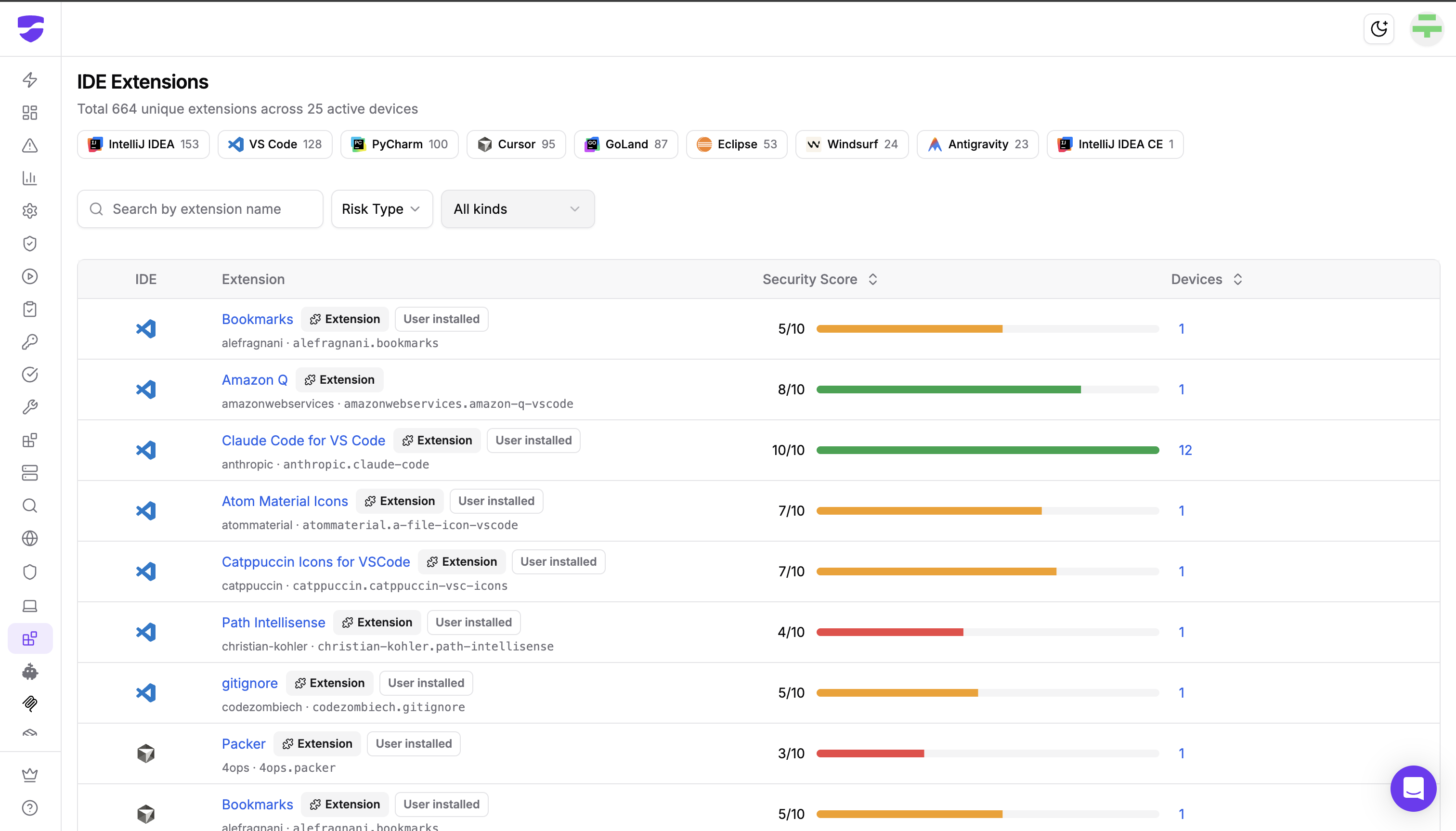
The IDE Extensions page in the dashboard shows IDE filter chips so security teams can scope the view to a single IDE, with the total count of unique extensions detected for each.
Per-item metadata
For every item found on a developer machine, Dev Machine Guard records:
- Name, publisher, and unique identifier
- Installed version
- Whether the item is an Extension (VS Code-style) or a Plugin (JetBrains-style)
- Whether it was User installed or shipped as part of the IDE
- The IDE in which it is installed
- The list of devices in your fleet that have it installed, and at which versions
Security Score
Each extension is assigned a Security Score based on multiple supply chain signals:
- Install base and adoption
- Release recency
- Publisher verification status
- License availability
- Known vulnerabilities
- Repository security posture, including branch protection and security policy presence
The score is rendered as a color-coded bar in the dashboard, with the underlying factors visible so security teams understand not just what an extension's score is, but why.
Risk Type detection
The Risk Type filter surfaces two categories of known-risky items:
- Compromised extensions where a known supply chain compromise has been identified
- Typosquat extensions that mimic legitimate ones with slightly altered names to trick developers into installing them
These detections are powered by StepSecurity's supply chain threat intelligence and are updated as new incidents are confirmed.
Cross-platform consistency
Every IDE listed above is scanned on macOS, Windows, and Linux. The same engine, the same inventory model, the same Security Score, regardless of where the developer machine sits.
What Security Teams Can Do With This Today
The expanded coverage makes a number of operational workflows possible that were previously partial or impossible:
- Incident response across IDEs: "Extension X was just disclosed as compromised. Which developers have it installed, in which IDE, and at which version?"
- Cross-IDE visibility: "Which Cursor users have extensions installed that none of our VS Code users have?"
- Typosquat hunting: filter the dashboard by Risk Type Typosquat to surface deceptive extensions impersonating popular ones across every developer machine in the fleet
- Compromised extension hunting: filter by Risk Type Compromised to find every device running an extension tied to a known supply chain incident
- Risk-prioritized review: use the Security Score to focus review effort on the extensions where the underlying signals (low adoption, recent publisher, no license, known vulnerabilities) suggest the most exposure
What Is Coming Next
The following capabilities are currently under development:
- Extension allowlists to define which IDE extensions are permitted across your organization
- Cooldown periods for new extension versions, preventing newly released updates from being used until they have been evaluated
These controls will sit on top of the same cross-IDE inventory and Security Score the dashboard already provides, so the rules you write will apply consistently across every IDE family Dev Machine Guard covers.
How To Get Started
If you already run Dev Machine Guard, the expanded IDE coverage and Security Score are included automatically. Update to the latest release and your next scan will inventory extensions across every supported IDE.
In community mode, all data stays on the machine. In enterprise mode, the consolidated extension inventory and Security Score flow into the StepSecurity dashboard, where you can filter by IDE, Risk Type, and item kind across the entire fleet.
For the full IDE Extensions feature reference, see the Dev Machine Guard documentation.
Try this interactive demo to see how it works:
One Inventory, Every IDE
Most extension governance tools were built when "IDE" meant "VS Code." Developer fleets have moved on, and the security tooling that protects them has to move with them.
With this release, Dev Machine Guard provides a single, cross-platform inventory of every IDE extension and plugin running across seven IDE families, with built-in scoring and known-bad detection on top.
If you find an IDE we are not yet covering, please open an issue at github.com/step-security/dev-machine-guard/issues. The scanning engine is open source, and detections for new IDEs are added once and benefit every customer.